

Solidity is a statically typed language, so all variables have a fixed type; it is not possible to change the type of the variable after its declaration. This is necessary because state variables have a dedicated space for them in storage.
It is possible, however, to convert one type to another. This is called type casting. There are two ways to do this: explicitly and implicitly.
Implicit conversions occur when the expression makes logical sense and there is no loss of information when casting. This may sound arbitrary, but it should become clearer with some examples.
Let's say we have two variables, one of type uint8 and one of type uint16. Let's call them narrow and broad, respectively, for convenience. The variable narrow accepts values between 0 and 2⁸ — 1, while the variable broad accepts values between 0 and 2¹⁶ — 1. Thus, all values accepted by the variable narrow are also accepted by the variable broad, but the reverse is not true.
The code below is perfectly logical and there is no information loss.
uint8 narrow = 140;
uint16 broad = narrow; // 140
Another example of implicit conversion occurs when there is a sum between different types, both (unsigned) integers. The code below is also perfectly legal and there is no loss of information.
uint8 valor1 = 140;
uint16 valor2 = 480;
uint16 valor3 = valor1 + valor2; // 620
Although the variables value1 and value2 be of different types, the sum will be carried out without problem. There is no loss of information.
Some conversions allowed in other programming languages, such as the conversion from string to integer, or from boolean to 0/1, do not exist in Solidity. Expressions like the ones below are not allowed.
uint8 number = 100 + false; // error
uint8 number = 100 + "2"; // error
Explicit conversions
It is possible to do explicit type conversions in Solidity, but you need to be very careful when doing this. Let's see an example converting from type int8 to uint8. First, let's understand how computers represent numbers.
Let's assume that the following 8 bits represents a number: 11111111. What number does it represent? There is no right answer. If it represents an unsigned integer, its decimal value is 255. But if it represents an integer that can be either positive or negative, its decimal value is -1.
Now consider a function with the following body, where we explicitly convert the int type to uint.
int8 negative = -1;
return uint8(negative);
The value of the variable negative, in bits, is 11111111, regardless of what it represents. In the case of an unsigner integer, its value is 255. Note that by doing the conversion explicitly, we transform the value of -1 to 255.

In the case above, we converted from an 8-bit type to an 8-bit type. We've already seen that converting an 8-bit unsigned integer to 16-bit is straightforward, and the conversion is implicit. But is it possible to convert from 16-bit to 8-bit? It is not possible to store a 16-bit value in 8 bits without losing information. It would be like trying to put a large box into a smaller box without folding it.
Consider the 16-bit binary value 0000101000001001. In decimal it is written as 2569. Now let's do an explicit conversion to uint8. What do you think should be the result?
Only the last 8 bits are kept. The value 0000101000001001 is converted to 00001001, which is 9 in decimal. When converting from a larger integer type to a smaller one, the bits on the right are kept while the bits on the left are lost.
In converting bytes types, the opposite occurs. When a larger byte type is converted to a smaller type, the first bytes are kept and the last ones are lost. When converting a smaller byte to a larger byte, null bytes are appended to the right. Let's see this in the examples below.
bytes4 value = 0x12345678;
bytes1 smallValue = bytes1(value); // 0x12
bytes5 largeValue = value; // 0x1234567800;
Note that when information is lost, an explicit conversion is required. When there is no loss of information, an implicit conversion occurs.
Bytes, strings and address
The type address is a 20-byte hexadecimal number, so you can convert the address and bytes20 types to each other. The conversion must be explicit.
address myAddress = 0x5B38Da6a701c568545dCfcB03FcB875f56beddC4
bytes20 addressInBytes = bytes20(myAddress)
Bytes and string can also be converted and the conversion needs to be explicit. A string is an array of bytes, encoded in UTF-8, that use Unicode to represent symbols.
Unicode is a standard for representing symbols like text and emojis. Each symbol requires between 1 and 4 bytes to be represented. Common letters use only 1 byte, while emojis use 4 bytes. Let's look at the function showUnicode of the figure below. It converts 2 common letters, a whitespace and an emoji to the type bytes.
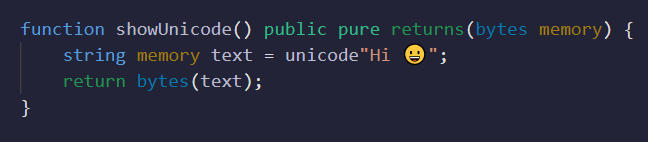
Calling this function in Remix, we get the following return:
0x486920f09f9880It is a 14-digit hexadecimal number, which means 7 bytes: 2 bytes for the common letters, 1 byte for the blank space and 4 bytes for the emoji.
Understand that Unicode and UTF-8 are different things. Unicode is a standard that relates values to symbols; each symbol has a related value, and this value can occupy up to 4 bytes. UTF-8 is a way of representing Unicode symbols in 8-bit packets, or 1 byte. Compare with UTF-16, which represents Unicode in 16-bit packages.
There are several sites where you can find the UTF-8 representation of a Unicode symbol. The website onlineunicodetools.com/convert-unicode-to-utf8 is an example. In the figure below we convert a smiley to UTF-8.

Note that the result, f0 9f 98 80, is exactly the last 4 bytes of the return from the function showUnicode. This shows that Solidity uses UTF-8 to represent symbols in Unicode.
It is not possible to convert bytes to string explicitly as we convert string to bytes.
It should be clear that converting strings to bytes does not change the value of the variable. A string variable is a static array of bytes, which is exactly what we see when converting to bytes. One reason to convert from string to bytes is to be able to use methods of type bytes. Let's see the example below.
string memory value = "Hello";
bytes1 firstByte = bytes(value)[0]; // ok
bytes1 firstByteFail = value[0]; // error
To retrieve the first byte of the string "Hello" we need to convert its type to bytes. The type string does not have a method for retrieving individual bytes.
Thanks for reading!
Comments and suggestions about this article are welcome.
Any contribution is welcome. www.buymeacoffee.com/jpmorais
New to trading? Try crypto trading bots or copy trading