

Function Calling In Cohere
In the last few years, AI has undergone a dramatic shift, especially after the development of tools like ChatGPT. The ability to reason, summarize, or classify text with one model has opened Pandora's box of use cases in Natural Language Processing.
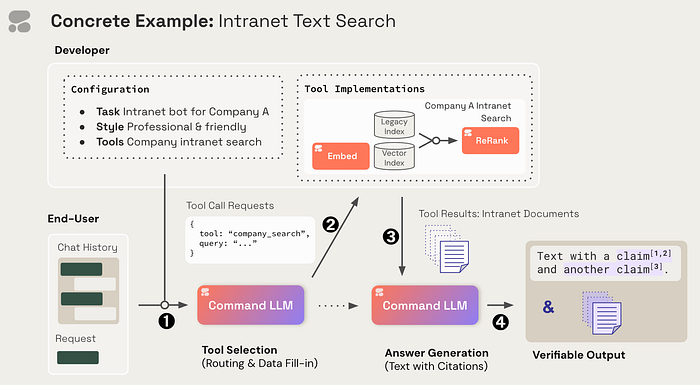
This dramatic shift has led many startups to work on building tools that can follow text instructions, reason out, and complete tasks. Among these startups is Cohere, which has its own set of tools and LLM models that can be leveraged to automate tasks.
In this blog post, we will learn how to leverage Cohere's Tool Use capability to complete a task. As with any task, we first need to install the Cohere package, and we must also generate an API key by signing into the Cohere app.
Installation and Decleration
!pip install cohere

import cohere, json, os
from dotenv import load_dotenv

load_dotenv()

API_KEY = os.getenv('COHERE_API_KEY')
co = cohere.Client(API_KEY)
We'll set up a .env file on the environment to set the environment variable COHERE_API_KEY. We can load the env into our runtime using dotenv package.
Mockup Data
Next, we can create a mockup database for lookup using a simple Python dictionary. We create two dictionaries, one containing the sales information and the other containing the product catalog information.
# Mock database containing daily sales reports
sales_database = {
    '2023-09-28': {
        'total_sales_amount': 5000,
        'total_units_sold': 100,
    },
    '2023-09-29': {
        'total_sales_amount': 10000,
        'total_units_sold': 250,
    },
    '2023-09-30': {
        'total_sales_amount': 8000,
        'total_units_sold': 200,
    }
}

# Mock product catalog
product_catalog = {
    'Electronics': [
        {'product_id': 'E1001', 'name': 'Smartphone', 'price': 500, 'stock_level': 20},
        {'product_id': 'E1002', 'name': 'Laptop', 'price': 1000, 'stock_level': 15},
        {'product_id': 'E1003', 'name': 'Tablet', 'price': 300, 'stock_level': 25},
    ],
    'Clothing': [
        {'product_id': 'C1001', 'name': 'T-Shirt', 'price': 20, 'stock_level': 100},
        {'product_id': 'C1002', 'name': 'Jeans', 'price': 50, 'stock_level': 80},
        {'product_id': 'C1003', 'name': 'Jacket', 'price': 100, 'stock_level': 40},
    ]
}
Let us add multiple capabilities to our tool using "function-calling". First, we define the two functions as follows:
Sales Function
The below function helps the tool get the sales report for a given day.
def query_daily_sales_report(day: str) -> dict:
    """
    Function to retrieve the sales report for the given day
    """
    report = sales_database.get(day, {})
    if report:
        return {
            'date': day,
            'summary': f"Total Sales Amount: {report['total_sales_amount']}, Total Units Sold: {report['total_units_sold']}"
        }
    else:
        return {'date': day, 'summary': 'No sales data available for this day.'}
Product Function
The below function helps the tools to get the product based on category.
def query_product_catalog(category: str) -> dict:
    """
    Function to retrieve products for the given category
    """
    products = product_catalog.get(category, [])
    return {
        'category': category,
        'products': products
    }
After this, we create a function mapping as follows
functions_map = {
    "query_daily_sales_report": query_daily_sales_report,
    "query_product_catalog": query_product_catalog
}
Tool Description
In the tool description, we describe the functionality of the tool to which the model has access. We combine multiple tools as required or remove tools if not required.
# tool descriptions that the model has access to
# note: Cohere always adds a "directly_answer" tool under the hood, so that the model can decide to not leverage any tool, if they're not needed.
tools = [
    {
        "name": "query_daily_sales_report",
        "description": "Connects to a database to retrieve overall sales volumes and sales information for a given day.",
        "parameter_definitions": {
            "day": {
                "description": "Retrieves sales data for this day, formatted as YYYY-MM-DD.",
                "type": "str",
                "required": True
            }
        }
    },
    {
        "name": "query_product_catalog",
        "description": "Connects to a a product catalog with information about all the products being sold, including categories, prices, and stock levels.",
        "parameter_definitions": {
            "category": {
                "description": "Retrieves product information data for all products in this category.",
                "type": "str",
                "required": True
            }
        }
    }
]
User Instruction
We create a user instruction, that tells the model what it is supposed to do given an input, and how appropriately it should use the provided tools to the best of its ability.
# preamble containing instructions about the task and the desired style for the output.
preamble = """
## Task & Context
You help people answer their questions and other requests interactively. You will be asked a very wide array of requests on all kinds of topics. You will be equipped with a wide range of search engines or similar tools to help you, which you use to research your answer. You should focus on serving the user's needs as best you can, which will be wide-ranging.

## Style Guide
Unless the user asks for a different style of answer, you should answer in full sentences, using proper grammar and spelling.
"""
User Request
Let us test the tool with user input, requesting a sales summary for a specific date along with some product information.
# user request
message = "Can you provide a sales summary for 29th September 2023, \
           and also give me some details about the products in the 'Electronics' \
           category, for example their prices and stock levels?"
Combine Tools and Model
We use the Cohere client's Chat API with the details of the input message from the user, user instructions, tools, and the model detail "command-r".
response = co.chat(
    message=message,
    tools=tools,
    preamble=preamble,
    model="command-r"
)

# Note that the Cohere Chat API also exposes:
# - stream (for streaming mode)
# - chat_history
# - among other parameters
# See https://docs.cohere.com/reference/chat for details.

print("The model recommends doing the following tool calls:")
print("\n".join(str(tool_call) for tool_call in response.tool_calls))
We can look at the response from the model for the tools to use to answer the user query. In the below output, we see the model needs to use the following tools
query_daily_sales_reportandquery_product_catalog.If you notice, the model has extracted the date and product category as parameter to be used for completing the task.
The model recommends doing the following tool calls:
cohere.ToolCall {
 name: query_daily_sales_report
 parameters: {'day': '2023-09-29'}
 generation_id: None
}
cohere.ToolCall {
 name: query_product_catalog
 parameters: {'category': 'Electronics'}
 generation_id: None
}
Tool Response
When we make tool calling by iterating over the tool_calls, we pass the parameter identified by the model and this will generate an appropriate output based on the parameters.
tool_results = []
# Iterate over the tool calls generated by the model
for tool_call in response.tool_calls:
    # here is where you would call the tool recommended by the model, using the parameters recommended by the model
    print(f"= running tool {tool_call.name}, with parameters: {tool_call.parameters}")
    output = functions_map[tool_call.name](**tool_call.parameters)
    # store the output in a list
    outputs = [output]
    print(f"== tool results: {outputs}")
    # store your tool results in this format
    tool_results.append({
        "call": tool_call,
        "outputs": outputs
    })

print("Tool results that will be fed back to the model in step 4:")
print(json.dumps(tool_results, indent=4))
= running tool query_daily_sales_report, with parameters: {'day': '2023-09-29'}
== tool results: [{'date': '2023-09-29', 'summary': 'Total Sales Amount: 10000, Total Units Sold: 250'}]
= running tool query_product_catalog, with parameters: {'category': 'Electronics'}
== tool results: [{'category': 'Electronics', 'products': [{'product_id': 'E1001', 'name': 'Smartphone', 'price': 500, 'stock_level': 20}, {'product_id': 'E1002', 'name': 'Laptop', 'price': 1000, 'stock_level': 15}, {'product_id': 'E1003', 'name': 'Tablet', 'price': 300, 'stock_level': 25}]}]
Tool results that will be fed back to the model in step 4:
[
    {
        "call": {
            "name": "query_daily_sales_report",
            "parameters": {
                "day": "2023-09-29"
            },
            "generation_id": null
        },
        "outputs": [
            {
                "date": "2023-09-29",
                "summary": "Total Sales Amount: 10000, Total Units Sold: 250"
            }
        ]
    },
    {
        "call": {
            "name": "query_product_catalog",
            "parameters": {
                "category": "Electronics"
            },
            "generation_id": null
        },
        "outputs": [
            {
                "category": "Electronics",
                "products": [
                    {
                        "product_id": "E1001",
                        "name": "Smartphone",
                        "price": 500,
                        "stock_level": 20
                    },
                    {
                        "product_id": "E1002",
                        "name": "Laptop",
                        "price": 1000,
                        "stock_level": 15
                    },
                    {
                        "product_id": "E1003",
                        "name": "Tablet",
                        "price": 300,
                        "stock_level": 25
                    }
                ]
            }
        ]
    }
]
The response above is an output from the function we defined earlier in the blog. Let us get a cleaner output for the same input for easier understanding.
response = co.chat(
    message=message,
    tools=tools,
    tool_results=tool_results,
    preamble=preamble,
    model="command-r",
    temperature=0.3
)

print("Final answer:")
print(response.text)

"""
Final answer:
## Sales Summary - 29th September 2023

Total sales amount: £10,000
Total units sold: 250

## Electronics Department
There are currently three products in the electronics department:
- Smartphones: £500 each, 20 in stock
- Laptops: £1000 each, 15 in stock
- Tablets: £300 each, 25 in stock
"""
From the above result, we see the sales report for 29th September, and the product catalog for electronics.
Citations
The output generated by AI is always questioned by the user since these results will be used for a potential action, the model needs to find the source of information based on which it has given an output. It address this issue, Citations are developed as one of the functionalities of the Cohere.
print("Citations that support the final answer:")
for cite in response.citations:
  print(cite)

Citations that support the final answer:
{'start': 19, 'end': 38, 'text': '29th September 2023', 'document_ids': ['query_daily_sales_report:0:0']}
{'start': 40, 'end': 67, 'text': 'Total sales amount: £10,000', 'document_ids': ['query_daily_sales_report:0:0']}
{'start': 69, 'end': 90, 'text': 'Total units sold: 250', 'document_ids': ['query_daily_sales_report:0:0']}
{'start': 186, 'end': 197, 'text': 'Smartphones', 'document_ids': ['query_product_catalog:1:0']}
{'start': 199, 'end': 203, 'text': '£500', 'document_ids': ['query_product_catalog:1:0']}
{'start': 210, 'end': 221, 'text': '20 in stock', 'document_ids': ['query_product_catalog:1:0']}
{'start': 224, 'end': 231, 'text': 'Laptops', 'document_ids': ['query_product_catalog:1:0']}
{'start': 233, 'end': 238, 'text': '£1000', 'document_ids': ['query_product_catalog:1:0']}
{'start': 245, 'end': 256, 'text': '15 in stock', 'document_ids': ['query_product_catalog:1:0']}
{'start': 259, 'end': 266, 'text': 'Tablets', 'document_ids': ['query_product_catalog:1:0']}
{'start': 268, 'end': 272, 'text': '£300', 'document_ids': ['query_product_catalog:1:0']}
{'start': 279, 'end': 290, 'text': '25 in stock', 'document_ids': ['query_product_catalog:1:0']}
With citations, we have come to a full circle on Cohere's Tool Use capability. I hope you've learned how to use Cohere and its capability for your use case.
Reference: