

If you are a regular user of a to-do list app and dump anything and everything that comes to your mind into your to-do list app of choice, I don't have to tell you that there is a certain kind of chaos only a never-ending to-do list can bring.
At the start of every day, I used to open Apple Reminders, my ex-to-do list app, with the best intentions of getting things done, only to be met with a cluttered mess of tasks that somehow felt overwhelming and underwhelming.
I have been there, through the pain of swiping through Reminders, trying to prioritize, and ending up feeling like I have given up on everything too many times to count.
Apple Reminders was my go-to app whenever I wanted to plan my day, schedule reminders, or note something down as soon as it popped up in my mind. It was a simple app that synced across all my Apple devices and got the job done — or so I thought.
However, as my personal and professional life became more complex, Apple Reminders started to show their limitations, and they couldn't keep up with how my workflow evolved.
The tipping point came one particularly hectic day when I realized that managing and sorting through my tasks was starting to feel like a task itself.
I decided that something had to change and started looking for an alternative to-do list or task management app, and that's when I discovered TickTick.
TickTick combined everything I needed in one clean, cohesive interface, finally allowing me to regain control of my day. After using it for multiple months, I can confidently say that it does more than replace Apple Reminders — it completely redefined what I thought a to-do app could do.
In this post, I will explain why I finally decided to switch from Apple Reminders to TickTick, how it has impacted my daily workflow and productivity, and why you should consider switching, too, if you are still using the Apple Reminders app.
Let's get started!
The Limitations of Apple Reminders — Where It Falls Short
At first glance, the Apple Reminders app seems like a straightforward, no-frills app that should help anyone manage their tasks and keep track of their reminders.
However, if you dig deeper, the cracks start to show.
One of the most significant issues I encountered while using Apple Reminders as my to-do list app was the lack of customization. Sure, you can create lists and set due dates, but beyond that, the options are sparse, and there is no real way to tailor the app to fit your unique workflow, leaving you to work around its limitations rather than with it.
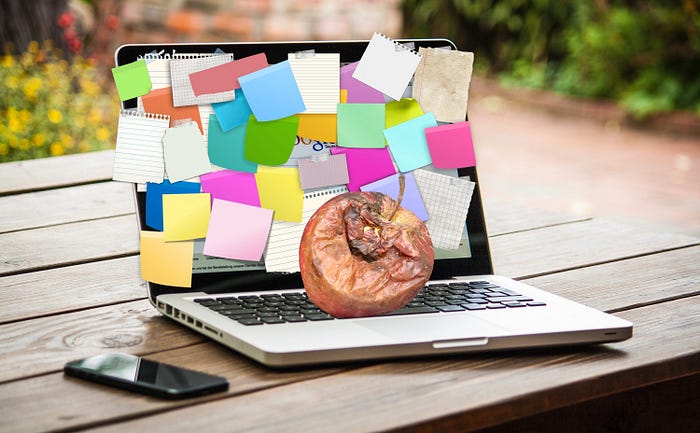
Another glaring shortcoming I often notice is the absence of advanced task-planning features, which would bother you if you juggle multiple projects or need to set complex recurring tasks.
Also, there is no built-in time tracking or Gantt charts, and the app's attempt at smart recognition—like setting reminders based on natural language input—often misses the mark. I frequently end up manually adjusting the details of the tasks after creating them, as they don't always get the proper context, and it frustrates me more than anything.
Beyond making my task management less efficient, these limitations also actively disrupted my workflow. I found myself spending too much time reorganizing tasks, setting up reminders manually, and constantly tweaking the app to try to make it fit my needs.
The simplicity of the Apple Reminders app, which once seemed appealing, became a hindrance as my responsibilities and task list grew.
I would still recommend Apple Reminders to anyone looking for basic task management, but the app can be less than adequate for power users whose to-do list includes more than a few grocery items and a reminder to water the plants.
If you need to handle more complex tasks, manage multiple priorities, or just want a tool that grows with you, Apple Reminders quickly becomes a bottleneck, holding back your productivity instead of enhancing it.
This is when you know it is time to look for something more robust — something like TickTick.
Discovering TickTick
When I first came across TickTick, I was not expecting much. I had already tried out a bunch of different to-do lists and task management apps, trying to find one that fit my needs, and I thought, how different could another app be?
However, as I started to use the app regularly as part of my usual testing process, I quickly realized that this app was not like the others. The first thing that caught my attention was the sleek, intuitive interface, which had everything right there — clean, organized, and, more importantly, easy to navigate.
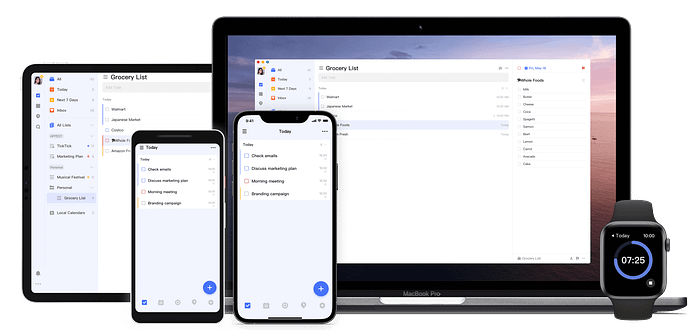
What I liked the most during my initial impressions was how the app was designed to get out of my way and let me focus on my tasks.
Beyond the interface, I was also impressed by the robust and versatile list of features that TickTick came with. It offered everything I had been missing with Apple Reminders and then some.
The ability to customize almost every aspect of my task management experience was a new experience, including setting complex recurring tasks, tagging items for easy sorting, or even integrating my calendar directly into the app.
I found out that more than any other app I had tried in the past, TickTick was the fastest one to adapt to my workflow, and this is what stood out for me in my quest to find the best task management app to manage my life.
It was very easy to input, organize, and track my tasks, and the app is designed to be flexible and evolve alongside my needs. It did not take me long before I realized that this was the task manager I had been searching for, and it was a true game-changer in every sense.
TickTick vs. Apple Reminders — Why TickTick Elevates Your Productivity to S-Tier
While Apple Reminders offers the basics like task prioritization, recurring tasks, cross-device syncing, and categorization, TickTick takes task management to another level with features that Apple Reminders simply doesn't offer.
Integrated Pomodoro Timer and Habit Tracking
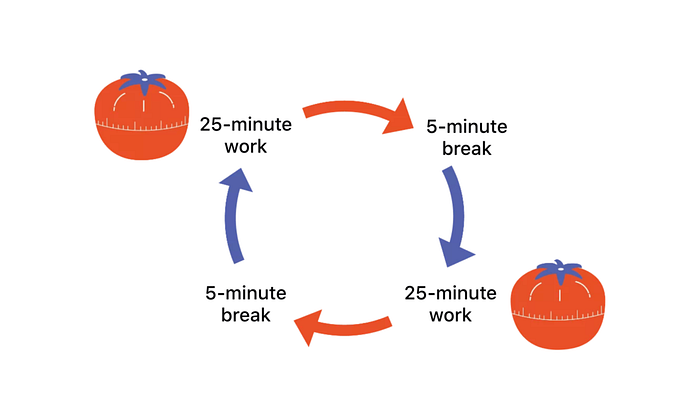
One of the standout features, and something I love the most about TickTick, is its integrated Pomodoro timer. This tool helps you stay focused by breaking your work into intervals, typically 25 minutes long, followed by a short break.
This is incredibly useful for maintaining productivity without the need to juggle multiple apps. The best part is that TickTick syncs your Pomodoro sessions across all devices, ensuring that your focus time is consistent whether you are on your iPhone or your Mac.
TickTick also includes a built-in habit tracker that lets you monitor and develop new habits, integrating them seamlessly with your task management. TickTick tracks your progress and keeps you motivated no matter what habit you are trying to develop, something that Apple Reminders doesn't offer at all.
Task Progress Tracking with Gantt Charts
For those who manage complex projects, TickTick's Gantt chart feature is a great addition. It provides a visual timeline of your tasks, helping you see how they interrelate and when each needs to be completed.
This is especially useful for project management, where understanding task dependencies is crucial. Apple Reminders lacks any Gantt chart or visual project planning tool, leaving users struggling to manage more intricate tasks.
Email-to-task-Conversion
Most of the items on our to-do lists come from the emails we receive throughout the day. If you are using Apple Reminders, the only way to add action items from your emails as tasks is to create them manually. If you don't have time to do it right away, you are left trying to remember to follow up later.
But, if you are using TickTick, it is a different story.
TickTick makes it easy to turn emails into tasks by simply letting you forward them to a dedicated email address. This feature ensures everything runs smoothly, even on your busiest days.
Productivity Statistics
Beyond tracking your daily tasks, TickTick also tracks how well you complete them. It uses an achievement score system to reward you for completing tasks on time and nudge you when you slip.
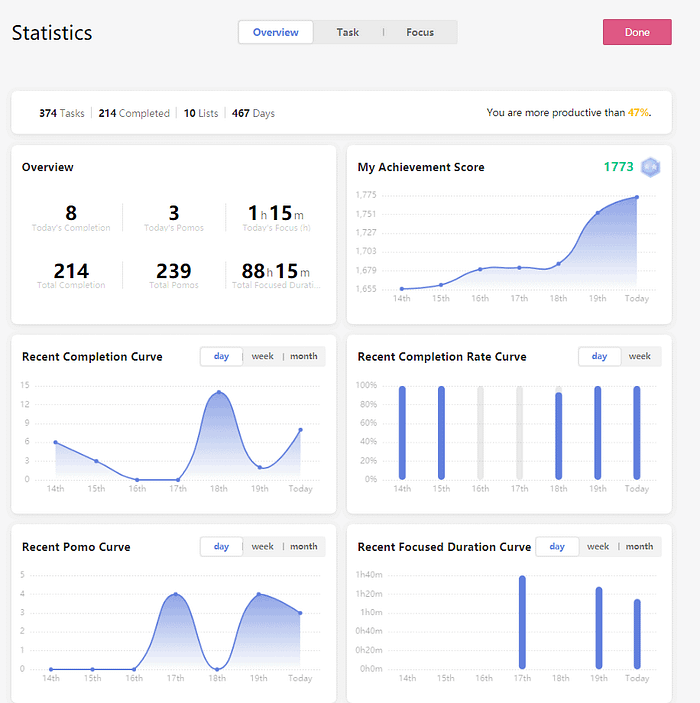
TickTick also offers detailed productivity statistics that let you analyze your work habits over time. Apple Reminders needs to provide feedback on your performance, leaving you in the dark about your productivity trends.
Eisenhower Matrix
One of the main features that convinced me to switch to TickTick is the Eisenhower Matrix view, which categorizes tasks into four quadrants based on urgency and importance. This method helps you prioritize tasks effectively, ensuring that less critical tasks do not overshadow important work.
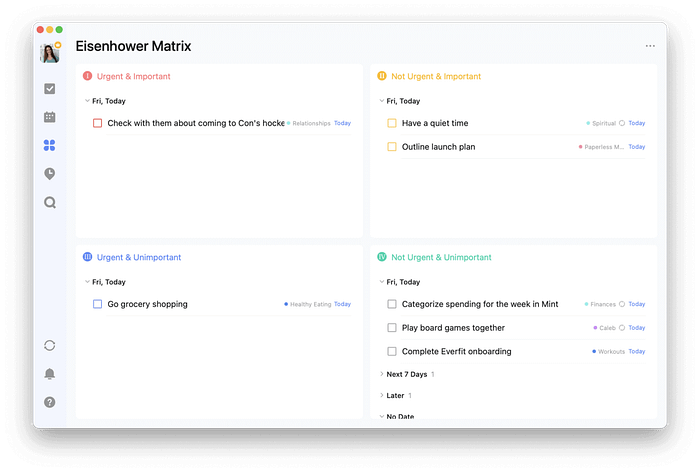
On the land of Apple Reminders, you are left to manually prioritize tasks without the guidance of such a structured system, which can make managing multiple tasks more challenging.
Customizable Review System
TickTick has a customizable review system that lets you quickly review your progress, look back at what you have accomplished over a week or a month, see where you excelled, and identify areas for improvement.
It even supports exporting your reviews as a markdown file for easy documentation. Apple Reminders does not offer this level of detailed review, so reflecting on your past tasks requires more manual effort.
In essence, while Apple Reminders offers the basics, TickTick provides a more comprehensive toolset for managing not just tasks but overall productivity and focus. It's these unique features—like the Pomodoro timer, habit tracking, and Eisenhower Matrix—that make TickTick the better choice for users who need more from their task management app.
How to Transition from Apple Reminders to TickTick
While making the switch from one to-do list or task management app to another might seem daunting, it is actually a straightforward process that can significantly enhance your productivity.
Here's how to make the transition smoothly.
TickTick lets you quickly import all your reminders from the Apple Reminders app with just one click.
Open the TickTick app on your iPhone, go to the Settings page, click the 'Import & Integration' option, and then select Reminders under the Import section.
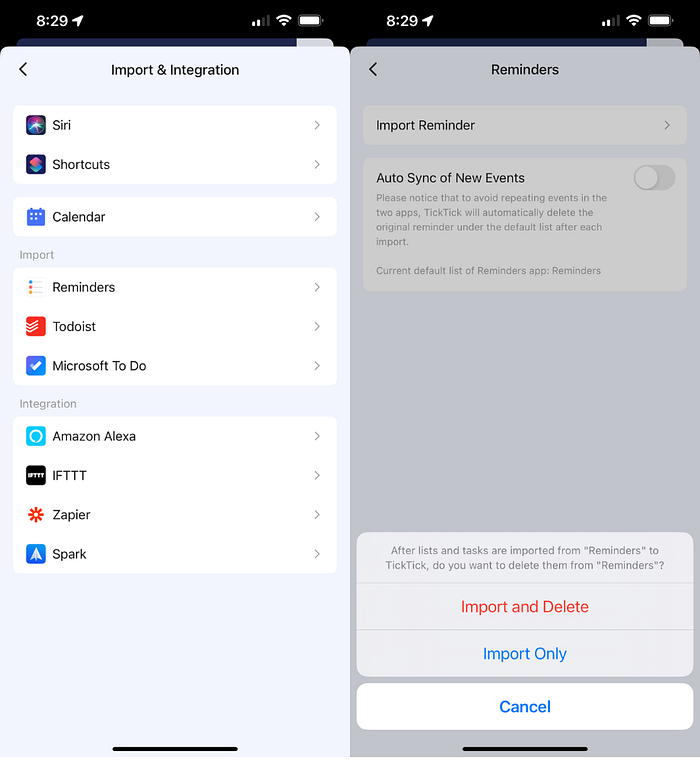
From here, just select the Import Reminder option. You can either import all the reminders from the Reminders app or delete them once they are imported to TickTick.
All of your reminders will now be instantly imported to TickTick. On the same page, you can also enable the 'Auto Sync of New Events' to ensure that any new reminder you create in the Apple Reminders app will be automatically added to TickTick.
Why You Should Make The Switch to TickTick
TickTick stands out as a powerhouse of task management, offering features far beyond what Apple Reminders provides, at least in its current state.
From the integrated Pomodoro timer and habit tracker to the advanced tools like the Eisenhower Matrix and customizable review system, TickTick delivers a comprehensive solution for anyone serious about productivity.
The ability to convert emails into tasks, track achievement scores, and analyze productivity statistics adds layers of functionality that Apple Reminders simply doesn't match.
If you are ready to take your task management to the next level, I highly recommend giving TickTick a try. Switching to TickTick has transformed the way I manage my time and tasks. It is more than just a to-do list; it is a tool that adapts to my needs, keeps me focused, and helps me plan my day better and achieve more each day.
If you are still on the fence, trust me — TickTick is worth it.
If you like discovering and adding new and useful apps to your workflow, you will definitely like Setapp, a Mac and iPhone App Store with over 200+ premium apps that can be used with a single monthly fee of $9.99.
You can use my affiliate link below to try Setapp for free for 30 days! Use the code 'usefultech' to avail of the offer.
With the link below, you can use 200+ premium apps from Setapp for free for 30 days and also directly support my blog!