

At Latitude after going through different options, as Keshav shared in previous post we have picked Airflow to manage data workflows. Selection criteria for us wasn't very different than any engineering team has for workflow management tools like:
- No ClickOps — All workflows should be code.
- A decent scheduler — We will never need complexity here like air traffic control systems.
- If a job fails, we should be able to replay.
- We should be able to extend the core platform easily when required.
- Platform should help us around data quality, and lineage.
Fancy words for these criteria were idempotency, replayability, orchestration, dependency management, etc 🤓
Airflow ticked all these required boxes but for us, the next question was how we will run it at scale in production. Questions which we started with were:
- How multiple projects will run on this platform?
- What will be the developer experience when multiple teams will be contributing to the platform and working on different projects?
- How different environment configurations will work for projects like sandbox, non-prod, prod?
- How we will make sure each project is isolated from a security perspective? One project should never access resources provisioned for other projects.
- How continuous deployment will work for projects?
- How we will make sure code quality is the same across projects?
- As a developer, does platform come in my way or hides behind the scene and enables me to get things done fast?
- How does platform encourage reusability and stops from duplication?
These are generally the questions you have to answer when you are building any platform which is targeted to add business value at scale without compromising on security and quality. One of the things which we really like about Airflow is, it provides you all the LEGO pieces for workflow management and you can arrange them in a lot of different ways to achieve what you need. We have played with few different approaches like a cookie-cutter project, docker operator for everything and settled down on Python packages for projects approach.
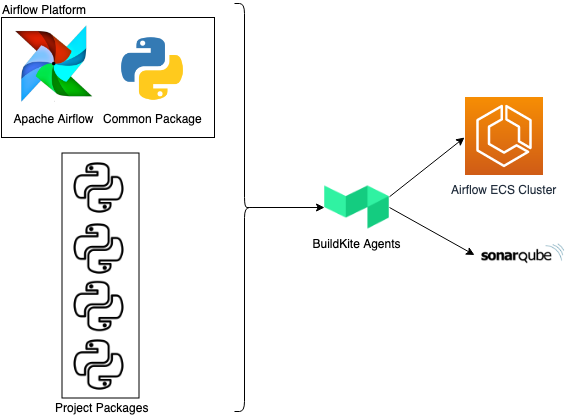
With this approach, we have Airflow platform which does all the plumbing work like infrastructure setup, CI/CD, automated test runs, SonarQube integration, logs monitoring and alerting. Project teams only need to bring their project-specific code to the platform as Python packages. 🤔 What about conflicting dependencies? Yes, we will have to solve this issue sometime in the future and yes we will share how we end up solving this problem.
Here is a glimpse of how we are developing Airflow platform and workflows.
Developer experience and multiple projects
Platform takes care of CI/CD, automated test runs, code coverage, monitoring and alerting. Each project will come to platform as Python package. This gives projects ability to define and manage their own dependencies.
In Airflow you can bring your plugins and dags as Python packages. In our platform, we are leveraging these to allow projects to bring their code as Python packages.
For data workflows, project teams primarily focus on project-specific functionalities. Airflow Platform which is based on CI tools [developed by our amazing CNP team] gives you a Dockerized local development environment to experiment, and verify code. Once code is ready, to deploy this code to any environment, project team just needs to make sure their code is packaged as a standard Python package and follows Airflow defined package conventions. As part of the deployment process, Airflow platform runs test cases, uploads coverage reports to SonarQube and makes code available on an ECS cluster in the required environment.
For MLA (monitoring, logging, and alerting), statsd is configured to collect metrics and send alerts to central and project-specific channels. All logs from Airflow are also aggregated and analyzed to generate alerts for exceptions.
Projects security and configurations
SSM parameter store to define connections and variables for projects. Project specific AWS connections with IAM role to assume.
Airflow provides you two powerful concepts Connections, and Variables to manage connections to external systems and environment-specific configurations. You can define different types of connections like DB Connection, AWS Connection, Docker Connection. Each connection type allows you to define your connection and in your workflow, all you need to do is use that connection Airflow takes care of connection logic.
In our case, all of our infrastructure is deployed in AWS and we are already using Parameter Store to manage, and share configurations between different services. For Airflow Platform we are leveraging Parameter Store as a central place to define project-specific connections, and variables.
To define connections and variables, all project code needs to do is put parameters in the parameter store under platform namespace along with a unique project name. Platform automatically picks up these parameters and configures them as Connections and Variables to project DAGs, and Plugins. This way both platform and project code is aligned with environment-specific AWS accounts like sandbox, non-prod, and prod.
We have mandated that each project will define their own AWS connection specifying an IAM role to assume in Extra property. With this approach, platform IAM roles have a very limited set of permissions which are required to run and monitor platform ECS cluster. It isolates project workflows to their own IAM role or connections, and platform doesn't need to define an overarching IAM role.
Common components and reusability
Common package provides a bunch of different common operators which you can use to write a project specific DAG using these operators which are already tested
To enable building reusable components, we have a common Airflow plugins package which is part of our Airflow platform. Idea is to encourage teams working on projects to come up with common plugins that can be used across different projects.
Right now we have few common operators and hooks like PGP encryption/decryption, Kinesis elastic search, etc. These plugins are already helping projects to create workflows faster. One of the biggest benefits we get with these plugins is these are already tested. Additionally, these plugins are organized like projects so contributing to these plugins is no different than working on projects which enable project teams to contribute easily.
We have plans to contribute these plugins back to Airflow community.
This is how we are approaching and maturing our airflow platform, and it's just a start. Questions that come next to any data engineering teams are data quality, lineage, discovery. No doubt answering these questions from a platform perspective is completely different compared to answering these for a project.