
Computer vision(CV) is a fascinating field that enables machines to interpret and understand visual data, much like the human eye and brain.
This content is inspired by "Module 1: A Beginner's Guide to Computer Vision: Pixel Perfect — Decoding Images." Let's break it down step-by-step
Introduction:
Computer vision is revolutionizing industries like retail, healthcare, and security by enabling machines to interpret images.
To understand how computers "see," we must first explore digital images, pixels, and artificial neural networks (ANNs).
This article explains digital images, pixel structure, image representation, and the limitations of ANNs in image recognition.
It also includes code snippets and real-world retail applications.
1. What Are Digital Images?
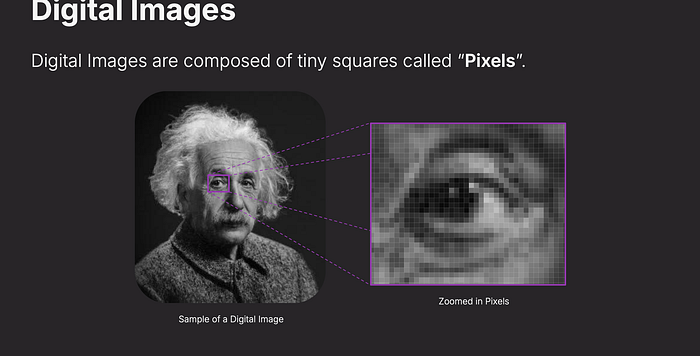
A digital image is made up of tiny squares called pixels. Each pixel has a numeric value that represents its brightness or color intensity.
Think of it like a mosaic — up close, you see individual tiles, but from a distance, they blend into a cohesive image.
Image Representation in Grayscale
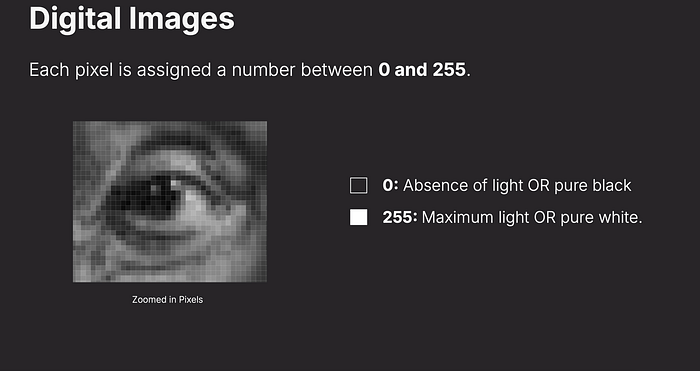
Each pixel is assigned a value between 0 (black) and 255 (white).
Intermediate values represent different shades of gray.
Code Example:
#pip3 install pillow

from PIL import Image

# Load an image
image = Image.open("cat.png")

# Display the image
image.show()

# Get image size (width x height in pixels)
width, height = image.size
print(f"Image size: {width} x {height} pixels")

#Image size: 1996 x 954 pixels
Retail Example: Barcode Scanning:
Grayscale image processing is used in barcode and QR code recognition for inventory management and checkout systems.
2. RGB Color Model in Digital Images
Most digital images use the RGB (Red, Green, Blue) color model, where each pixel has three values:
Each pixel in a grayscale digital image is assigned a value between 0 and 255. Zero represents pure black (absence of light), while 255 represents pure white (maximum light). In between, shades of gray define the image's contrast and detail.
Red (0–255)
Green (0–255)
Blue (0–255)
These values combine to form a wide range of colors.

import numpy as np
from PIL import Image

# Create a 5x5 grayscale image (0 = black, 255 = white)
pixels = np.array([[0, 50, 100, 150, 255],
                   [50, 75, 125, 175, 200],
                   [100, 125, 150, 175, 200],
                   [150, 175, 200, 225, 255],
                   [255, 200, 175, 150, 125]], dtype=np.uint8)

# Convert to image and display
image = Image.fromarray(pixels)
image.show()

#
# Create a 100x100 red image
red_image = np.zeros((100, 100, 3), dtype=np.uint8)
red_image[:] = [0, 0, 255]  # Full intensity red

cv2.imwrite('red_image.png', red_image)
cv2.imshow('Red Image', red_image)
cv2.waitKey(0)
cv2.destroyAllWindows()
Retail Example: Virtual Try-On Systems
Clothing and makeup retailers use RGB-based color recognition to simulate how products will look on customers.
3. Image Size and Features
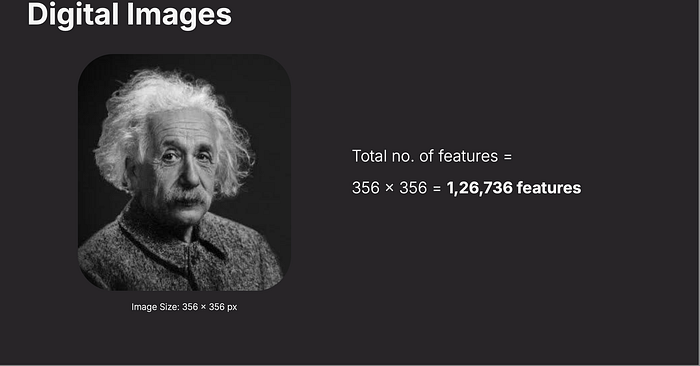
Images contain thousands or even millions of pixels. For example:
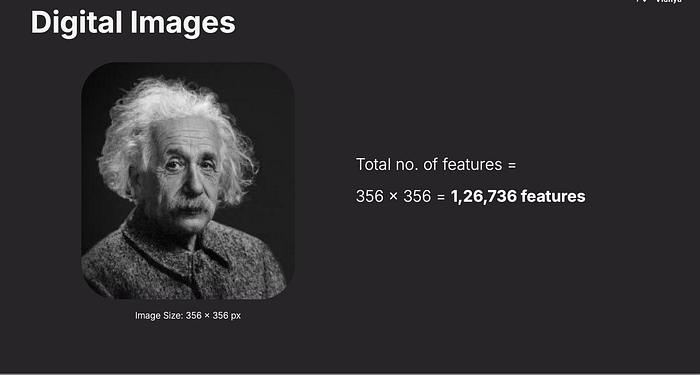
A 356×356 image has 126,736 pixels.
A Full-HD image (1920×1080) has 6,220,800 pixels (1920×1080×3 RGB channels).
Each pixel contributes to the overall features of the image, which deep learning models use for object recognition, face detection, and more.
The total number of pixels (or features) in an image is calculated by multiplying its width by its height.
For example, a 356x356 pixel image has 126,736 features. Each pixel is a data point that a computer vision system must process.
Code Example: Counting Pixels in an Image (Python & OpenCV)
import  cv2
width = 356
height = 356

# Calculate total features
total_features = width * height
print(f"Total number of features: {total_features}")


# Load an image
image = cv2.imread('cat.png')

# Get dimensions
height, width, channels = image.shape
print(height, width, channels)
total_pixels = height * width

print(f"Image Dimensions: {width}x{height}")
print(f"Total Pixels: {total_pixels}")
/Users/pvishnoi/PycharmProjects/av-ml-9month/pythonProject/.venv/bin/python /Users/pvishnoi/PycharmProjects/av-ml-9month/pythonProject/Computer Vision using PyTorch/Module 1/image_feature.py
Total number of features: 126736
954 1996 3
Image Dimensions: 1996x954
Total Pixels: 1904184
Retail Example: Shelf Space Optimization
Retailers use image analysis to track the arrangement of products on store shelves.
4. RGB Color Model
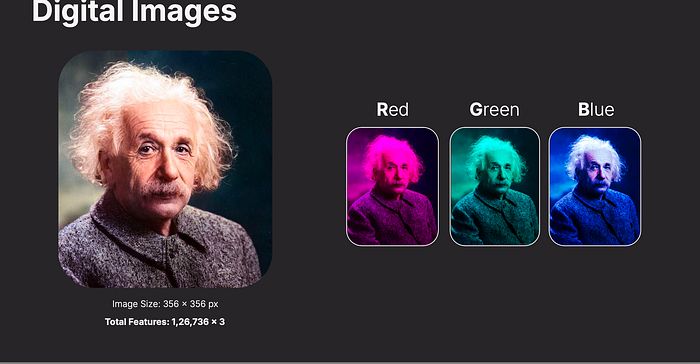

Most digital images use the RGB color model, which stands for Red, Green, and Blue. Each pixel is represented by three values (one for each color channel), ranging from 0 to 255. Combining these creates millions of possible colors — red (255, 0, 0), green (0, 255, 0), blue (0, 0, 255), and so on.
Code Example
import numpy as np
from PIL import Image

# Create a 3x3 RGB image
pixels = np.array([[[255, 0, 0], [0, 255, 0], [0, 0, 255]],
                   [[255, 255, 0], [0, 255, 255], [255, 0, 255]],
                   [[128, 128, 128], [255, 255, 255], [0, 0, 0]]], dtype=np.uint8)

# Convert to image and display
image = Image.fromarray(pixels)
image.show()
image.close()
5. The Challenge of Spatial Relationships in ANNs
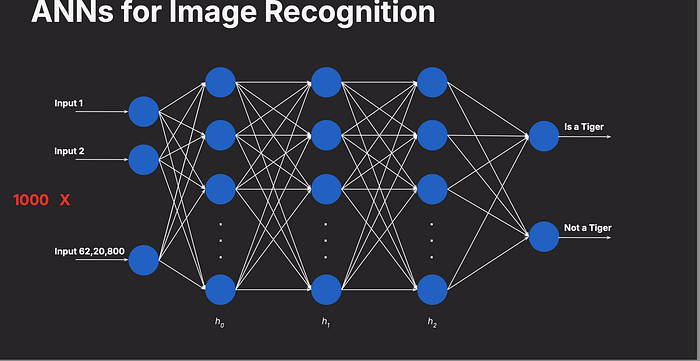
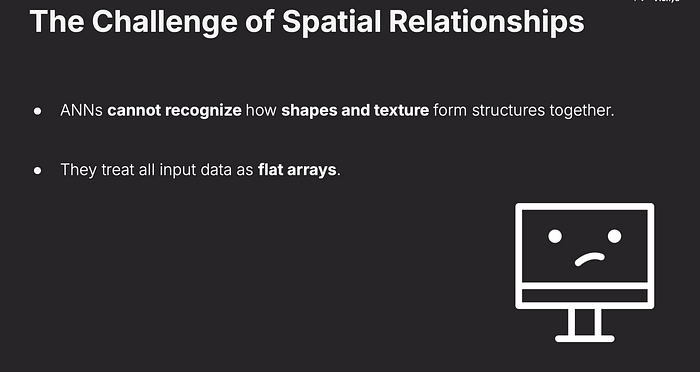
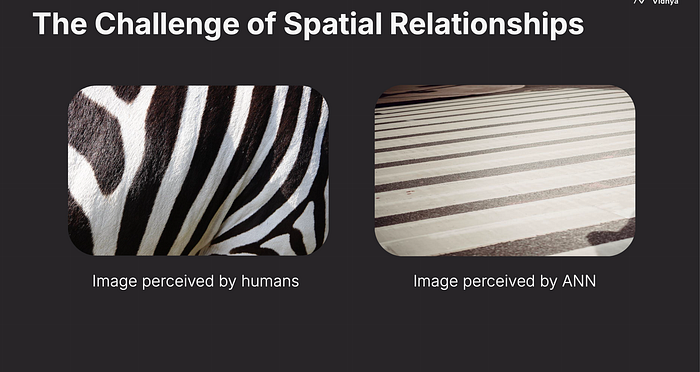
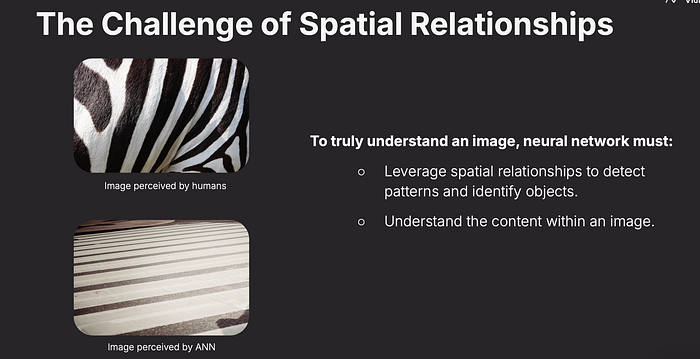
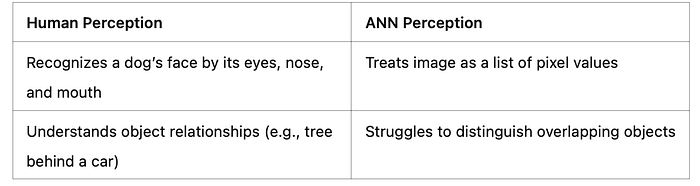
Traditional Artificial Neural Networks (ANNs) struggle with image recognition because they treat images as flat arrays of numbers, ignoring spatial relationships — how shapes, textures, and structures connect. Humans see a cat's whiskers and ears as related parts, but an ANN sees only a list of pixel values.
Code Example
Flatten an image into a 1D array (how ANNs see it):
import numpy as np
from PIL import Image

# Load a grayscale image
image = Image.open("sample_image.jpg").convert("L")
pixels = np.array(image)

# Flatten the 2D array into 1D
flat_pixels = pixels.flatten()
print(f"Flattened array length: {len(flat_pixels)}")
Retail Example
A retail ANN-based system might fail to distinguish between a striped shirt and a polka-dot shirt because it doesn't understand the spatial pattern — just the raw pixel values. This could lead to mislabeling inventory or recommending the wrong product.
ANNs vs. Images
Artificial Neural Networks (ANNs) process data as flat 1D arrays, making them inefficient for images, which contain spatial relationships (e.g., edges, textures, shapes).
Key Limitations:
ANNs treat images as individual pixel values without understanding structure.
They fail to recognize object boundaries, textures, and spatial patterns.
6. Human vs. ANN Perception
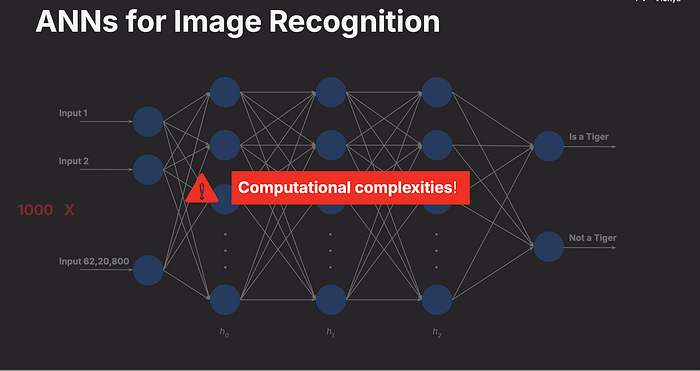
Humans perceive images holistically, recognizing objects based on context and structure (e.g., a face with eyes, nose, and mouth). ANNs, however, see a scrambled mess of numbers without spatial context, making them less effective for tasks requiring structural understanding.
✅ Recognize edges, shapes, and objects
✅ Detect patterns in textures and backgrounds
✅ Maintain spatial relationships between features
This is why Convolutional Neural Networks (CNNs) are used for image recognition instead of basic ANNs.
Code Example
Simulate human-like vs. ANN-like perception (simplified):
import numpy as np

# Human-like: structured 2D array
image_2d = np.array([[0, 255, 0],
                     [255, 0, 255],
                     [0, 255, 0]])

# ANN-like: flattened array
image_flat = image_2d.flatten()
print("Human perception (2D):", image_2d)
print("ANN perception (1D):", image_flat)

import  cv2
# Load an image in grayscale
image = cv2.imread('cat.png', 0)

# Apply edge detection
edges = cv2.Canny(image, 100, 200)

cv2.imshow('Edges', edges)
cv2.waitKey(0)
cv2.destroyAllWindows()
7.Final Notes:
Digital images are the backbone of computer vision, breaking down complex visuals into manageable pixels and colors. However, traditional ANNs fall short in capturing the spatial relationships that humans intuitively understand. This limitation has paved the way for advanced techniques like Convolutional Neural Networks (CNNs), which we'll explore in future modules. For now, grasping the pixel-level foundation is key to unlocking the potential of computer vision in real-world applications like retail.
Computer vision is transforming retail and e-commerce by enabling AI-driven solutions like:
✅ Automated Checkout (Amazon Go) — Using image recognition to track items.
✅ AI-Powered Search (Visual Search in Shopping Apps) — Customers search for products using images instead of text.
✅ Inventory Monitoring — Stores use cameras and AI to track product availability.
By understanding digital images, RGB models, and spatial challenges in ANNs, businesses can develop more accurate, AI-powered retail
8.Useful Links and ref:
Introduction to Computer Vision — OpenCV's official site for learning more about image processing.
Python Imaging Library (PIL) — Documentation for working with images in Python.
Understanding RGB Colors — A beginner-friendly guide to RGB.
Why ANNs Struggle with Images — An article on transitioning from ANNs to CNNs.
PyTorch for Image Recognition:https://pytorch.org/tutorials/intermediate/torchvision_tutorial.html
Retail AI Trends: https://towardsdatascience.com/retail-ai-applications