

When working with arrays in C#, one common mistake developers make is exposing internal arrays directly. This allows external code to modify internal data unintentionally, leading to hard-to-debug issues, especially in larger projects.
Fortunately, the .NET framework provides a simple yet powerful solution: Array.AsReadOnly.
This method wraps an existing array in a read-only collection, offering a layer of protection without copying the array.
In this article, we'll dive deep into what Array.AsReadOnly is, why it's useful, explore 10 advanced real-world use cases, and even compare it to alternatives like ImmutableArray<T>.
Whether you're a beginner or an experienced developer, mastering this small tool can significantly improve the robustness of your code.
🚀 What is Array.AsReadOnly?
Array.AsReadOnly<T> is a static method that wraps an array into a ReadOnlyCollection<T>, providing read-only access to the array elements.
While you can still modify the original array if you have a direct reference, the wrapped version blocks modifications through the read-only interface.
Example:
int[] numbers = { 1, 2, 3 };
var readOnlyNumbers = Array.AsReadOnly(numbers);

// readOnlyNumbers[0] = 10; // Error: Read-only collection
Important:
Array.AsReadOnlydoes not create a new copy.- It offers fast, zero-cost wrapping around the original array.
🔥 Why Use Array.AsReadOnly?
Before jumping into use cases, it's important to understand when Array.AsReadOnly is particularly valuable:
- You want to protect internal arrays without expensive cloning.
- You need to share arrays safely between classes or layers.
- You aim for clean, immutable APIs without losing performance.
- You want a quick defense against unintended or malicious changes.
In short, it gives you safe sharing with minimal performance overhead.
🛠️ 10 Advanced Use Cases of Array.AsReadOnly
1. Safeguarding Internal State in Libraries and APIs
When exposing internal arrays from libraries or APIs, accidental modification is a real risk.
Bad Practice:
public class Library
{
    public int[] GetData() => _data;
}
Good Practice:
public class Library
{
    private readonly int[] _data = { 1, 2, 3 };

    public ReadOnlyCollection<int> GetData() => Array.AsReadOnly(_data);
}
✅ Now consumers can read data but cannot modify it.
2. Enforcing Immutability in Domain-Driven Design (DDD)
Immutability is a core principle in DDD to ensure aggregate consistency.
public class Invoice
{
    private readonly LineItem[] _lineItems;

    public Invoice(LineItem[] items)
    {
        _lineItems = items ?? throw new ArgumentNullException(nameof(items));
    }

    public ReadOnlyCollection<LineItem> LineItems => Array.AsReadOnly(_lineItems);
}
✅ Guarantees that after object creation, no external change is possible.
3. Protecting Configuration Data
Configuration values like supported formats, database providers, etc., should never change during runtime.
public static class Config
{
    private static readonly string[] _supportedFormats = { "json", "xml", "yaml" };

    public static ReadOnlyCollection<string> SupportedFormats => Array.AsReadOnly(_supportedFormats);
}
✅ Avoids unpredictable behavior due to runtime configuration changes.
4. Safe Multithreaded Access
In multi-threaded applications, direct access to mutable arrays leads to race conditions.
Instead, share read-only versions:
private readonly int[] _sharedData = { 1, 2, 3 };

public ReadOnlyCollection<int> GetSharedData() => Array.AsReadOnly(_sharedData);
✅ Multiple threads can read safely without locks.
5. Securing Unit Test Data
Test data should remain stable throughout the lifecycle of the test execution.
public static class TestData
{
    private static readonly string[] _cases = { "CaseA", "CaseB", "CaseC" };

    public static ReadOnlyCollection<string> Cases => Array.AsReadOnly(_cases);
}
✅ Prevents "mutated test data" bugs that cause flaky tests.
6. Reducing Side Effects in Service Layers
Passing arrays between services can accidentally modify shared data.
Use ReadOnlyCollection to guarantee safe handoffs.
public class BillingService
{
    public void Process(ReadOnlyCollection<Invoice> invoices)
    {
        // No risk of modifying invoices accidentally
    }
}
✅ Clear contract: Read-only expectations built into the method signature.
7. Dependency Injection with Immutable Arrays
Injecting dependencies like supported commands? Ensure safety with Array.AsReadOnly
public class CommandService
{
    private readonly ReadOnlyCollection<string> _commands;

    public CommandService(string[] commands)
    {
        _commands = Array.AsReadOnly(commands);
    }
}
✅ Dependency cannot be tampered with after injection.
8. Binding Read-Only Collections in UI Frameworks
In WPF, Blazor, MAUI, or WinForms, binding mutable lists often results in hard-to-find bugs.
public class MenuViewModel
{
    private readonly string[] _menuItems = { "Home", "About", "Contact" };

    public ReadOnlyCollection<string> MenuItems => Array.AsReadOnly(_menuItems);
}
✅ Ensures UI and data stay synchronized and safe.
9. Wrapping Legacy Arrays Without Full Refactor
Working on legacy projects where arrays are exposed openly? Quickly wrap them:
public ReadOnlyCollection<Customer> GetSafeCustomers()
{
    return Array.AsReadOnly(legacyCustomerArray);
}
✅ Boosts stability with minimal code changes.
10. Providing Optimized Read-Only Snapshots
Sometimes you need to snapshot data efficiently without duplicating it.
Example in caching layer:
public ReadOnlyCollection<CacheEntry> GetCurrentCacheSnapshot()
{
    return Array.AsReadOnly(_cacheEntries);
}
✅ Delivers fast, low-cost snapshots without memory overhead.
🆚 Array.AsReadOnly vs ImmutableArray<T>
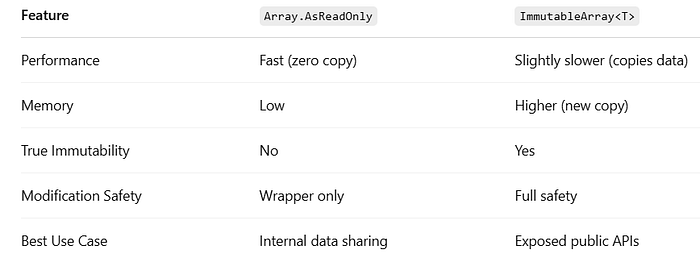
Key Takeaway:
- Use
Array.AsReadOnlywhen performance matters and data is controlled internally. - Use
ImmutableArray<T>when you need true immutability guarantees for public APIs.
🛡️ Best Practices When Using Array.AsReadOnly
- Always prefer exposing
ReadOnlyCollection<T>over raw arrays in public-facing APIs - Be cautious: If the underlying array reference leaks, external code can still mutate it.
- For critical data, consider cloning the array before wrapping it.
- Combine with
IReadOnlyList<T>interface when possible for maximum flexibility.
✨ Conclusion
Although it's a small utility, Array.AsReadOnly can make a big difference when building secure, scalable, and robust applications.
By understanding when and how to use it, you can prevent many classes of bugs — from multithreading issues to accidental API misuse.
More Articles You Might Like:
If you found this article helpful, you might also enjoy these:
- 10 Costly HttpClient Mistakes in C#.NET (And How to Fix Them Like a Pro)
- C# 12.0 Unleashed: 10 Game-Changing Features Every Developer Needs to Know
- 20 Essential C# List Prompts to Speed Up Your .NET Development
- Top 5 C# List Mistakes You're Probably Making in .NET 8 (And How to Fix Them)
- 15 Game-Changing C#-12 Dictionary Tips You Probably Didn't Know
- 20 Essential LINQ Filtering Examples Every C# Developer Must Know
- Avoid These 5 Common C# Tuple Pitfalls in .NET 8 (And How to Fix Them)
- Why '==' Should Never Be Used When Overriding 'Equals()' in C#
- Stop Using async void in C#! Here's Why (With Real Examples)
- C# 12's Type Aliasing in .NET 8: A Game-Changer for Cleaner Code
- 25 Essential C# Best Practices for Writing Clean and Maintainable Code
- 15 Little-Known C# Array Tips That Will Supercharge Your Coding
- Task.WhenAll vs Task.WhenEach vs Task.WhenAny in C#: The Ultimate Guide
- 15 C# Shorthand Techniques Every Developer Should Know to Boost Productivity
- The Sliding Window Trick That Every C#.NET Developer Should Learn
- Mastering Time Zone Comparison in C# 12 and .NET 8 with SQL Server
- 10 Costly Mistakes Developers Make When Using GC.Collect() in C#
- Mastering Median of Two Sorted Arrays in C#: The Binary Search You Never Knew You Needed
- You're Using LINQ Wrong: 10 Weird Facts Every C# Developer Must Know
- No Projects, Just Code: How dotnet run app.cs in .NET 10 Preview 4 Is Revolutionizing C# Development