

What is Pgadmin ?
PgAdmin is an open-source administration and management tool for the PostgreSQL database. PostgreSQL is a powerful, open-source relational database management system. pgAdmin provides a graphical user interface (GUI) for administrators and developers to interact with and manage PostgreSQL databases
3 best use cases :
-> pgAdmin offers a user-friendly graphical interface, allowing administrators to perform various database management tasks without relying solely on command-line tools
-> Users can design and modify database schemas using visual tools, making it easier to create and manage database structures
-> PgAdmin includes a SQL Query Tool that enables users to write and execute SQL queries against PostgreSQL databases
Installing PgAdmin
Visit the website https://www.pgadmin.org/download/ and download PgAdmin based on your operating system. Once the installation is complete, the dashboard will look like the one below
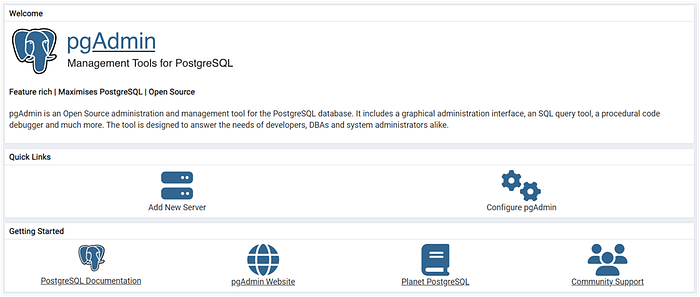
Now, we can proceed to set up our database connection. Click on "Add new server" and the tab below will open. Just give any name for the database
Proceed to provide the database host, port, database, and username details

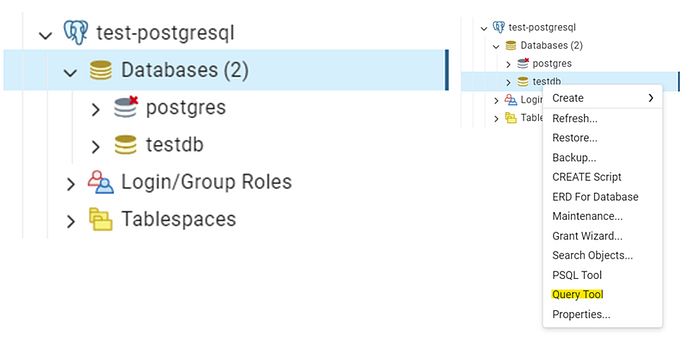
Once completed, our database view will resemble the image below
Right-click on the database name, then open the query tool. It helps to interact with our database table
For example, I am trying to insert data into the table by running the command as shown below

Now, we will try to view the table. It should be working fine.

Now, we will proceed to understand an important concept, which is killing the PID. Although it is not recommended, in some cases, we may find ourselves in a situation where it becomes necessary for the following reasons
Unresponsive or Frozen Process : An application might freeze and become unresponsive, consuming resources and preventing other programs from running. In such cases, killing the PID can free up resources and allow the system to continue functioning.
High Resource Usage : A runaway process could be consuming excessive CPU, memory, or other resources, impacting system performance. Terminating the process can alleviate the bottleneck and restore normal operation.
Security Threat : In rare cases, a process might be compromised by malware or exhibiting suspicious behavior. If confirmed as a threat, terminating the PID can limit potential damage.
By using the provided SQL query, you will obtain a list of active PIDs. Copy this list to Notepad or any text editor
SELECT 'select pg_terminate_backend(' || pid || ');'
FROM pg_stat_activity;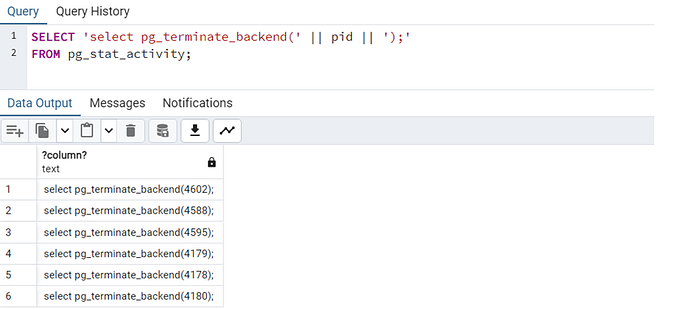
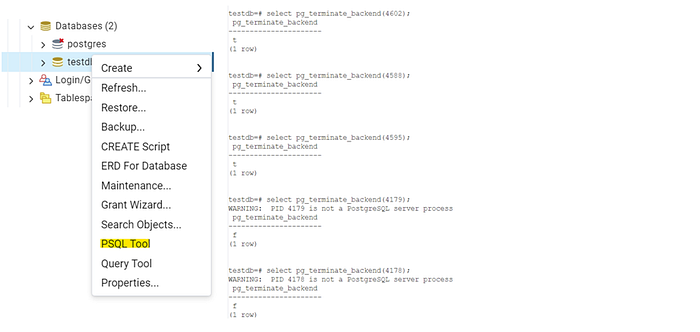
After copying the active PIDs to Notepad, you can choose the PSQL tool. The PSQL tool is a command-line utility for interacting with PostgreSQL databases. It allows you to execute SQL commands and manage database operations from the command line
Now, paste the PIDs that you copied to Notepad into the PSQL tool. Executing the provided SQL statements will terminate the corresponding processes, potentially improving system performance by freeing up resources. However, be cautious when terminating processes and ensure that it is done for valid reasons, such as resolving unresponsive or problematic processes
In the next blog, we will explore a script to automate the same processes.
That's a wrap! Thanks for reading. Loads of love ! ❤️