

Computing power and performance have skyrocketed since their invention. The number of cores and their potentials are like nothing before, giving your application infinite possibilities. Despite the vast improvement, a single-threaded application can only utilize a maximum of one core and cannot benefit from the multi-cores that most modern computers have.
If you feel your application is lagging, compared to other applications in the world that do way more work, it being single-threaded might be the culprit. The solution: multithreading. If this is what you need, consider applying one of the following methods.
- Thread
- Parallel Streams
- ExecutorService
- ForkJoinPool
- CompletableFuture
When used appropriately, it could shake up your world and launch your career. Let's see how you can transform your application into an efficient multithreaded one.
1. Thread
The first option is to use the Thread class. This way, you can control threads directly from their creation to management. Here's an example.
CustomTask counts from 0 to count - 1 every 50 milliseconds.
public class CustomTask implements Runnable {
    private final String name;
    private final int count;

    CustomTask(String name, int count) {
        this.name = name;
        this.count = count;
    }

    @Override
    public void run() {
        for (int i = 0; i < count; i++) {
            System.out.println(name + "-" + i + " from " +
                    Thread.currentThread().getName());
            try {
                Thread.sleep(50);
            } catch (InterruptedException e) {
                throw new RuntimeException(e);
            }
        }
    }
}a, b, and c are the three instances of this class.
Thread a = new Thread(new CustomTask("a", 5));
Thread b = new Thread(new CustomTask("b", 10));
Thread c = new Thread(new CustomTask("c", 5));
Notice that b is expected to count twice as much as others. You want to run b while a and c run sequentially.
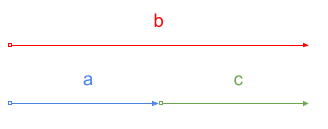
You can implement this behavior very easily.
// a, b start running first.
a.start();
b.start();

// c starts after a is finished.
a.join();
c.start();
And here is the result.
a-0 from Thread-0
b-0 from Thread-1
b-1 from Thread-1
a-1 from Thread-0
b-2 from Thread-1
a-2 from Thread-0
b-3 from Thread-1
a-3 from Thread-0
b-4 from Thread-1
a-4 from Thread-0
b-5 from Thread-1
c-0 from Thread-2
b-6 from Thread-1
c-1 from Thread-2
b-7 from Thread-1
c-2 from Thread-2
b-8 from Thread-1
c-3 from Thread-2
b-9 from Thread-1
c-4 from Thread-2
a and b started running together, printing out in turns. c began producing after a is done. Also, all of them are running in different threads. By manually creating instances of Thread, you can have full control over them.
However, be mindful that low-level thread handling requires synchronization and resource-management too, which can be more error-prone and complex.
2. Parallel Streams
Parallel streams are effective when you have to apply identical, repetitive, and independent tasks to all the elements in a large collection.
For example, image resizing is a heavy task to run sequentially; it will take forever to finish when you have a number of them. In this case, you can resize them in parallel as follows.
private static List<BufferedImage> resizeAll(List<BufferedImage> sourceImages,
                                             int width, int height) {
    return sourceImages
            .parallelStream()
            .map(source -> resize(source, width, height))
            .toList();
}
This way, images will be resized simultaneously, saving you much precious time.
3. ExecutorService
You can consider using ExecutorService when the implementation doesn't require precise thread controls. ExecutorService provides higher-level abstraction for thread management, including thread pooling, task scheduling, and resource management.
ExecutorService is an interface and its most general usage is the thread pool. Suppose that you have piles of asynchronous tasks stacking up, but running them all at the same time — each of them taking up one thread — just seems too much. Thread pools can help you by limiting the maximum number of threads to use.
Below, we're using ExecutorService instantiated by Executors.newFixedThreadPool() to run 10 tasks with 3 threads. Each task will only print a single line. Note that we're reusing the CustomTask defined in the previous section.
ExecutorService executorService = Executors.newFixedThreadPool(3);

for (int i = 0; i < 10; i++) {
    executorService.submit(new CustomTask(String.valueOf(i), 1));
}

executorService.shutdown();
This prints out the following.
0-0 from pool-1-thread-1
2-0 from pool-1-thread-3
1-0 from pool-1-thread-2
4-0 from pool-1-thread-3
3-0 from pool-1-thread-2
5-0 from pool-1-thread-1
6-0 from pool-1-thread-1
7-0 from pool-1-thread-3
8-0 from pool-1-thread-2
9-0 from pool-1-thread-3
10 tasks are running in 3 threads. By limiting the number of threads used for specific tasks, you can assign the number of threads depending on the priorities: more threads for important and frequent tasks, and less threads for trivial or occasional tasks. With high efficiency and simplicity, ExecutorService is a preferred option for most multithreading scenarios.
If you feel the need for more control and flexibility, check out ThreadPoolExecutor, which is an actual implementation of ExecutorService that Executors.newFixedThreadPool() returns. You can directly create its instance or cast the returned ExecutorService instance to gain more control.
4. ForkJoinPool
ForkJoinPool is another type of thread pool, as its name implies. While it is used under the hood of a lot of other asynchronization methods, it is also very powerful for tasks that can be divided into smaller, and independent sub-tasks, which can be solved by divide-and-conquer strategy.
One such task is image resizing. Image resizing is a great example of a divide-and-conquer problem. With ForkJoinPool, you can divide the image into two, or four smaller images and resize them in parallel. The following demonstrates ImageResizeAction, which resizes the image into a given size.
package multithreading;

import java.awt.image.BufferedImage;
import java.util.concurrent.RecursiveAction;

public class ImageResizeAction extends RecursiveAction {
    private static final int THRESHOLD = 100;

    private final BufferedImage sourceImage;
    private final BufferedImage targetImage;
    private final int startRow;
    private final int endRow;
    private final int targetWidth;
    private final int targetHeight;

    public ImageResizeAction(BufferedImage sourceImage,
                             BufferedImage targetImage,
                             int startRow, int endRow,
                             int targetWidth, int targetHeight) {
        this.sourceImage = sourceImage;
        this.targetImage = targetImage;
        this.startRow = startRow;
        this.endRow = endRow;
        this.targetWidth = targetWidth;
        this.targetHeight = targetHeight;
    }

    @Override
    protected void compute() {
        if (endRow - startRow <= THRESHOLD) {
            resizeImage();
        } else {
            int midRow = startRow + (endRow - startRow) / 2;
            invokeAll(
                    new ImageResizeAction(sourceImage, targetImage,
                            startRow, midRow, targetWidth, targetHeight),
                    new ImageResizeAction(sourceImage, targetImage,
                            midRow, endRow, targetWidth, targetHeight)
            );
        }
    }

    private void resizeImage() {
        int sourceWidth = sourceImage.getWidth();
        double xScale = (double) targetWidth / sourceWidth;
        double yScale = (double) targetHeight / sourceImage.getHeight();

        for (int y = startRow; y < endRow; y++) {
            for (int x = 0; x < sourceWidth; x++) {
                int targetX = (int) (x * xScale);
                int targetY = (int) (y * yScale);
                int rgb = sourceImage.getRGB(x, y);
                targetImage.setRGB(targetX, targetY, rgb);
            }
        }
    }
}
Note that ImageResizeAction inherits RecursiveAction. RecursiveAction is used to define the recursive resizing action. In this example, the image is divided into half and resized concurrently.
You can run the ImageResizeAction with the following code:
public static void main(String[] args) throws IOException {
    String sourceImagePath = "source_image.jpg";
    String targetImagePath = "target_image.png";
    int targetWidth = 300;
    int targetHeight = 100;

    BufferedImage sourceImage = ImageIO.read(new File(sourceImagePath));
    BufferedImage targetImage = new BufferedImage(targetWidth, targetHeight,
            BufferedImage.TYPE_INT_RGB);

    ForkJoinPool forkJoinPool = new ForkJoinPool();
    forkJoinPool.invoke(new ImageResizeAction(sourceImage, targetImage,
            0, sourceImage.getHeight(), targetWidth, targetHeight));

    ImageIO.write(targetImage, "png", new File(targetImagePath));

    System.out.println("Image resized successfully!");
}
With the help of ForkJoinPool, you are now able to resize an image more efficiently, with more scalability, and with maximized resource usage.
5. CompletableFuture
With CompletableFuture, you can have full functionality of Future and a number of additional features. The most prominent feature of it is its ability to chain asynchronous operations, allowing you to build complex asynchronous pipelines.
public static void main(String[] args) {
    CompletableFuture<Void> future = CompletableFuture.supplyAsync(() -> {
        System.out.println(Thread.currentThread().getName());
        return "Hyuni Kim";
    }).thenApply((data) -> {
        System.out.println(Thread.currentThread().getName());
        return "My name is " + data;
    }).thenAccept((data) -> {
        System.out.println(Thread.currentThread().getName());
        System.out.println("Result: " + data);
    });

    future.join();
}
The above code shows a key aspect of the CompletableFuture: chaining. With CompletableFuture.supplyAsync(), first CompletableFuture that results in a string is created and run. thenApply() accepts the result from the previous task and performs additional stuff, in this case, appending a string. Lastly, thenAccept() prints out the generated data. The result is as follows.
ForkJoinPool.commonPool-worker-1
ForkJoinPool.commonPool-worker-1
ForkJoinPool.commonPool-worker-1
Result: My name is Hyuni Kim
3 tasks were not run in the main thread, indicating that they were run in parallel with the main logic. When you have tasks that have results and should be chained, CompletableFuture will be a great option.
Summary
The absence of multithreading is like using only one pizza machine in a pizza store. It is inefficient and users will complain about it. Applying mutithreading is not difficult at all. With a simple change, you'll be able to leverage the full power of computers today. Try multithreading now to unleash the new efficiency level of your application!