
Hello, #AndroidDev and #Kotlin enthusiasts
For Clean Code Practices, Discover the powerful feature of Kotlin's 'by' Keyword for Interface Delegation. It not only simplifies your code but enhances clarity and modularity. Let's dive deep into how by can improve your coding practices:
What is Interface Delegation?
In programming, delegation is a design pattern that refers to a scenario where an object (the delegator) relies on another one (the delegate) to perform specific tasks. In the context of Kotlin's 'by' keyword for interfaces, it means that the delegator object does not implement the interface's methods directly. Instead, it delegates all calls to those methods to a delegate object that implements them.
Understanding Delegator and Delegate: Definitions
Delegator: The class or component that inherits the interface and delegates the responsibility of implementing its methods to another object (the delegate). Delegate: The object that actually implements the interface methods.
Below, we'll explore how to integrate these concepts effectively in an Android project.
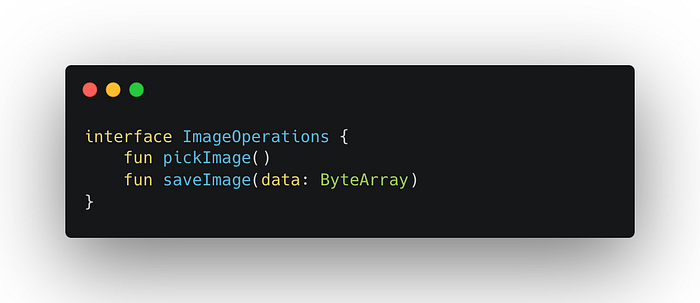
Step 1: Define Your Interfaces
First, we define an interface that the delegate will implement. This interface specifies the functionalities related to image operations.
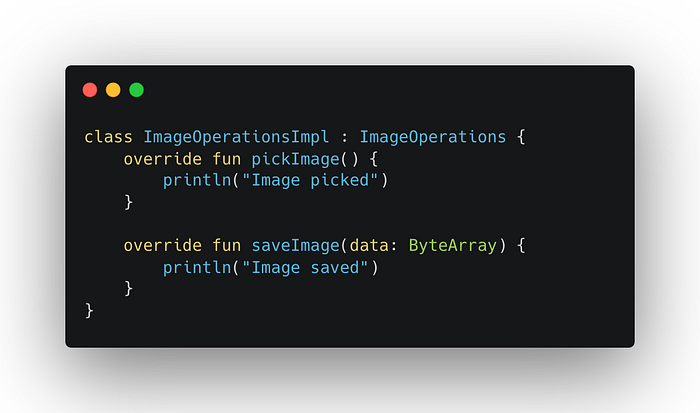
Step 2: Create the Delegate
Create a class that implements the interface. This class will provide concrete implementations of the interface methods.
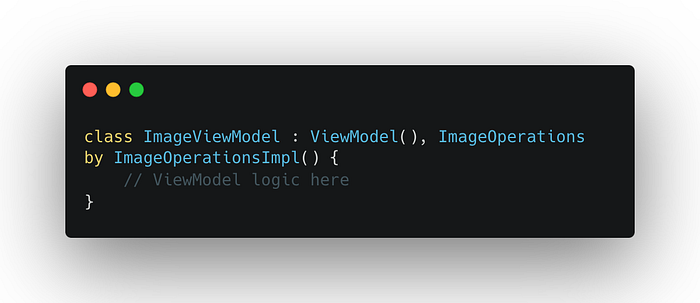
Step 3: Set Up ViewModel with Interface Delegation
In your ViewModel, use the by keyword to delegate the interface implementation to an instance of the implementing class.
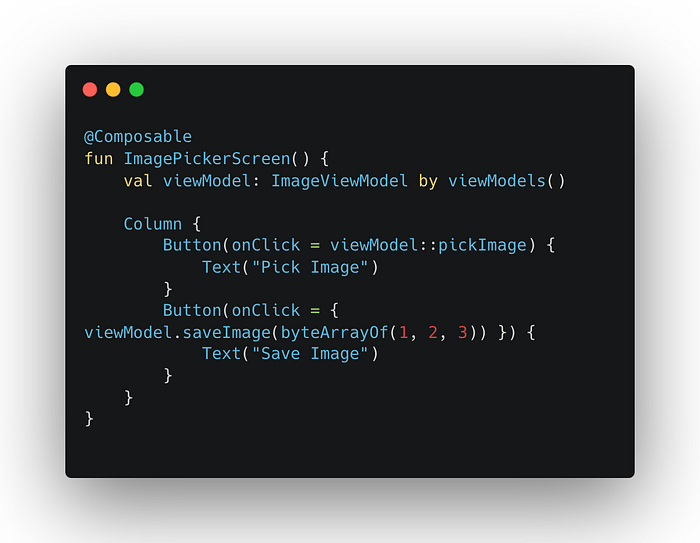
Step 4: Integrate with Jetpack Compose
Use the ViewModel in your Jetpack Compose UI layer. Here, the ViewModel is instantiated using the by viewModels() delegation, which simplifies the ViewModel lifecycle management.
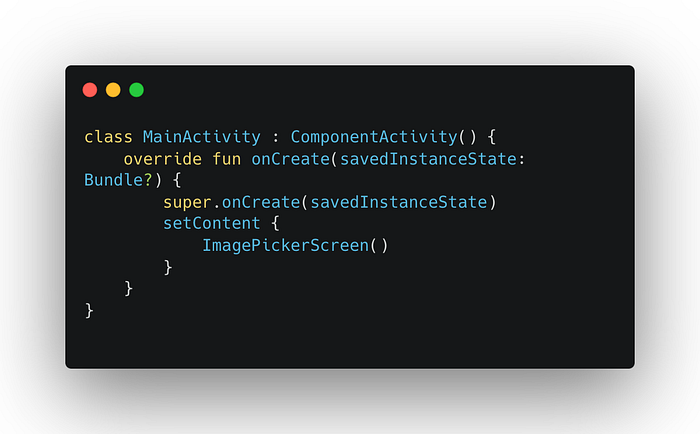
Step 5: Activity Setup
Set up your Activity to use Jetpack Compose.
How does It Work Technically?
As demonstrated in the Kotlin code snippets above,
Delegate — ImageOperationsImpl: It provides the concrete implementations for the methods defined in the ImageOperations interface.
Delegator — ImageViewModel: It implements the ImageOperations interface. but keep in mind that When a class uses the by keyword to delegate the implementation of an interface to another object, it does not actually implement the methods itself. Instead, it depends on another object (the delegate) for these implementations. Although the class doesn't directly provide its own implementation of the methods, it still implements the interface by fulfilling its contract through the methods provided by the delegate object. Therefore, it Uses the 'by' keyword to delegate the implementation of the ImageOperations interface to ImageOperationsImpl. This means ImageViewModel does not handle the logic itself but it will use ImageOperationsImpl to handle calls to pickImage() and saveImage(data).
Why Use Interface Delegation?
Separation of Concerns (Cleaner Code): Delegates the responsibility of implementing an interface's methods to another class, thus keeping your class clean and focused on its core and primary responsibilities. for example, Keeps the ViewModel focused on view-management logic, separating it from the business logic handled by the delegate.
Enhanced Reusability: Allows the same implementation to be reused by multiple classes without rewriting code, promoting DRY (Don't Repeat Yourself) principles.
Improved Maintainability and Flexibility: Changes to the method implementation in the delegate class do not require changes in the delegator class, making the code easier to maintain. for example, Changes in the business logic (handled by ImageOperationsImpl) do not affect the ViewModel, promoting low coupling and high cohesion.
Simplified Unit Testing: It's easier to mock the ImageOperationsImpl, as you can provide a fake or mock delegate that implements ImageOperationsInterface.
Real-World Application
Imagine using the ImageOperationsInterface in an Android app where multiple Viewmodels need to pick and save images. Instead of implementing the interface in each Viewmodel, you could define it once in ImageOperationsImpl and have each Viewmodel delegate to it. This setup not only keeps the ImageViewModel cleaner by reducing boilerplate code but also centralizes the image operation logic within ImageOperationsImpl, making the code more maintainable and easier to manage or fix bugs.
Conclusion
Utilizing Kotlin's by keyword for interface delegation adheres to clean architecture principles, promoting a scalable and maintainable codebase. By decoupling functionalities and focusing on modularity, your app becomes easier to develop, test, and manage.
Connect with Me on LinkedIn
If you found this article helpful and want to stay updated with more insights and tips on Android development, Kotlin, Jetpack Compose, and other tech topics, feel free to connect with me on LinkedIn. I regularly publish articles, share my experiences, and engage with the developer community. Your feedback and interaction are always welcome!