

Lets address some of the facts about kubernetes Pod
Yes, you heard it right!
Is Kubernetes Pod utilising the same concept as virtual machines but enhancing it by leveraging Linux features?
Let's delve into Kubernetes Pods in detail and understand the analogy. But before we dive deeper into the What, How, and Why of Kubernetes Pods, let's grasp the fundamentals of Linux features responsible for isolation:
1. Cgroup (Control Group): Cgroups manage system resources among groups of processes, ensuring fair allocation and preventing resource monopolization. They are essential for efficient resource management in containerized or virtualized environments.
2. Linux Namespace: Linux Namespaces provide isolation for system resources, enabling the creation of isolated environments like containers with restricted access to resources. They ensure security and resource isolation in modern computing environments.
3. IPC (Inter-Process Communication) IPC facilitates communication between processes, with IPC namespaces ensuring secure communication within containers or Pods. This enables efficient and secure communication within containerized environments, crucial for modern distributed applications.
Alright, now that we have the groundwork laid, let's begin by addressing some facts related to Pods.
What is a Kubernetes Pod and How is it similar to a VM?
By definition, Pods are the smallest deployable units of computing that you can create and manage in Kubernetes. A Pod is a group of one or more containers with shared storage and network resources.
It's straightforward up to this point. But how does it relate to a Virtual Machine?
A Pod is essentially a logical host for applications, containing one or more application containers that are relatively tightly coupled.
In non-cloud contexts, applications executed on the same physical or virtual machine, using the same underlying host resources, are analogous to cloud applications executed on the same logical host (Pod).
So fundamentally, Pods are mini versions of VMs utilising similar Linux isolation features like cgroups, namespaces such as user namespace, IPC, etc., to share resources.
Now, if you've followed along this far and understood, let's continue further and explore more facts about Kubernetes. I promise you'll find it intriguing!
Shared Context of a Pod: How do Containers inside a Pod Communicate?
The shared context of a Pod comprises a set of Linux namespaces, cgroups, and potentially other facets of isolation — the same elements that isolate a container.
Within a Pod's context, individual applications (containers using the same isolation features) may have further sub-isolations applied.
But how does Kubernetes ensure that multiple containers share the same resources? Do you have the same question?
In Kubernetes, each Pod uses its own IPC namespace (Inter-Process Communication), meaning all containers within the same Pod share the same IPC namespace, enabling them to communicate using IPC mechanisms like System V IPC and POSIX message queues.
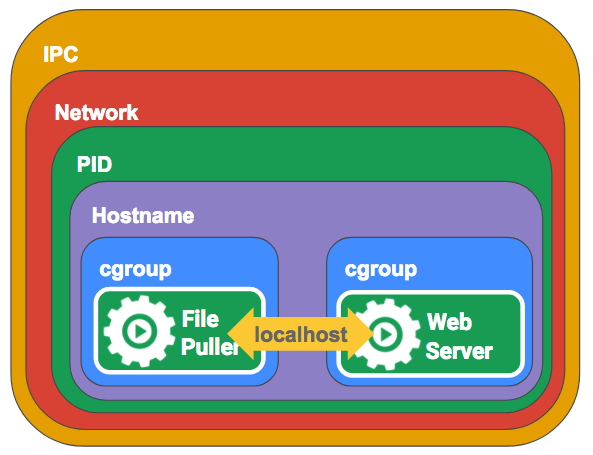
This sharing of IPC namespaces has several implications:
- Shared Memory: Containers within the same Pod can create and access shared memory segments, useful for inter-process communication or data sharing between containers.
- Message Queues: Processes in different containers within the same Pod can use POSIX message queues to communicate.
- Semaphore Sets: Containers can use System V semaphores to coordinate access to shared resources within the same Pod.
- IPC Namespace Isolation: Containers in different Pods are isolated from each other's IPC namespaces, ensuring that communication between containers only happens within the same Pod.
Why Does Kubernetes Choose Pods over Containers?
Containers were serving the purpose of deploying applications across multiple environments and scaling without issues.
Then why did Kubernetes choose Pods over containers?
In my opinion, Kubernetes developers were smart enough to realise the potential challenges with containers, which was to restrict the endless possibilities of contianers and soon it was addressed with pod by having another isolation layer within them.
By introducing Pods, Kubernetes provides a great deal of flexibility for orchestrating container behavior and communication. They can share file volumes, communicate over the network, and even communicate using IPC.
Let's understand with an example: One container serves data stored in a shared volume to the public, while a separate sidecar container refreshes or updates those files. The Pod encapsulates these containers, storage resources, and an ephemeral network identity into a single unit.
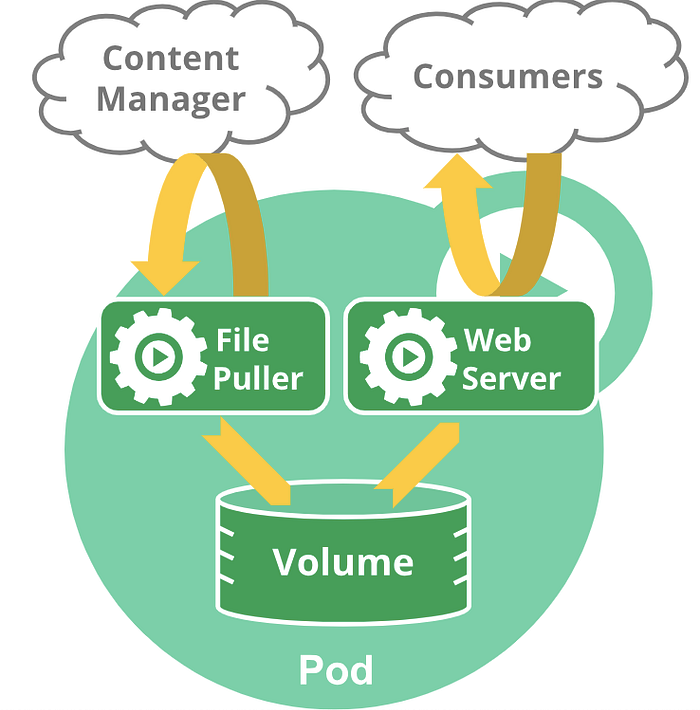
Pods are designed to support multiple cooperating processes (as containers) that form a cohesive unit of service. The containers in a Pod are automatically co-located and co-scheduled on the same physical or virtual machine in the cluster. They can share resources and dependencies, communicate with one another, and coordinate when and how they are terminated.
That's the reason the smallest unit controlled by Kubernetes Control Plane components like the API Server is the Pod, not the container.
However, would you agree if I say the above statement is not entirely correct?
Yes, it's not. There are special types of pods that are not managed by the kube API server. We call them Static Pods.
Static Pods are managed directly by the kubelet daemon on a specific node, without the API server observing them. Unlike Pods managed by the control plane, the kubelet watches each static Pod.
In simple terms, Static Pods are just like regular Pods, but they are not controlled by the master node. Instead, the kubelet present on the node spins them up and watches them throughout their lifecycle, even restarting them whenever they fail.
Static Pods are usually used by different software for bootstrapping Kubernetes itself. For example, kubeadm uses static Pods to bring up Kubernetes control plane components like api-server and controller-manager as static pods on the Master Node.
For more about Kubernetes, I have an in detail article.
At the end, let's remember: there are facts and learning opportunities everywhere; it's just a matter of uncovering them. Keep exploring and discovering new insights. Happy learning!
I hope you like this article. If you did, please share it with your friends!
Thanks for reading! Stay tuned for more exciting content on Kubernetes and beyond.
And Don't forget to clap and follow for future updates!