


A View in PostgreSQL is a virtual table that represents the result of a saved SQL query. Unlike regular tables, views do not store data themselves but dynamically retrieve data from the underlying tables.
Key Characteristics of Views
- Views are read-only by default, meaning we cannot directly insert, update, or delete records in a view.
- They help simplify complex queries by saving frequently used SQL queries as a virtual table.
- Views improve security by restricting access to specific columns or rows.
Why Use Views?
Views are useful in various real-world scenarios, such as:
Query Simplification:Saves complex SQL queries for repeated use.Security & Data Access Control:Restricts access to sensitive columns while exposing necessary information.Data Abstraction:Shields users from changes in underlying database structure.Performance Optimization:In some cases, views can optimize query execution by reducing redundant computations.
Creating a View
We can create a view using the CREATE VIEW statement.
Example: Create a View
CREATE VIEW high_salary_employees AS
SELECT emp_id, first_name, last_name, salary
FROM employees
WHERE salary > 50000;- This view filters out employees earning more than 50,000.
- To retrieve data, simply use:
SELECT * FROM high_salary_employees;Using Views
Once a view is created, we can use it like a regular table in SELECT queries.
Example: Querying a View
SELECT first_name, last_name FROM high_salary_employees;- This retrieves only the
first_nameandlast_namecolumns from the view.
Joining Views with Other Tables
We can also join views with other tables for more useful results.
SELECT h.first_name, h.salary, d.department_name
FROM high_salary_employees h
JOIN departments d ON h.department_id = d.department_id;
Modifying a View
To modify an existing view, use the CREATE OR REPLACE VIEW statement.
Example: Adding More Columns
CREATE OR REPLACE VIEW high_salary_employees AS
SELECT emp_id, first_name, last_name, salary, department_id
FROM employees
WHERE salary > 50000;- This updates the existing view to include
department_id.
Dropping a View
If a view is no longer needed, it can be removed using DROP VIEW.
Example: Dropping a View
DROP VIEW high_salary_employees;- This removes the view but does not affect the original table.
Granting & Revoking Permissions on Views
Views allow us to control access to specific data.
Grant Permission on a View
GRANT SELECT ON high_salary_employees TO devportal;- This grants read access to the
devportaluser.
Revoke Permission on a View
REVOKE SELECT ON high_salary_employees FROM devportal;- This removes read access for
devportal.
Advantages of Views
Simplifies Complex Queries:Saves reusable SQL queries as a virtual table.Enhances Security:Restricts data access to specific users.Provides Data Abstraction:Hides the complexity of database structure.Can Optimize Performance:Predefined views can improve query execution speed.
Common Mistakes to Avoid
Overusing Views:Creating unnecessary views for simple queries makes database management complex.Ignoring Performance Considerations:Views involving multiple joins can slow down performance.Not Updating Views When Schema Changes:If underlying tables change, views must be updated.
Views vs Materialized Views
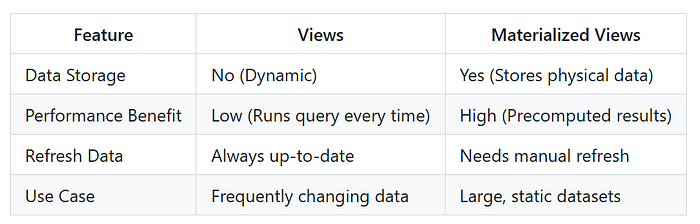
- Use Views when we need real-time data.
- Use Materialized Views when we need precomputed data for faster queries.
Conclusion
Views in PostgreSQL provide a powerful way to simplify queries, enhance security, and improve data abstraction.