

athens-proxy | go | goproxy | helm | guide
With Athens-Proxy you can share private libraries with proper versioning across projects instead of using a vendor folder.
Prerequisites
- A Kubernetes cluster you can deploy to (Minikube, k3s, kind, RancherDesktop, …).
- Your build environment must be able to reach Athens deployed in that Kubernetes (yes, localhost or port-forwarding works).
- You're familiar with or willing to read up on configuring Helm Charts and using
kustomize.
1 Setup With Helm
The demo environment is simple:
myAthens/ # created by you during this guide
  kustomization.yaml
  values.yaml
  athens-auth.yaml
athens.yaml # generated by kustomize
charts/* # created by kustomize
go.mod # created by you with the demo below
go.sum # created by you with the demo below
main.go # created by you with the demo below
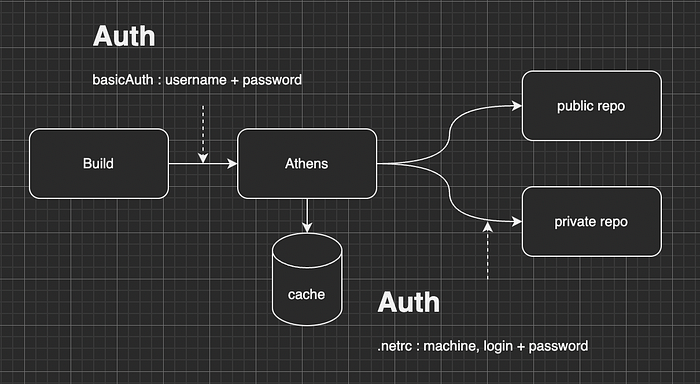
For simplicity, we will setup Athens without credentials for local testing. We will configure, but NOT enable basicAuth.
Since Go is very picky about security and rightfully so, it does NOT support sending credentials over HTTP to a GOPROXY (https://github.com/golang/go/issues/35975#issuecomment-562146283). Additionally, when using HTTPS, it requires a valid certificate.
# values.yaml
basicAuth:
  enabled: false
  secretName: athens-auth
  passwordSecretKey: password
  usernameSecretKey: username
In order for Athens to be able to access the private repositories, you need to provide credentials. The simplest way is to provide a .netrc through a Secret as well. You can use GitHub or GitLab access tokens for example.
# values.yaml
netrc:
  enabled: true
  existingSecret: athens-auth
All you need to do is create a Secret with your credentials base64 encoded, either manually or in your deployment:
# athens-auth.yaml
---
apiVersion: v1
kind: Secret
metadata:
  name: athens-auth
type: Opaque
data:
  .netrc: # echo -ne "machine my.example.com\nlogin athens\npassword foobar\n" | base64
  password: # echo -n "myS3cr3t" | base64
  username: # echo -n "example" | base64
Bring It Together With Kustomize
You can use Kustomize to template the Helm Chart and add additional resources:
# kustomization.yaml
helmGlobals:
 chartHome: ../charts
helmCharts:
- name: athens-proxy
  namespace: default
  includeCRDs: false
  valuesFile: values.yaml
  releaseName: athens-proxy
  version: 0.5.8
  repo: https://gomods.github.io/athens-charts
resources:
  - athens-auth.yaml
When you run kustomize , it will download the Helm Chart and use it to render the Chart with the given values.yaml including all additional resources. Kustomize will only download the Helm Chart once and from then on use the local copy.
# template the Helm Chart
kustomize build --enable-helm myAthens -o athens.yaml

# deploy to k8s
kubectl apply -f athens.yaml

# start port-forwarding to Athens
kubectl port-forward svc/athens-proxy 8080:80
Verify that Athens is running by opening http://localhost:8080 in your browser.
If your local Kubernetes supports it, you can also add an ingress to be able to reach Athens without port-forwarding. In that case you should be able to reach it with http://localhost and set that as GOPROXY.
# values.yaml
ingress:
  enabled: true
  hosts:
    - host: "localhost"
      paths:
        - path: "/"
          pathType: ImplementationSpecific
2 Use The Proxy In Your Build
Info: Go will NOT accept a GOPROXY with an invalid certificate, either you have a valid certificate or use HTTP.
Fetching public libraries through the proxy:
# this is where you reach your Athens installation
export GOPROXY=http://localhost:8080
export GONOSUMDB=my.example.com

# imports are pulled through GOPROXY
cat <<EOF > main.go
package main

import "github.com/urfave/cli/v2"

func main() {
  app := cli.NewApp()
  app.Name = "Test Athens"

  fmt.Printf("App %s", app.Name)
}
EOF

go mod init example.com/athens/v2
go mod tidy

# or simply run go get to test
go get github.com/hamba/cmd/v2
You should see some activity in the log of your athens-proxy Pod where it says that it's saving ... to storage .
Private libraries work just the same. As long as Athens has the credentials to access the referenced Git repositories, it will work just like with public libraries: import "my.example.com/my/awesome/library"
3 Monitoring Athens-Proxy
Athens-Proxy exposes metrics by default, you can choose to scrape them with Prometheus or Victoria Metrics:
# values.yaml
metrics:
  # create ServiceMonitor for prometheus
  serviceMonitor:
    enabled: false
    # namespace: "monitoring"
    # labels:
    #   prometheus: default

  # create VMServiceScrape for victoria
  serviceScrape:
    enabled: false
    # namespace: "monitoring"
Thank you!
Thank you for your interest, make sure to follow https://github.com/gomods for more updates on Athens. Leaving some stars is greatly appreciated and helps raise awareness for the #awesome #athens-proxy and the people behind it.
Disclaimer
I'm writing this article also because together with my colleague we joined the maintainers of Athens. We're working on getting the project back up to date and keep it maintained, because it is a great piece of OpenSource software.
References
Level Up Coding
Thanks for being a part of our community! Before you go:
- 👏 Clap for the story and follow the author 👉
- 📰 View more content in the Level Up Coding publication
- 💰 Free coding interview course ⇒ View Course
- 🔔 Follow us: Twitter | LinkedIn | Newsletter
🚀👉 Join the Level Up talent collective and find an amazing job