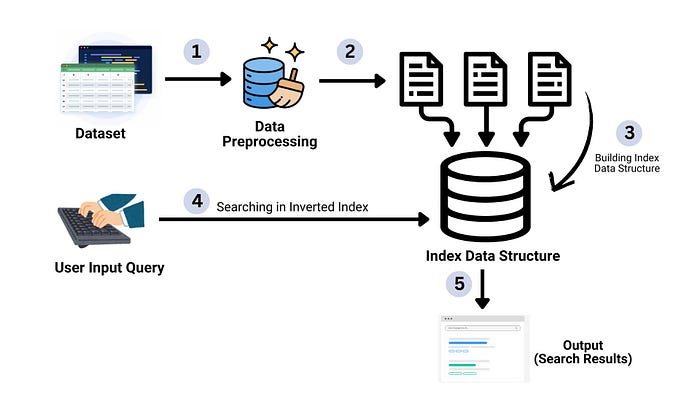
- Efficient search engines are at the core of modern
information retrieval systems, allowing users to quickly find relevant data in massive datasets. One of the most fundamental techniques in building a fast and scalable search engine is the use of an inverted index - In this project article, we demonstrate how to build a search engine using an inverted index, where we tokenize the text, create the index, and use it to perform rapid searches.
- This approach significantly reduces search time and is widely used in search engines, digital libraries, and large-scale text retrieval systems.
PROBLEM STATEMENT
Building a Search Engine for quick retrieval of information from large datasets, using the concept of inverted Index.
USE — CASE : Searching Job Postings
- Search Engines can be built for any domain or they might be generalized. But, in this article we'll focus on one of the use case of the Search Engine which is
Searching Job Postings - In a job portal scenario, users typically search for specific job titles like "Data Analyst" or "Software Developer" etc. The inverted index allows our system to quickly fetch relevant job postings, reducing the search time and enhancing the user experience
- This approach is especially beneficial for job portals with a high volume of listings, where quick retrieval is essential.
DATASET DESCRIPTION
- For this project, we use a job postings dataset from
Kaggle, which contains thousands of job listings with mulitple details such as :Job Title,Job Role,Company Name,Quallification,Salary,Experienceand many more. - We clean this dataset by removing irrelevant columns and handling missing values and considering only the prominent features to ensure the data is ready for building the inverted index.
Kaggle Link : https://www.kaggle.com/datasets/ravindrasinghrana/job-description-dataset
df = pd.read_csv('/content/1/job_descriptions.csv')

# dropping the unwanted columns
df.drop(columns=['Job Id','latitude', 'longitude','Job Portal', 'location','Company Profile', 'Job Description'],
        inplace = True)

# checking for null values
df.isna().sum()

# modifying the data type of Date col
df['Job Posting Date'] = pd.to_datetime(df['Job Posting Date'])
INVERTED INDEX : Concept & Benefits
- Concept of Inverted Index :
An inverted index is a data structure that maps terms(words) to the documents (job postings) in which they appear.
- Each
termis awordfrom the job title (e.g., "developer", "analyst" etc). - Each
document IDcorresponds to a row in our dataset. - For each word (token) in the dataset, the inverted index maps that word to a list of document IDs where the word appears.
e.g :
Term : "Senior Data Engineer"
Tokens : ["senior", "data", "engineer"]
Mappings :
- "data" : [row_0, row_3, row_5]
- "engineer" : [row_1, row_2, row_5]
- "senior" : [row_0, row_2]

2. Benefits of Inverted Index:
- Faster Search: The inverted index allows us to look up terms quickly without scanning the entire dataset.
- Efficient Text Retrieval: It reduces the time complexity of searching from O(n) (linear search) to O(1) or O(log n) for lookups.
- Scalability: The structure can handle increasing data volumes effectively, making it ideal for large datasets.
# Building the inverted index

def build_inverted_index(df):
    inverted_index = defaultdict(list)

    # Iterate through each row in the DataFrame
    for idx, row in df.iterrows():
        # Tokenize the search_term column (split by spaces)
        terms = str(row['Job Title']).lower().split()

        # Add each term to the inverted index with the document index (row ID)
        for term in terms:
            if idx not in inverted_index[term]:
                inverted_index[term].append(idx)

    return inverted_index

inverted_index = build_inverted_index(df)
print("\nInverted Index Built Successfully!")
SEARCHING THROUGH INVERTED INDEX : Search Query
- When a user enters a
search query, the system processes the input to find relevant job postings from the dataset - First, the query is tokenized, which involves splitting the search string into individual terms (words). These terms are then matched against the inverted index, which stores mappings of terms to the documents (job postings) in which they appear.
- For each term in the query, the system looks up the posting list in the inverted index to find the corresponding document IDs where the term is present.
- Once the relevant document IDs are identified, the corresponding job postings are retrieved and displayed to the user.
This process allows for a fast and efficient retrieval of relevant results based on the search terms, without the need to scan the entire dataset.
def search_with_inverted_index(query, inverted_index, df, max_results=5):
    query_terms = query.lower().split()
    matching_docs = set()

    # Collect matching document IDs from the inverted index
    for term in query_terms:
        if term in inverted_index:
            matching_docs.update(inverted_index[term])

    # Limit the number of results to max_results (default is 50)
    matching_docs = list(matching_docs)[:max_results]

    if matching_docs:
        print(f"\nDisplaying up to {max_results} results for search term '{query}':\n")
        for doc_id in matching_docs:
            row = df.iloc[doc_id]

            # Display the result
            print(f"Job Title : {row['Job Title']}")
            print(f"Role : {row['Role']}")
            print(f"Company Name : {row['Company']}")
            print(f"Location : {row['Country']}")
            print(f"Qualifications : {row['Qualifications']}")
            print(f"Experience : {row['Experience']}")
            print(f"Salary Range : {row['Salary Range']}")
            print(f"Work Type : {row['Work Type']}")
            print(f"Responsibilities : {row['Responsibilities']}")
            print(f"Skills : {row['skills']}")
            print(f"Benefits : {row['Benefits']}")
            print(f"Contact : {row['Contact']}")
            print("-" * 50)
    else:
        print(f"No results found for search term '{query}'.")
For full code, refer to Github Repository: https://github.com/RishaRane/Building_Search_Engine_using_Inverted_index.git
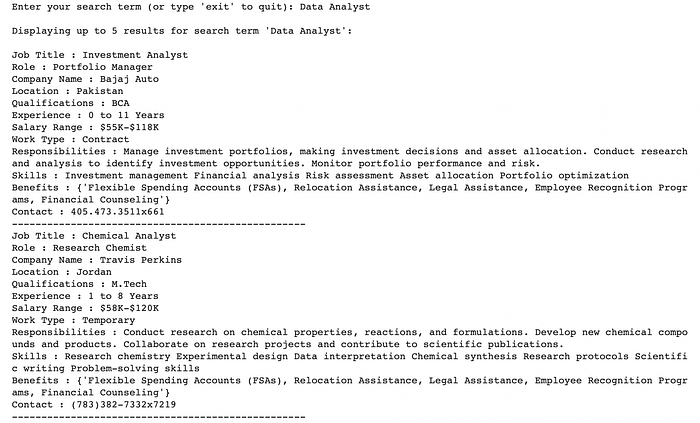
In this article, we explored the process of building a search engine using an inverted index, a fundamental technique for efficient information retrieval.