

Extensible & Linkable File Malware Analysis for Beginners | ELF | Linux
1.UNDERSTANDING THE EXECUTABLE AND LINKABLE FILE FORMAT
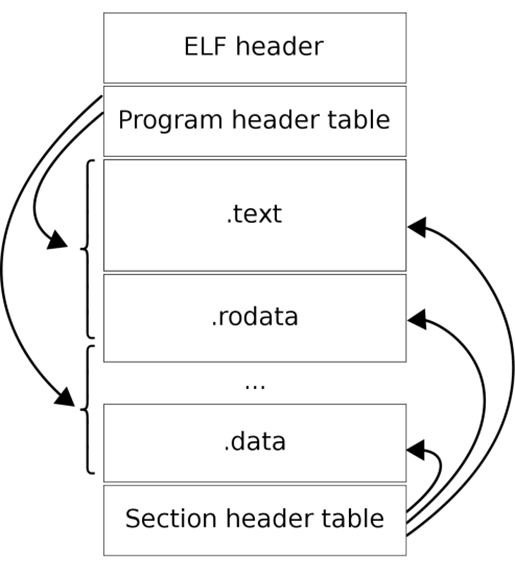
The ELF file structure is majorly divided into ELF header, program header table and section header table. The ELF header acts as a container and director for the Linux operating system. It contains all the file metadata for the ELF and it directs the operating system to load it into memory and get its routine done.
The program header table contains information about individual blocks that are loaded into memory during run-time by the kernel. These individual blocks may be made out of several sections and are mapped as segments in the memory. Another slice of the ELF structure, the section header table, contains information about the sections. A section is any individual, binary part of the file that has a specific symbol, parameter or resource on the disk. The section header table also contains information that helps linkers to load external libraries available in the system.
1.1 Identifying ELF files-
To identify ELF files, we can look into the magic bytes of the file. In Linux, we have the HexDump utility that can be used to see the magic bytes in the terminal-
hd \path\to\file\filename.elf

The magic bytes for ELF are 7f 45 4c 46, which are equivalent to .ELF when converted from hexadecimal to characters one by one.
1.2 Viewing section table and program header table-
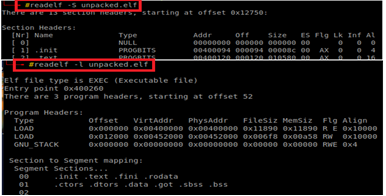
The readelf utility can be used to view the program header and section header tables-
readelf –S filename.elf for section table and readelf –l filename.elf for program header table.
The ELF header has a length of 52 bytes for the 32-bit binary and 64 bytes for the 64-bit binary. It consists of several fields that provide basic information on the file needed by the operating system for processing. The ELF header is not just meant for basic understanding of the file, it may contain anomalies. It shows file architecture, data encoding, file type, address of entry point, and other information related to section and program headers. To view the ELF header-
readelf –h filename.elf
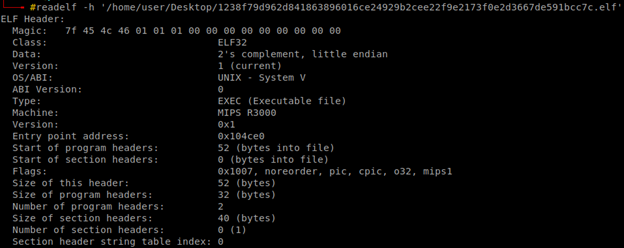
Using the ELF header, we can trace down information on the section header table and the program header table, further supporting the analyst to trace down symbols, linking, and other debugging-related information. This also helps one to identify packing by looking at section names and even self-modifying or writable sections of the file.
2.STRING ANALYSIS OF ELF FILES
The basic process for performing static analysis of ELF files includes header, section table, and program table, and string analysis. There might be packer-specific section names, zero entry points, self-modifying sections that unpack or clear up the obfuscated code in the memory, segment-to-section mapping details, IP addresses or ransom notes in strings, etc.
The strings utility in Linux-based operating systems can be utilized to dump strings into an output file. We use the redirection operator '>' in the Linux terminal for dumping file strings into a text file. The output file can then be opened using a text editor and strings analysis can be performed-
strings filename.elf > string_dump.txt
vi string_dump.txt
Malicious IP addresses, URLs, ransom notes, embedded shell scripts, threat patterns, or any useful information can be extracted from file strings. These collected IoCs can be used to write detection rules for malware.
3.DYNAMIC ANALYSIS OF ELF FILES
Dynamic analysis, also known as behavioral analysis, involves direct execution of the file. The advantage of several Linux operating systems is that no file can execute until it gains permission to run. Malware has by-passed this facility, but for performing file analysis one should ensure that the sample is run with total privileges. To do so-
chmod 777 filename.elf
The above command gives combined permission to read, write, and execute to owners, groups, and other users. The file can then be freely executed in a Linux environment by a simple double click. RegShot is a tool used to monitor the registry and file system while performing dynamic analysis on the Windows operating system. There is no such tool for Linux, but there are utilities that help the analysts to enumerate files starting from the \root\ directory.
The process involves snap1, which contains all files present in the system before the execution of the malicious sample. After taking a snapshot, the file is run. Then another snapshot named snap2 is taken. Both of the snapshots, snap1, and snap2, are then compared to return extra content present in snap2. This extra content has all the malicious dropped files that get into remote locations post-malware execution. The added files are preceded by a '+' sign.

find / | grep -v '^proc' > snap1
Execute the sample.
find / | grep -v '^proc' > snap2
diff -crB snapshot1 snapshot2 > list_of_dropped_files.txt
The 'find /' command enumerates all the files present on the system, the '\proc\' directory is excluded as it has a list of processes currently in a running state, and 'diff' compares the two snapshots to return the list of dropped files due to malware execution. This does not help to identify file attribute modification as ransomware does, it changes the file type, file size, etc. for instance.
To identify file attribute modification using Linux utilities-
find / -type f -wholename '/proc' -prune -print0 | xargs -0 md5sum | tee md5_hashes.txt
Execute the sample.
md5sum -c md5_hashes.txt 2> /dev/null | grep -i 'FAIL' > failed.txt
It compares the md5 hash values of all the files before and after execution of the malware sample and returns the names of all the files modified in the .txt output file. Tools like WireShark or NetHogs can be used for network traffic monitoring to capture the IP addresses and content that is being sent over the network. Linux also facilitates fake, one-way network interfaces.
4.PERSISTENCE MECHANISMS IN LINUX
Using various persistence mechanisms, the malware author ensures that the malware survives termination, shutdown, restart, log-off, or runs as per a desired schedule. Although there are various persistence mechanisms in Linux, a few that are quite popular have been discussed-
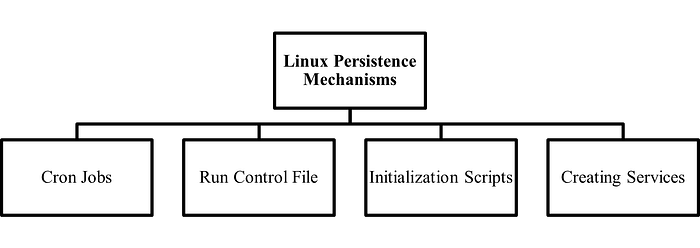
4.1 Cron Jobs
A cron job is like a Windows scheduled task. It runs an executable at specified intervals of time. To view the cron jobs specified for all users on a Linux machine-
sudo crontab –l
To view the cron jobs specified for a particular user in a linux machine-
sudo crontab -u [username] –l
Check the cron table using 'cron –e' command and it may have-
@reboot /path/to/the/script param1 param2 (The script runs on every reboot)
/path/to/the/script param1 param2 (The script runs every minute)
4.2 Run Control File
The rc.local file is usually present in /etc/ path or its sub-directories. It is used to define startup scripts or to run services on Linux systems. To view the rc.local file, go to the path and check for-
sudo systemctl enable rc-local (Enables rc.local in the system)
nano /etc/rc.local (Opens up the rc.local file)
A check can be made for suspicious script names or services running in rc.local via this mechanism. It also provides a facility for scripts to run during system boot.
4.3 Initailization Scripts
This mechanism in Linux runs scripts at system startup. The file /etc/init.d contains the names of all the scripts that are supposed to run during system startup. Every initialization script has a pre-defined template-
BEGIN INIT INFO
Provides: script_name
Required-Start:
Required-Stop:
Default-Start:
Default-Stop:
Short-Description:
END INIT INFO
4.4 Linux Services in systemd
The service files in /etc/systemd/system contain services in the following template-
[Unit]
Description=Description of your script
After=
[Service]
ExecStart=/path/to/the/script param1 param2
Restart=
User=
Group=
Type=
[Install]
WantedBy=
There are several privilege level attributes available that can be misused by the malicious file.
5.A SIMPLE OVERVIEW ON CODE ANALYSIS
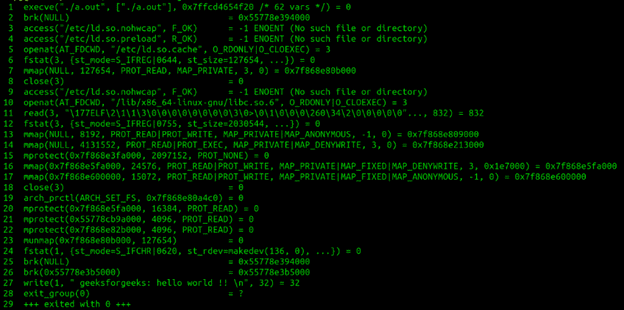
The 'strace' utility is a diagnostic tool that is used to trace running executables, intercepts, and records system calls and Linux signals created by any command or process. This utility generates an output file that can be used for debugging or any other relevant diagnosis. To run 'strace' utility for an ELF executable-
strace ./filename.elf –o debugged_dump.txt
- o attribute is used to output the traced information to the text file named debugged_dump.txt.
GDB is a popularly used debugger in Linux. It can debug any type of executable, including ELF file type, and works on commands. To install GDB in Linux via terminal, the user can run-
sudo apt install gdb
To debug a file using GDB, this opens the gdb shell-
gdb ./filename.elf
GDB Commands-
help:Shows list of actions the user can perform. list:Shows loaded symbol's table. info functions:Shows all the functions used by ELF. info files:Shows all files used by the ELF. break main:Creates a breakpoint on main function. run:Executes the file until the breakpoint. info registers:To check register values modified by the ELF. info sharedlibrary:To check libraries used by the ELF. disassemble:Shows the assembly code with '=>' at breakpoint. break *address:To breakpoint at an address (Check CALL). info breakpoints:Shows all the breakpoints.
CONCLUSION
The demand for various Unix/Linux-based systems has increased. Several IoT appliances are usually based on Linux. These operating systems have uncountable applications and offer several utilities to their users. Several Advanced Persistent Threats have therefore increased the rate of attacks on such platforms. There is a high rise in malicious entities that have harmful effects on Linux environment-based systems. Varieties of trojans, spyware, and ransomware of executable and linkable format types have been seen in recent times. Mirai malware was reported by several trusted authorities in January 2023. The count has increased over time and it even exceeded the number of Windows malware reported in a certain week. Linux OS has several utilities in its terminal that support easy analysis of the ELF malware.