


In the process of building a user interface, handling unexpected behaviors is equally important to handling expected behaviors. Even with all of the testing in the world, someone, somewhere, will (accidentally) figure out how to break your app. Even the most reliable network will, at some point, fail.
While it may be impossible to anticipate and evade every single possibility of this, we can acknowledge that it will happen in a broad sense.
The elegant handling of these occurrences in broad strokes is imperative to a positive user experience.
Unhandled JavaScript Errors
Left to its own devices, JavaScript can essentially break your entire app from one simple, dreaded, cannot read property <property_name> of undefined. The good news is, every year we are getting more tools to help avoid these errors in the first place. For instance, optional chaining was introduced to help avoid this very issue. The bad news is that these tools still, at best, will leave your app in limbo if unhandled.
React Error Boundaries

Lucky for us, React has us covered. React 16 introduced the concept or Error Boundaries. As the documentation explains:
Error boundaries are React components that catch JavaScript errors anywhere in their child component tree, log those errors, and display a fallback UI instead of the component tree that crashed.
In essence, error boundaries allow you to contain the negative ramifications of an error to the specific component in which the error occurred. It is important to note, though, that error boundaries will not catch errors that occur inside of event handlers. Even with this limitation, the solution is much more elegant than the entire DOM turning into an error message with a stack trace, right?
Quick note: As of this writing, there is no hook equivalent of the lifecycle methods we will be using, so we will be referencing a classic React.Component rather than a functional component.
Building a Boundary
An error boundary is not code that is added into an existing component, but rather its own individual component that is used to wrap others. The error boundary component has four main characteristics:
- Maintaining a boolean error status in state
- Use of
componentDidCatch() - Use of
static getDerivedStateFromError() - A custom fallback UI to render
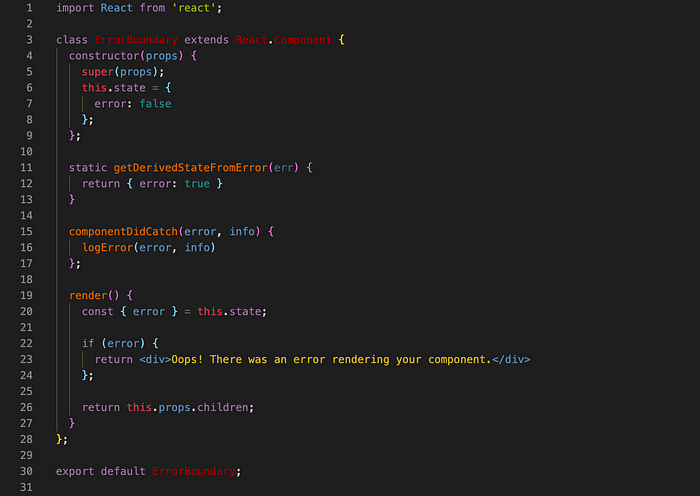
It is not required that you use both componentDidCatch() and static getDerivedStateFromError(), however they do serve very different purposes, and so we will cover both here.
componentDidCatch()
This lifecycle is invoked after an error has been thrown by a descendant component.
The above is from the React documentation. componentDidCatch() operates similarly to the standard catch block that you are likely familiar with. It is triggered on an error being thrown inside of a descendant, and allows you to do something with the actual error information, such as log it.
The method accepts two arguments, the error object and the stack trace, both of which are helpful in debugging.

static getDerivedStateFromError()
This lifecycle is invoked after an error has been thrown by a descendant component. It receives the error that was thrown as a parameter and should return a value to update state.
The above is also provided by the the official docs. componentDidCatch() is the friend of the developer, but static getDerivedStateFromError() is the friend of the user. This lifecycle method is where we create the elegant handling, and it is incredibly simple to do so.
All that we have to do inside of this lifecycle method is to set the maintained error state to true.

The ErrorBoundary Component
The ErrorBoundary component will include the state of the error as well as both of the above lifecycle methods, and will conditionally render either the fallback UI or the children of the error boundary component. Let's put this all together:
Implementing a Boundary

Your error boundary component can now be used to neatly wrap other components on which you want to create a boundary:

Alternatively, you can leverage render props to make your ErrorBoundary component more dynamic, and accept a different fallback UI depending on the component being wrapped:

The decision of which components to wrap is largely dependent on the application. In some scenarios, you may want to wrap lower level, individual components, resulting in a part of the UI being replaced by the fallback UI in the event of an error. In other scenarios, you may want to wrap higher level components and use a more general fallback UI for the page being accessed.
In both scenarios, the boundary will catch errors from all descendants of the wrapped component. One approach is not better than the other, and which you choose will depend largely on context, dependencies within the component tree, logic, priorities, user experience, and personal preference.
You can play around with React's CodePen for error boundaries, and check out the documentation to learn more.