
You're introducing new software to a client's team, and your job goes beyond installation. You're there to help everyone get up to speed, ensuring they're ready to tackle their daily tasks with this new tool.
In this guide, we cover some practical strategies and tips on employee training, focusing on making sure they can use the new tools successfully.
Know your audience
Understanding who you're training is key. Start by assessing the current skills and knowledge level of the team.
Are they tech-savvy or do they need more basic instructions? Find out how they feel about using new software. Some might be excited, while others could be apprehensive.
This knowledge allows you to create a training program that meets everyone's needs.
Here's what you can do:
- Conduct a quick survey or interview to gauge their comfort level with technology.
- Identify any previous software they've used that's similar to the new system.
- Acknowledge that learning speeds vary. Plan to offer additional support for those who need it.
This approach ensures your training resonates with everyone, from eager learners to those wary of change. Tailoring your sessions to accommodate different learning styles — visual, auditory, and kinesthetic — can make a big difference. For example, visual learners benefit from diagrams and screenshots, auditory learners from discussions and explanations, and kinesthetic learners from hands-on practice.
Set clear goals
Defining what success looks like is critical before diving into training. What specific skills or knowledge should the team have by the end of the training?
Clear goals guide your training content and structure, and they give you a way to measure success. Follow these steps to set effective goals:
- List the key features of the new software that the team needs to use.
- Determine the tasks the team should be able to complete with the software.
- Decide how you'll measure mastery of these tasks. Will it be through a test, a demonstration, or another method?
Goals might include mastering basic functions for all team members, with more advanced features for power users. Or, ensuring everyone can complete their daily tasks using the new system efficiently.
Remember that your goals should be realistic and achievable within your training timeframe.
Deal with resistance to change
When introducing new software, not everyone will be on board immediately. People often resist change because it pulls them out of their comfort zone.
Here's how you can handle it:
- Explain the benefits: Make sure everyone understands how the new software improves their work life. Will it save time? Reduce errors? Make their jobs easier? Give clear, real-world examples.
- Involve team leaders: Find champions within the team who see the value of the new software. Their enthusiasm and support can influence employee buy-in significantly.
- Address concerns directly: Take the time to listen to what the team is worried about. Some might fear they can't learn the new system or that it might make their jobs harder. Offer reassurances and solutions.
- Show career development opportunities: Highlight how mastering the new software can open up opportunities for advancement or skill development. People are more likely to embrace change if they see it can lead to personal growth.
- Provide plenty of training: Make sure everyone knows help is available. Offer training sessions, one-on-one support, and resources like manuals or online tutorials.
- Celebrate early adopters: Recognize and reward those who adapt quickly to the new software. This can motivate others to get on board.
Patience and communication are key. Change doesn't happen overnight, but with the right approach, you can get everyone moving in the same direction.
Use different ways to teach
People learn differently, so using varied teaching methods is important to keep everyone interested. Here are a few training methods you could use to match different learning styles and make the training stick:
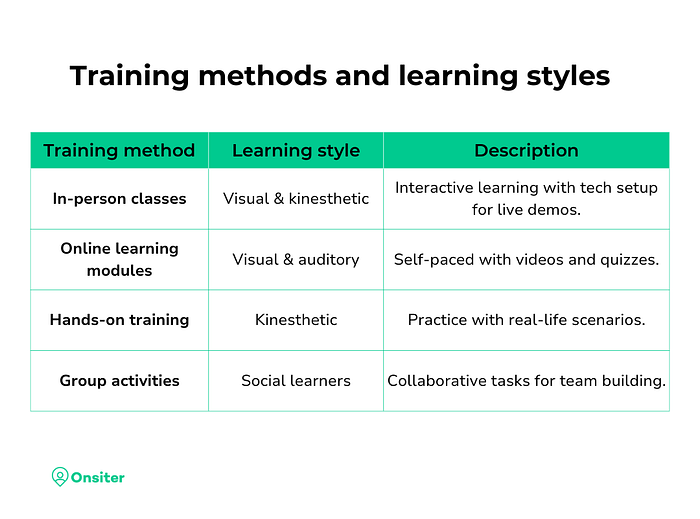
- In-person classes: These are great for interactive learning and immediate feedback. If you're turning a conference room into your training venue, make sure your setup includes all necessary tech so participants can follow along with the software demonstrations.
- Online learning modules: Combining face-to-face training with online training (blended learning) lets people learn at their own pace, when they have time and go back over the tricky parts. Use videos, step-by-step guides, and quizzes to make the learning stick. It's a good way to fit training into a busy schedule.
- Hands-on training: Nothing beats actually using the software. Set up real-life scenarios so people can practice what they're learning. It helps make the learning real and gives them confidence.
- Group activities: Working together on tasks using the new software can help people learn how to use it in their day-to-day work. It's also great for team building.
- Q&A sessions: Have regular times when people can ask questions or get help with problems they're having. This can be done in person or online, making sure everyone gets the help they need.
- Peer-led sessions: Sometimes, learning from a coworker can be easier. If someone is really good with the new software, have them share tips or give mini-lessons. It can make team training less formal and more comfortable.
The main aim is to get everyone up to speed with the new software as smoothly and quickly as possible. Mixing up how you teach can help make sure everyone gets the hang of it, no matter how they learn best.
Check if the training's working
Evaluating the effectiveness of your training sessions is key to ensuring your client's team can use new software efficiently. You need a clear picture of how well the team is absorbing the information and applying it to their daily tasks.
Here's how you can measure the impact:
- Use surveys: After each training session, send out a quick survey. Ask specific questions about the content, the pace, and the presentation style. Include open-ended questions for detailed feedback. This direct input from employees highlights areas that are clear versus those that need more explanation.
- Look at performance data: If the new software has analytics or reporting features, track how the team uses the software over time. Are they completing tasks more quickly? Are there features they avoid? This data can show you if certain functions need more training focus.
- Conduct follow-up tests: A few weeks after the initial training, organize short tests or practical tasks for the team. These can be simple projects that require using the software's key features. Reviewing these tasks will show you who needs more help and which parts of the software are still causing confusion.
- Monitor help desk calls: Keep an eye on the type and frequency of questions coming into your IT support team. A spike in queries about specific features or frequent issues with the same tool can indicate a gap in your training.
- Set up a feedback box: Sometimes, team members might not feel comfortable sharing feedback in a survey or public setting. A feedback box, whether physical or digital, allows for anonymous tips on how to improve the training sessions.
Getting ready to move on as a consultant
When it's time for you to wrap up your work and leave the client's team to manage the new software on their own, you need to plan for a smooth transition.
Here are some ways to make sure that they can continue to succeed without your direct involvement:
Create detailed documentation: User manuals, troubleshooting guides, and FAQs that you've developed during your time with them should be part of your handover checklist. This should be easy to understand and accessible to everyone on the team.
- Step-by-step instructions for common tasks
- Troubleshooting tips for typical issues
- Contact information for technical support
Identify and train key team members: Choose a few employees who have shown both interest and aptitude with the new software. Train them more intensively so they can serve as internal experts and go-to people for others in the team.
Set up a support structure: Before you leave, make sure there's a clear support plan in place. This could involve:
- Scheduling regular check-ins via phone or video call
- Establishing a relationship with a third-party support provider
- Creating a protocol for escalating unresolved issues
Plan for future training needs: Recognize that the team's needs will evolve as they become more familiar with the software.
- Arrange for advanced training sessions in the future
- Leave resources for self-guided learning, such as links to online courses or forums
Foster a culture of continuous improvement: Encourage the team to keep learning and exploring the software's capabilities. Suggest ways they can stay informed about updates and new features.
Ensure open lines of communication: Implement a feedback mechanism for the team to share their experiences, challenges, and successes with the software. This could be a digital feedback form or a regular meeting with their supervisor.
Wrap-up
Training employees on new software is about showing them how to use new technology and making sure they can integrate these tools into their daily tasks, contributing to the team's success.
Clear goals, different teaching methods, and promoting continuous learning are key to effectively train employees. This supports their growth and helps everyone get comfortable with the new systems. The main goal is to make sure the team can fully use the new software, making the changeover smooth and setting up a solid base for growth in the future.