


Document understanding and conversion technologies have become one of the most critical components of digitalization processes today. SmolDocling, a new development in this field, stands out as an ultra-compact vision model designed for end-to-end document conversion.
The paper of this model, prepared jointly by HuggingFace and IBM, was published on March 14. If you are ready now, we will examine what is written in this paper and how it is implemented.
If you like this article and want to show some love:
- Clap 50 times — each one helps more than you think! 👏
- Follow me here on Medium and subscribe for free to catch my latest posts. 🫶
- Let's connect on LinkedIn.
What is SmolDocling?
SmolDocling is an ultra-compact model derived from Hugging Face's SmolVLM-256M model, 5–10 times smaller than other vision models. Containing only 256 million parameters, this model performs at a level that can compete successfully with vision models 27 times larger.
One of the most important features of SmolDocling is its ability to fully represent the content and structure of document pages. The model can capture not only the content, but also the document structure and the positioning of elements within the page.
DocTags Format
SmolDocling uses a format for document transformation, "DocTags". DocTags is an XML-like markup language that defines key attributes of document elements. This format includes the following key features:
Basic Structure of DocTags
DocTags define three basic properties of document elements. Element type refers to text, image, table, code, title, footnote, and other types of content components. Position on page indicates the exact placement of the element on the page and shows where it is located. Content represents the textual or structural content of the element and encompasses the actual information contained within the element.
Working Principle of DocTags
The basic elements that represent document content are surrounded by XML-style tags.
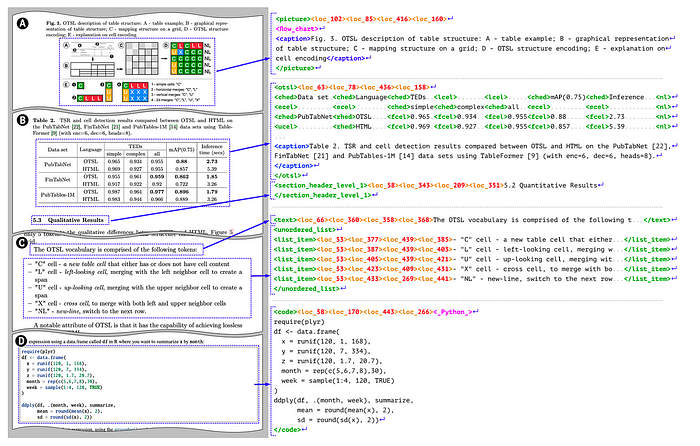
Each element can contain additional position tags that encode its location on the page. This position information represents the element's bounding box on the page and is displayed in the following format: <loc_x1><loc_y1><loc_x2><loc_y2>. Here:
- x1, y1: Coordinates of the upper left corner of the bounding box
- x2, y2: Coordinates of the lower right corner of the bounding box
Nested Structures
DocTags provide additional information through nested tags. Images and tables can contain their own captions which are represented by caption tags. Table structure is represented by OTSL tags which help define the organization of tabular data. Lists can nest list items, allowing for hierarchical organization of information. Code blocks and images can carry classification information such as programming language or content type, providing context about the nature of the visual or code content.
Advantages of DocTags
The DocTags format has significant advantages over formats such as standard HTML or Markdown. Reduced ambiguity eliminates uncertainties with a clear tag structure that precisely defines document elements. Separation of structure and content clearly distinguishes between the document's organizational framework and its textual information. Preservation of page layout maintains the original document appearance through position tags that capture spatial relationships. Token optimization minimizes the total token count, making processing more efficient. Modeling performance enhances the capabilities of Image-to-Sequence models by providing well-structured consistent data for better learning and output generation.
Architectural Structure
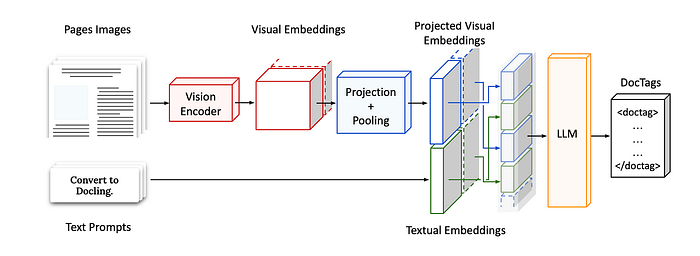
SmolDocling's architecture features a comprehensive process flow that converts document images into DocTags format. The Input Phase involves page images, which are the document pages to be processed, and text prompts that provide conversion instructions such as "Convert to Docling." The Visual Processing Phase utilizes a vision encoder that converts page images into visual embeddings, followed by projection and pooling operations that transform these visual embeddings into a more compact format.
The Embedding Integration phase combines projected visual embeddings, which are structured representations of visual information, with textual embeddings derived from text prompts. These two embedding types are merged to create the input for the model. The Output Generation phase employs an LLM (Language Model) that processes the embeddings to produce output in DocTags format, which is an XML-like markup language representing the structure and content of the document.
This architecture effectively combines image understanding and text generation capabilities, preserving the content and structural properties of documents end-to-end. Particularly due to the LLM's autoregressive features, it can accurately convert complex document structures into DocTags format.
Application Areas
SmolDocling can be used for a variety of document understanding tasks. It supports document classification, helping to categorize different types of documents automatically. The system performs OCR (Optical Character Recognition) to convert printed or handwritten text from images into machine-encoded text. Layout analysis capabilities allow it to understand the structural organization of documents, identifying different sections and their relationships. Table recognition enables the extraction and interpretation of tabular data, preserving its structure and relationships.
SmolDocling also excels at key-value extraction, identifying important pairs of information within documents. The system provides graph understanding functionality, interpreting visual representations of data and their meanings. Equation recognition allows it to process and convert mathematical formulas and expressions into structured formats. The model demonstrates particular strength in extracting complex document elements such as code lists, tables, graphs, and equations, making it versatile for handling sophisticated document structures.
Training and Dataset
During the development of SmolDocling, the team used many existing datasets and created their own data in areas where it was not sufficient and made it available as open source. Data augmentation techniques were used in training the model, and special datasets were prepared to better understand code lists, equations and graphs.
Distinguishing Features
Some key features that distinguish SmolDocling from other document understanding models:
Reading Order Preservation: Reading order within documents is critical, especially for content enriched with elements such as tables and graphs. SmolDocling is able to preserve this semantic integrity.
Holistic Approach: While other systems have achieved great success by dividing the transformation problem into several subtasks, they can be difficult to tune and generalize. SmolDocling overcomes this problem by offering an end-to-end solution.
Positional Awareness: The model is able to preserve page layout information by encoding the positions of document elements in the form of bounding boxes.
Performance Evaluation
SmolDocling has been tested on DocLayNet using various metrics such as Edit Distance, F1-Score, Precision, Recall, BLEU and METEOR for text accuracy and has achieved strong results. The following table shows the performance of the model compared to other models:
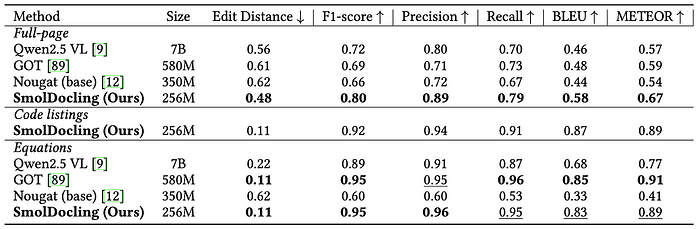
According to the evaluations on DocLayNet, the SmolDocling model has the lowest Edit Distance (0.48) and the highest F1-Score (0.80), especially in full page conversion. It also outperformed the other models in terms of Precision, Recall, BLEU and METEOR metrics.
SmolDocling achieved very high success with 0.11 Edit Distance and 0.92 F1-Score in code lists. It achieved a similar performance level with the GOT model in the equation recognition task (0.11 Edit Distance, 0.95 F1-Score, 0.96 Precision).
What is particularly striking is that SmolDocling achieves better results compared to much larger models (e.g. Qwen2.5 VL with 7B parameters). This shows the effectiveness of the model architecture and the success of the DocTags format in structural document recognition tasks.
Integration and Usage of SmolDocling
In the application section, we will run the sample code shared by the developers. I have a comment in this section: make sure your PIL library is up to date, otherwise you will be trying to figure out what the problem is all day long like me :D
# /// script
# requires-python = ">=3.12"
# dependencies = [
#     "docling-core",
#     "mlx-vlm",
#     "pillow",
# ]
# ///
from io import BytesIO
from pathlib import Path
from urllib.parse import urlparse
import requests
from PIL import Image
from docling_core.types.doc import ImageRefMode
from docling_core.types.doc.document import DocTagsDocument, DoclingDocument
from mlx_vlm import load, generate
from mlx_vlm.prompt_utils import apply_chat_template
from mlx_vlm.utils import load_config, stream_generate
## Settings
SHOW_IN_BROWSER = True  # Export output as HTML and open in webbrowser.
## Load the model
model_path = "ds4sd/SmolDocling-256M-preview-mlx-bf16"
model, processor = load(model_path)
config = load_config(model_path)
## Prepare input
prompt = "Convert this page to docling."
image = "sample.png"
# Load image resource
if urlparse(image).scheme != "":  # it is a URL
    response = requests.get(image, stream=True, timeout=10)
    response.raise_for_status()
    pil_image = Image.open(BytesIO(response.content))
else:
    pil_image = Image.open(image)
# Apply chat template
formatted_prompt = apply_chat_template(processor, config, prompt, num_images=1)
## Generate output
print("DocTags: \n\n")
output = ""
for token in stream_generate(
    model, processor, formatted_prompt, [image], max_tokens=4096, verbose=False
):
    output += token.text
    print(token.text, end="")
    if "</doctag>" in token.text:
        break
print("\n\n")
# Populate document
doctags_doc = DocTagsDocument.from_doctags_and_image_pairs([output], [pil_image])
# create a docling document
doc = DoclingDocument(name="SampleDocument")
doc.load_from_doctags(doctags_doc)
## Export as any format
# Markdown
print("Markdown: \n\n")
print(doc.export_to_markdown())
# HTML
if SHOW_IN_BROWSER:
    import webbrowser
    out_path = Path("./output.html")
    doc.save_as_html(out_path, image_mode=ImageRefMode.EMBEDDED)
    webbrowser.open(f"file:///{str(out_path.resolve())}")
This code analyzes the content of an image and generates explanations using DocTags. Then, it uses these tags to create a document and exports it in Markdown or HTML format.
The necessary libraries are imported.
requests: For downloading images from URLs.
PIL (Pillow): For opening and processing images.
docling_core: For creating and exporting documents using DocTags.
mlx_vlm: For the image processing model.
Settings and Model Loading
SHOW_IN_BROWSER: Determines whether the HTML output will be automatically opened in the browser.
load() and load_config(): Load the model and configuration file.
Preparing Input Data
prompt: A text prompt specifying how the model should process the image.
image: The URL of the image to be analyzed.
Downloading and Opening the Image
Checks if the URL is valid.
requests.get(): Downloads the image.
Image.open(): Opens the image.
convert("RGB"): Converts the image to RGB format to prevent transparency issues.
Applying the Prompt Template
apply_chat_template(): Formats the prompt to match the model's requirements.
num_images=1: Specifies that a single image will be used.
Generating DocTags (Model Output)
stream_generate(): Generates output from the model step by step.
token.text: Provides each piece of text generated by the model.
output += token.text: Combines the output.
print(token.text, end="") Prints the output to the screen.
if "</doctag>" in token.text: Stops the process if the </doctag> tag is detected.
Creating a Document with DocTags
DocTagsDocument.from_doctags_and_image_pairs(): Matches the DocTags with the corresponding image.
DoclingDocument(): Creates a new document.
load_from_doctags(): Loads the DocTags content into the document.
Exporting as Markdown and HTML
export_to_markdown(): Exports the document as Markdown and prints it to the screen.
save_as_html(): Generates an HTML file.
webbrowser.open(): Opens the generated HTML file in a browser.
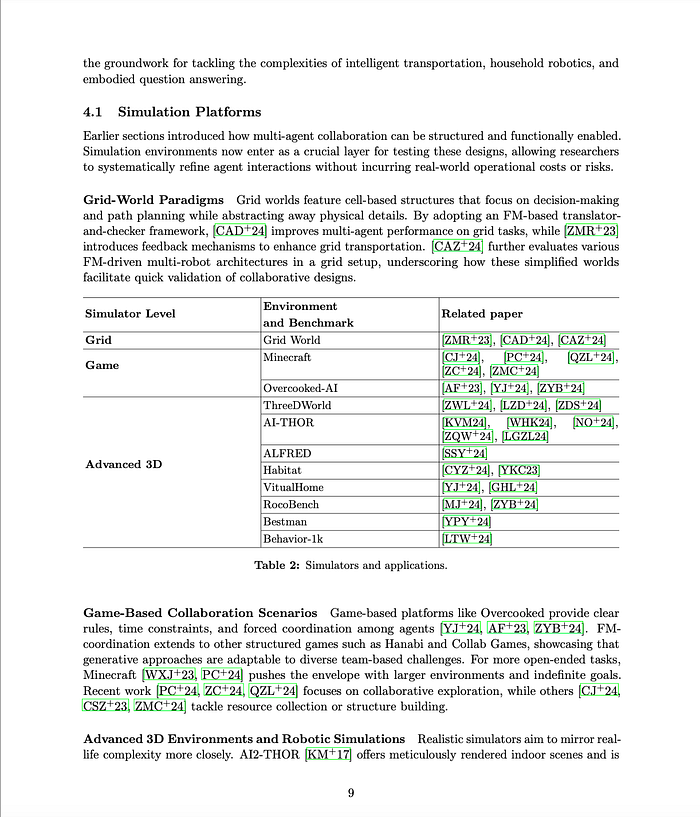
Below, I provided an example of the document:
The SmolDocling output was as follows:
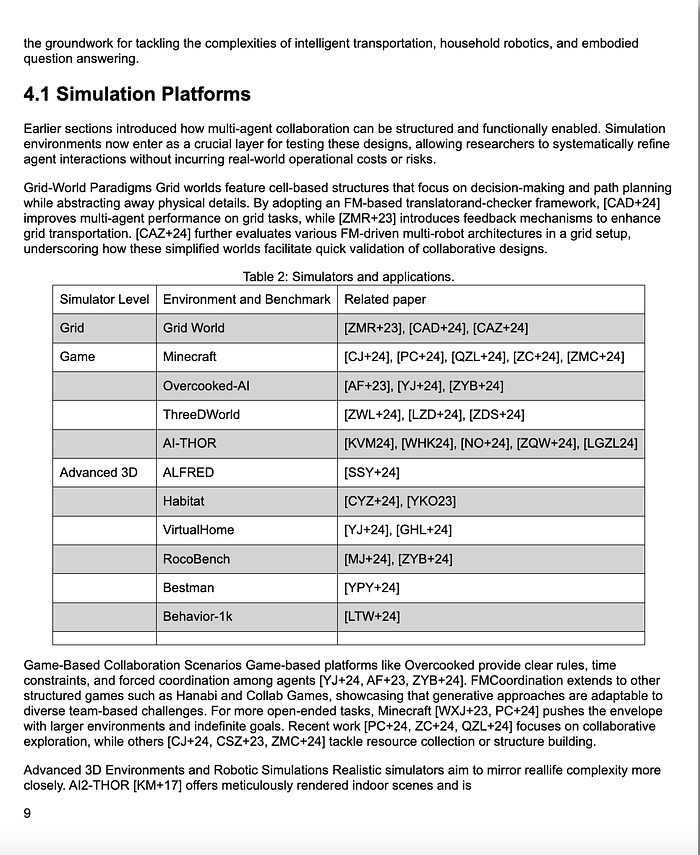
Especially when we examine it from a table perspective, it is not a bad result. There were some shifting data due to the fact that the values of the Simulator Level were centered in the original document, but the overall structure was preserved.
Conclusion
SmolDocling is an innovative model that stands out with its compact size and strong performance in the field of document conversion. Thanks to the DocTags format and end-to-end architecture, it can represent the content and structural features of documents with high accuracy. This model can provide great advantages especially in resource-constrained environments or applications requiring high scalability.
The results obtained in performance evaluations show that SmolDocling exhibits strong performance especially in full-page conversion, code lists and equation recognition. The fact that it achieves competitive results even compared to much larger models with only 256 million parameters proves the effectiveness of the model design and the DocTags format.
The use of compact and efficient models such as SmolDocling in the development of modern document processing systems will contribute to the wider applicability of digitalization processes by providing optimization in terms of both performance and resource usage.
I hope it was useful.Don't forget to follow me, clap me 50 times and leave a comment. If you want to check out my other articles: