

Unlocking the Power of Langchain: A Comprehensive Python Guide to Answer Questions about Your Documents from Local Files, URLs, YouTube Videos, and Websites
We have all heard already about the fact that OpenAI can learn from your data/documents. However, for those who want to have an alternative, I have found the HuggingFace Langchain model. An alternative to the OpenAI language model.
But what is Langchain?
LangChain is a software development framework created to simplify the creation of applications using large language models (LLMs). It was developed by Harrison Chase and had its initial release in October 2022. The framework is written in Python and JavaScript and is available under the MIT License. The primary use-cases of LangChain largely overlap with those of language models in general, which includes tasks such as document analysis, summarization, creation of chatbots, and code analysis. Source: Wikipedia.
Tldr: LangChain was launched as an open-source project while Harrison Chase was working at a machine learning startup named Robust Intelligence. The project quickly gained popularity, with improvements from hundreds of contributors on GitHub.
Now, let's explore how you can leverage LangChain to answer questions about your documents. For that, I have split this article in multiple parts:
- Introduction to the problem statement: Explanation of the problem space: Why we need systems to answer questions about documents.
- Understanding Langchain: Brief overview of Langchain
- Setting up for Innovation: This part includes the environmental setup for creating your first smart LLM mode based on your documents.
- The code: The complete code for the use case, broken down into different parts to be explained.
- Conclusion
1. Introduction to the problem statement
As our access to information continues to grow in the digital age, so does the need for effective and efficient ways to navigate, search, and extract relevant information from large documents. That's where systems like Langchain come in, as they can help automate and streamline the process of answering questions about documents, removing the need for manual searching and interpretation.
2. Understanding Langchain
LangChain is a framework for developing applications powered by language models. Its design aims to enable applications that can connect a language model to other sources of data and interact with its environment. The LangChain framework provides two main values:
- Components: LangChain provides modular abstractions for the components necessary to work with language models. It also has collections of implementations for all these abstractions, designed to be easy to use.
- Use-Case Specific Chains: These can be thought of as assembling the components in particular ways to best accomplish a particular use case. These chains provide a higher-level interface for people to easily get started with a specific use case and are designed to be customizable1.
LangChain operates on the following basic data types and schemas:
- Text: The primary interface for interacting with language models.
- ChatMessages: The primary interface through which end users interact with language models, usually through a chat interface.
- Examples: Input/output pairs that represent inputs to a function and the expected output.
- Document: A piece of unstructured data, consisting of content and metadata.
LangChain also employs prompts, which are inputs to the model, and PromptTemplates, which are responsible for constructing these inputs. It also has output parsers to extract more structured information from the text output of the models.
2.1 Prompt Templates
LangChain allows you to manage prompts for LLMs. You can define a prompt template and then format it with user input. Here's an example in JavaScript, and a similar approach would apply in Python:
from langchain import PromptTemplate


template = """
I want you to act as a naming consultant for new companies.
What is a good name for a company that makes {product}?
"""

prompt = PromptTemplate(
    input_variables=["product"],
    template=template,
)
prompt.format(product="colorful socks")
# -> I want you to act as a naming consultant for new companies.
# -> What is a good name for a company that makes colorful socks?
2.2 Chains
Chains in LangChain allow you to combine LLMs and prompts in multi-step workflows.
from langchain.prompts import PromptTemplate
from langchain.llms import OpenAI

llm = HuggingFaceHub(repo_id="declare-lab/flan-alpaca-large", model_kwargs={"temperature":0, "max_length":512})
prompt = PromptTemplate(
    input_variables=["product"],
    template="What is a good name for a company that makes {product}?",
)

from langchain.chains import LLMChain
chain = LLMChain(llm=llm, prompt=prompt)

# Run the chain only specifying the input variable.
print(chain.run("colorful socks"))

--> "Bright Socks"
2.3 Memory
LangChain provides a feature to add state to Chains, which is referred to as "Memory".
from langchain.memory import ChatMessageHistory

history = ChatMessageHistory()

history.add_user_message("hi!")

history.add_ai_message("whats up?")

history.messages
In conclusion, LangChain provides a robust and flexible framework for developing applications with large language models. Its features like prompt templates, chains, and memory make it an ideal tool for handling complex workflows involving language models.
3. Setting Up the Environment for Innovation
Before diving into LangChain's capabilities, ensuring you have the correct environment set up is important. In this chapter, we'll guide you through the installation process and the necessary configurations for this use case: Answering Questions about any kind of Documents using Langchain (Not GPT3/GPT4)
3.1. Installation
To install LangChain, you can use either pip or conda. Here's how you do it:
# Pip installation LangChain and Hugginface API
!pip install langchain
!pip install huggingface_hub

# Pip installation of additional needed libraries
!pip install sentence_transformers
!pip install faiss-cpu
!pip install unstructured

# To download the transcript of a youtube video
!pip install youtube_transcript_api
3.2. Environment Setup
After installing LangChain, it's crucial to set up the environment correctly. LangChain may require integrations with one or more model providers, data stores, APIs, etc. For this use case we will use huggingface
import os
import requests
os.environ["HUGGINGFACEHUB_API_TOKEN"] = "YOUR API TOKEN"4. The code: Getting Started with Langchain and Document Indexing
LangChain offers functionalities to process documents from various sources using a feature called Document Loaders. Document Loaders are designed to easily create Documents from a variety of sources. These documents can then be loaded onto Vector Stores to load documents from a source.
The following chapter will be split into 4 parts:
- Loading of documents as a learning basis (Text, URL, PDF, Website, Video)
- Split the documents in chunks (Important as LLM cannot accept too long inputs)
- Convert the documents into embeddings and store them
- Use those embeddings to feed the LLM model and Ask your questions
4.1 Loading of documents as a learning basis
This process starts by using any random text file. For test purposes, I have added one for you on my GitHub repository which you can download.
Using the LangChain library TextLoader, you will load the file from the local file storage. This file is passed over later to the split method to create chunks.
from langchain.document_loaders import TextLoader

# Load the text document using TextLoader
loader = TextLoader('./local_text_file.txt')
loaded_docs = loader.load()
To facilitate your workflow, I have created five distinct loading functions that enable you to effortlessly load diverse data sources for effective learning purposes.
- Local text
- Text from an URL
- Text from a PDF
- Content from a website
- Transcript from a video
4.1.1 TextLoader from Local
def loadTXTFileFromLocal(local_file_name="local_text_file.txt"):
    # Load the text data
    with open('./'+local_file_name, "r", encoding='utf-8') as file:
        text = file.read()

    with open('./'+local_file_name, "w",  encoding='utf-8') as file:
      file.write(text)

    # Load the text document using TextLoader
    loader = TextLoader('./'+local_file_name)
    loaded_docs = loader.load()
    return loaded_docs
4.1.2 TextLoader from URL
def loadTXTFileFromURL(text_file_url="https://raw.githubusercontent.com/vashAI/AnsweringQuestionsWithHuggingFaceAndLLM/main/url_text_file.txt"):
    # Fetching the text file
    output_file_name = "url_text_file.txt"
    response = requests.get(text_file_url)
    with open(output_file_name, "w",  encoding='utf-8') as file:
      file.write(response.text)

    # Load the text document using TextLoader
    loader = TextLoader('./'+output_file_name)
    loaded_docs = loader.load()
    return loaded_docs
4.1.3 PDFLoader
from langchain.document_loaders import UnstructuredPDFLoader

def loadPDFFromLocal(pdf_file_path="./Eurovision_Song_Contest_2023.pdf"):
    loader = UnstructuredPDFLoader(pdf_file_path)
    loaded_docs = loader.load()
    return loaded_docs
4.1.4 WebsiteLoader
from langchain.document_loaders import UnstructuredURLLoader

def loadTextFromWebsite(url="https://saturncloud.io/blog/breaking-the-data-barrier-how-zero-shot-one-shot-and-few-shot-learning-are-transforming-machine-learning/"):
    loader = UnstructuredURLLoader(urls=[url])
    loaded_docs = loader.load()
    return loaded_docs
4.1.5 VideoLoader
from youtube_transcript_api import YouTubeTranscriptApi

def loadTextFromYoutubeVideo(youtube_video_id="eg9qDjws_bU"):
    transcript = YouTubeTranscriptApi.get_transcript(youtube_video_id)

    transcript_text = ""
    for entry in transcript:
        transcript_text += ' ' + entry['text']

    youtube_local_txt_file = "youtube_transcript.txt"
    with open('./'+youtube_local_txt_file, "w",  encoding='utf-8') as file:
      file.write(transcript_text)

    # Load the text document using TextLoader
    loader = TextLoader('./'+youtube_local_txt_file)
    loaded_docs = loader.load()
    return loaded_docs
4.2 Split the documents in chunks (Important as LLM cannot accept too long inputs)
Large Language Models (LLMs) come with a token limit, which imposes restrictions on processing excessively long inputs. As a result, the document is divided into smaller, manageable chunks to ensure compatibility with the model. To achieve this, we utilize the CharacterTextSplitter functionality provided by LangChain. By setting the chunk_size to 1000 and the chunk_overlap to 10, we can effectively avoid splitting words in half while maintaining the integrity of the document.
from langchain.text_splitter import CharacterTextSplitter

# Splitting documents into chunks
splitter = CharacterTextSplitter(chunk_size=1000, chunk_overlap=10)
chunked_docs = splitter.split_documents(loaded_docs)
4.3 Convert the documents into embeddings and store them
Embeddings serve as numerical representations of information segments that capture the semantic essence of the input.
In our scenario, we generate text embeddings utilizing the HuggingFaceEmbeddings feature from LangChain. These embeddings are then stored within a FAISS vector store, which is constructed using the chunked documents alongside their respective embeddings. This approach allows for efficient retrieval and manipulation of the embedded information.
from langchain.embeddings import HuggingFaceEmbeddings
from langchain.vectorstores import FAISS

# Create embeddings and store them in a FAISS vector store
embedder = HuggingFaceEmbeddings()
vector_store = FAISS.from_documents(chunked_docs, embedder)
4.4 Use those embeddings to feed the LLM model
The stored embeddings play a crucial role in conducting a similarity search within the vector store. By leveraging these embeddings, we can retrieve the most semantically similar documents to a given query. These search results serve as valuable context for the Large Language Model (LLM) to accurately answer the query at hand. The combination of the powerful similarity search and the contextual understanding of the LLM allows for precise and informative responses.
# Search for similar documents in the vector store
search_query = "How ChatGPT and Plugins are Empowering Citizen Data Scientists?"
similar_docs = vector_store.similarity_search(search_query)
4.5 Ask your questions
To facilitate user interaction and provide insightful answers based on the constructed knowledge base, we employ the Hugging Face Large Language Model (LLM). The user's query is first embedded, and a similarity search is conducted within the vectorized database. The retrieved documents, along with the query, are then passed as inputs to the question-answer chain's run method. This consolidated input is subsequently forwarded to the LLM, enabling it to generate a response that accurately addresses the posed question.
from langchain.chains.question_answering import load_qa_chain
from langchain import HuggingFaceHub

# Load the LLM and create a QA chain
llm=HuggingFaceHub(repo_id="declare-lab/flan-alpaca-large", model_kwargs={"temperature":0, "max_length":512})
qa_chain = load_qa_chain(llm, chain_type="stuff")

# Ask a question using the QA chain
question = "What are the potential issues and drawbacks?"
similar_docs = vector_store.similarity_search(question)
response = qa_chain.run(input_documents=similar_docs, question=question)
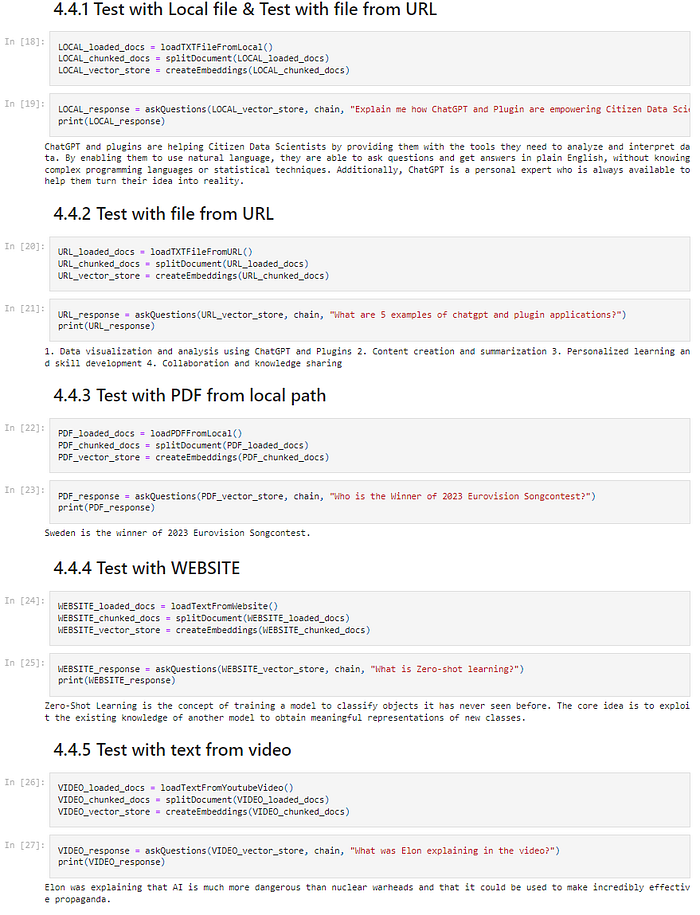
The answer from the LLM:
ChatGPT and plugins are helping Citizen Data Scientists by providing them
with the tools they need to analyze and interpret data. By enabling them
to use natural language, they are able to ask questions and get answers
in plain English, without knowing complex programming languages or
statistical techniques. Additionally, ChatGPT is a personal expert who
is always available to help them turn their idea into reality.
The complete code can be found on my Github link, with the necessary local files to experiment: AnsweringQuestionsWithHuggingFaceAndLLM
6. Conclusion
Throughout this article, we've explored how to employ the power of HuggingFace's language models and Langchain to perform document-based question-answering.
The process involves fetching and loading a text file, splitting the document into manageable chunks, transforming these text chunks into embeddings, and storing them in a vector database. These steps prepare the groundwork for feeding our document data into a large language model (LLM), such as HuggingFace's 'declare-lab/flan-alpaca-large', and allowing for robust and context-aware answers to our queries.
This approach demonstrates how we can use existing language models and libraries to create intelligent systems capable of understanding, retrieving, and providing meaningful responses based on a set of documents. The ability to convert raw text into a searchable database of embeddings that can be used to feed an LLM is a powerful tool for information retrieval and knowledge management.
Looking toward the future, the potential for advancements in both Langchain and HuggingFace is significant. As these libraries continue to evolve, we can expect to see more efficient document loading and text splitting, more accurate and diverse embeddings, and improvements in how these embeddings are stored and retrieved. With continuous advancements in NLP and machine learning, we might see more effective language models, capable of understanding even more complex queries and providing more nuanced responses.
Moreover, there's a lot of potential for using these tools in various applications, such as creating intelligent chatbots, automated customer service agents, advanced search engines, or even AI tutors capable of providing detailed explanations based on a vast array of textbooks and reference materials. The combination of Langchain and HuggingFace paves the way for developers and researchers to build more sophisticated and intelligent language processing applications, pushing the boundaries of what's possible in the field of AI and machine learning.
AI in Finance is a reader-supported publication. To receive new posts and support my work, consider becoming a free or paid subscriber. Unlimited access to exclusive AI articles in Finance written by me + Q&A's sessions if you want deeper insights!
Subscribe to DDIntel Here.
Visit our website here: https://www.datadriveninvestor.com
Join our network here: https://datadriveninvestor.com/collaborate