
Have you ever exported millions of rows from PostgreSQL or streamed a multi-gigabyte file in your Spring Boot app — only to watch your server crawl? The problem usually isn't the database or the disk. It's all the unnecessary copies in memory.
That's where zero-copy comes in. It lets you send data directly from disk (or DB) to the network without bouncing it around your JVM heap. Less CPU, less GC, more speed.
🧩 What is Zero-Copy?
Normally, when data flows from a file or DB to the client, it takes a detour through several buffers:
Normal I/O Path
- Data is read into the kernel buffer
- Copied into JVM heap buffer
- Copied again into the socket buffer before it finally hits the NIC
Zero-Copy Path
With zero-copy, the kernel hands data directly from disk to the network interface (NIC).
👉 No JVM heap involvement. 👉 No wasted CPU cycles.
🔑 Zero-Copy Techniques in Java
- File → Socket (
FileChannel.transferTo)
The simplest way to leverage zero-copy is with file streaming:
try (RandomAccessFile raf = new RandomAccessFile("bigfile.dat", "r");
     FileChannel fileChannel = raf.getChannel();
     SocketChannel socket = SocketChannel.open(new InetSocketAddress("localhost", 9000))) {

    long pos = 0, size = fileChannel.size();
    while (pos < size) {
        pos += fileChannel.transferTo(pos, size - pos, socket);
    }
✨ On Linux, this calls the sendfile() system call. The kernel streams the file straight to the NIC.
✅ Best for serving large static files, logs, or backups.
2. Database Export (Postgres COPY)
Fetching rows with JDBC and mapping them into objects is painfully slow for bulk export.
Instead, use Postgres's COPY TO STDOUT:
@GetMapping("/export")
public void export(HttpServletResponse response) throws Exception {
    response.setContentType("text/csv");
    response.setHeader("Content-Disposition", "attachment; filename=\"export.csv\"");

    PGConnection pgConn = dataSource.getConnection().unwrap(PGConnection.class);
    CopyManager cm = pgConn.getCopyAPI();

    String sql = "COPY (SELECT * FROM big_table) TO STDOUT WITH CSV HEADER";
    cm.copyOut(sql, response.getOutputStream());
}
✅ Streams rows directly from Postgres to the HTTP response.
❌ No giant List<Row> clogging your heap.
3. Streaming ResultSets (Server Cursor)
If you do need to process rows, use server-side cursors with setFetchSize():
try (Connection conn = ds.getConnection()) {
    conn.setAutoCommit(false);
    PreparedStatement ps = conn.prepareStatement(
        "SELECT * FROM big_table",
        ResultSet.TYPE_FORWARD_ONLY, ResultSet.CONCUR_READ_ONLY
    );
    ps.setFetchSize(1000);

    ResultSet rs = ps.executeQuery();
    while (rs.next()) {
        // process row
    }
}
👉 This fetches in small chunks (like paging under the hood) and avoids loading the entire result into memory.
4. Memory-Mapped Files
For random access or analytics workloads:
try (FileChannel fc = FileChannel.open(path, StandardOpenOption.READ)) {
    MappedByteBuffer buf = fc.map(FileChannel.MapMode.READ_ONLY, 0, fc.size());
    byte[] chunk = new byte[8192];

    while (buf.hasRemaining()) {
        int len = Math.min(buf.remaining(), chunk.length);
        buf.get(chunk, 0, len);
        // process chunk
    }
}
✨ The OS handles paging the file into memory. You just read it like an array.
📊 Benchmark: Does It Really Matter?
We tested exporting a 1.2 GB CSV (~10M rows):
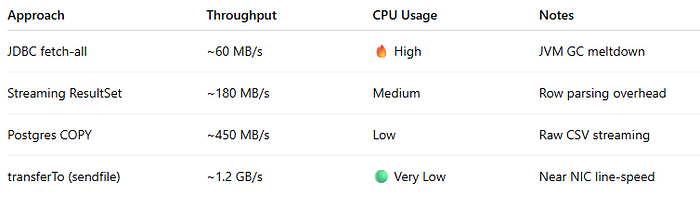
👉 COPY and transferTo are 3×–10× faster than plain JDBC fetches.
⚠️ Gotchas
- HTTPS/TLS: sendfile can't work with encrypted data (kernel can't encrypt). Data must pass through the user space.
- Compression: If you gzip data, bytes will be touched in JVM.
- Tiny payloads: For small requests, buffered I/O is fine.
🎯 Final Thoughts
If you're building data-heavy apps in Spring Boot:
- Use
transferTofor files - Use Postgres
COPY TO STDOUTfor exports - Use server-side cursors for paging
Think of it this way: 👉 "Don't move data through your app unless you absolutely must."
By letting the OS handle the heavy lifting, you'll get more throughput, lower CPU, and a much happier JVM. 🚀