

This is the first article you will read with some of Har Narayan tips.
In 2021 I found a great data community DataTalkClub (DTC).
And why is it a great community? You may ask. 🙂
Because:
- It is an international community data (not country-specific);
- The community has great free courses;
- It is a community for data in general and not a tool or provider in specific;
- I feel great empathy with the creator Alexey Grigorev.
If you still don't know this community then you have to. GO GO!!
Wait! First, you must read my article 😂 (after, go to meet DTC)
I did the first edition of the Data Engineer Zoomcamp and it was a game changer for me.
After this first edition, I realized that I had to share this knowledge by writing: It is a great complementary resource to the videos.
This article talks about one of the most important lesson you must know as a data professional: clustering and partitioning.
To be more specific in this article you will see some information on the video Partioning vs Clustering and how you can optimize query performance in Google BigQuery.
What you will learn in this article:
- What are online data warehouses;
- The advantages of clustering and partitioning;
- Clustering and partitions in Google BigQuery
Read every story from Luís Oliveira (and thousands of other writers on Medium for a low price)
1. Online Data Warehouses — Powering Data-Driven Organizations
Before going to Google BigQuery, you need to have a basic know-how of the role of online data warehouses in modern organizations.
Online data warehouses are nowadays pivotal components of a data-driven ecosystem.
They serve as robust repositories for storing and processing massive volumes of data, making them accessible for analytical and business intelligence purposes.
Three prominent players in the online data warehousing domain are Amazon Redshift, Google BigQuery, and Snowflake.
If you want to know more about data warehouses follow this article.
2. Clustering and Partitioning — The Key to Query Optimization
2.1. Partitioning: Breaking Data into Manageable Segments
Partitioning is a strategy that involves dividing a large table into smaller segments or partitions, each created based on a specified partitioning key.
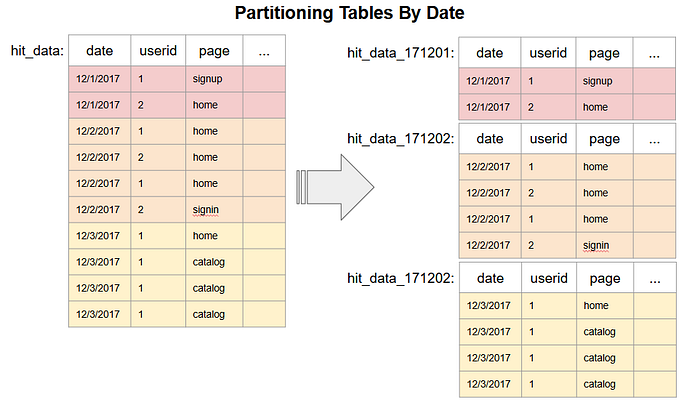
This key can be selected based on a variety of criteria, such as time, date, or specific numeric ranges.
As data volumes grow, the performance and scalability of a database can be significantly impacted.
Partitioning comes to your rescue by breaking down the large table into smaller, more manageable tables, increasing the efficiency of table scans and reducing memory swaps.
This, in turn, boosts query performance and minimizes the resource load on the system.
There are two primary methods of partitioning data within a database:
- Horizontal Partitioning: In this approach, data is divided horizontally, which means it's segmented based on rows.
- Vertical Partitioning: Here, data is divided vertically, focusing on the columns rather than rows. Specific columns are grouped together in partitions, enabling efficient access to required data attributes.
2.2. Clustering: Grouping Data Based on Similarities
Clustering is a data organization process that groups data based on similarities or shared characteristics.
In clustering, all the data that exhibits common traits is grouped together within clusters.
In the context of database management, clustering is typically implemented for partitioned tables.
The objective is to co-locate data with similar attributes within a partitioned table to enhance query performance.
Let's break down clustering further:
- Clustering involves grouping data into clusters, and each cluster contains a set of records that share common attributes.
- Clustering is most effective when used in conjunction with partitioned tables. This is because it relies on the initial division of data into partitions before further organizing it into clusters.
- The order in which you specify the clustering columns is vital as it determines the sort order of the data within these clusters.
Properly chosen clustering columns can significantly improve the efficiency of filter and aggregate queries, particularly when those queries target the clustered columns.
Now, let's explore the practical implementation of clustering and partitioning in Google BigQuery.
If you are enjoying this article please don't forget to clap or comment to support me!!!! Please 😊
3. Clustering and Partitions in Google BigQuery
Google BigQuery, a powerful cloud-native data warehouse, offers robust features for both clustering and partitioning.
3.1. Partitioning in BigQuery
When you create a partition table in BigQuery, you have the option to choose between two primary partitioning strategies:
- Time Unit Partitioning:
With time unit partitioning, you can select from various time units such as daily, hourly, monthly, or yearly. Each choice has specific use cases, with "daily" being the default.
For medium-sized data evenly distributed across days, daily partitioning is an excellent starting point.
When dealing with a massive influx of data and the need to process it on an hourly basis, hourly partitioning is your go-to.
Keep in mind that BigQuery limits the number of partitions to 4000, which is important to consider when using hourly partitioning.
Monthly or yearly partitioning is suitable for scenarios with smaller data volumes spread across different date ranges.
- Integer Range:
Integer range partitioning is a strategy that involves partitioning your data based on an integer or numeric column.
It is suitable for scenarios where the data doesn't have a clear chronological aspect.
You can choose the column you want to use as the partition key and set the range boundaries, creating partitions with defined integer ranges.
This strategy allows you to quickly access and analyze data within specific ranges, which can be beneficial for use cases like inventory management or product performance analysis.
3.2. Clustering in BigQuery
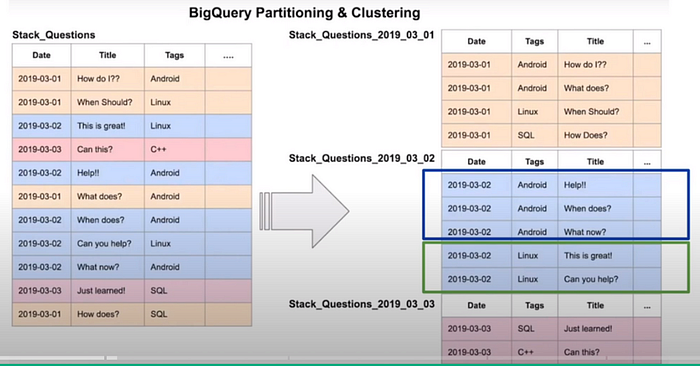
Clustering in BigQuery involves specifying the columns by which data should be co-located and sorted.
The order of the columns is crucial as it determines the sort order of the data.
For example, if you're clustering on columns A, B, and C, the data will be sorted first on column A, then B, and finally C.
This optimization is especially beneficial for filter and aggregate queries that use the clustered columns.
However, it's important to note that when the data size is relatively small, typically less than one gigabyte, both partitioning and clustering may not significantly enhance query performance but can add to query costs due to metadata reads and maintenance.
In your clustering table, you can specify up to four clustering columns. These columns must be top-level and non-repeated columns.
BigQuery allows you to choose clustering columns from various data types, including date, boolean, geography, int, numeric, string, and date times.
3.3. Choosing Between Clustering and Partitioning
Selecting between clustering and partitioning in Google BigQuery depends on various factors, and the decision should align with your specific use case.

Clustering Benefits:
- Clustering provides granularity beyond what partitioning can offer.
- Ideal for situations where the number of values in a column or group of columns is large (cardinality) and exceeds partitioning limitations.
- Useful when the partitioning strategy results in an excessive number of partitions beyond the 4000 limit.
- Appropriate when the partitioning strategy leads to frequent modifications of partitions, which can be costly.
Partitioning Benefits:
- Partitioning offers known cost benefits upfront, making it suitable for managing query costs effectively.
- Excellent when you need to aggregate or filter data based on a single column.
- Allows for partition-level management, including creating, deleting, and moving partitions, which is not feasible with clustering.
3.4. Automatic Clustering in BigQuery
BigQuery offers the convenience of automatic clustering, which optimizes your cluster table as new data is added.
Newly inserted data is written into different blocks to avoid overlapping with your specified clustering strategy.
Overlapping key ranges can weaken the table's sort property and increase query times.
BigQuery performs automatic clustering in the background without impacting query performance, and it does not incur any additional costs.
In Conclusion
Understanding the differences and use cases for clustering and partitioning is crucial for optimizing your data warehouse performance and cost efficiency.
By making informed decisions about when to use clustering over partitioning or vice versa, you can ensure that your data warehouse operates at its best.
Remember that your choice between these strategies depends on factors such as data volume, query complexity, plans of the data, and maintenance requirements.
You can learn more about Google Big Query here:
Did you like this article? Follow me for more articles on Medium.
Read every story from Luís Oliveira (and thousands of other writers on Medium for a low price)