

Hidden diary inside your Settings
Your phone knows exactly where you've been, when you went there, and how long you stayed.
In this article, I write my personal experience so you can easily know how to see the history and wipe it clean.
Since this is a privacy tutorial that benefits everyone, I recommend using a Friend Link so non-members can read and share it freely.
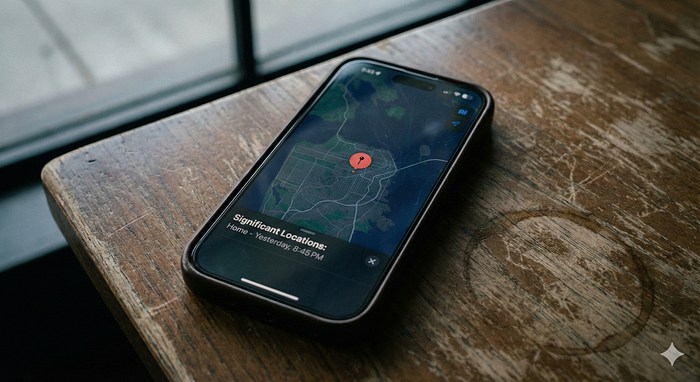
I remember the first time I stumbled across this feature.
I was digging through my settings, trying to save battery life, when I found a menu buried deep in the system. I clicked it, authenticated with Face ID, and my jaw dropped.
There was a list of everywhere I had been for the last few months. My home, my office, the coffee shop, and most importantly, "my friend's apartment".
It wasn't just a list; it was a detailed log. It knew I arrived at work at 8:45 AM and left at 6:15 PM.
It's called Significant Locations & Routes, and it's likely turned on in your pocket right now.
Here is what it is, how to find it, and how to reclaim your privacy.
What is "Significant Locations & Routes"?
Apple describes this feature as a way to allow your iPhone to learn places that are significant to you.
The goal isn't necessarily nefarious. Your phone uses this data to give you personalized services in Maps, Calendar, and Photos.
For example, if you get in your car and your phone automatically suggests a route to "Work," it's using this data. If your Photos app creates a "Memory" video of your trip to Italy, it's using this data.
Apple states that this data is end-to-end encrypted and cannot be read by them. It stays on your device.
But for many of us, seeing a detailed log of our physical movements feels a little too intrusive. It feels like a hidden map of our private lives.
How to Find The Map
Finding this menu isn't easy. It is buried under several layers of settings, almost like they don't want you to stumble upon it accidentally.
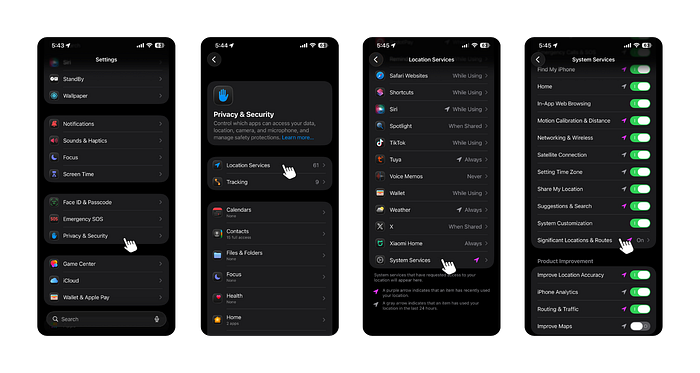
Grab your iPhone and follow these steps:
- Open Settings.
- Scroll down and tap Privacy & Security.
- Tap Location Services (it's usually at the very top).
- Scroll all the way to the bottom and click System Services.
- Scroll down again until you see Significant Locations & Routes.
You will need to use Face ID, Touch ID, or your passcode to enter.
What You Will See
Once you are in, look at the Summary. It might say something like "150 Records" or show a map of your home city.
Below that, you will see a list of locations.
If you tap on one of those locations, it breaks it down further. It doesn't just say you were at the mall; it says you were there on Tuesday from 4:12 PM to 5:30 PM.
Take a moment to look. Does it feel helpful? Or does it feel creepy?
How to Delete It (And Turn It Off)
If you decide you don't want your phone keeping a diary of your movements, getting rid of it is simple.
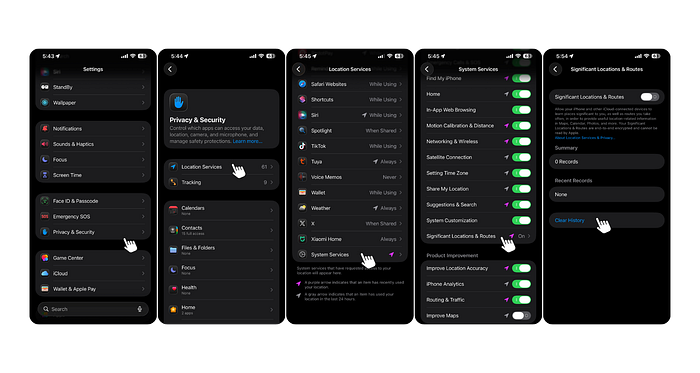
To clear the history: Scroll to the bottom of the Significant Locations & Routes list and tap the red Clear History button. Confirm it, and the map vanishes.
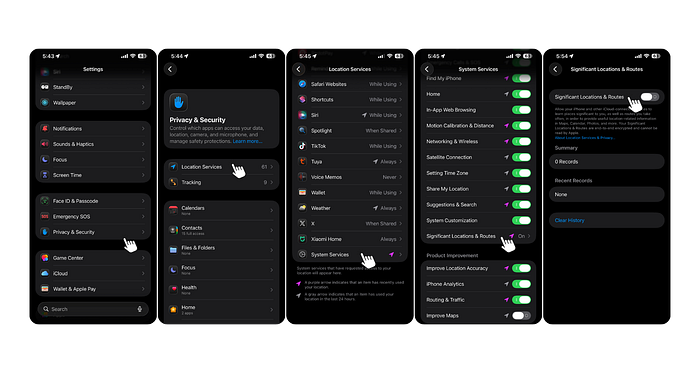
To stop it from tracking you: Simply toggle the Significant Locations & Routes switch at the top of the screen to Off.
Will Turning It Off Break My Phone?
I turned mine off two years ago.
Honestly? I haven't noticed a difference.
My GPS still works perfectly. Google Maps and Apple Maps still navigate me fine. Find My iPhone still tracks my device if I lose it.
The only thing you lose is the predictive stuff, "like your phone guessing where you're going before you type it in." For me, that was a fair trade for peace of mind.
The Takeaway
We live in an age where data is currency. While Apple is better than most when it comes to privacy, it is always a good idea to know exactly what your devices are recording.
You are the owner of the phone. You should be the one deciding what it remembers.
Go check your map. You might be surprised by what you find.
Did you already know about this feature? Or did it surprise you? Let me know in the comments.
Read Next:-