

Instead, I stared at a screen full of words like API, agent, schema, and webhook — nodding along while secretly thinking, I have no idea what's going on.
If that's you, good news: this article fixes that.
I'll walk you through some essential vibe-coding terms — not as abstract definitions, but as connected building blocks you actually use when shipping a real app. By the end, you'll know how the pieces fit together well enough to build something useful, not just repeat buzzwords.
First: What "Vibe Coding" Actually Means
Vibe coding is building software by describing what you want in natural language and letting an AI coding agent do the heavy lifting.
You don't micromanage code. You steer.
That shift is why vocabulary matters. If you don't know the words, you can't steer.
The Core Loop (Understand This, and Everything Clicks)
Every vibe-coded app follows the same loop:
Prompt → AI Model → Frontend → Backend → Database → Deploy
The 35 terms are just details inside that loop.
Let's break them down.
1–5: The Foundation Terms
1. Prompt
The natural-language instruction you give the AI.
Your first prompt sets the ceiling for the whole project.
Be specific. Screenshots help. Vague prompts = vague apps.
2. Context
Everything the agent remembers from the conversation.
That's why a lazy follow-up like "fix this formatting" can still work — the agent remembers what "this" is.
3. Frontend
What users see: buttons, text, layouts, forms.
If it's in the browser and clickable, it's frontend.
4. Backend
What users don't see: logic, APIs, auth, databases.
Think: where the thinking happens.
5. Preview
A live development version of your app.
It's not deployed yet. It's your sandbox.
6–10: Data & Identity
6. Database
Where your app's data lives.
Users, tasks, messages — everything ends up here.
7. Authentication
Login, signup, passwordless email codes.
Auth decides who can see what data.
8. Schema
The structure of your data.
Tables, fields, relationships — your app's skeleton.
9. Table
A collection of related data (like a spreadsheet).
Rows = records. Columns = fields.
10. Seed Data
Fake data used for design and testing.
Design first. Real data later.
11–15: APIs & Secrets
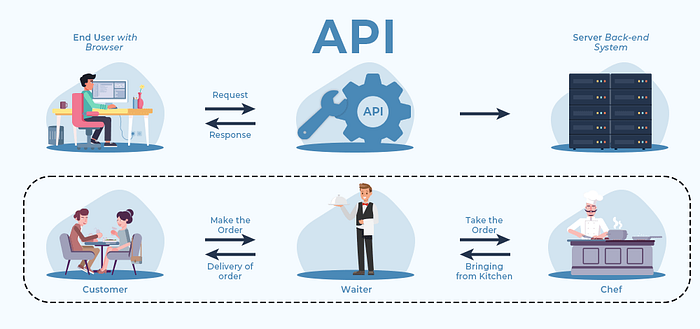
11. API
A way for software to talk to other software.
Every AI model, payment system, or email service uses one.
12. Third-Party API
Any external service: AI models, payments, SMS, analytics.
13. Environment Variables
Secret values stored outside your code.
API keys live here — never hard-coded.
14. Image Assets
Logos, icons, illustrations.
Most vibe tools can generate these directly.
15. Sound Assets
Audio cues: chimes, alerts, notifications.
Small touch. Big UX upgrade.
16–20:Agents (Where Vibe Coding Gets Wild)

16. Agent
An AI model that can use tools in a loop.
Not just answering — doing.
17. Tool Use
Web search, file access, APIs, calculations.
Agents decide when to use tools.
18. Agent Skills
Reusable abilities you give an agent.
Example: "Send a Slack message" or "Create a calendar event."
19. Queue
A list of prompts that run one after another.
Perfect for multi-step builds.
20. Webhook
A URL that listens for events from other apps.
Think: "When X happens over there, trigger Y over here."
21–25: Debugging Reality

21. Error
Something breaks and the app stops running.
Copy. Paste. Ask the agent to fix it.
22. Bug
Something's wrong — but the app still runs.
Describe behavior clearly. Words matter.
23. Debugging
The process of finding and fixing bugs.
Yes, vibe coders still debug.
24. Logs
Messages your app prints while running.
They tell you what actually happened.
25. Hot Reload
The app updates while you're using it.
Feels like magic. It's not. It's hot reload.
26–30: Shipping Your App

26. Deployment
Pushing your app live on the internet.
This is the "oh sh*t, it's real now" moment.
27. Hosting
The service that runs your app 24/7.
Servers, uptime, URLs — handled for you.
28. Domain
Your app's real address.
Not a random URL. A name people remember.
29. Password Protection
Simple access control without full auth.
Perfect for internal tools.
30. Preview vs Production
Preview = sandbox Production = real users, real consequences
31–35: The Business Layer

31. SaaS
Software as a Service.
Apps that charge recurring fees.
32. Paywall
Limits access unless users pay.
Add this after people want the tool.
33. Internal Tool
Software built for you or your team.
The smartest place to start.
34. Integration
When apps work together.
Slack + your app = leverage.
35. Vibe Coding
Directing software with intent instead of syntax.
This is the shift.
The One Mistake Beginners Make
Trying to monetize before solving a real problem.
Build a tool you actually use. Then invite one other person. Then think about money.
That order matters.
Your First Move (Do This Today)
- Pick one pain point in your work or life
- Write a clear prompt describing the tool you wish existed
- Let the agent build the ugly first version
- Improve it through conversation
That's vibe coding.
You don't need to learn everything. You just need to know enough to steer.
If you want more breakdowns like this — agents, automations, real apps — subscribe to my newsletter. I send practical, no-fluff guides for builders who'd rather ship than posture.