

What is GraphQL
GraphQL is a data query and operation language developed by Facebook. 🏢 If you've written SQL queries before, you can think of it as a SQL-like query language, but with a twist: GraphQL is used by clients to query data. 📊
Although it might sound like database software, GraphQL is not a database. Instead, you can think of GraphQL as middleware, acting as a bridge between the client and the database. 🌉 The client provides a description, and GraphQL retrieves and combines the matching data from the database, returning it to the client. This also means GraphQL doesn't care about the type of database where the data is stored.
At the same time, GraphQL is also a set of standards, under which different platforms and languages have corresponding implementations. GraphQL also designs a type system, under the constraints of this type system, you can get a relatively safe development experience similar to TypeScript.
What Problems GraphQL Solve
Let's first review the RESTful API design that we are already very familiar with. Simply put, RESTful API mainly uses URLs to express and locate resources, and uses HTTP verbs to describe operations on this resource.
Let's take the IMDB movie details page as an example to see what kind of API we need to meet the requirements of RESTful API design. First, let's take a look at what information is needed on the main page.
You can see that the page consists of basic movie information, actor information, and rating/comment information. According to the design requirements, we need to put these three resources under different APIs. First, for basic movie information, we have the API /movie/:id , which returns basic information data given a movie ID.
Pretend to GET to get data in JSON format:
{
  name :  "Manchester by the Sea" ,
  ratings :  "PG -13 " ,
  score :  8.2 ,
  release :  " 2016 " ,
  actors : [ " https : // api / movie / 1 / actor / 1 / " ] ,
  reviews : [ "https : // api / movie / 1 / reviews " ]
}
This contains the movie name, rating and other information we need, as well as a type of data called HyperMedia , which is usually a URL that indicates the API endpoint address where this resource can be obtained. If we follow the connection request pointed to by HyperMedia , we can get all the information we need on our page.
GET /api/movue/1/actor/1
{
  name :  "Ben Affleck" ,
  dob :  " 1971 - 01 - 26 " ,
  desc :  "blablabla" ,
  movies : [ " https : // api / movie / 1 " ]
}
GET /api/movie/1/reviews
[
  {
     content :  "Its  as  good  as …" ,
     score :  9
  }
]
Finally, as needed, we need to request all API endpoints containing the required information. For mobile terminals, initiating an HTTP request is still relatively resource-intensive, especially in cases where the network connection quality is poor. Sending multiple requests at once will lead to a bad experience.
In traditional API design, specific resources are distributed across specific API endpoints. This setup is convenient for backend development but not always ideal for 🌐 web or 📱mobile clients.
For example, when a new, highly anticipated feature is released on an Android or iOS client, the same API might return more data to support this feature. However, for clients that haven't upgraded, this additional data is useless and leads to resource wastage. 📉 If all resources are consolidated into one API, the data payload might increase due to the inclusion of irrelevant data.
GraphQL is designed to solve these problems. It sends a description to the server once to inform the client of all the data it needs. The data can even be controlled down to the field level, so that all the required data can be obtained in one request.
GraphQL Hello World
GraphQL request body
Let's first take a look at what a GraphQL request looks like:
query myQry  ( $name :  String ! )  {
  movie ( name :  "Manchester" )  {
    name
    desc
    ratings
  }
}
Does this request structure look a bit like JSON? This is intentional design by Facebook. I hope you will appreciate Facebook's good intentions after reading this.
So, the request description above is called a GraphQL request body, which is used to describe what data you want to get from the server. Generally, the request body consists of several parts. Let's take a look at it from the inside out.
First, the field is a data unit. In GraphQL, the scalar field is the most granular data unit and is the last field in the returned JSON response data. In other words, if it is an Object, at least one of its fields must be selected.

We call the fields we need a selection set of something together. The name , desc , and ratings above are called the selection set of movie . Similarly, movie is the selection set of myQry . It should be noted that the selection set operation cannot be used on scalars because it is already the last layer.
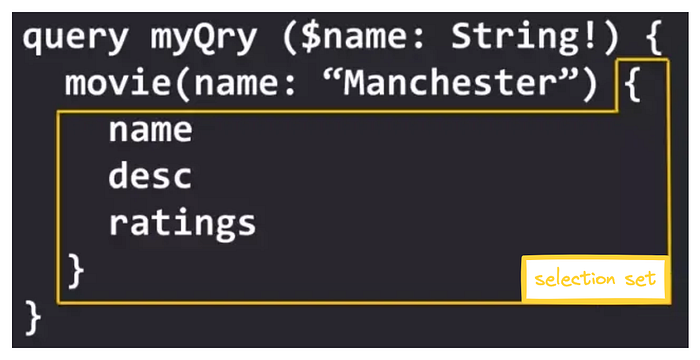
Next to movie , name: Manchester represents the parameters passed into movie . The parameter name is name and the value is Manchester . Use these parameters to tell the server what conditions the data you need must meet.
Finally we come to the outermost layer of the request body:
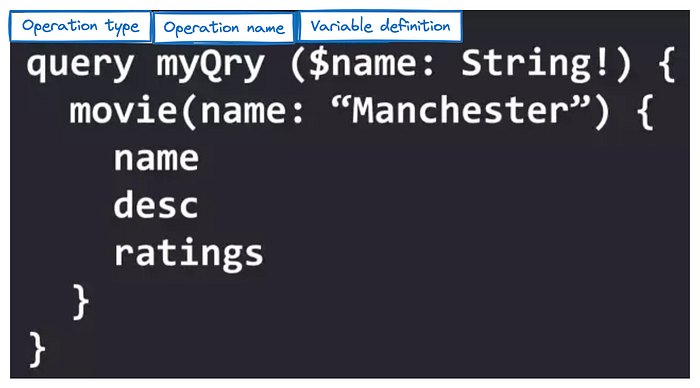
- Operation type: specifies what operation this request body will perform on the data, similar to GET POST in REST. The basic operation types in GraphQL are
queryfor query,mutationfor operation on data, such as add, delete, modify, and subscription . - Operation name: The operation name is an optional parameter. The operation name has no effect on the entire request. It only gives the request body a name, which can be used as a basis for debugging.
- Variable definition: In GraphQL, a variable is declared starting with a $ sign, followed by the colon and the variable's incoming type. If you want to use a variable, you can directly reference it. For example, the movie above can be rewritten as movie(
name: $name) .
🚨 If none of the above three are provided, the request body will be considered a query operation by default.
Request results
If we execute the above request body, we will get the following data:
{
  "data" :  {
    "movie" :  {
      "name" :  "Manchester By the Sea" ,
      "desc" :  "A depressed uncle is asked to take care of his teenage nephew after the boy's father dies. " ,
      "ratings" :  "R"
    }
  }
}
If you carefully compare the structure of the result and the request body, you will find that they are exactly the same. In other words, the structure of the request body also determines the structure of the final returned data .
GraphQL Server
In GraphQL, there is only one API endpoint, which also accepts GET and POST verbs. If you want to perform mutations , use POST requests.
As mentioned earlier, GraphQL is a set of standards. How to use it? We can use some libraries to parse it. For example, Facebook's official GraphQL.js. And Apollo developed by the Meteor team, which has developed both the client and the server, also supports the popular Vue and React frameworks. In terms of debugging, you can use Graphiql for debugging. Thanks to GraphQL's type system and Schema, we can also use the auto-completion function in Graphiql debugging.
Schema
In GraphQL, the definition of types and the query itself are defined through Schema. The full name of GraphQL's Schema language is Schema Definition Language.
The Schema itself does not represent the actual data structure in your database . Its definition determines what the entire endpoint can do and what we can ask and operate on the endpoint. Let's review the previous request body again. The request body determines the structure of the returned data, and the definition of the Schema determines the capabilities of the endpoint.
Next, let's take a look at the Schema through examples one by one.
Type system, scalar types, non-nullable types, parameters
First look at the Schema on the right: type is the most basic concept in GraphQL Schema, representing a GraphQL object type. It can be simply understood as an object in JavaScript.
- In JavaScript, an object can contain various keys.
- In GraphQL, type can also contain various fields.
Moreover, field types can not only be scalar types, but also other types defined in the Schema. For example, in the above Schema, the type of the movie field under Query can be Movie.
In GraphQL, there are several scalar types: Int , Float , String , Boolean , ID , which represent integer, floating point, string, Boolean, and ID types respectively. The ID type represents a unique identifier. The ID type will eventually be converted to the String type, but it must be unique.
For example, the _id field in mongodb can be set to the ID type. At the same time, these scalar types can be understood as primitive types in JavaScript. The above scalar types can also correspond to Number , Number , String , Boolean , Symbol in JavaScript .
List, Enumeration Type
If one of our fields returns more than one scalar type of data, but a group, we need to use the List type declaration, and use brackets [] on both sides of the scalar type to surround it, which is the same as the writing of arrays in JavaScript, and the returned data will also be an array type.
It should be noted that [Movie]! and [Movie!] have different meanings: the former means that the movies field is always returned and cannot be empty, but the Movie element can be empty. The latter means that the Movie element returned in movies cannot be empty, but the movies field can be empty.
Parameters passing in complex structures (Input)
In the previous examples, the parameters passed in are all scalar types. So how do we define it if we want to pass in data with a complex structure? The answer is to use the keyword input . Its usage is exactly the same as type .
According to the Schema definition in this example, the data parameter when we query search must be: { term : "Deepwater Horizon" }
Alias
vantage of GraphQL, I want to query the information of both movies at the same time and request the movie data in the request body. As mentioned earlier, the request body determines the structure of the returned data. Before the data is returned, two data with the key of movie are found . After merging, only one piece of data can be obtained due to the duplicate key. In this case, we need to use the alias function.
An alias is another name for the returned field. It is very easy to use. Just use the alias: format in front of the field in the request body , and the returned data will be automatically replaced with the name.
Fragment, Fragment Spread
In the above example, we need to compare the data of two movies. If it is a hardware comparison website, the number of hardware that needs to be queried is often more than two.
At this time, writing redundant selection sets is very laborious, bloated and difficult to maintain. To solve this problem, we can use the fragment function. GraphQL allows you to define a common selection set, called a fragment. The definition of a fragment uses the syntax of fragment name on Type , where name is the custom fragment name and Type is the type from which the fragment comes.
In this example, the common part of the request body selection set is extracted into fragments:
fragment movieInfo on Movie  {
   name
   desc
}
Before we start using fragments, we need to introduce the fragment deconstruction function. Similar to JavaScript structure, GraphQL's fragment structure notation "structures" the fields in the fragment into a selection set.
Interface
Like most other languages, GraphQL also provides the ability to define interfaces. An interface is a set of fields provided by a GraphQL entity type itself, defining a set of ways to communicate with the outside world. Types that use implements must contain the fields defined in the interface.
interface  Basic  {
    name :  String !
    year :  Number !
}
type Song  implements  Basic  {
    name :  String !
    year :  Number !
    artist :  [ String ] !
}
type Video  implements  Basic  {
    name :  String !
    year :  Number !
    performers :  [ String ] !
}
Query  {
    search ( term :  String ! ) :  [ Basic ] !
}
In this example, a Basic interface is defined, and both Song and Video types must implement the fields of this interface. This interface is then returned in the search query.
The searchMedia query returns a set of Basic interfaces. Since the fields in this interface are common to all types that implement the interface, they can be used directly in the request body. For other non-common fields on a specific type, such as performers in Video , direct selection will be problematic because the types in the returned data of searchMedia may be all types that implement the interface, and there is no performers field in the Song type. At this time, we can use the help of inline fragments (described below).
Union Type
The concept of a union type is similar to that of an interface, except that there are no common fields defined between types in a union type. In a Union type, you must use an inline fragment to query, for the same reason as the interface type above.
union SearchResult  =  Song  |  Video
Query  {
    search ( term :  String ! ) :  [ SearchResult ] !
}
Inline Fragment
When querying an interface or union type, the selected fields may be different due to different return types. In this case, you need to use inline fragments to decide to use a specific selection set under a specific type. The concept and usage of inline selection sets are basically the same as those of ordinary fragments, except that inline fragments are directly declared in the selection set and do not require fragment declaration.
Example of query interface:
query  {
    searchMedia ( term :  "AJR" )  {
        name
        year
        ... on Song  {
            artist
        }
        ... on Video  {
            performers
        }
    }
}
First, we need two public fields on the interface, and select the artist field when the result is of type Song , and select the performers field when the result is of type Video . The same is true for the following example of querying union types.
Example of querying union types:
query  {
    searchStats ( player :  "Aaron" )  {
        ... on NFLScore  {
            YDS
            TD
        }
        ... on MLBScore  {
            ERA
            IP
        }
    }
}
GraphQL built-in directives
There are two built-in logical instructions in GraphQL. The instructions are used after the field name.
@include
When the condition is met, query this field:
query  {
    search  {
        actors@ include ( if :  $queryActor )  {
            name
        }
    }
}
@skip
When the condition is met, this field is not queried:
query  {
    search  {
        actors@ include ( if :  $noComments )  {
            from
        }
    }
}
Resolvers
We have already learned about the request body and schema, so where does our data come from? The answer comes from the Resolver function.
The concept of Resolver is very simple. Resolver corresponds to the fields on the Schema. When the request body queries a certain field, the corresponding Resolver function will be executed. The Resolver function is responsible for obtaining data from the database and returning it, and finally returning the fields specified in the request body.
type Movie  {
    name
    genre
}

type Query  {
    movie :  Movie !
}
When the request body queries for movie , the Resolver with the same name must return data of the Movie type. Of course, you can also use a separate Resolver for the name field. The following code examples will clearly explain the Resolver.
Summary
Advantages of GraphQL:
- What You See Is What You Get: Requests precisely define the data structure returned.
- Reduced Network Requests: Complex data fetching is streamlined into one request, minimizing network overhead.
- Schema as a Document: GraphQL's schema acts as a contract, outlining request rules and structure.
- Type Checking: Offers rigorous type validation to catch and prevent errors early on.
Disadvantage:
- Increased Server-Side Complexity: Implementing GraphQL on the server side can be challenging, especially for legacy systems. Middleware solutions may add complexity and resource consumption.
Stackademic 🎓
Thank you for reading until the end. Before you go:
- Please consider clapping and following the writer! 👏
- Follow us X | LinkedIn | YouTube | Discord
- Visit our other platforms: In Plain English | CoFeed | Differ
- More content at Stackademic.com