

But for simple table redefinitions, Oracle gives you a simpler tool. That tool is the DBMS_REDEFINITION.REDEF_TABLE procedure.
Use the DBMS_REDEFINITION.REDEF_TABLE procedure for the following use cases:
- Tablespace changes.
- Compression type changes.
- LOB columns changes.
Let's put this tool through it's paces in an Oracle container.
We'll do a simple move of a table and it's associated indexes, to a tablespace that has a 32k block size. But we'll do the move of the table, with DML transactions still present against the table.
Moving a table while it's still changing will demonstrate the true power of this tool.
Setup Linux
On-prem, or in the cloud, first create an oracle account in Linux. For Linux, we'll use an rpm-based distribution named Fedora.
# create account
sudo useradd oracle

# add oracle to sudo file
sudo usermod -aG wheel oracle

# as oracle, show the groups
sudo su - oracle
groups
Setup Docker
Now we can install Docker.
# if installed previously, remove existing Docker components
sudo dnf remove docker \
                docker-client \
                docker-client-latest \
                docker-common \
                docker-latest \
                docker-latest-logrotate \
                docker-logrotate \
                docker-selinux \
                docker-engine-selinux \
                docker-engine

# install the yum-groups-manager from the Core DNF Plugins
sudo dnf install -y yum-utils

# add the Docker repo
\\ sudo dnf -y install dnf-plugins-core
sudo dnf-3 config-manager --add-repo https://download.docker.com/linux/fedora/docker-ce.repo

# install Docker
sudo dnf install docker-ce \
                 docker-ce-cli \
                 containerd.io \
                 docker-buildx-plugin \
                 docker-compose-plugin
With the install complete, now we can start Docker.
# start
sudo systemctl start docker
sudo systemctl status docker

# start on boot
sudo systemctl enable docker
sudo systemctl enable containerd

# show the version
docker -v
Finish up with some Docker post-tasks.
# Configure the json-file logging driver to turn on log rotation.
sudo vim /etc/docker/daemon.json
{
  "log-driver": "json-file",
  "log-opts": {
    "max-size": "10m",
    "max-file": "3"
  },
  "features": {
    "buildkit": true
  }
}

# Need to reboot for Fedora
systemctl reboot
Now for a test using sudo.
# test
sudo docker run --rm hello-world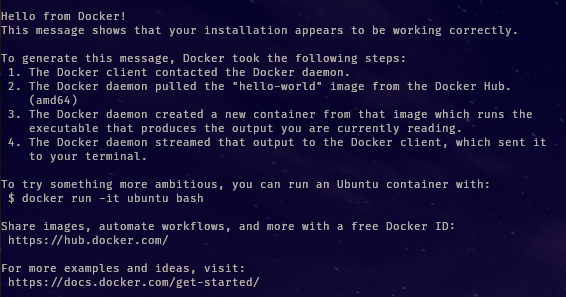
Continue now with the setup to use Docker without sudo.
# create the Docker group
sudo groupadd docker

\\ add the current user to this group
sudo usermod -aG docker $USER
Now for a quick test without sudo.
# test without sudo
docker run --rm hello-world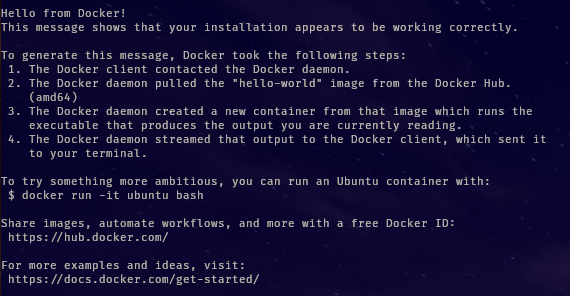
Pull the image
Next, we need the image for the Oracle database. You'll need your free Oracle website username and password. We'll pull the version 21.3.0.0 from the Oracle container registry.
# list all images
docker image ls

# if you need to clean up Docker, then do this
docker container ps
docker ps --all --size
docker container stop <containername>
docker container rm <containername>
\\ Remove all unused containers, networks, images (both dangling and unused), and optionally, volumes.
docker system prune -af

# list all the Oracle database images available
docker search container-registry.oracle.com/database

# login to the container registry to get access to the image
docker login container-registry.oracle.com
Username:
Password:

# pull the image
docker pull container-registry.oracle.com/database/enterprise:21.3.0.0
Run the container
With the image pulled, now we are ready to run the container.
# Note: can use ports other than 1521 at the host, as we are using below
docker run -d --name oracle21c \
 -p 1522:1521 \
 -p 5500:5500 \
 -e ORACLE_SID=ora21c \
 -e ORACLE_PDB=ora21cPDB1 \
 -e ORACLE_PWD=ora \
 -e INIT_SGA_SIZE=2000 \
 -e INIT_PGA_SIZE=500 \
 -e ORACLE_EDITION=enterprise \
 -e ENABLE_ARCHIVELOG=false \
 -v OracleDBData:/opt/oracle/oradata \
container-registry.oracle.com/database/enterprise:21.3.0.0
Get the status of the container.
# list just running containers
docker container ls

# alternative
docker ps

# list all containers present with port and their size,
# regardless of whether they are running
docker ps --all --size
Extra status information for the container and database can be obtained as follows.
# view the database alert log
docker logs oracle21c

# view the location of the oracle volume (it is persistent)
docker volume inspect OracleDBData
When the database has finished starting, you will see the healthy status. At this point the database is available for workloads.
Login to the container, and then the database as below.
# login to the container
docker exec -it oracle21c /bin/bash

# inside the container, login to sqlplus
sqlplus / as sysdba

-- sqlplus formating
ALTER SESSION SET nls_date_format='ddMonyyyy hh24:mi:ss';
SET PAGESIZE 9999 LINESIZE 132 APPINFO OFF FLUSH OFF SERVEROUTPUT OFF TRIMSPOOL ON ARRAYSIZE 100 TRIMOUT ON

-- should see instance name as ORA21C
select instance_name, version, status, startup_time from v$instance;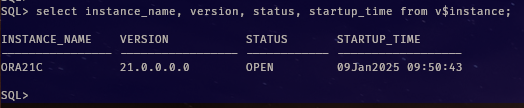
Setup the tablespaces in the database
We will create two tablespaces — one of default block size (8k bytes), and another of 32k block size.
To create a tablespace that is of a different block size than the default, we'll need to create a compatible memory space for it. For a 32k block size tablespace, we'll need a 32k cache in the shared global area of the database.
--
alter system set db_32k_cache_size=100m;
With the 32k cache available, we can now create a 32k tablespace in the PDB.
Access the PDB as follows.
-- list the non-seed PDBs
col name format a20
SELECT CON_ID, NAME, OPEN_MODE FROM V$PDBS WHERE CON_ID > 2;

-- login to the PDB
ALTER SESSION SET CONTAINER = ora21cPDB1;
SELECT SYS_CONTEXT('USERENV', 'CON_NAME') AS CUR_CONTAINER FROM DUAL;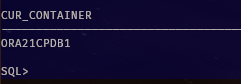
Now inside the PDB, create an 8k tablespace for a table, and then another tablespace (32k block size).
DEFINE tblspc=tablespace_8k
DEFINE newtblspc=tablespace_32k

-- create an 8k tablespace for the table that will move
create tablespace &tblspc
 datafile '/opt/oracle/oradata/ORA21C/ORA21CPDB1/&&tblspc.01.dbf' size 1G
 autoextend on next 100m;

-- create a 32k tablespace for the table to move to
create tablespace &newtblspc
 datafile '/opt/oracle/oradata/ORA21C/ORA21CPDB1/&&newtblspc.01.dbf' size 1G
 autoextend on next 100m BLOCKSIZE 32K;
Setup the user account
We'll also need to create a test account to own the table that will be moved.
DEFINE schm=testuser
DEFINE tblspc=tablespace_8k
DEFINE newtblspc=tablespace_32k

-- ensure logged in to the PDB
ALTER SESSION SET CONTAINER = ora21cPDB1;
SELECT SYS_CONTEXT('USERENV', 'CON_NAME') AS CUR_CONTAINER FROM DUAL;

DROP USER &schm CASCADE;
CREATE USER &schm IDENTIFIED BY "&schm"
default tablespace &tblspc
quota unlimited on &tblspc
quota unlimited on &newtblspc;

grant create database link, CREATE INDEXTYPE, CREATE OPERATOR,
 CREATE PROCEDURE, CREATE SEQUENCE, CREATE SESSION, CREATE SYNONYM,
 CREATE TABLE, CREATE TRIGGER, CREATE TYPE, CREATE VIEW, CREATE JOB,
 MANAGE SCHEDULER, SELECT ANY DICTIONARY
TO &schm;
Create the table and constraints
Create a table to move. To do this we will create a table for a base, then create another table to move, based on that table.
DEFINE tbl=TESTTABLE
DEFINE tblspc=tablespace_8k
DEFINE newtblspc=tablespace_32k

ALTER SESSION SET current_schema = &schm;

-- drop the tables if they already exist
DROP TABLE &tbl.0 PURGE;
DROP TABLE &tbl PURGE;

-- create an base table
create table &tbl.0
nologging
storage (initial 1m minextents 500) -- note: does not allow deallocation
--SEGMENT CREATION IMMEDIATE
tablespace &tblspc as
select /*+ append */ * from dba_objects;

-- create another table based from the base table
-- columns are numbers, dates, and varchar2
create table &tbl
nologging
storage (initial 1m minextents 500) -- note: does not allow deallocation
--SEGMENT CREATION IMMEDIATE
tablespace &tblspc as
select /*+ append */
  rownum rn,
  trunc(sysdate) sd,
  extract(day from sysdate) dy,
  extract(month from sysdate) mn,
  extract(year from sysdate) yr,
  a.ROWID rwd,
  dbms_rowid.rowid_row_number(a.ROWID) rid,
  dbms_rowid.rowid_relative_fno(a.ROWID) fl,
  dbms_rowid.rowid_block_number(a.ROWID) bk,
  a.*
from &tbl.0 a, &tbl.0 b
where rownum<=7000000;
Now create some indexes and constraints for the table that will be moved to the 32k tablespace. The indexes will be moved automatically when the table is moved.
-- create a unique index
create unique index ix_&tbl._owner
on &tbl(rn)
nologging
storage (initial 250m)  -- note: does not allow deallocation
tablespace &tblspc;

-- add primary key constraint
alter table &tbl
add (constraint &tbl._PK primary key(rn)
using index ix_&tbl._owner);

-- create another unique index
create unique index ix_&tbl._rid
on &tbl(rid,fl,bk,rn)
nologging
storage (initial 250m)  -- note: does not allow deallocation
tablespace &tblspc;

-- add a unique key constraint
alter table &tbl
add (constraint &tbl._UK unique(rid,fl,bk,rn)
using index ix_&tbl._rid);
Now verify what objects we have available.
-- sqlplus formating
ALTER SESSION SET nls_date_format='ddMonyyyy hh24:mi:ss';
SET PAGESIZE 9999 LINESIZE 132 APPINFO OFF FLUSH OFF SERVEROUTPUT OFF TRIMSPOOL ON ARRAYSIZE 100 TRIMOUT ON

DEFINE tblspc=tablespace_8k
DEFINE newtblspc=tablespace_32k

-- constraint list for the table
col constraint_name format a50
select CONSTRAINT_NAME, CONSTRAINT_TYPE, status
from dba_constraints
where owner=upper('&schm');

-- segment list
col owner format a20
col segment_name format a30
select owner, segment_name, segment_type, bytes/1024/1024 mb, tablespace_name
from dba_segments
where REGEXP_LIKE(tablespace_name, UPPER('^&tblspc'))
 or REGEXP_LIKE(tablespace_name, UPPER('^&newtblspc'))
order by tablespace_name, segment_type;
Also for reference, we can confirm how many redo records have been generated to create the tables.
-- for this particular session
col name format a50
select a.con_id, b.name, TRUNC(value/1024/1024,1) "MB"
from v$sesstat a, V$STATNAME b
where a.statistic#=b.statistic#
  --and a.CON_ID=b.CON_ID
  and b.name IN ('redo size', 'redo size for direct writes')
  and sid=SYS_CONTEXT('USERENV', 'SID');
The redo records are measured as:
- 'redo size' is all logging, including logging for direct path (if any)
- 'redo size for direct writes' is logging just for the direct path
Create some DML
We're going to attempt to move the table that still has a DML transaction present. So first we'll perform the DML as an update statement.
Transaction present before the table is moved
So create another session — and create some DML on the table.
# login to the container
docker exec -it oracle21c /bin/bash

# then login to sqlplus on the server
sqlplus / as sysdba

-- login to the PDB
ALTER SESSION SET CONTAINER = ora21cPDB1;

DEFINE schm=testuser
ALTER SESSION SET current_schema = &schm;
Now we can perform an update on the table.
-- create DML against the table
SET TRANSACTION NAME 'update';
DEFINE tbl=TESTTABLE

-- create some preexisting DML before attempting the redefinition
UPDATE &tbl
SET yr=2026
WHERE rn=1;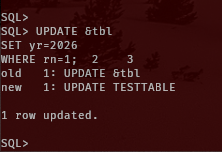
Attempt to move the table
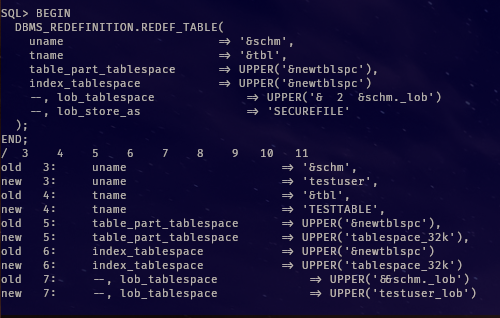
With a transaction present, let's try to move the table to the 32k tablespace with the DBMS_REDEFINITION.REDEF_TABLE procedure.
-- now back in the original session
BEGIN
  DBMS_REDEFINITION.REDEF_TABLE(
    uname                      => '&schm',
    tname                      => '&tbl',
    table_part_tablespace      => UPPER('&newtblspc'),
    index_tablespace           => UPPER('&newtblspc')
    --, lob_tablespace             => UPPER('&&schm._lob')
    --, lob_store_as               => 'SECUREFILE'
  );
END;
/
Now in another session, list all the blocking sessions for the PDB.
# login to the container
docker exec -it oracle21c /bin/bash

# then login to sqlplus on the server
sqlplus / as sysdba

-- sqlplus formating
ALTER SESSION SET nls_date_format='ddMonyyyy hh24:mi:ss';
SET PAGESIZE 9999 LINESIZE 132 APPINFO OFF FLUSH OFF SERVEROUTPUT OFF TRIMSPOOL ON ARRAYSIZE 100 TRIMOUT ON

-- login to the PDB
ALTER SESSION SET CONTAINER = ora21cPDB1;

DEFINE schm=testschema
ALTER SESSION SET current_schema = &schm;

-- should see a blocking session
col mode_requested format a10
col blocking_others format a15
select session_id, mode_held, mode_requested, blocking_others
from dba_lock
where con_id=3
order by SESSION_ID;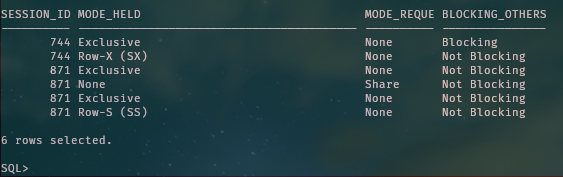
There is a problem. A blocking transaction is present.
To get a better idea of what the DBMS_REDEFINITION.REDEF_TABLE is doing, we can perform a status check of the move.
A status check is performed with the DBA_REDEFINITION_STATUS dictionary view.
-- With the DML not commited, there is no redefinition status.
col base_table_owner format a20
col base_table_name format a20
col operation format a20
col status format a20
SELECT BASE_TABLE_OWNER, BASE_TABLE_NAME, OPERATION, STATUS
FROM DBA_REDEFINITION_STATUS;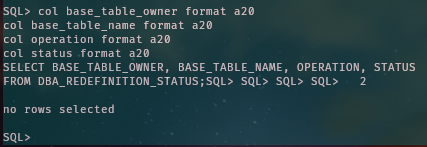
So far the move of the table hasn't started.
The problem is the transaction is preventing the move of the table.
To fix this, we now need to do a commit (or rollback) of the update statement.
commit;Another check of blocking sessions confirms that there are no more blocks.
col mode_requested format a10
col blocking_others format a15
select session_id, mode_held, mode_requested, blocking_others
from dba_lock
where con_id=3
order by SESSION_ID;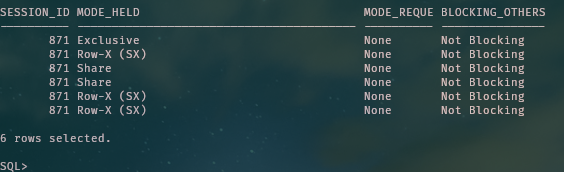
Another status check of the DBA_REDEFINITION_STATUS dictionary view should indicate a change of status.
-- now 'In Progress'
col base_table_owner format a20
col base_table_name format a20
col operation format a20
col status format a20
SELECT BASE_TABLE_OWNER, BASE_TABLE_NAME, OPERATION, STATUS
FROM DBA_REDEFINITION_STATUS;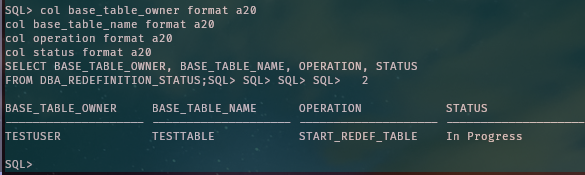
So with no more outstanding transactions, the move of the table is proceeding to the 32k tablespace.
We will also see some work in progress for the table and indexes.
-- should be original and new segments
col owner format a20
col segment_name format a30
select owner, segment_name, segment_type, bytes/1024/1024 mb, tablespace_name
from dba_segments
where REGEXP_LIKE(tablespace_name, UPPER('^&tblspc'))
 or REGEXP_LIKE(tablespace_name, UPPER('^&newtblspc'))
order by tablespace_name, segment_type;
Do another update statement against the table as follows:
UPDATE &tbl
SET yr=2027
WHERE rn=2;

commit;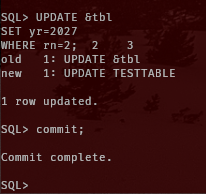
As the redefinition progresses, there will be some new segments created in the 32k tablespace.
-- constraint verification
col constraint_name format a50
select CONSTRAINT_NAME, CONSTRAINT_TYPE, status
from dba_constraints
where owner=upper('&schm');

-- current schema
col owner format a20
col segment_name format a30
select owner, segment_name, segment_type, bytes/1024/1024 mb, tablespace_name
from dba_segments
where REGEXP_LIKE(tablespace_name, UPPER('^&tblspc'))
 or REGEXP_LIKE(tablespace_name, UPPER('^&newtblspc'))
order by tablespace_name, segment_type;
Query again, and all the segments should be in the 32k tablespace.

Towards the completion of the DBMS_REDEFINITION.REDEF_TABLE, another status check should indicate the success that the table and indexes have completed the move.
col base_table_owner format a20
col base_table_name format a20
col operation format a20
col status format a20
SELECT BASE_TABLE_OWNER, BASE_TABLE_NAME, OPERATION, STATUS
FROM DBA_REDEFINITION_STATUS;

BASE_TABLE_OWNER     BASE_TABLE_NAME      OPERATION            STATUS
-------------------- -------------------- -------------------- --------------------
TESTUSER             TESTTABLE            START_REDEF_TABLE    Success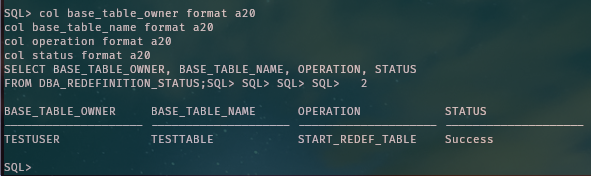
Next, the outstanding DML will be moved too, and that won't take long. Then the move of the table, and indexes is complete.
Should be some redo generated too.
-- for this particular session that executed the REDEF_TABLE
col name format a50
select a.con_id, b.name, TRUNC(value/1024/1024,1) "MB"
from v$sesstat a, V$STATNAME b
where a.statistic#=b.statistic#
  --and a.CON_ID=b.CON_ID
  and b.name IN ('redo size', 'redo size for direct writes')
  and sid=SYS_CONTEXT('USERENV', 'SID');
Now check that both DML statements that were performed previously are present in the new table.
SELECT yr from &tbl
WHERE rn in (1,2);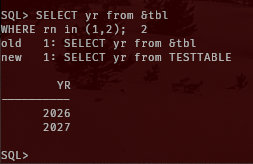
Now table and indexes are moved, and both DML statements are in the new table segment.
For simple table redefinitions, use the right tool for the job.
Paul Guerin has presented at many Oracle conferences, including Oracle Open World 2013. Since 2015, his work has been featured in the IOUG Best Practices Tip Booklet, and in publications from AUSOUG, Oracle Technology Network, Quest, and Oracle Developers (Medium). He was awarded as a most valued contributor for the My Oracle Support Community (2019), and continues to be a participant of the Oracle ACE program.