
Overview
Generally speaking, GraphQL is an excellent way to improve your API design and performance, if you frequently overfetch data. It addresses the problems of overfetching and underfetching data in REST APIs, which are caused by the resource-based nature of APIs and can create performance hell when data is sourced from different locations.
If you are already using GraphQL, you understand that it resolves the issues above. However, as your server grows, the code can become disorganized, leading to a large server with unrelated queries and mutations, numerous data source connections, and multiple teams working on the same codebase.
This is where GraphQL Federation comes into play. This architectural approach divides the server into "microservices," allowing for better separation of concerns and more manageable code.
In this article, I will share my experience with Apollo tools and explain how to use them to create your new services.
Apollo Federation and How it Works
We will divide the federated GraphQL migration into the following steps:
- Split into multiple logical servers — subgraphs
- Create the entry point — router for distributing traffic between subgraphs
- Finish by adding the custom logic of traffic routing
Subgraphs
Splitting the server into subgraphs is fairly straightforward. It depends on how you divide the server into logical groups. During this stage, consider organization's team structure, existing data sources and services, future features and domain responsibilities.
Once you have carefully designed the subgraphs, you can create separate schemas for each one. Remember to use the entity-sharing mechanisms (e.g. special schema directives) when writing the schemas.
Refer to these pages of Apollo docs to get familiar with federation directives and schema syntax.
- Apollo Federation Directives | Apollo GraphQL Docs
- Value Types in Apollo Federation | Apollo GraphQL Docs
- Entities in Apollo Federation | Apollo GraphQL Docs
- Advanced Topics on Federated Entities | Apollo GraphQL Docs
Router
Apollo Router is a tool written in Rust which serves as an entry point and gateway between the client and subgraphs. When the server receives a request, it traverses the query like a graph and triggers the resolver for each node. This is one of the many reasons you still need a composed schema of all the subgraph schemas in one place.
How to create the composed schema? Apollo has a tool for that too! You can run the command line tool having addresses of multiple running subgraphs in the configuration and it will output a composed schema. Here are the docs for the tool usage. (You will only use the supergraph compose command in this case)
After you have successfully generated the composed schema, you only have to run the router and specify the schema in the options, along with other configurations.
Keep in mind that request routes, exception propagation, schema introspection and many other features are fully configurable with the help of a single file.
Below is the link to the page in the Apollo docs, where you can learn to configure and use router
Custom routing scripts
Sometimes (almost always) you want to do pre-processing on your requests, before sending them to the subgraphs. This can include logging, manipulating headers, filtering requests etc. For these cases, router supports scripts in rhai language, which is fairly simple and easy to use.
You can override request processing functions, write additional logic and attach the script destinations in the router configuration file.
Below is the reference to detailed docs
Usage Examples
Generate composed schema
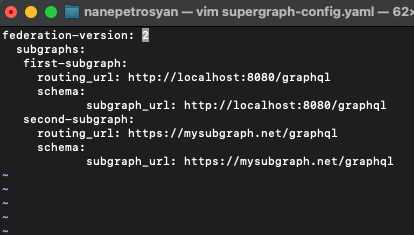
rover supergraph compose --config supergraph-config.yamlRunning the command above you will see the output on the terminal (you can write it to a file by adding >> filename.graphql)
Run router
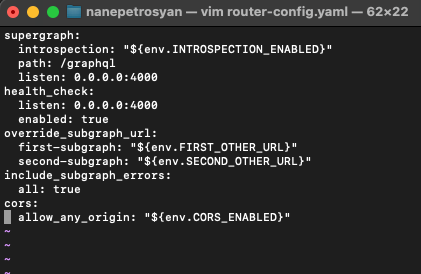
Pass the configurations and the generated supergraph to router
router --supergraph supergraph-schema.graphql --config router-configurations.yamlAdd your scripts
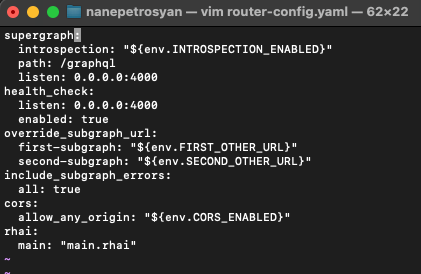
Replace main.rhai with the path of the script from running directory.
Thank you for reading! I hope this short guide helps you on your graphql journey :)