
As of now you've only fetched those APIs which gives text/string responses and if you don't know how to handle API responses that give images you came at right place, Yes I'm talking about real images not image URLs.
To handle string related API responses you probably write React code that looks like this:
import React, { useState, useEffect } from 'react';

export default function App() {
  const [data, setData] = useState(null);

  useEffect(() => {
    const fetchData = async () => {
      try {
        const res = await fetch('/randomjokes');
        const dt = await res.json();
        setData(dt);
      } catch (e) {
        console.log(`Error: ${e}`);
      }
    };
    fetchData();
  }, []);

  return (
    <div className='App'>
      {data ? JSON.stringify(data) : 'loading...'}
    </div>
  );
}
basically just hitting the url with built-in fetch() api/function and displaying the data.
some warning before I saw you how to handle Image response:
I am using useEffect() hook for demonstration purpose but it's not a good practice to use it instead use React Query or something else, and secondly for api URL purposes I am using this freeapi website https://api.freeapi.app/#/
so to handle Image api response you just have to simply put your URL in fetch() function and instead of writing res.json() you have to write res.blob() see code snippet below:
import { useState,useEffect } from 'react';


export default function App() {

  const [imageData,setImageData] = useState(null);

  useEffect(()=>{
  const fetchData = async()=>{
    try{
      const res = await fetch(`https://api.freeapi.app/api/v1/kitchen-sink/image/png`);
      const blob = await res.blob();
      const url = URL.createObjectURL(blob)

      setImageData(url);

    }catch(e){
      console.log(`Error: ${e}`)
    }
  }
  fetchData()
},[])

  return (
    <div className='App'>
      { imageData ?<img src={imageData} alt="Guido Van Rossum"  /> : 'loading...' }
    </div>
  );
}
In above code we're just normally fetching the API but after the res we're using res.blob() which is a method of the Response object that retrieves the response body as a Blob. Now the Blob means "Binary Large Object" which represented as immutable raw data which is used for handling files and binary data, means multimedia formats.
The URL.createObjectURL() creates image into DOMString based on the parameter, and then we're simply just putting the final response in setImageData() and then rendering the image response with the <img> tag.
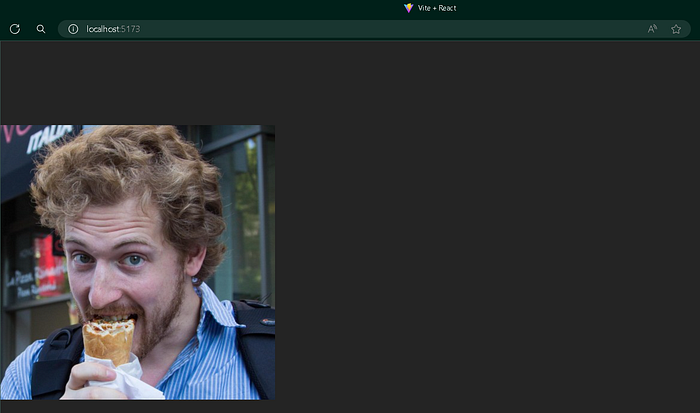
Here's the output of the API that is handled in the code:
SO that was about handling Image responses coming out from an API hope you understood it, Give this blog a clap 👏🏾 and hit a follow for more such blogs like this I write blogs about Javascript,React or webdev in general💻.