
A Complete Step-by-Step Guide to Building a GenAI Career Assistant with LangGraph and LangChain
We will explore how to build a Generative AI Learning Agent using LangGraph, LangChain, and Groq. The goal is to create a structured workflow that classifies user queries and provides intelligent responses using different AI models.
LangGraph is designed for stateful, multi-step workflows in AI applications. It extends LangChain by providing:
- State Management: Tracks conversation context across steps.
- Conditional Routing: Dynamically directs queries based on real-time decisions.
- Cyclic Workflows: Supports loops (e.g., for iterative Q&A).
Key Features of the GenAI Career Assistant
🚀 Learning & Content Creation
- Provides personalized learning paths in Generative AI, covering essential topics and skills.
- Assists in crafting tutorials, blogs, and posts based on user interests and queries.
💡R Q∓A Support
- Offers on-demand Q&A sessions for real-time guidance on concepts and coding challenges.
📄 Resume Building & Review
- Delivers one-on-one resume consultations with expert guidance.
- Creates personalized, market-optimized resumes aligned with current industry trends.
🎯 Interview Preparation
- Conducts Q&A sessions on common and technical interview questions.
- Simulates real interview scenarios with mock interview sessions.
Agents in This System
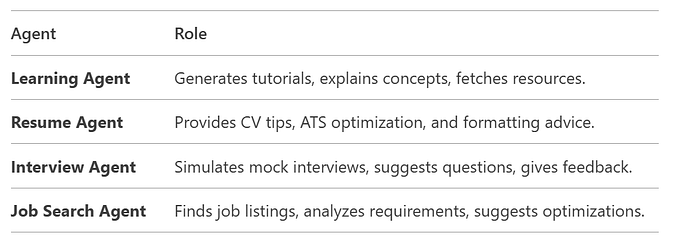
1. Overview of Key Components
The system consists of:
- State Management: Uses
TypedDictto track conversation state. - LangGraph Workflow: Manages decision-making and routing.
- AI Agent Functions: Handles different user queries (learning, resume, interview, job search).
- File Management: Saves responses in markdown files.
- Interactive CLI: Allows users to input queries and get responses.
2. Detailed Code Breakdown
2.1 Imports and Initial Setup
from typing import Dict, TypedDict
from langgraph.graph import StateGraph, END, START
from langchain_core.prompts import ChatPromptTemplate
from langchain_groq import ChatGroq
from dotenv import load_dotenv
import os
from datetime import datetimeTypedDict: Defines structured state for the workflow.StateGraph: Manages workflow states and transitions.ChatGroq: Uses Groq's fast LLM API (Llama3-70b).dotenv: Loads environment variables (API keys).
2.2 LLM Initialization
llm = ChatGroq(
    model="llama3-70b-8192",
    verbose=True,
    temperature=0.5,
    groq_api_key=os.environ["GROQ_API_KEY"]
)- Uses Groq's Llama3–70b for fast responses.
temperature=0.5: Balances creativity and accuracy.
2.3 State Definition
class State(TypedDict):
    query: str          # User's input query
    category: str       # Determined category (learning, resume, etc.)
response: str # Generated response or file path- Tracks the conversation state across workflow steps.
2.4 Helper Functions
def save_file(data, filename):
    """Saves responses in markdown files with timestamps."""
    folder_name = "Agent_output"
    os.makedirs(folder_name, exist_ok=True)
    timestamp = datetime.now().strftime("%Y%m%d%H%M%S")
    filename = f"{filename}_{timestamp}.md"
    file_path = os.path.join(folder_name, filename)
    with open(file_path, "w", encoding="utf-8") as file:
        file.write(data)
return file_path- Stores AI responses in organized markdown files
def trim_conversation(prompt):
    """Keeps only the latest messages to avoid exceeding token limits."""
return trim_messages(prompt, max_tokens=10, strategy="last")- Prevents excessive memory usage in long conversations.
2.5 Categorization & Routing
def categorize(state: State):
    """Classifies user queries into categories using keywords."""
    query = state['query']
    if 'learn' in query.lower():
        return {"category": "handle_learning_resource"}
    elif 'resume' in query.lower():
        return {"category": "handle_resume_making"}
    elif 'interview' in query.lower():
        return {"category": "handle_interview_preparation"}
    elif 'job' in query.lower():
        return {"category": "job_search"}
    else:
return {"category": "handle_learning_resource"}- Uses keyword matching to classify queries.
route_query()
def route_query(state: State):
    """Directs queries to the appropriate handler."""
return state['category']- Routes based on the category from
categorize().
2.6 Agent Handlers
handle_learning_resource()
def handle_learning_resource(state: State):
    """Generates learning materials using Groq LLM."""
    prompt = ChatPromptTemplate.from_messages([
        SystemMessage(content="You are an AI learning expert."),
        HumanMessage(content=state['query'])
    ])
    agent = LearningResourceAgent(prompt)
    response_path = agent.TutorialAgent(state['query'])
return {"response": response_path, "category": "Learning Resource"}- Uses
LearningResourceAgentto generate tutorials.
handle_resume_making()
def handle_resume_making(state: State):
    """Saves resume-related queries to a file."""
    path = save_file(f"Resume Request: {state['query']}", 'Resume_Request')
    return {"response": path, "category": "Resume Making"}
Placeholder for resume-building logic.
2.7 LearningResourceAgent Class
class LearningResourceAgent:
    def __init__(self, prompt):
        self.model = ChatGroq(model="llama3-70b-8192")
        self.prompt = prompt
        self.tools = [DuckDuckGoSearchResults()]  # Web search for real-time data
def TutorialAgent(self, user_input):
        """Generates tutorials using LLM and tools."""
        agent = create_tool_calling_agent(self.model, self.tools, self.prompt)
        agent_executor = AgentExecutor(agent=agent, tools=self.tools)
        response = agent_executor.invoke({"input": user_input})
        path = save_file(response['output'], 'Tutorial')
        return path
    def QueryBot(self, user_input):
        """Interactive Q&A loop."""
        while True:
            response = self.model.invoke(self.prompt)
            if user_input.lower() == "exit":
                break
# Continues conversation until 'exit'- Uses DuckDuckGo Search for real-time data.
- Supports interactive Q&A sessions.
2.8 LangGraph Workflow Setup
workflow = StateGraph(State)
# Add nodes
workflow.add_node("categorize", categorize)
workflow.add_node("handle_learning_resource", handle_learning_resource)
workflow.add_node("handle_resume_making", handle_resume_making)
# Define transitions
workflow.add_edge(START, "categorize")
workflow.add_conditional_edges(
    "categorize",
    route_query,
    {
        "handle_learning_resource": "handle_learning_resource",
        "handle_resume_making": "handle_resume_making",
    }
)
workflow.add_edge("handle_learning_resource", END)
workflow.add_edge("handle_resume_making", END)
app = workflow.compile() # Final executable workflowStateGraphdefines the workflow structure.- Conditional edges route queries dynamically.
2.9 Main Execution
def main():
    """CLI interface for user interaction."""
    while True:
        query = input("Enter your query (or 'exit'): ")
        if query.lower() == 'exit':
            break
        results = app.invoke({"query": query})
print(f"Category: {results['category']}, Response: {results['response']}")- Runs an interactive loop for user queries.