

Motivation
Keycloak is one wonderful open source identity access management server-side app, which is ideal for self-hosted OAuth / Open ID Connect (OIDC) solution.
The motivation of this article is to quickly show any developer the appropriate REST API end-points for OAuth / OIDC authentication, token refresh or to logout the user (saving time browsing through tonnes of documentation).
Here's a quick guide (cheat sheet) for the impatient. ** Some OAuth2 / OIDC familiarity is needed.
Where To Find The REST API URL End-Points?
Keycloak has a feature in listing some important URL end-points. Let's start from scratch. Assuming the deployed Keycloak is a running locally (the default port is 8080), do create a "demo" realm and see what are the end-points:
- On the browser, go to localhost:8080, click on the "Administration Console" and login as the server admin.
- At the left side panel, "Add Realm", and type "demo".
- Once the "demo" realm is created, on the left panel, click on "Realm Settings".
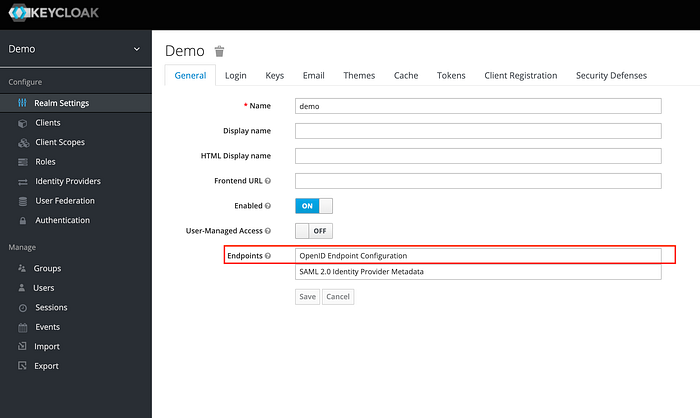
You should be able to see a link called "OpenID Endpoint Configuration". Click on this and some very important endpoint info will be displayed in JSON.
Just an example (small extract) of what to expect from the JSON output (the port listed here is different as I ran Keycloak on port 8001 instead of 8080):
Besides the end points, do also take a look at the "grant_types_supported" section for all available grant types; and the "scopes_supported" section for the available scopes. This information will eliminate much of the guess work.
End-Point URL List
A quicker way is to perform a http GET call (or just have this URL viewed on the web browser):
http://<host>:<port>/auth/realms/<realm_name>/.well-known/openid-configuration
Do replace "<realm_name>" with the realm name (in this case: "demo").
The rest of the article will make referent to the openid-configuration JSON values.
Login — Web Page to Keycloak Authentication Page
For the web/mobile app to be routed to Keycloak's authentication page, then back to the web/mobile app kind of setup; take the "authorization_endpoint" URL value to redirect the app to Keycloak's authentication page:
http://<host>:<port>/auth/realms/<realm_name>/protocol/openid-connect/auth
What Is Needed
Create a Keycloak client with:
- Client Protocol: openid-connect
- Access Type: public
- Standard Flow Enabled: On
- Valid Redirect URIs: the web page for Keycloak to be redirected to upon successful authentication (either the authorization code or access token will be returned from Keycloak)
- Web Origins: "+" — only if you want to enable CORS.
Refer to this article on the necessary parameters.
Login — Direct Username/Password Authentication
If you prefer a direct approach of just stating the username/password, in exchange for an access token, you may invoke the "token_endpoint" which is:
http://<host>:<port>/auth/realms/<realm_name>/protocol/openid-connect/token
What Is Needed
Create a Keycloak client with:
- Client Protocol: openid-connect
- Access Type: public or confidential (if confidential is selected, client_secret is needed) for this authentication method.
- Direct Access Grants Enabled: "On"
- Web Origins: "+" — only if you want to enable CORS.
Perform a http POST method invocation to this URL, with an x-www-form-urlencoded payload. Refer to this article on the necessary parameters.
To Get Access to User Info
Upon getting an access token after Keycloak's authentication, do a http GET method invocation to the "userinfo_endpoint" URL (requires access token in the header):
http://<host>:<port>/auth/realms/<realm_name>/protocol/openid-connect/userinfo
to obtain user info such as user ID (in the form of UUID), name, email and other user related details.
To Refresh An Access Token
The refresh token URL is the "token_endpoint" value (the same URL for the use of direct username/password authentication).
http://<host>:<port>/auth/realms/<realm_name>/protocol/openid-connect/token
Perform a POST method http invocation with an x-www-form-urlencoded payload (with "refresh_token" as grant type instead). For further information on what parameters to be included, please refer to this article.
To Logout
To logout or invalidate a token, the URL can be found in "end_session_endpoint", which is:
http://<host>:<port>/auth/realms/demo/protocol/openid-connect/logout
Perform a http POST method invocation. The x-www-form-urlencoded payload must have: the client_id, client_secret (only if access type is confidential) and the refresh_token.
Summary
Hope that this gives an idea of the most basic REST API End-Points for authentication and token management the OAuth/OIDC way on Keycloak.