
Developers used to working with Inversion of Control (IOC) using Spring Framework via a spring.xml may find annotation style configuration of Spring Boot a bit tricky at first.
The spring.xml offers a straightforward way of configuring the spring beans in a single place and in a no-nonsense way. Configuring Spring beans though requires a learning curve to start with, but once into it things really start becoming natural.
With annotation style of configuration, applying spring IOC is a part of writing code.
Lets start with configuring a bean. Lets take the example of Vehicle Registration number that all vehicle in India are required to have. Vehicle registration numbers in India are as follows:
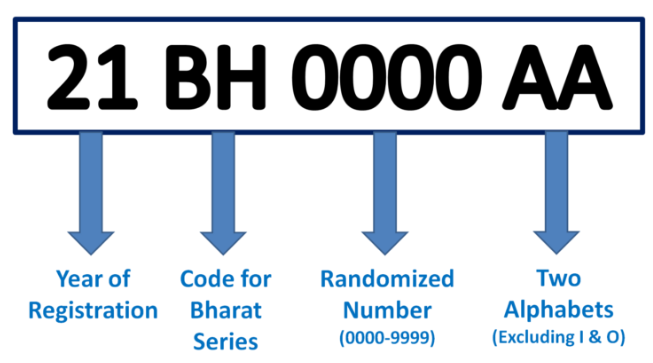
Lets suppose there is a Vehicle registration generator class that generates Vehicle registration number for India. The generator class has an year of registration field, two-letter incrementing code and an a four-digit integer value that keeps on incrementing. Our generator class look something like follows:
import java.time.LocalDate;
import java.util.Objects;
import java.util.concurrent.atomic.AtomicInteger;

public class VehicleRegistrationNumberGenerator{
    private int registrationNumber;
    private String twoAlphabetSuffix;

    public String getVehicleRegistrationNumber(){
        return String.format("%s %s %s %s", this.getyearOfRegistration(), "BH", getRegistrationNumber(), getTwoAlphabetSuffix());
    }

    private Integer getyearOfRegistration(){
        return LocalDate.now().getYear()%100;
    }

    private String getRegistrationNumber(){
        registrationNumber = (registrationNumber%9999) + 1;
        String regNum = "000" + registrationNumber;

        return regNum.substring(regNum.length()-4);
    }

    private String getTwoAlphabetSuffix(){
        int firstChar = 65, secondChar = 65;

        if(Objects.isNull(this.twoAlphabetSuffix)){
            this.twoAlphabetSuffix = "AA";
        }
        else{
            firstChar = twoAlphabetSuffix.charAt(0);
            secondChar = twoAlphabetSuffix.charAt(1);

            secondChar++;

            if(secondChar>97){
                secondChar = 65;
                firstChar++;

                if(firstChar>97)
                    firstChar = 0;
            }
        }

        return "" + (char)firstChar + (char)secondChar;
    }

    public void setTwoAlphabetSuffix(String twoAlphabetSuffix) {
        this.twoAlphabetSuffix = twoAlphabetSuffix;
    }
}
Once we have the generator class, lets begin to configure it as a bean in spring.xml file.
<bean name="vehicleNumberGenerator" class="com.learn.domain.VehicleRegistrationNumberGenerator">
  <property name="twoAlphabetSuffix" value="AA">
</bean>
In order to use the above class, just create a main class and instantiate the spring IOC container and then the bean for there as follows:
ApplicationContext = new ClassPathXmlApplicationContext("configs/spring.xml");
sequenceGen = appContext.getBean("vehicleNumberGenerator", VehicleRegistrationNumberGenerator.class);

for (int i = 1; i <= 10; i++) {
    System.out.println(sequenceGen.getVehicleRegistrationNumber());
}
Above code prints starting 10 registration number generated with the idea of Bharat based Vehicle Number generation system.
All the code for the above exercise can be located here.
In next article, lets try to achieve the same thing by making use of Spring based annotations.