
What is It?
SSRF stands for server-side request forgery. This vulnerability allows an attacker to make HTTP requests from the back end server of a web application to resources the server has access to. An attacker can take advantage of this vulnerability to gain access to internal assets or even get the server to connect to external systems.
There are two types of SSRF attacks: regular/basic and blind. The only difference between the two is that in a successful basic SSRF attack, data is returned to the attackers screen, as opposed to a blind attack, where even though successful, no data is returned.
How to Find?
Now that you have a brief overview of what a SSRF vulnerability is, you're probably wondering "where do I find one?". There are multiple places a SSRF vulnerability can be discovered. For example:
- Full URL In the address bar

- A partial URL in the address bar

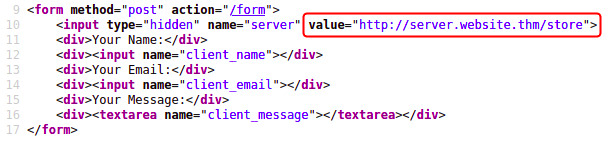
- A field in a form where the value is a full URL.
Testing For SSRF
Let's test! Say, for example there is a web application that lets a user view whether an item is in stock in a store.
The above will get the server to make a request to the specified URL, which in this case is https://api.example.com/api/stock/product?id=123, retrieve the stock status, and return this to the user.
An attacker could modify the parameter value to a URL of their choosing and potentially get unauthorized access to data. For example:
When the server receives this request, instead of returning stock information, user data will be returned to the attacker!
What if an attacker only has control over the path instead of a full URL? Take the below for example:
An attacker can use path/directory traversal to reach the /user page they seek like so:
If you're unsure of how path/directory traversal works, I covered it in more depth in my File Inclusion Vulnerabilities piece.
Say an attacker wants access to the contents of https://example.com/admin. They go to the URL in their browser, but their access is denied with a message saying "authenticated user is not authorized to access this resource". Because they are sending a request to the server as an unauthorized user, the server is denying it and refusing to return the contents of the page.
We've discovered already that this application is vulnerable to SSRF so we can use this to access /admin as an authorized user.
If we capture the above request in BurpSuite, the response might look similar to this:
POST /product/stock HTTP/1.0
 Content-Type: application/x-www-form-urlencoded
 Content-Length: 118

 stockApi=http://stock.example.com:8080/product/stock/check%3FproductId%3D6%26storeId%3D1
The above example response shows that the URL was passed to the backend API endpoint stockAPI. If we were to modify the request to a URL local to the server itself, we might be able to access the contents of the admin page. For example:
POST /product/stock HTTP/1.0
 Content-Type: application/x-www-form-urlencoded
 Content-Length: 118

 stockApi=
http://localhost/admin
Localhost in computer networking refers to the machine on which an application is running(in this case the web application's server). The above request gets the server itself to retrieve the contents of /admin and return it to the attacker, thus bypassing access controls. This is made possible because applications implicitly trust requests that come from the local machine. Because the request appears to come from a trusted location(the server itself), the attacker is given full access.
Circumventing Defenses
Applications with SSRF behaviors will have defenses implemented to prevent the malicious exploitation of them. These defenses can come in the form of allow and deny lists. Web applications may deploy these to protect endpoints, IP addresses, or domains from being accessed. With a deny list, all requests except the ones specified in the list are accepted. If the request matches a resource in the list or matches a certain pattern, it will be denied. Some applications will block input containing hostnames like 127.0.0.1 and localhost.
These filters can be circumvented by using alternative representations. For example, instead of using 127.0.0.1, use 0.0.0.0, 0000, 127.1, 127.*.*.*, 2130706433, or 017700000001.
What's the Risk?
To sum up, when an attacker edits an HTTP request sent to a web application's server that is vulnerable to SSRF, they can take advantage of the access rights of that server to perform unauthorized actions. Below are some risks associated with SSRF vulnerabilities:
- Browsing private server directories
- Unauthorized access to data such as authorization credentials.
- Access to customer/organizations data
- RCE(remote code execution) in the server.
That's what I've learned about SSRF vulnerabilities so far! I hope you learned something too! Thankyou so much for reading!
Happy Hacking!