

Async/await changed the way we write asynchronous code in Node.js. It's clean, readable, and avoids callback hell. But here's the catch:
Many developers misuse async/await in ways that silently murder performance.
Let's break down what's going wrong, and how to fix it.
😬 The Mistake: Running Async Tasks Sequentially Instead of Concurrently
Consider this example:
js
CopyEdit
await fetchUser();
await fetchPosts();
await fetchComments();
Each await waits for the previous one to complete before starting the next.
That's 3 separate network calls, run one after another.
In real-world apps, this adds latency and kills throughput.
💥 The Real-World Impact
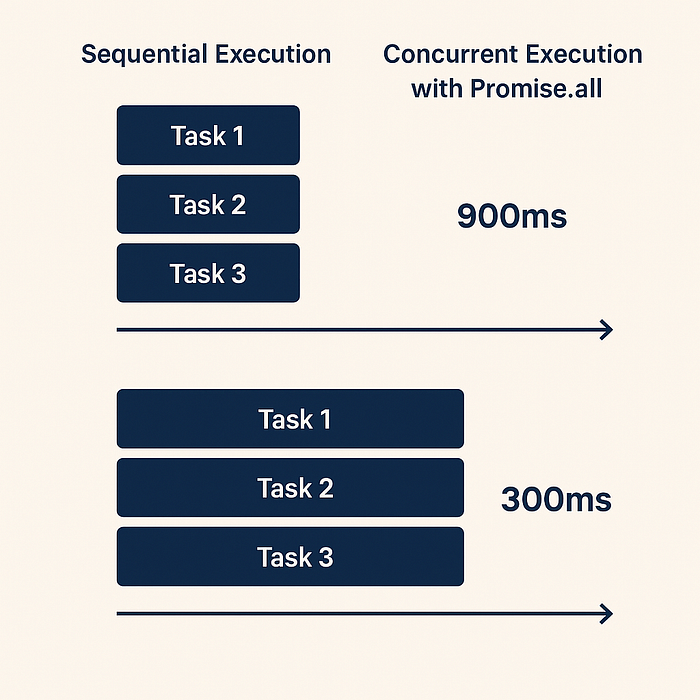
Let's say each function takes 300ms:
js
CopyEdit
await fetchUser();     // 300ms
await fetchPosts();    // +300ms
await fetchComments(); // +300ms
Total time: ~900ms. But if they don't depend on each other, they can be done in parallel:
js
CopyEdit
const [user, posts, comments] = await Promise.all([
  fetchUser(),
  fetchPosts(),
  fetchComments()
]);
Boom! Still ~300ms total.
You've cut your latency by 66% — just by changing how you await.
🔍 Why It Happens
Async/await is deceptive. It looks synchronous, so we write it like synchronous code — one step at a time. But JavaScript is single-threaded, and you're blocking the event loop if you're not careful.
🛠️ Quick Fix: Use Promise.all for Independent Async Calls
Let's revisit our example:
❌ Bad (sequential):
js
CopyEdit
await doFirstTask();
await doSecondTask();
await doThirdTask();
✅ Good (concurrent):
js
CopyEdit
await Promise.all([
  doFirstTask(),
  doSecondTask(),
  doThirdTask()
]);
If the tasks don't rely on each other's results, they should run concurrently.
🔄 Bonus Tip: Don't Overuse Promise.all
If one promise fails, the whole Promise.all fails. Use Promise.allSettled() if you want to handle errors individually.
js
CopyEdit
const results = await Promise.allSettled([
  task1(),
  task2(),
  task3()
]);
🧠 Pro Tip: Lazy Evaluation With Functions
Sometimes you don't want to invoke the promises immediately. Wrap them in functions:
js
CopyEdit
const tasks = [() => task1(), () => task2()];
await Promise.all(tasks.map(fn => fn()));
This helps you control when promises are created.
🔎 How to Audit Your Code for Async Mistakes
- Look for back-to-back
awaits that don't depend on each other. - Replace with
Promise.all()wherever possible. - Benchmark before/after using tools like:
- Chrome DevTools
- Node.js's built-in
performancemodule - APM tools (New Relic, Datadog)
📈 Real Performance Boost
I recently optimized a backend that used sequential async calls for fetching data. After refactoring to use Promise.all, the average response time dropped from 1200ms to 480ms.
The codebase stayed almost identical — just smarter async handling.
🔄 TL;DR
Bad async/await = slow Node.js.
Use Promise.all() for concurrency. Your users (and your server bill) will thank you.
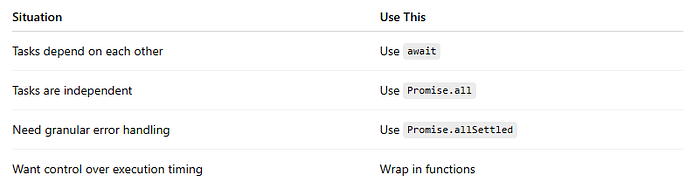
🧰 Here's a Cheatsheet
🎯 Final Thoughts
Async/await is a gift — but only if used correctly.
Misusing it by running independent tasks sequentially is a performance trap. One that's easy to fall into. But also easy to fix.
Go back to your codebase, grep for back-to-back awaits, and ask:
"Can these run in parallel?"
If yes — refactor it today.
📌 Save + Share
Found this helpful? Bookmark it for your next Node.js project. And share it with your team — you might just save them a few hundred milliseconds (and a few angry users).
📊 Custom Infographic: "Async/Await — Sequential vs Concurrent"
💡 Have questions? Drop them in the comments!
Enjoyed? Clap 👏, share, and follow for more!
As content creators on Medium.com, we face minimal compensation for our hard work. If you find value in our articles, please consider supporting us on our "Buy Me a Coffee" page. Your small contributions can make a big difference in fueling our passion for creating quality content. We appreciate your support.
So Don't wait👇,
Buy Me a Coffee: https://buymeacoffee.com/cloudguru
