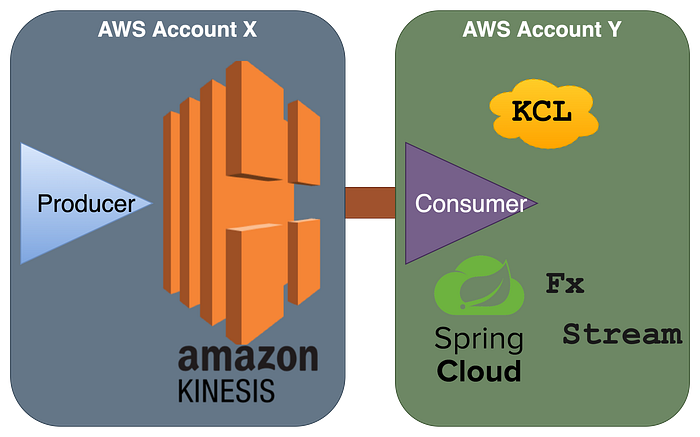

There are two ways you can implement AWS Kinesis consumer in Java Spring Cloud Stream, one using AWS SDK and the second using KCL (Kinesis Client Library). Maybe this short & very informative excerpt from AWS will help you quickly choose KCL over SDK for the majority of the use cases like it helped me.
KCL helps you consume and process data from a Kinesis data stream by taking care of many of the complex tasks associated with distributed computing. These include load balancing across multiple consumer application instances, responding to consumer application instance failures, checkpointing processed records, and reacting to resharding. The KCL takes care of all of these subtasks so that you can focus your efforts on writing your custom record-processing logic.
The KCL is different from the Kinesis Data Streams APIs that are available in the AWS SDKs. The Kinesis Data Streams APIs help you manage many aspects of Kinesis Data Streams, including creating streams, resharding, and putting and getting records. The KCL provides a layer of abstraction around all these subtasks, specifically so that you can focus on your consumer application's custom data processing logic
Reference: https://docs.aws.amazon.com/streams/latest/dev/shared-throughput-kcl-consumers.html#shared-throughput-kcl-consumers-overview
Here are the steps you require for creating consumer in spring cloud and enabling its binding to cross-account kinesis stream:
Step 1) Go to the producer's AWS console (where Kinesis is hosted), and create an IAM role for the consumer with inline policy:
#kinesis-consumer-role

{
    "Version": "2012-10-17",
    "Statement": [
        {
            "Sid": "KinesisConsumer",
            "Effect": "Allow",
            "Action": [
                "kinesis:Get*",
                "kinesis:List*",
                "kinesis:Describe*"
            ],
            "Resource": "arn:aws:kinesis::@ProducerAccountID:stream/event-notify"
        }
    ]
}
then add the trust relationships for this new role to grant @ConsumerAccountID to assume access.
{
  "Version": "2012-10-17",
  "Statement": [
    {
      "Effect": "Allow",
      "Principal": {
        "AWS": "arn:aws:iam::@ConsumerAccountID:root"
      },
      "Action": "sts:AssumeRole",
      "Condition": {}
    }
  ]
}

#Note: you can limit to certain user or role of the consumer account rather than giving blanket access. Ex:

"Principal": {
  "AWS": [
    "arn:aws:iam::@ConsumerAccountID:user/user-name-1",
    "arn:aws:iam::@ConsumerAccountID:role/roleName2"
  ]
}
Step 2) Go to the consumer's AWS console, then create one programmatic user (for local dev/testing) and one role (for application to use for cloud run) which will be granted access to assume the producer's account role.
#local-dev-consumer
#cloud-run-consumer

{
    "Version": "2012-10-17",
    "Statement": [
        {
            "Sid": "KinesisConsumerAdditionalAccess",
            "Effect": "Allow",
            "Action": [
                "dynamodb:*",
                "cloudwatch:PutMetricData"
            ],
            "Resource": "*"
        },
        {
            "Sid": "CrossAccountRoleAssumeForStreamConsumerAccess",
            "Effect": "Allow",
            "Action": "sts:AssumeRole",
            "Resource": "arn:aws:iam::@ProducerAccountID:role/kinesis-consumer-role"
        }
    ]
}
Step 3) Application Code:
- Spring configuration for Spring Cloud 3x Stream with Spring Cloud Function:
#application.yml

app:
  aws-assume-role-arn: arn:aws:iam::@ProducerAccountID:role/kinesis-consumer-role
spring:
  main.allow-bean-definition-overriding: true
  cloud:
    stream:
      kinesis:
        binder:
          auto-create-stream: false
          kpl-kcl-enabled: true #enables Spring to bring in KCL
      bindings:
        # events inbound
        processEvent-in-0:
          destination: event-notify
          group: Event-Notify-Consumer-Group-1
          content-type: application/json
          consumer:
            concurrency: 5 #defaults to 1, this will process upto 5 messages concurrently
      function:
        definition: processEvent;
cloud.aws:
  stack.auto: false
  region:
    static: ${AWS_REGION}
    auto: false           #Region autodetection doesn't work with FARGATE deployments, https://github.com/spring-cloud/spring-cloud-aws/issues/734
#to suppress warnings if deployed using Fargate
logging.level:
  com.amazonaws.util.EC2MetadataUtils: error
  com.amazonaws.internal.InstanceMetadataServiceResourceFetcher: error


_ _ _ _ _ _ _ _ _ _ _ _ _ _ _ __ _ _ _ _ _ _ __ _ _ _ _ _ _ __ _ _ _


#application-LOCAL.yml

#for local dev/test SPRING_PROFILES_ACTIVE set to LOCAL
#set aws credentials & config for local-dev-consumer created before
cloud.aws.credentials.profile-name: local-dev-consumer- Declare dependencies:
#springCloudVersion=2020.0.1
#springCloudKinesisVersion=2.1.0

dependencies {
  //spring-cloud
  implementation 'org.springframework.cloud:spring-cloud-stream'
  implementation "org.springframework.cloud:spring-cloud-stream-binder-kinesis:${springCloudKinesisVersion}"

  //aws sts sdk for role assume
  implementation "com.amazonaws:aws-java-sdk-sts:${awsSTSVersion}"
}

dependencyManagement {
  imports {
    mavenBom "org.springframework.cloud:spring-cloud-dependencies:${springCloudVersion}"
  }
}- Override default Spring kinesis beans with proxy AWSCredentialsProvider to support cross-account role assume.
import com.amazonaws.auth.AWSCredentialsProvider;
import com.amazonaws.auth.STSAssumeRoleSessionCredentialsProvider;
import com.amazonaws.services.cloudwatch.AmazonCloudWatchAsync;
import com.amazonaws.services.cloudwatch.AmazonCloudWatchAsyncClientBuilder;
import com.amazonaws.services.dynamodbv2.AmazonDynamoDBAsync;
import com.amazonaws.services.dynamodbv2.AmazonDynamoDBAsyncClientBuilder;
import com.amazonaws.services.kinesis.AmazonKinesisAsync;
import com.amazonaws.services.kinesis.AmazonKinesisAsyncClientBuilder;
import com.amazonaws.services.securitytoken.AWSSecurityTokenService;
import com.amazonaws.services.securitytoken.AWSSecurityTokenServiceClientBuilder;
import org.springframework.beans.factory.annotation.Autowired;
import org.springframework.beans.factory.annotation.Value;
import org.springframework.context.annotation.Bean;
import org.springframework.context.annotation.Configuration;
import org.springframework.context.annotation.Primary;

@Configuration
public class KinesisXAccountConfiguration {

  private static final String SESSION_NAME = "EventNotifyConsumerSession";

  private final AWSCredentialsProvider awsCredentialsProvider;

  private final String region;

  private final String awsAssumeRoleARN;

  @Autowired
  public KinesisXAccountConfiguration(
      final AWSCredentialsProvider awsCredentialsProvider,
      @Value("${cloud.aws.region.static}") final String region,
      @Value("${app.aws-assume-role-arn}") final String awsAssumeRoleARN) {
    this.awsCredentialsProvider = awsCredentialsProvider;
    this.region = region;
    this.awsAssumeRoleARN = awsAssumeRoleARN;
  }

  @Bean
  @Primary
  public AWSCredentialsProvider kinesisProxyCredentialsProvider() {
    final AWSSecurityTokenService stsClient =
        AWSSecurityTokenServiceClientBuilder.standard()
            .withRegion(region)
            .withCredentials(awsCredentialsProvider)
            .build();
    return new STSAssumeRoleSessionCredentialsProvider.Builder(awsAssumeRoleARN, SESSION_NAME)
        .withStsClient(stsClient)
        .build();
  }

  @Bean
  public AmazonKinesisAsync amazonKinesis(final AWSCredentialsProvider awsCredentialsProvider) {
    return AmazonKinesisAsyncClientBuilder.standard()
        .withCredentials(awsCredentialsProvider)
        .withRegion(region)
        .build();
  }

  @Bean
  public AmazonCloudWatchAsync amazonCloudWatch() {
    return AmazonCloudWatchAsyncClientBuilder.defaultClient();
  }

  @Bean
  public AmazonDynamoDBAsync amazonDynamoDB() {
    return AmazonDynamoDBAsyncClientBuilder.defaultClient();
  }
}- Create a java functional consumer for cloud stream:
import lombok.extern.slf4j.Slf4j;
import org.springframework.context.annotation.Bean;
import org.springframework.context.annotation.Configuration;
import java.util.Map;
import java.util.function.Consumer;
@Slf4j
@Configuration
public class StreamConfiguration {
@Bean
  //for brevity, I am binding with raw JSON payload using Map, you can use the respective POJO class (payload type)
  public Consumer<Map<String, Object>> processEvent() {
    return eventRawData ->
      log.info(
          "Event received {}",
          eventRawData)
  }
}
Voila! With minimal configuration, you have your kinesis consumer app setup.
I hope you liked ❤️ this article, stay tuned for more posts. All feedback, comments & questions are welcomed. 🙌
Humble Request To Readers🙏
It takes time & effort to write these BLOGS. Please support me back by clicking on FOLLOW button (available at either the top right or bottom of the page). Your gracious support goes a long way for me.
Donation😇
If this helped you reduce the time to develop and you are feeling generous 🫶👐 today, then you can buy me a cup of coffee ☕
