

GoCharting vs. TradingView: The Ultimate Charting Tool Comparison for Crypto, Order Flow & Pro Traders
Choosing the right charting platform can significantly impact your trading decisions, especially in fast-moving markets like crypto. While TradingView remains a popular choice among retail traders, many professionals are now turning to GoCharting for its advanced order flow tools, footprint charts, and real-time data features. In this in-depth comparison, I'll walk you through the key differences between GoCharting vs. TradingView, including charting features, scripting languages (Pine Script vs. LIPI Script), customization options, and why GoCharting might just be the best-kept secret for serious traders and analysts. Whether you're a scalper, swing trader, or a volume profile enthusiast, this guide will help you choose the platform that aligns with your strategy.
🧭 Who Is This For?
This article is for:
- Retail traders comparing charting tools
- Crypto or futures traders exploring orderflow charts
- Quants and data scientists wanting more than visual candlesticks
- Professionals looking to go beyond TradingView's limits
Whether you are just starting or already a pro trader, understanding the strengths and limitations of your charting tool is essential.
Summary Table: TradingView vs. GoCharting
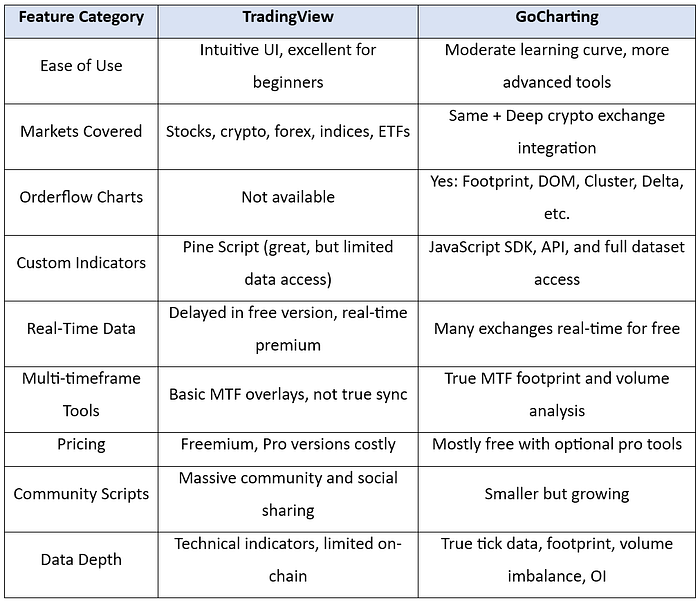
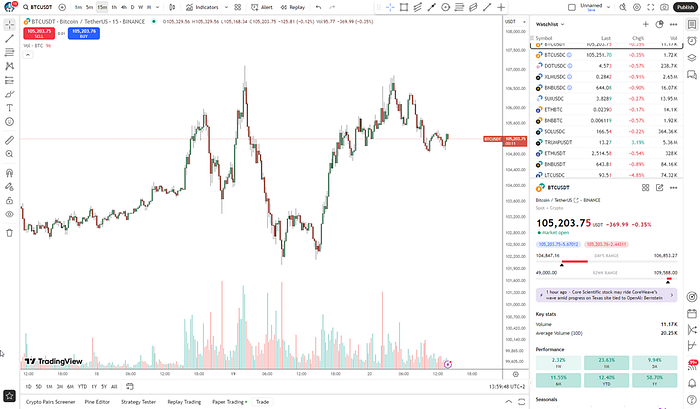
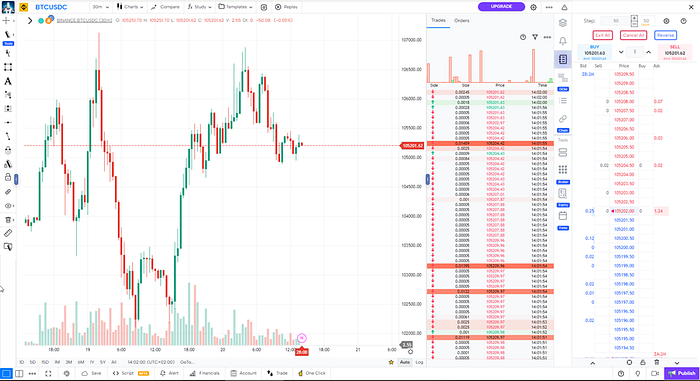
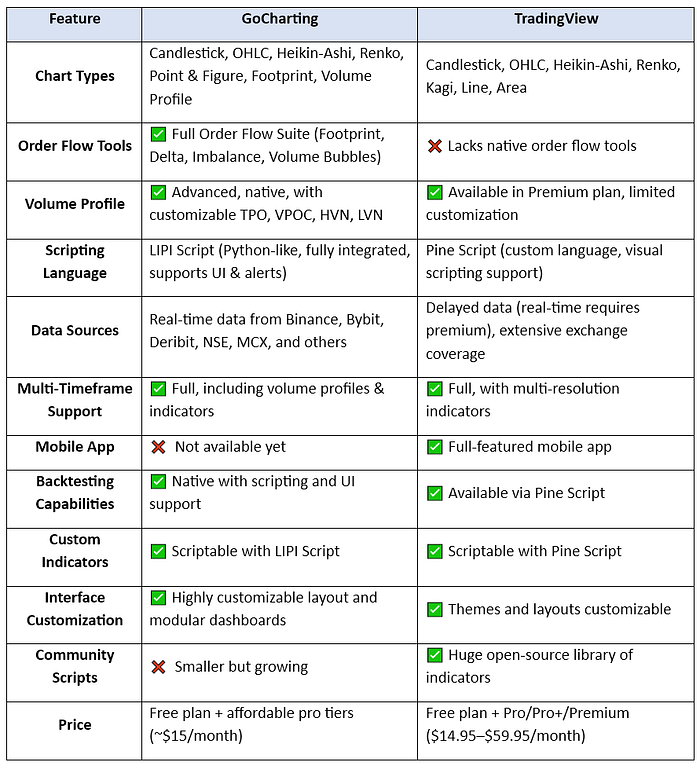
Feature Comparison
A quick side-by-side comparison of the most essential features for traders considering GoCharting or TradingView:
🎯 Where TradingView Shines
- Extremely user-friendly, mobile-friendly
- Huge public library of indicators
- Best for traditional TA (technical analysis)
- Great for sharing analysis and social features
TradingView is like the iPhone of charting tools: polished, clean, and widely supported.
🚀 Where GoCharting Excels
- Professional orderflow & volume tools (rare in retail platforms)
- Institutional-style analytics: Depth of Market (DOM), volume profile
- Works natively with crypto exchanges
- Great for scalping, intraday, and quantitative traders
For those coming from Sierra Chart or Quantower, GoCharting feels like a web-native upgrade with cleaner UI and crypto support.
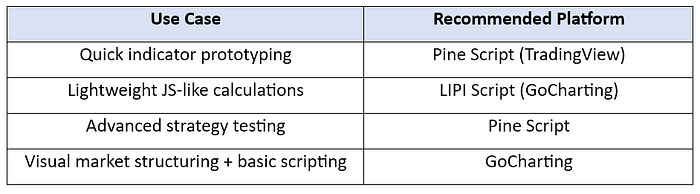
Use Case Examples
1. Crypto Day Trader (Scalping BTC/ETH)
- Preferred: GoCharting (for real-time DOM, footprint)
- TradingView lacks true orderflow tools.
2. Swing Trader in Stocks
- Preferred: TradingView (ease of watchlists, alerts, layouts)
- TradingView's layout saving and multi-chart setup is fast and user-friendly.
3. Quant Trader / Strategy Developer
- Preferred: GoCharting
- Integration with JavaScript & REST API enables dynamic custom indicators, advanced strategy prototyping.
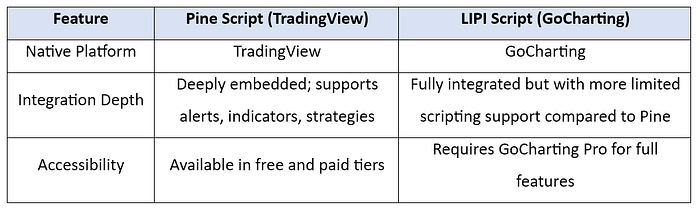
Comparative Analysis: LIPI Script (GoCharting) vs Pine Script (TradingView)
⚙️ 1. Platform Integration
📜 2. Language Design & Syntax
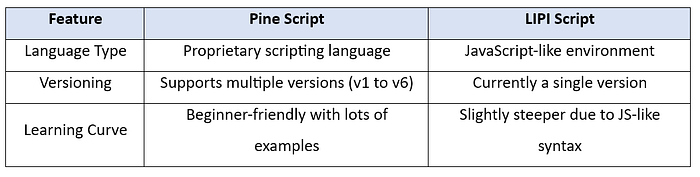
Observation: Pine Script is easier to pick up for beginners due to better documentation and community support.
🧩 3. Functionality & Features

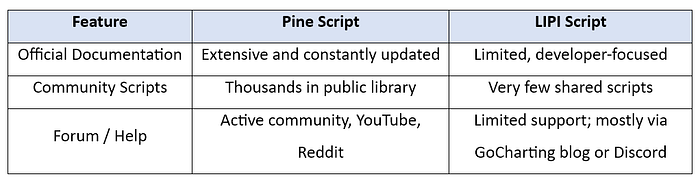
📚 4. Documentation & Community
💡 5. Use Cases
🔍 Note: If you're just starting, Pine Script offers a much smoother entry point due to community engagement and examples.
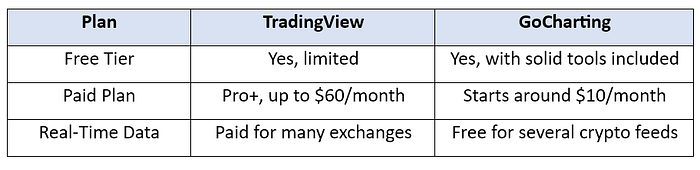
📦 Pricing Breakdown
💬 Final Thoughts
Both TradingView and GoCharting are excellent platforms, but your trading style determines which one will serve you better:
- Use TradingView if you care more about social features, clean layouts, classic TA, and multi-market watchlists.
- Use GoCharting if you want to dive into orderflow, real-time execution data, or build deep insights for crypto/futures.
Pine Script is currently the more mature and capable scripting platform for technical analysis, especially for traders who want robust backtesting, visual elements, and deep community support. LIPI Script, on the other hand, is lightweight and growing, ideal for simple custom indicators and working directly within GoCharting's advanced visual platform, but lacks many of Pine Script's advanced features.
📣 Do you have experience using LIPI Script or transitioning from Pine Script? Share your thoughts — what worked for you, and what didn't?