


Similar to a master woodworker, an experienced business analyst (BA) accumulates a rich set of practices, techniques, and tools, along with the wisdom to know which one to use when. Books like the IIBA's A Guide to the Business Analysis Body of Knowledge, Business Analysis Techniques: 123 Essential Tools for Success by James Cadle et al., and my own Software Requirements, 3rd Edition (with Joy Beatty) describe dozens of such tools.
This article describes six of those BA techniques I find especially valuable in many situations. They're also easy to explain to other stakeholders, which helps engage those people more actively in the business analysis process. Follow the links embedded below for more on each technique.
I'd love to hear what techniques you've found particularly effective in your BA practice. Please share your experiences through comments on this article.
Root Cause Analysis
The problem someone initially presents to a BA might not be the real problem, just a symptom. Alternatively, a stakeholder might present not a problem but a desired solution. The BA must assess whether it's a good solution and whether it's even addressing the right problem. Before you set about inventing a solution, do some root cause analysis to understand the problem.
Root cause analysis is a process of thinking backward, asking "why" several times until you get to fundamental issues you can target with solution ideas. This technique is especially valuable when a BA works with management to explore how to solve a business problem or achieve superior results. The first suggested cause might not be directly actionable, nor might it be the ultimate root cause. Therefore, addressing it won't solve the problem. You need to ask "why" a few more times to reach the tips of the analysis tree.
We can depict a root cause analysis using a fishbone diagram, like the partial example shown in Figure 1. Suppose the presented problem is that the company's products aren't meeting customer needs with their initial release. Begin by writing the problem statement on a long horizontal line:
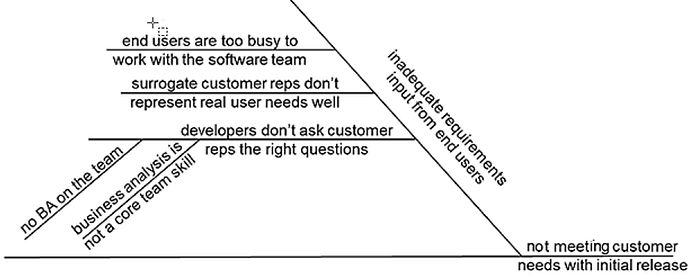
Now the retro-thinking begins with a group of appropriate stakeholders. Ask, "Why are we not meeting our customer needs?" Maybe someone says the team doesn't get adequate input on the requirements from end users. Write that cause on a diagonal line coming off the goal statement line. That's a start, but you need a deeper understanding. You ask, "Why not?"
Someone else says, "We've tried to talk to real users, but their managers say they're too busy to work with the software team." Another participant complains that surrogate customer representatives don't do a good job of presenting the actual users' needs. Write those second-level causes on horizontal lines coming off the parent problem's diagonal line.
Continue this layered analysis with one initial cause after another until the participants agree they understand why they're not achieving the goal now, what the real problem is, and what the actionable root causes are. Now you can begin conceiving solutions with confidence that you're on the right track.
Business Objectives Model
Once the team understands the problem, the next step is to describe what the key stakeholders expect the solution to accomplish: their business objectives. Those objectives should specify the desired business outcomes and identify measures that will indicate when they're achieved. Business objectives provide the guiding directives for all the work that follows and align all stakeholders to create an effective solution.
Defining business objectives lets you determine when a problem is solved, a need is fulfilled, or an opportunity is exploited. They drive the creation of the solution concept, which leads to requirements elicitation activities to define the solution's specific features, characteristics, scope, and priorities.
A business objectives model visually links business problems to business objectives, their associated success metrics, and the resultant solution concept. Figure 2 illustrates a partial business objectives model for a restaurant online ordering system designed to supplement the restaurant's current approach of taking orders over the phone.
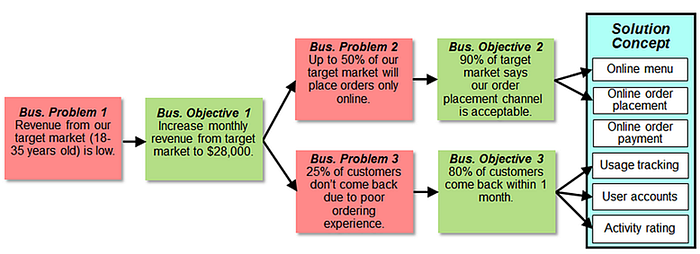
Modeling is particularly valuable when you have interwoven business problems and objectives. One problem leads to an objective, which leads to a more detailed problem, which leads to another objective, and so on. Without this kind of analysis, you can't be sure a proposed solution will achieve the desired results.
Product Champions
Product development initiatives have many stakeholders. Some stakeholders are customers, and some customers are users. Most products have multiple user classes with largely different needs. It's not realistic to expect any one individual to understand the needs of all these user classes and balance their interests appropriately.
The product champion approach is an effective technique for engaging representative customers to ensure the development team addresses their diverse requirements and constraints. A product champion serves as the key user representative for a particular user class. In this model, the flow of requirements information involves one or more product champions working with one or more BAs:
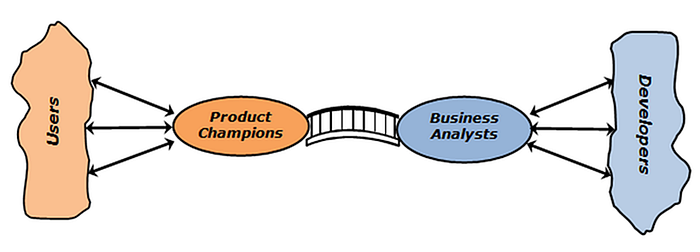
As a start, look for one product champion per major user class. Some individuals might belong to multiple user classes and could indeed present the needs of all those groups. In other situations, a large user class might need to be divided into subclasses, each of which must be represented in requirements discussions.
Product champions present the needs and constraints of their user class. They work with the BA to establish priorities and resolve conflicts that arise among the requirements from multiple user classes. They might also contribute to developing and performing tests that reflect real-life usage scenarios. I can't recommend the product champion approach too strongly.
Use Cases
Once you've identified some key users, you need to engage them on requirements elicitation. Elicitation can focus either on product features or on anticipated product usage. I highly recommend the latter. Use cases are an excellent technique for discovering what people will need to do with the product and how they envision their interactions with it. I think use cases are the BA's best friend.
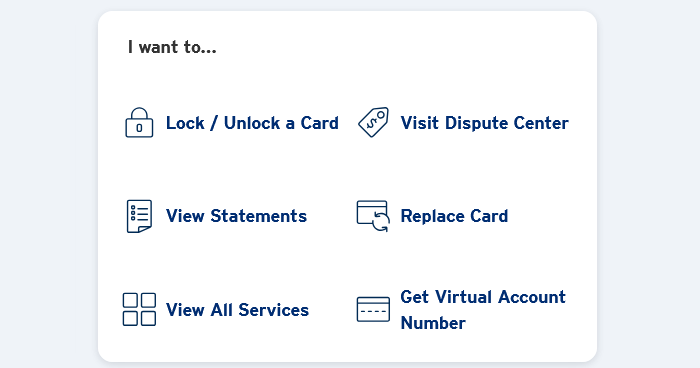
Each time a user interacts with a product, they have an intent in mind, something they wish to accomplish: a goal or a task. Each of those is a use case. When a requirements elicitation participant says "I want to [do something]," the [do something] is probably a use case. This screenshot from the website of the bank that issued my credit card shows several common credit card use cases in that form:
A use case consists of three major components:
- A description of the normal or most common sequence of steps: the basic flow
- Variations on the basic flow, called alternative flows
- Exceptions that could potentially prevent the user from achieving their goal
By focusing elicitation on what users need to do with the solution, the BA can then derive the solution's needed functionality. Identifying alternative and exception flows helps the BA and product champions prioritize the functionality, which feeds into iteration and release planning. Use cases also lead logically to creating test cases.
This usage-centric perspective reduces the chance of missing necessary functionality. It also makes it less likely that the team will waste time implementing features that go unused because they don't contribute to performing known user tasks. If I were a new BA just beginning to build up a tool kit of useful practices, use cases would be the first thing I'd put in there.
Dialog Maps
I'm a big fan of analysis modeling, drawing diagrams to visually represent aspects of a software system and its requirements. Business analysts can choose among many models to depict various aspects of a problem or a proposed solution, including processes, data, and states. My favorite model is the dialog map, which is an efficient way to represent, validate, and improve how a user can navigate through a user interface.
The dialog map uses the simple concepts and notations of a state-transition diagram. Figure 4 shows a partial dialog map for a tracking system to manage the inventories of chemicals in a company's research labs. It shows various paths the user might follow while creating a request to order new chemicals. The rectangles show dialog elements such as menus, screens, pages, and dialog boxes — anywhere the user can interact with the system. The arrows show possible navigation pathways between those dialog elements, along with the action that initiates each navigation.
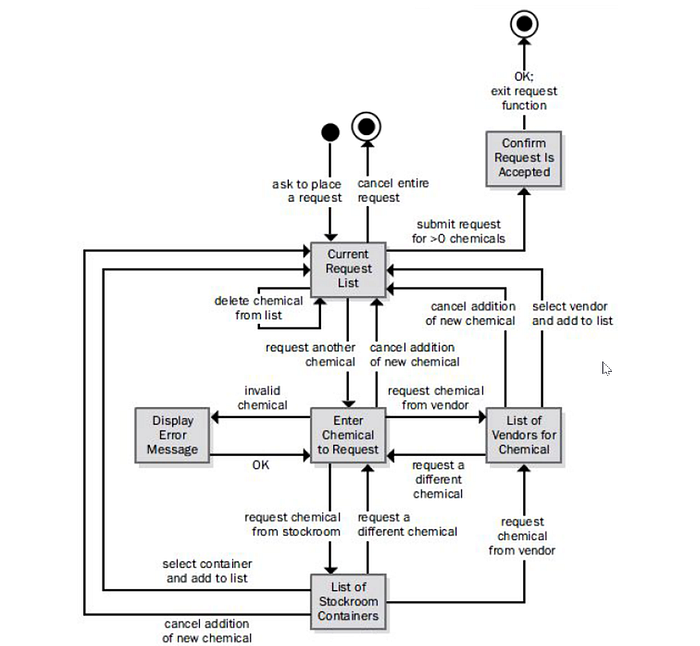
A dialog map depicts the architecture of a user interface, not the display details. A dialog map can reveal many problems, such as these:
- Navigation dead ends, where the user isn't sure what to do next
- Activities that require too many displays or user actions and could perhaps be simplified
- Places where the user cannot back out of an operation after beginning it
- Missing functionality, such as the need to confirm a risky action before performing it
- Places where error situations aren't handled sensibly or at all
- Duplications that reveal opportunities for reusing dialog elements
A dialog map helps the project participants reach a common understanding of the system's intended behavior and design a superior user experience before the UX experts get into detailed screen design.
Decision Tables
Many systems involve multivariable decision-making in which certain combinations of values for multiple factors determine a product's behavior. Business rules are a common source of such complex logic. It's easy to overlook a particular combination when analyzing requirements, or to miss the fact that more than one combination should lead to the same action. A decision table is an effective tool for concisely structuring that knowledge and the resultant outcomes.
A decision table lists the possible values for all the factors and indicates the expected system actions in response to each combination of them. These factors can be shown as statements with possible answers of true or false, as questions with possible answers of yes or no, or as conditions that can have two or more possible values.
Let's return to the chemical tracking system I mentioned earlier. Whether or not the system should accept a request for a new chemical from a particular user depends on four factors:
- Whether the requester is authorized to request chemicals.
- Whether the chemical is available in the company's stockroom or from a vendor.
- Whether the chemical is on the list of hazardous chemicals that require training in safe handling.
- Whether the requester has been trained in handling this type of hazardous chemical.
If you tried to write out all the logic combinations of these four factors as functional requirements in natural language, it would quickly become bulky and convoluted. It would be easy to miss one of the combinations or to include combinations that are not logically sensible.
Figure 5 depicts these logic combinations in a decision table. This table makes it clear whether the system should accept or reject each request. The four binary (yes/no) conditions could theoretically lead to sixteen possible outcomes, but only five are uniquely actionable. A decision table like this one facilitates documenting, analyzing, and communicating complex knowledge efficiently among developers, testers, users, and other stakeholders.

Pick a Tool, Any Tool
So, there are my favorite techniques for business analysis and requirements exploration. Of course, there are dozens of others with which a BA should become comfortable. If I'm heading to a client site, though, I'll be sure to have these six tools in my briefcase.
Karl Wiegers is the Principal Consultant at Process Impact. He's the author of numerous books, including Software Requirements (with Joy Beatty), Software Requirements Essentials (with Candase Hokanson), Software Development Pearls, The Thoughtless Design of Everyday Things, and Successful Business Analysis Consulting.