


On November 16, 2022, Google released the fifteenth major version of its Angular framework.
Just like many members of the community, I feel very excited about the great improvements it brought to the ecosystem.
In this post, I'll dig deeper into the new features and dozens of refinements and break down what they mean for the Angular landscape and how they improve the developer experience and web performance.
But before we get started, I'll explain some accompanying jargon.
Table of Contents

Lingo
   ∘ Function composition
   ∘ HMR
   ∘ @keyframes
   ∘ Lazy loading
   ∘ Stack trace
   ∘ Tree shaking

New Features

   1. Directive Composition API
   2. Stable Standalone APIs
   3. Tree-shakable Router API
   4. HTTP with provideHttpClient
   5. Functional Router Guard
   6. Dynamic Router Outlet Names
   7. Easy Lazy Loading
   8. Stable Image Directive
   9. Better stack traces
   10. Mistyped banana in the Box
   11. Component-Scoped keyframes
   12. Compatibility for MDC Components
   13. CDK Listbox

Additional Improvements

   ∘ Ivy Landmark / Better Performance
   ∘ Angular DevTools
   ∘ Angular CLI
   ∘ More utility in forms package
   ∘ Deprecated Protractor
   ∘ Improvements in the esbuild support

Final Thought
Lingo
Function composition
When we pass the result of one function to the next function and then the result of this one to another until we get a final result from the final executed function, we call this process in JavaScript function composition.
// Instead of passing the result of one function to another this way:

func1(func2(func3(15)))

// You can define a compose function (if you're not using a library like lodash or ramda)

const compose = (…fns) => x => fns.reduceRight((y, f) => f(y), x)

compose(func1, func2, func3)(15)
HMR
While an application runs on the browser, we can add, remove, or exchange modules without a full reload. We call this process Hot Module Replacement (HMR).
- It saves valuable development time because it instantly updates only what's changed in the app when the source code changes.
- Unlike a full reload, HMR keeps the application state and can significantly speed up development.
@keyframes
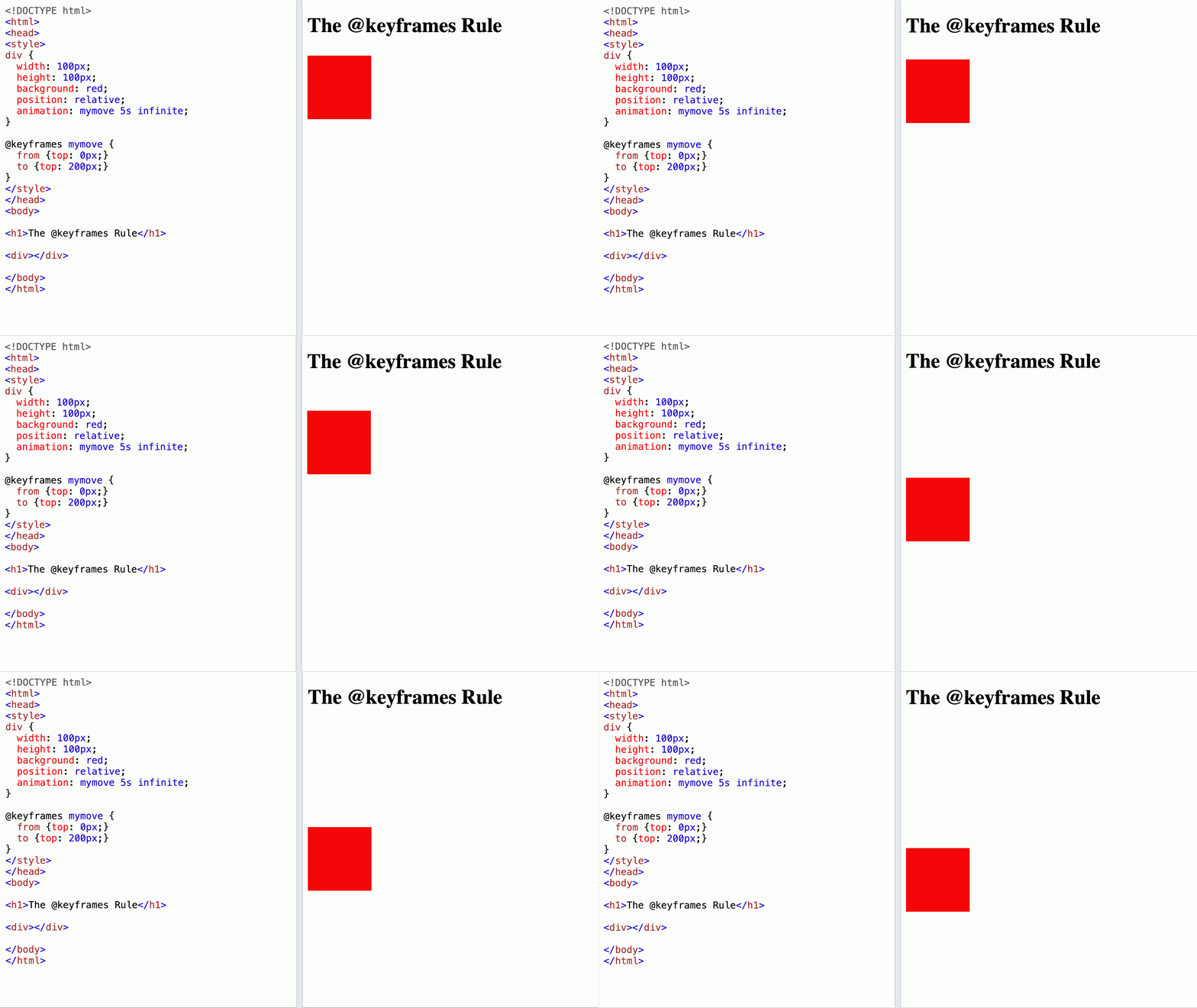
The @keyframes at-rule in CSS specifies the intermediate steps of an animation that gradually changes from one set of styles to another.
We use the keywords "from" and "to" or 0% and 100% to determine this change. Here is an example:
Lazy Loading
To improve the performance and usage of system resources, we delay the initialization or loading of the modules and objects until they are required by the application. We call this design pattern lazy loading.
Stack trace
The stack and the heap represent the two places where memory is dynamically allocated to a program while running.
The stack trace is the report of the execution stacks at a certain point in time during the execution of a program.
Developers commonly use stack traces during interactive or post-mortem debugging sessions.
Tree shaking
Tree shaking in JavaScript is the process of eliminating dead code. The result would be a minimal bundle size.
By checking the import and export statements, module bundlers like webpack and Rollup automatically remove the code that is not used by your application.
New Features
1. Directive Composition API
Directive Composition is a feature request on GitHub that has been in demand for six years before being implemented in Angular 15.
Minko Gechev, Google developer relations lead and an engineer on the Angular team, described it as a new way to compose UI logic because it allows code reuse beyond classic inheritance.
Similar to function composition in JavaScript, directive composition supports combining individual directives, in components and other directives, into a more complex one by leveraging the hostDirectives property:
In the above example, we're using the HasColor directive and specified inputs and outputs from CdkMenu.
Remember that only standalone directives can be used for composition.
2. Stable Standalone APIs
Standalone components and APIs are one remarkable feature introduced in Angular 14. They make application building easier without NgModule. With this new release, the API becomes stable and is no more in Developer Preview status.
3. Tree-shakable Router API
The Router standalone API with the provideRouter() function added in Angular 14.2 has as well a stable status now.
const appRoutes: Routes = [];
bootstrapApplication(AppComponent,
  {
    providers: [
      provideRouter(appRoutes,
        withDebugTracing(),
        withRouterConfig({paramsInheritanceStrategy: 'always'}))
    ]
  }
);
The Router standalone API allows tree shaking, which leads to the elimination of superfluous code. When the bundlers remove the unneeded code during the build, we get about 11 percent leaner router implementation.
4. HTTP with provideHttpClient
Just like using the provideRouter() function in the Router API, in the new world of Angular 15, we can use provideHttpClient() to provide the HttpClientin an app where modules are optional.
The same logic applies to HTTP interceptors. We can define them as functions by using withInterceptors():
bootstrapApplication(AppComponent, {
  providers: [provideHttpClient(withInterceptors([authInterceptor()]))]
});
Or by using withInterceptorsFromDi() to register a class-based interceptor:
bootstrapApplication(AppComponent, {
  providers: [provideHttpClient(withInterceptorsFromDi([AuthInterceptor]))]
});
5. Functional Router Guard
In addition to the Tree Shakeable Router API, Angular 15 brings other innovations to reduce the boilerplate code. The new Functional Router Guards offer a leaner approach to implementing guards directly in the declaration, as we can see in the following example:
With the traditional approach, we implement an AuthGuard and inject an AuthService in it to check if the user is authenticated or not in the canActivate() method:
// The traditional approach: Implement AuthGuard and inject AuthService in it
@Injectable({ providedIn: 'root' })
export class AuthGuard implements CanActivate {
  constructor(private authService: AuthService) {}

  canActivate() {
    return this.authService.isAuthenticated();
  }
}

const route = {
  path: 'dashboard',
  canActivate: [AuthGuard]
};
With Functional Router Guards, we can get rid of all the boilerplate code and inject the AuthService and call its isAuthenticated() method in the declaration of our route:
const route = {
  path: 'dashboard',
  canActivate: [() => inject(AuthService).isAuthenticated()]
};
6. Dynamic Router Outlet Names
We can set the router outlet name dynamically now in Angular 15.
For example, we can bind it to a variable from a for loop, which was impossible in the past. This is a game changer that allows us to write robust elastic components. So this is how you're going to write it within a loop:
You can pass the outlet as an input parameter.
7. Easy Lazy Loading
Previously, when you lazy load your components or their children in the routing module, you must select what to load by following the lazy loading syntax, which is a bit complex.
I personally have never memorized it. Each time I need to use it, I copy/paste it from another module or project and adjust it:
The new syntax in Angular 15, called router unwraps default imports, is much easier. If you are, just like me, a fan of writing less boilerplate code, you'll love it.
All you need to do is to use export default to specify what component should be loaded per default. Then you can get rid of the .then(..) operation:
8. Stable Image Directive
The image directive NgOptimizedImage, added to the framework with Angular 14.2, is now stable in the current release. It optimizes the web performance and the Core Web Vitals scores — Land's End, for example, has witnessed a 75% improvement in its Largest Contentful Paint (LCP) after using this directive.
Angular 15 also offers the following:
- An improvement in images warnings
- A reduced download time thanks to an automatic generation of
srcsetdirective - An experimental fill mode: It lets an image fill its parent container when its dimensions are not specified
9. Better Stack Traces
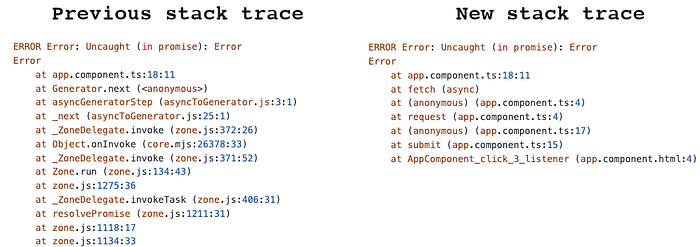
With the new async stack tagging API developed in collaboration with the Chrome DevTools team, we now have no more zone.js crap in stack traces and a better debugging experience.
10. Mistyped Banana in the Box
"banana in a box" is a term that describes the syntax of two ways binding in an Angular template. You have probably seen it multiple times when using ngModel:
Sometimes developers write the parenthesis (the banana) and the square bracket (the box) not in the correct order by putting parentheses outside of the box ([]), which leads to a lot of errors.
The fix in the new Angular version will report such issues and offer a fix through language service. Depending on your IDE, you may or may not need to install @angular/language-service on your project and add it to your package.json. WebStorm, for example, does not require it anymore since its version 2019.1:
npm install --save-dev @angular/language-service11. Component-Scoped Keyframes
For a long time, there was a problem with the CSS keyframes in Angular.
Although the framework provides an Emulated viewEncapsulation that prevents naming collisions of the stylesheet, CSS @keyframes animations were not locked down to the attribute-selector of a component. They remained available globally, and as a result, they leaked or overlapped with other keyframes with the same name. Here is a demo for such a case by Ben Nadel:
In Angular 15, if you have the same keyframes names in multiple places in your app, they will not collide across component definitions and rendering since they are now component scoped.
The Angular team tackled this issue which has been running for years, by pretending the keyframes name with the host component selector.
This change can break your code if you're relying on a global aspect of keyframes. In such a case, you need to move them into your global stylesheet.
12. Compatibility for MDC Components
To offer a better alignment to the Material Design specification and adopt Material 3 component styles, the Angular team has refactored the Angular material components based on Material Design Components for Web (MDC).
You may notice an update in the styles and DOM structures of many of these components and that some are rewritten from scratch. So you probably need to adjust your project when migrating to Angular 15.
13. CDK Listbox
In Angular 15, the Component Dev Kit (CDK) package came with a @angular/cdk/listbox module that is based on the WAI ARIA listbox pattern:
This new CDK module helps to create custom listbox interactions thanks to the directives it provides. It offers accessibility (A11y) features like bidi layout support, keyboard interaction, and focus management.
Additional Improvements
With Angular 15, we also have the following changes:
- Ivy Landmark / Better Performance: The latest version of Angular offers a comfortable build, and rebuilding HMR is easier to enable.
- Better stack traces:
- Angular DevTools offers now a preview of dependency injection debugging.
- Angular CLI: when you're creating a new Angular workspace with
ng new myAppName, you'll get a simplified output and fewer generated files. - The forms package has more utility functions.
- Deprecated Protractor: Based on community feedback, the Angular team announced Protractor, the e2e testing framework, as deprecated, and it will reach end-of-life in the summer of 2023. Alternative end-to-end testing solutions that you can use for your Angular project include Cypress, Nightwatch, and WebdriverIO.
- The new release has improved the experimental esbuild support, which was introduced in Angular 14. To try esbuild, you need to update your builder in
angular.jsonas below:
"builder": "@angular-devkit/build-angular:browser-esbuild"Final Thought
Angular has suffered from performance problems compared to lightweight libraries like React. But after removing the legacy compiler and rendering engine and replacing it with Ivy, the Angular team and community contributors have implemented new improvements, which will make Angular ultra-fast.
As you can see, there are a lot of changes in the framework version 15. If you haven't yet got your feet wet in it, I hope you got some insights from this post and feel more ready to use it in your projects.
You can check the Angular blog or Angular 15 Changelog on GitHub for more details.
The following article could help you in your migration process: Upgrading to Angular 15: Our Experience and Lessons Learned.
Want more?

I write about engineering, technology, and leadership
for a community of smart, curious people.

Join my free email newsletter for exclusive access.