

We already know that AI is going to be a part of the future in many ways. I have already written about some of the ways I think AI will impact productivity apps. But there was one I did not mention because there are not many applications doing it currently. There is actually just one I have been able to find. This application is called Lifestack, and it does something I have not seen in other productivity apps. It uses information from your wearable to help you determine when you should do your tasks. It is a daily planner with task management abilities, and it uses AI together with the information you provide to help you determine when your tasks should be done. I think this is a really interesting way of incorporating AI, and I think in the future, this is something more and more applications will add, and I also think this might be the future of daily planner apps. This application is more about mindful productivity rather than just doing as much as possible. That is another thing I think we'll see more of in the future: more mindful productivity apps. But that is for another post.
Lifestack Features
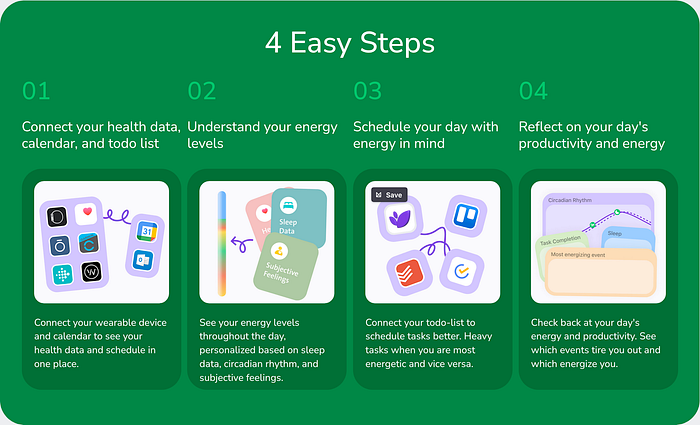
To use this application or to get benefits from it, you need some sort of wearable to track things like your stress, exercise, and sleep. I used my Apple Watch. It does not have stress tracking, but I found that with the sleep tracking, the app worked well. It has quite a few integrations like Apple Health, Garmin, Fitbit, Oura, Whoop, Google Fit, Eight Sleep, and Ultra Human, to mention some. So there are plenty of them you can choose from. They also integrate with a few to-do list applications so you can consolidate your tasks into Lifestack and schedule them to your calendar. Currently, they are supporting Trello, Todoist, TickTick, and Notion is coming soon according to their website. This is a feature I expect in a daily planner app; in addition to having the ability to add tasks right into the app, I think that daily planner apps should be integrated with other task management apps, especially the popular ones like Todoist and TickTick. So it is great that Lifestack does that.
The way the daily planner functionality works is that you get a Kanban board that shows you your whole week, and you can drag the cards that are your tasks around. You can also drag your cards onto your calendar to do calendar blocking. On the calendar, you can see a colored bar. That is the selling point of this application. That bar on the side of your calendar shows you your energy levels during the day. Green means that you have a lot of energy, so you might want to add your high-intensity tasks there. For me, that would mean that my design tasks are all added into the green times, while things like answering messages or emails will be done during the red times since those are less energy-consuming. The way the application decides what times are green and red is by using your sleep tracking from your wearable, your stress levels, and subjective feelings which you provide to the app. That is why I think you need a wearable to use this application to its full potential.
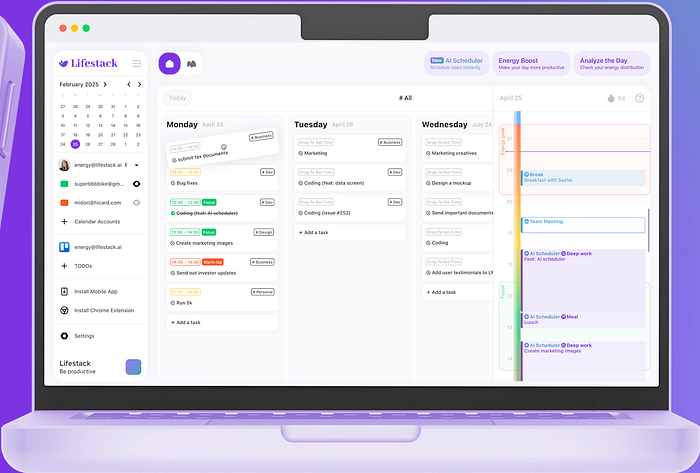
The application does more than that as well. The app has something called AI scheduler, which I have seen more and more applications add. The way this works is that the app, based on your energy and preferences, does all of the planning for you. This is probably the dream of all task management and daily planner apps. AI is getting much better at doing it as well, so I do not think that we are far away from AI being able to do task planning perfectly, and then this will be a great feature to have. I still think Lifestack does this well, but there is some work that needs to be done before it is completely perfect.

Lifestack also offers something they call energy boosts. This is a feature where Lifestack will, based on your schedule, suggest activities that can boost your energy in certain time slots, like a coffee break, meditation, or you can add your custom ones if you have activities that you know give you a lot of energy. It also has widgets for iOS, and you can import your meals. The design of Lifestack is also fun and colorful, which I like for a daily planner that is supposed to help me be more mindful. I also like the fact that it is really easy to use. You don't want a daily planner app with a huge learning curve. This app is basically just plug and play. You connect your calendar, wearable, and task management tool if you have one, and you are good to go. Lifestack is intuitive and easy to learn, which is something I like a lot for an application like this.
Pricing and Final Thoughts
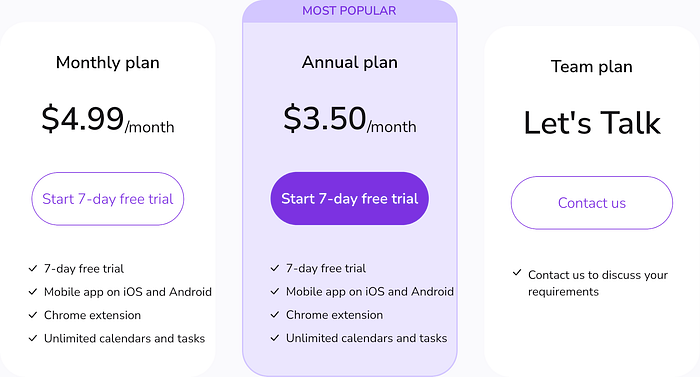
Lifestack has a really simple pricing plan. You have two choices: you can either pay monthly or yearly, and both of them are really cheap. When I say really cheap, I mean like too cheap to be true. They have changed their pricing a little. When I first tested the application, it was a little more expensive. Currently, the monthly plan is 4.99 USD, and the yearly is 3.50 USD. Both of them are really cheap for daily planner apps and even cheaper if you consider that this is an AI application, but prices might change.
I think this is a really interesting application for a cheap price. With that being said, I know that there are some privacy concerns with applications like this. I just have to mention here that since I already have a wearable and I am giving away all of my information for free so that companies can advertise to me, I don't find giving my information away to another company as big of an issue. Jokes aside though, there are some privacy concerns you should keep in mind. Lifestack uses a third-party API to connect to your wearable called Terra. Terra ensures that the data is end-to-end encrypted. In the Lifestack database, only metadata from your sleep is stored, but they are anonymized so they cannot be tied to a user. That is the basic part of how they handle their privacy, but they have their privacy policies on their website if you want to dive deep into it.
With the privacy concerns out of the way, I would just like to say that I am a big fan of Lifestack. I think it is a really good daily planner app, and with the price, I would consider it even if it did not have AI features. When you add AI features on top, I get even more excited about it. It is still early stage and things might not be perfect, but I am excited about an application that blends mindfulness and productivity into one. I think this can be the future of AI in daily planner apps, but we will just have to wait and see how it develops.