


If you're like me, you probably love the idea of staying organized — everything prim, proper, and neatly arranged.
Aaaand maybe you've tried every organization apps, hacks, and tricks out there.
Aaaand maybe they worked for a while… until you stopped being consistent. Slowly but surely, everything went from being neatly structured to total chaos.
Sound familiar?
Let's be real: blaming the system feels great:
"This app is trash!"
"It doesn't work"
"It takes to much time"
Then were off to the next shiny app or trend on the market to solve our problems.
Deep down, though, we know the problem isn't the system — it's staying committed to it.
It's completely understandable though. Life gets busy, deadlines pile up, and suddenly, you don't have the time or energy for something complicated or time-consuming.
Who wants to commit to something that feels like a second job!
What we really need is a solution that's simple, intuitive, and effortless — something that doesn't require a ton of setup, learning, or commitment
I came across something that will solve all these problems
The best part? It's free. Who doesn't love free stuff?
How To Use Trello
So let me take you step by step on how you can get started organizing your life today and how I've used it to stay organized this year.
1. Set Up Your Dashboard (Most important thing)
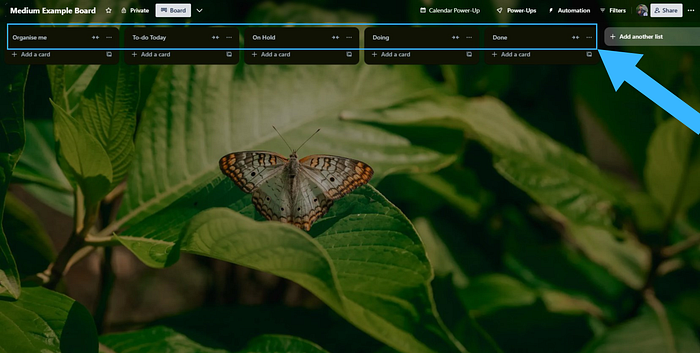
Start by creating columns (or "lists") to categorize your tasks. My setup includes:
- Organize Me: Just basically dump all the tasks I need to get done here
- To Do Today: Tasks I aim to tackle today.
- On Hold: Tasks requiring attention at a later stage.
- Doing: Tasks I'm actively working on.
- Done: The checkered flag to move my completed tasks to.
Here is an example:
2. Add Cards for Tasks
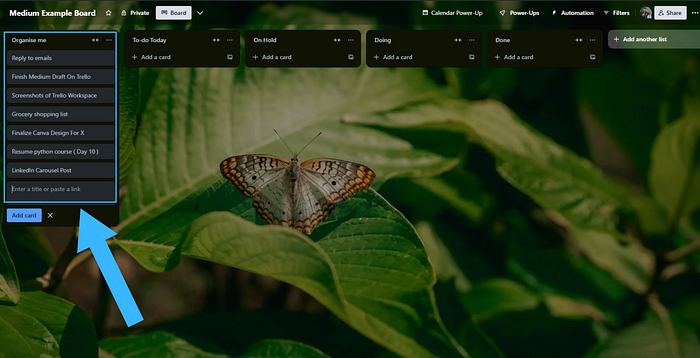
Every time a new task or idea pops up, create a card under the "Organize Me" column. For example:
- "Reply to emails."
- "Finish draft for Medium post."
- "Plan weekend grocery shopping."
3. Drag and Drop
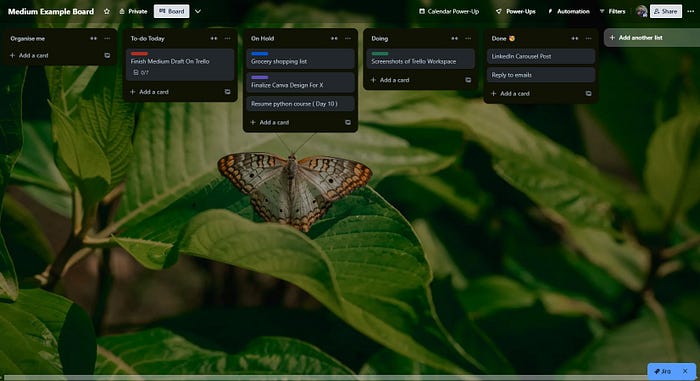
As you progress through your day, drag tasks (the cards you created earlier) into the appropriate columns to keep track of your progress.
For eg: What you're currently working on, and what you plan to tackle later ("To-Do Today," "On Hold," "Done," etc.)
When you finish a task, move it to the "Done" column — it's surprisingly satisfying!
The Best Parts
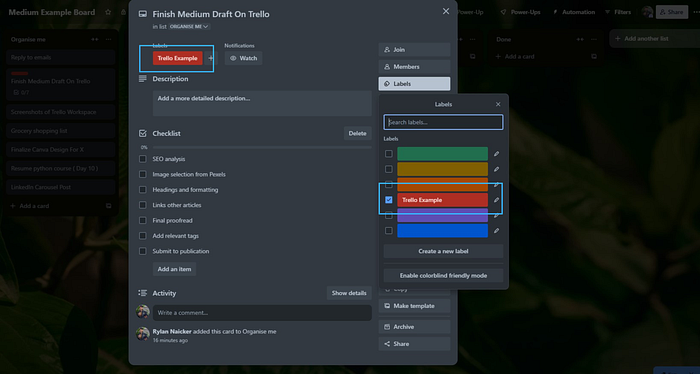
Color Coding:
- You can assign colors to tasks for easy categorization by just clicking on the card you have created
Detailed Cards:
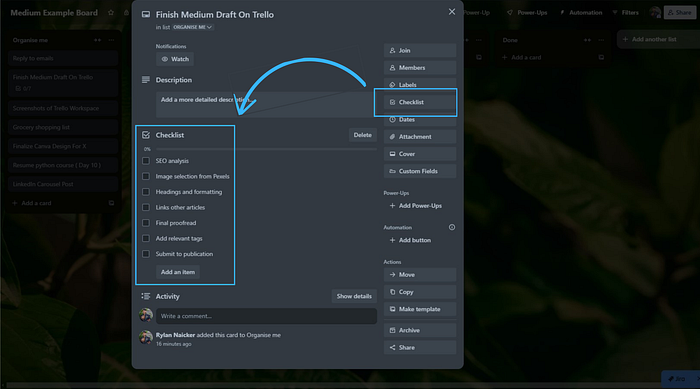
- These are most useful! You can enhance each task with descriptions, checklists, and attachments.
- For example, I used a checklists to break larger tasks into smaller, actionable steps for this post.
- I tick the boxes off as I go.
Reminders and Deadlines:
- You can also add due dates to cards and synch it to your google calendar so nothing slips through the cracks.
My Daily Routine with Trello
I found the app/online version didn't work as well for me, so Ill save you the trouble… But the the Desktop version? A total game-changer.
Here's how I incorporate it into my day.
1 ) Morning:
- Review the "Organize Me" column and sort tasks into "To Do Today," "On Hold," or "Doing and "Done" etc.
- Set priorities for the day by arranging the tasks and color coding them in order of importance.
2. ) Throughout the Day:
- I use the Pomodoro Technique to stay focused and complete tasks efficiently. It's the method I find most effective for boosting productivity. Check out my post for more details on how to use it.
- I apply this technique specifically to tackle tasks in the "Doing" column, helping me stay on track and make steady progress.
3. Throughout the Day:
- Drag completed tasks into the "Done" coulomb when completed 💪
4. Evening: Most crucial step
- Clean up the board, updating it with any new tasks or changes.
- Celebrate your wins by glancing at the "Done" column.
The most important thing is to spend at least 15 minutes at the end of the day clearing up your workspace, updating your cards, and setting everything in order for tomorrow — because it'll be the first thing you see when you start your day.
THIS STEP IS CRUCIUL: The reason people fail is because of skipping this . It will lead to falling of the wagon and destroying the structure you spent so much time and effort building.
The Key to Success: Commitment
Trello (or any organization tool) only works if you actually use it. Be strict with yourself by doing the following:
- Update your board regularly and as you progress through tasks.
- Keep it tidy.
- Set aside a few minutes at the end of the day to review it and set yourself up in a good position to tackle the the next days task.
I even convinced a few family members — busy CEOs and managers — to try it. Watching them move from chaos to clarity felt like introducing fire to the Stone Age.
Ready to Try Trello?
I wish this was an affiliate link 🤣 I am doing such a good job advertising for them. But no.
I just want to spread the love to my medium community and help them be in the best position to tackle the oncoming year!
If you're ready to stop forgetting things and start feeling organized, give Trello a shot. Here's the link to get started: Trello.
Thanks for reading! I appreciate you all.
Stay tuned for more tips on improving your organization systems, boosting productivity, and structuring your life better!