
Background
We have discussed the overall solution approach and implemented the CI pipelines. The update stage was the last stage in the CI pipelines. In this post, we will start from there.
Target Audience:
- Intermediate-level knowledge of Kubernetes (Services, Deployments, Replicas)
- Basic understanding of cloud security groups (firewall) to allow ingress and egress traffic to a cluster
- Some knowledge of writing K8s manifest/configuration files
Result of a Successful Execution of a CI pipeline
- For the sake of discussion, I am posting the overall CI/CD pipelines again.
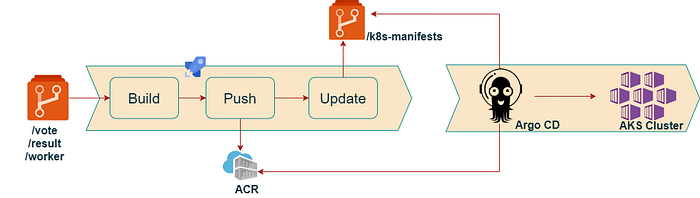
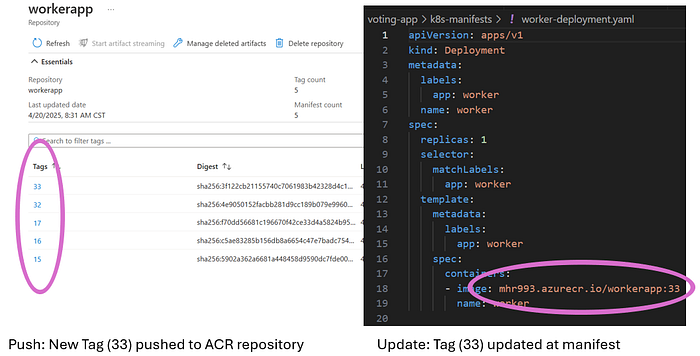
- The Push stage will push the new image as
image:tagto the ACR with a new tag, and the Update stage will update the tag in the manifest files. The following image shows the outcome of the CI pipeline for the worker app.
Invoking CD pipeline
To invoke the CD pipeline, we need to set up the K8S cluster, Argo CD, and deploy the voting app using K8S manifests with Argo CD, which will be discussed sequentially in this article.
Setup Kubernetes Cluster
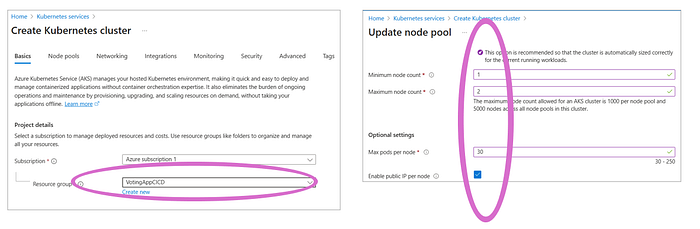
- Search for "Kubernetes Services" in the Azure portal and create one.
- Try to use a separate resource group so that you can delete it later.
- This project is a sample project, and there won't be much load. To save money, choose the minimum and maximum node count as 1 and 2, respectively, and allow 30 containers per node.
- We will use a NodePort Service to access the applications, so enable a public IP for each node (node refers to worker nodes in Kubernetes terms).
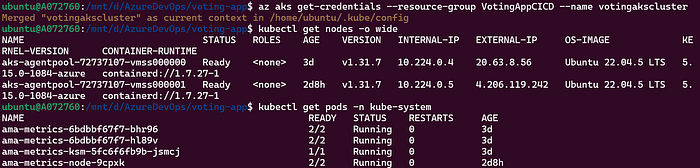
- After a successful deployment, you can check the K8s core services using the command-line tool from your own workstation. You can set up a VM in Azure and use it as the base station for the entire process. This is recommended for production applications, but for this project, we will do everything from our local workstation.
- Install the Azure client and kubectl utility on your laptop/VM using the official documentation. You can refer to https://www.youtube.com/watch?v=zsjnBNRgK9E ) and https://www.youtube.com/watch?v=05MNwC4XJBs for guidance.
- Type the following command to import credentials for the AKS cluster:
az aks get-credentials --resource-group VotingAppCICD --name votingakscluster - Also, check if the nodes and pods in the
kube-systemnamespace are running successfully.
Deploy Aargo CD
- The official documentation is straightforward for installation. You can check it here: https://argo-cd.readthedocs.io/en/stable/getting_started/. In this project, we will use the web GUI, so the ArgoCD CLI is not required separately. Just follow the "1. Install Argo CD" section to install it.
- After installation, you can check the resources in the
argocdnamespace.
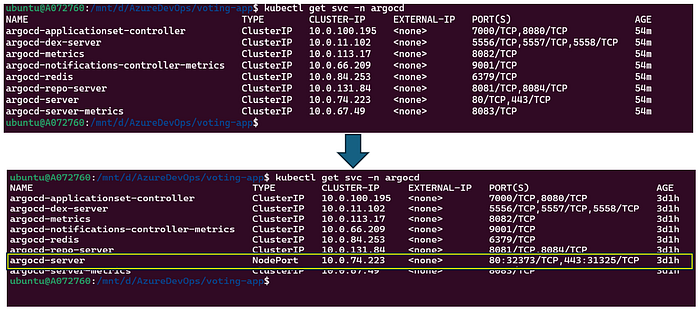
- Initially, the
argocd-serverservice was of typeClusterIP, which doesn't have access from outside the cluster. So, we changed it toNodePortby editing the manifest files. I used thekubectl edit svc argocd-server -n argocdcommand and changed the service type fromClusterIPtoNodePortas follows:

- Although the standard way to expose a service is by using an external load balancer, for this sample project, we will expose it using
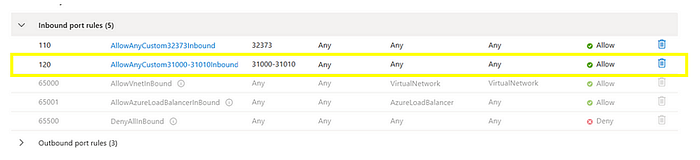
NodePort. We need to add an inbound rule to allow traffic from any IP and port to reach the cluster on port 32373.

- Now, by typing
nodeip:32373in the browser, we can access the ArgoCD web interface.
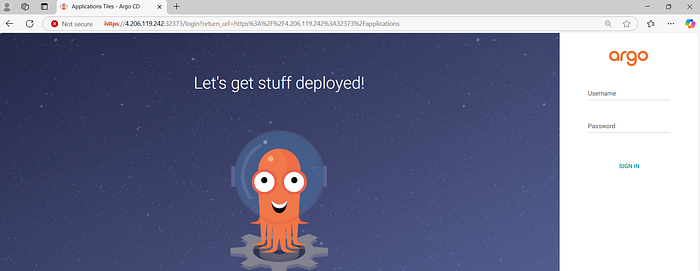
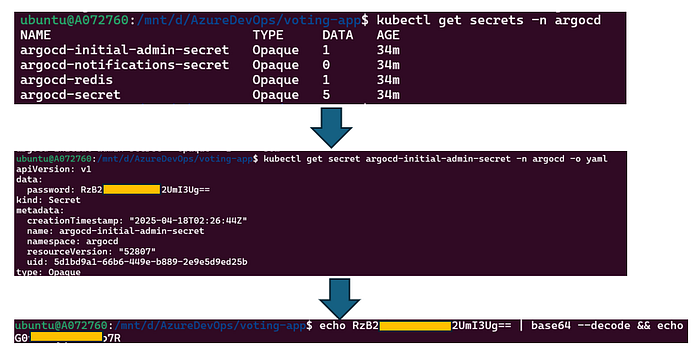
- The default username is
admin, and the default password is stored in a secret namedargocd-initial-admin-secret. To extract the raw password, follow the steps below. Note: Kubernetes secrets are base64 encoded, so we need to decode them
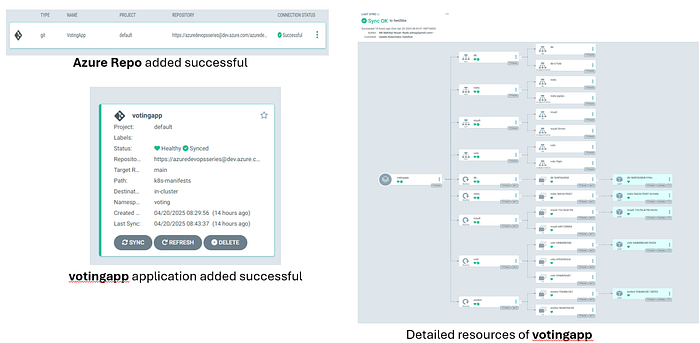
- Now we can login to the ArgoCD web interface using extracted password and admin user. We need to perform two tasks:
- Adding the Azure Repo to the ArgoCD from Settings option. You have to use PAT. You can follow step by by step guideline here https://argo-cd.readthedocs.io/en/stable/user-guide/private-repositories/
- Creating an votingapp using that added Repo pointing to the manifests directory ./k8s-manifests. You can check this video to get an idea https://www.youtube.com/watch?v=8AJlVQy6Cx0
- If you are successful up to this point, you can see following in your ArgoCD web interface
- We have kept everything related to the voting app in a separate namespace called "voting". We can view the resources using kubectl commands as well.
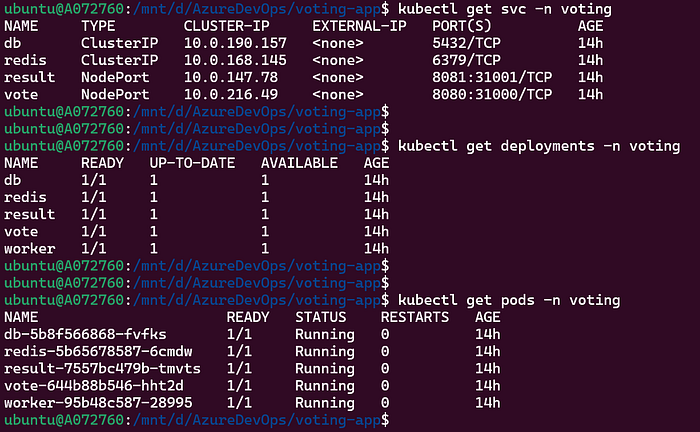
- The Result and Vote microservices are using NodePort, and we have allowed these ports in the ingress rule.
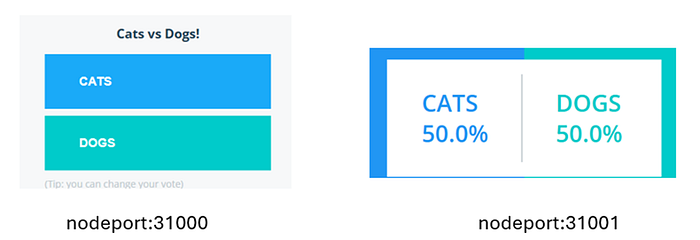
- Now, we can access the voting and result pages by browsing to
nodeip:31000andnodeip:31001, respectively.
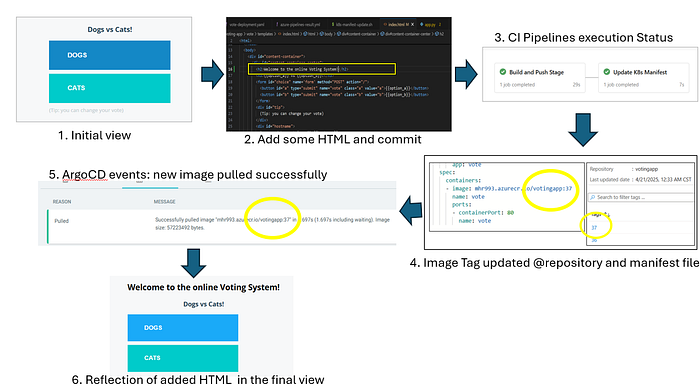
End to End Testing
Future Work
- Azure resources, such as Agent Pool, ACR, and AKS Cluster provisioning, will be automated using Terraform.
- Decouple CI/CD pipelines using ArgoCD Image Updater.
- Use of Ingress to expose services/applications.
Courtesy
- https://www.youtube.com/@Ciraltos
- https://www.youtube.com/@AbhishekVeeramalla
- https://www.youtube.com/@TechWorldwithNana
If you have any question
- You can comment in this article
- You can directly reach me at mahibul07hasan@gmail.com as well