
Jira, Agile, and DevOps: A Practical Walkthrough from Planning to Deployment
This week, In my DevOps Micro-Internship program, the hands-on projects involved local terminal code workspace (VSCode/Gitbash), github, AWS EC2, and a work through of a full Agile–Scrum workflow using Jira, not just clicking around a board but using it the way real DevOps teams do, from planning work to tracking progress, reporting delivery, and deploying a visible product increment.
If you're new to Jira, Agile, or DevOps, this post breaks everything down step by step, with clear definitions and real context.
First: How Agile, Scrum, and DevOps Fit Together
Before we get to the concept that is Jira, let's make sense of all related concepts first..
Agile
Agile is a way of working that focuses on:
- Delivering work in small pieces
- Adapting quickly to change
- Continuous improvement through feedback
Scrum
Scrum is a framework inside Agile. It structures work into:
- Short time-boxed iterations called sprints
- Clearly defined roles, tasks, and reviews
DevOps
DevOps connects development and operations. Its goal is:
- Faster, reliable delivery
- Continuous integration and deployment
- Visibility across planning, building, and releasing software
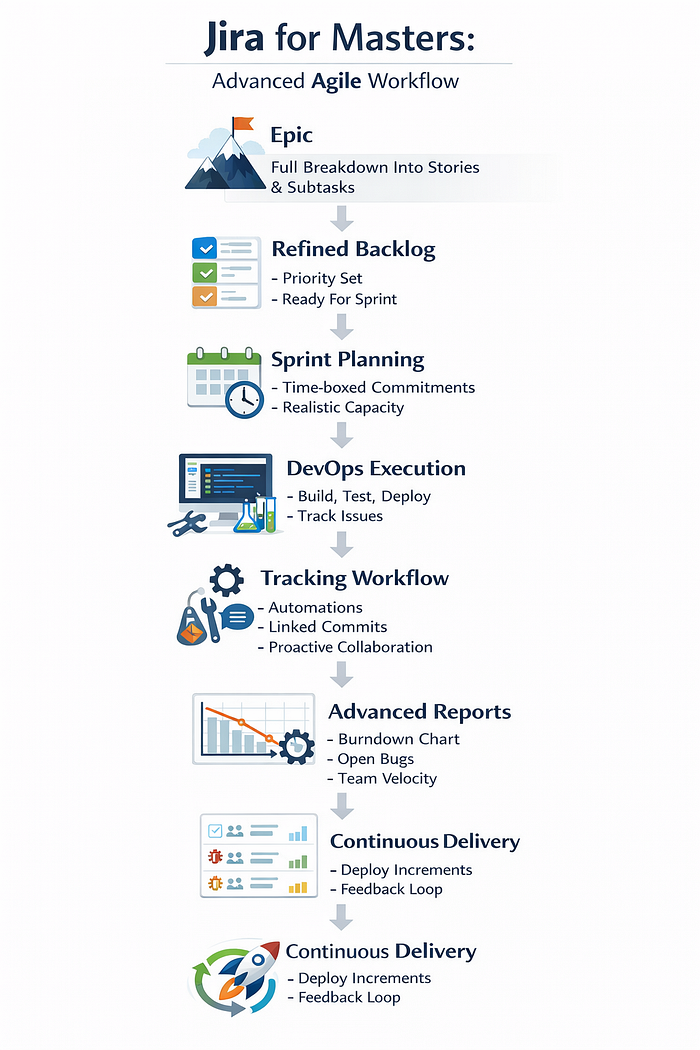
Jira sits at the intersection of Agile and DevOps. It tracks what is being built, why, by whom, and how far it has progressed — all before and after deployment.
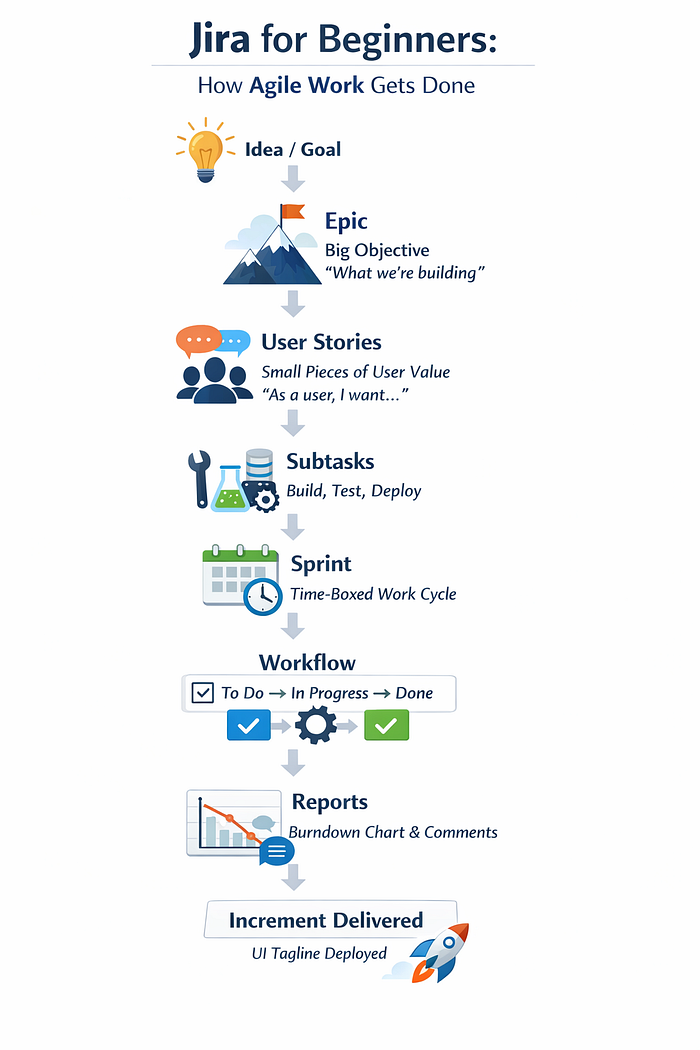
Step 1: Defining the Big Picture with Epics
What is an Epic?
An Epic is a large body of work that represents a major goal or feature.
In DevOps terms, an epic answers:
"What meaningful outcome are we delivering?"
Example:
- Improving a product's user interface
- Adding a new feature
- Enhancing performance or usability
Creating epics in Jira helped anchor all work to a business or user value, not just random tasks.
Step 2: Breaking Epics into User Stories
What is a User Story?
A user story describes work from the user's perspective.
Typical format:
As a user, I want X, so that Y.
In DevOps workflows, stories act as the bridge between planning and execution. They are small enough to be built, tested, and deployed within a sprint.
Each epic was broken into multiple stories that could realistically be delivered.
Step 3: Turning Stories into Subtasks (Real Work)
What is a Subtask?
Subtasks represent the actual actions required to complete a story.
This is where theory ends and real work begins.
Examples:
- Update UI text
- Modify configuration files
- Test changes
- Validate deployment
For DevOps teams, subtasks expose:
- Dependencies
- Effort distribution
- Bottlenecks early in the process
Step 4: Creating and Running a Sprint
What is a Sprint?
A sprint is a fixed time period (usually 1–2 weeks) where a team commits to completing selected work.
In Jira:
- Stories and subtasks are added to a sprint
- Work is locked in once the sprint starts
- Progress is tracked daily
Sprint planning forced realism:
- No overloading
- No vague tasks
- Clear ownership
This mirrors real DevOps environments where delivery timelines must align with deployment goals.
Step 5: Tracking Work Through Jira Workflow
Jira workflows visually represent task status:
- To Do — work not yet started
- In Progress — actively being worked on
- Done — completed and verified
This simple flow provided:
- Visibility across the team
- Immediate insight into blockers
- Clear signals when work stalled
In DevOps, visibility like this is critical, it prevents "invisible work" and last-minute surprises before deployment.
Step 6: Using Comments for Collaboration and Documentation
Each completed task included comments explaining:
- What was done
- Any challenges encountered
- Decisions made during execution
This transformed Jira into more than a tracker — it became lightweight documentation.
For DevOps teams, this matters because:
- Context is preserved
- Knowledge is shared
- Onboarding becomes easier
Step 7: Burndown Chart: Measuring Reality, Not Effort
What is a Burndown Chart?
A burndown chart shows:
- Remaining work vs time in a sprint
It answers one honest question:
"Are we on track to finish what we committed to?"
Flat lines revealed blockers. Sharp drops showed momentum. Deviations triggered reflection and adjustment.
In DevOps culture, this kind of feedback loop is essential for continuous improvement.
Step 8: Delivering an Increment — UI Tagline Deployment
Agile and DevOps both prioritize incremental and continous delivery.
As part of the sprint, we deployed a UI tagline update:
- Planned as a user story
- Executed through subtasks
- Tracked through Jira workflow
- Reflected in sprint reports
This demonstrated a key DevOps principle:
Every sprint should result in something usable, however small.
What Jira Taught Me About Agile and DevOps
Working hands-on revealed truths and strengthened so much for me which are:
- Planning quality determines delivery quality
- Small, clear tasks outperform big vague ones
- Visibility reduces risk
- Reporting exposes weak assumptions
- Deployment is smoother when work is traceable
Jira doesn't create discipline, it reveals it.
Final Thoughts
Jira is not "just a task board."
When used properly in an Agile–DevOps environment, it becomes:
- A planning framework
- A collaboration space
- A delivery tracker
- A feedback system
For beginners, Jira teaches structure. For DevOps practitioners, it enforces alignment between planning, execution, and deployment.
Agile may start with ideas but Jira is where delivery becomes real.