
Secure, Extendable, and Frontend-Ready — the Architecture Your App Deserves
🤔 Why This Isn't Another Blog Post
Most JWT auth tutorials teach you just enough to get hacked.
They stop at generating access tokens. No refresh logic. No revocation strategy. No deployment safety. No frontend.
This one? You'll walk away with a blueprint.
A fully working JWT auth system using .NET 8 Minimal APIs, built with:
✅ Secure login ✅ Access + refresh token generation ✅ Token blacklisting (so logout actually works) ✅ Role-based authorization ✅ Frontend-ready integration with React + Axios ✅ Dev/test/staging friendly setup with deployment notes ✅ GitHub Gist to clone, fork, or drop into your app
This isn't another "JWT 101" tutorial. This is the guide you'd ship to production — or send to your dev team on Slack.
🧰 What You'll Build — Feature Set
- 🔐
POST /loginwith secure token issuance - 🔁
POST /refreshwith rotating refresh tokens - ❌ Blacklisting revoked tokens (yes, logout works now)
- 🛡️ Role-based access with scoped policies
- 🧱 Minimal API project, layered for real-world scaling
- 🧪 Endpoint tests to catch regressions
- ⚛️ React + Axios integration for token handling
- 🚀 Deployment tips (Azure, secrets, Docker build)
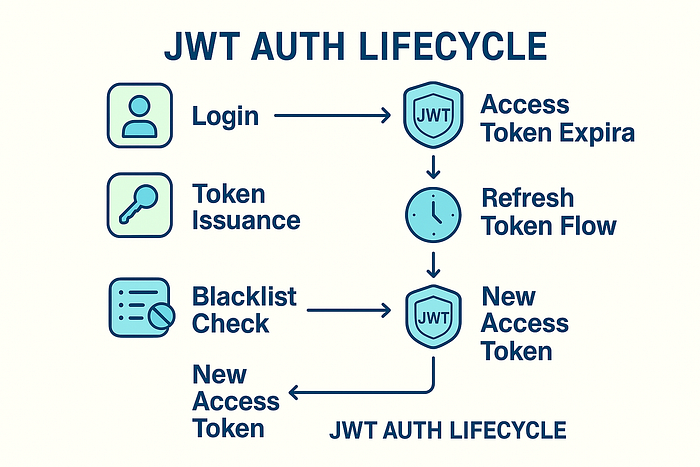
🔐 JWT + Refresh Token Logic
Secure Issuance, Rotation, and Real Expiry Management in .NET 8 Minimal APIs
In most tutorials, you get a JWT and move on. But in production, access tokens must expire quickly — and refresh tokens must be rotated, tracked, and revocable.
Let's build it right.
📦 Project Setup
Packages you'll need:
dotnet add package Microsoft.AspNetCore.Authentication.JwtBearer
dotnet add package Microsoft.EntityFrameworkCore.InMemory
🔧 In this walkthrough, we'll use EF Core In-Memory DB for the refresh token store — swappable later for PostgreSQL, Redis, or Cosmos DB.
🔧 In this walkthrough, we'll use EF Core In-Memory DB for the refresh token store — swappable later for PostgreSQL, Redis, or Cosmos DB.
🔐 Generate Access + Refresh Tokens
TokenService.cs — cleanly split responsibilities:
public class TokenService
{
    private readonly IConfiguration _config;
    private readonly IRefreshTokenStore _store;

    public TokenService(IConfiguration config, IRefreshTokenStore store)
    {
        _config = config;
        _store = store;
    }

    public async Task<AuthResult> GenerateTokensAsync(User user)
    {
        var accessToken = GenerateAccessToken(user);
        var refreshToken = GenerateSecureRefreshToken();

        await _store.SaveAsync(user.Id, refreshToken);

        return new AuthResult
        {
            AccessToken = accessToken,
            RefreshToken = refreshToken
        };
    }

    private string GenerateAccessToken(User user)
    {
        var claims = new[]
        {
            new Claim(ClaimTypes.Name, user.Username),
            new Claim(ClaimTypes.Role, user.Role)
        };

        var key = new SymmetricSecurityKey(
            Encoding.UTF8.GetBytes(_config["Jwt:Key"]));
        var creds = new SigningCredentials(key, SecurityAlgorithms.HmacSha256);

        var token = new JwtSecurityToken(
            issuer: _config["Jwt:Issuer"],
            audience: _config["Jwt:Audience"],
            claims: claims,
            expires: DateTime.UtcNow.AddMinutes(15),
            signingCredentials: creds);

        return new JwtSecurityTokenHandler().WriteToken(token);
    }

    private string GenerateSecureRefreshToken()
        => Convert.ToBase64String(RandomNumberGenerator.GetBytes(64));
}
🔁 /login Endpoint
Minimal API Version (clean and injectable)
app.MapPost("/login", async (
    LoginRequest request,
    IUserService users,
    ITokenService tokens) =>
{
    var user = await users.ValidateAsync(request.Username, request.Password);

    if (user == null)
        return Results.Unauthorized();

    var result = await tokens.GenerateTokensAsync(user);

    return Results.Ok(result);
});
🔁 /refresh Endpoint
Rotating Refresh Token on Every Use
app.MapPost("/refresh", async (
    RefreshRequest req,
    ITokenService tokenService) =>
{
    var result = await tokenService.RefreshAsync(req.RefreshToken);

    return result is null
        ? Results.Unauthorized()
        : Results.Ok(result);
});
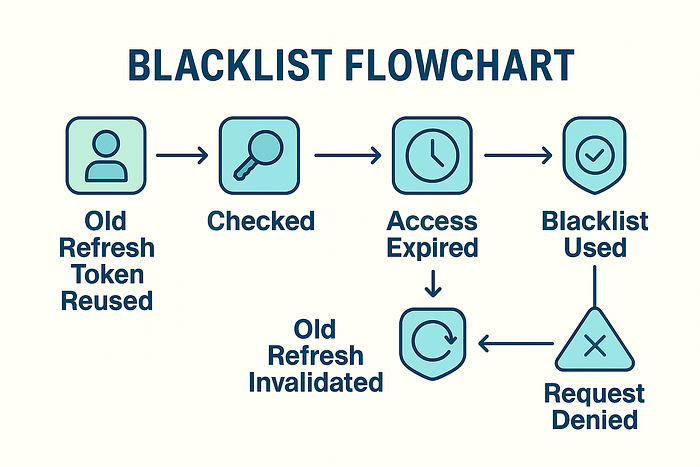
🔐 Refresh Token Blacklisting & Revocation Logic
Making Logout Real in .NET 8 — In-Memory Blacklist Pattern
If your refresh tokens can't be revoked, your logout endpoint is a lie.
🤯 The Problem Most Tutorials Ignore
In the majority of "secure" .NET samples, refresh tokens are:
- Stateless ❌
- Stored only on the client ❌
- Never invalidated ❌
That means:
- If someone steals a refresh token, it stays valid until expiry.
- Logging out doesn't revoke anything.
You can't run a real app like that.
✅ Blacklisting Done Right — With In-Memory Store
To support real revocation:
- Save refresh tokens server-side.
- Check token validity on every use.
- Invalidate old token after issuing a new one.
Let's build it.
💾 RefreshTokenStore.cs
A simple IRefreshTokenStore implementation:
public class RefreshTokenStore : IRefreshTokenStore
{
    private readonly Dictionary<string, string> _tokens = new();

    public Task SaveAsync(string userId, string refreshToken)
    {
        _tokens[userId] = refreshToken;
        return Task.CompletedTask;
    }

    public Task<string?> GetAsync(string userId)
    {
        _tokens.TryGetValue(userId, out var token);
        return Task.FromResult(token);
    }

    public Task InvalidateAsync(string userId)
    {
        _tokens.Remove(userId);
        return Task.CompletedTask;
    }
}
📌 In production, replace with:
- Redis (for multi-instance scaling)
- EF Core with indexed token table
- Cosmos DB for serverless models
🔁 RefreshAsync() Logic
Update your token service:
public async Task<AuthResult?> RefreshAsync(string providedToken)
{
    var userId = GetUserIdFromToken(providedToken); // Optional: parse from payload

    var stored = await _store.GetAsync(userId);
    if (stored is null || stored != providedToken)
        return null;

    // Invalidate the old token
    await _store.InvalidateAsync(userId);

    var user = await _userService.GetByIdAsync(userId);
    if (user is null) return null;

    return await GenerateTokensAsync(user);
}
✅ Now you:
- Track refresh token per user
- Invalidate on reuse
- Protect against token theft
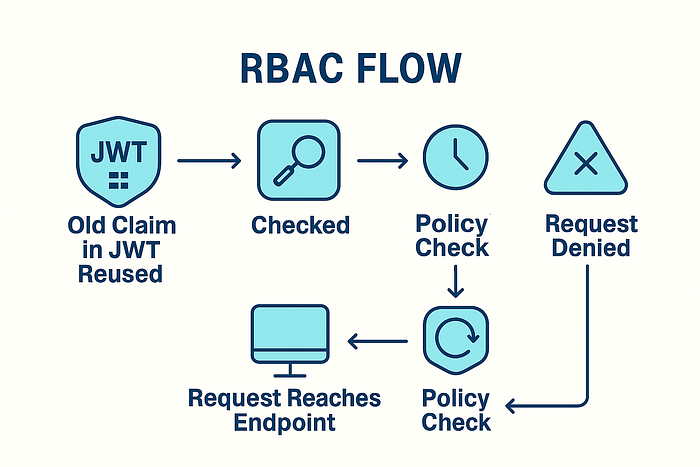
🔐 Role-Based Access & Secure Middleware
🔑 Real RBAC in Minimal APIs Without Bloat
🔒 Just slapping [Authorize] isn't enough — real-world apps need fine-grained control.
In this section, you'll learn to:
✅ Protect endpoints based on user roles ✅ Configure JWT validation cleanly ✅ Avoid magic strings and scattered policies
🛠️ Configure JWT Authentication in Program.cs
builder.Services.AddAuthentication(JwtBearerDefaults.AuthenticationScheme)
    .AddJwtBearer(options =>
    {
        var config = builder.Configuration;
        options.TokenValidationParameters = new TokenValidationParameters
        {
            ValidateIssuer = true,
            ValidateAudience = true,
            ValidateLifetime = true,
            ValidateIssuerSigningKey = true,
            ValidIssuer = config["Jwt:Issuer"],
            ValidAudience = config["Jwt:Audience"],
            IssuerSigningKey = new SymmetricSecurityKey(
                Encoding.UTF8.GetBytes(config["Jwt:Key"]!)
            )
        };
    });

builder.Services.AddAuthorization(options =>
{
    options.AddPolicy("AdminOnly", policy => policy.RequireRole("Admin"));
});
🧱 Securing Routes in Minimal API Style
Admin-only route:
app.MapGet("/admin/stats", () => "Secret stats")
   .RequireAuthorization("AdminOnly");
Authenticated users only:
app.MapGet("/profile", (ClaimsPrincipal user) =>
{
    var username = user.Identity?.Name;
    return $"Hello, {username}";
}).RequireAuthorization();
🎯 Tip: Avoid Role Scattering
Create a Roles.cs:
public static class Roles
{
    public const string Admin = "Admin";
    public const string User = "User";
}
Use it everywhere instead of "Admin" or "User" literals. This avoids bugs and makes refactoring safer.
⚛️ React + Axios Frontend Integration
🧪 Syncing Auth State, Handling Token Expiry, and Refreshing Seamlessly
Most devs nail the backend — but the frontend still gets
401 Unauthorizedafter 15 minutes. Let's fix that with a real React setup.
🔌 Axios Interceptor for Auto-Refresh
We'll build:
- A secure login form
- A token-aware Axios client
- Automatic refresh when access token expires
🧾 Store Tokens in Memory or Secure Cookie
Avoid localStorage unless necessary. For simplicity here, we'll use a tokenService abstraction:
export const tokenService: {
  access: string;
  refresh: string;
  setTokens: (access: string, refresh: string) => void;
} = {
  access: '',
  refresh: '',
  setTokens: (access: string, refresh: string): void => {
    tokenService.access = access;
    tokenService.refresh = refresh;
  },
};
🔄 Axios Setup with Auto Refresh
import axios, { AxiosRequestConfig, AxiosError } from 'axios';
import tokenService from './tokenService'; // Adjust path accordingly

interface RefreshResponse {
  accessToken: string;
  refreshToken: string;
}

const api = axios.create({
  baseURL: 'https://your-api.com',
  headers: { 'Content-Type': 'application/json' },
});

api.interceptors.request.use((config: AxiosRequestConfig) => {
  if (config.headers) {
    config.headers.Authorization = `Bearer ${tokenService.access}`;
  }
  return config;
});

api.interceptors.response.use(undefined, async (error: AxiosError) => {
  const originalRequest = error.config as AxiosRequestConfig & { _retry?: boolean };

  if (
    error.response?.status === 401 &&
    !originalRequest._retry
  ) {
    originalRequest._retry = true;

    const res = await axios.post<RefreshResponse>('/refresh', {
      refreshToken: tokenService.refresh,
    });

    tokenService.setTokens(res.data.accessToken, res.data.refreshToken);
    if (originalRequest.headers) {
      originalRequest.headers.Authorization = `Bearer ${res.data.accessToken}`;
    }

    return api(originalRequest);
  }

  return Promise.reject(error);
});

export default api;
🔐 Login Handler Example
import axios from 'axios';
import tokenService from './tokenService'; // Adjust path as needed

interface LoginResponse {
  accessToken: string;
  refreshToken: string;
}

const handleLogin = async (username: string, password: string): Promise<void> => {
  const res = await axios.post<LoginResponse>('/login', { username, password });

  tokenService.setTokens(res.data.accessToken, res.data.refreshToken);
};
Now your frontend will:
- Automatically retry requests after token expiry
- Stay authenticated until refresh token expires
- Log out correctly when refresh token is revoked

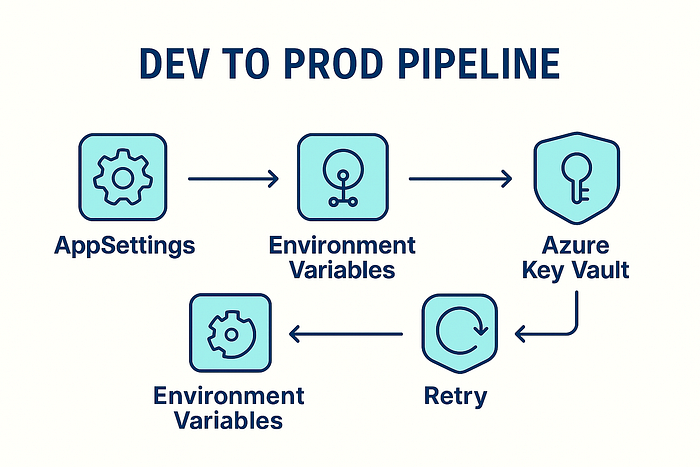
🚀 Deployment Tips — Azure, Docker, Secrets, and Environment Safety
🧩 Making JWT Auth Production-Ready — Not Just Working on Localhost
You've got the backend working and the frontend synced. Now it's time to deploy securely — without leaking keys or hardcoding secrets.
🧰 Environment Secrets (Don't Hardcode Keys!)
🔒 Move all secrets to appsettings.Production.json or use environment variables.
✅ Sample appsettings.Production.json:
{
  "Jwt": {
    "Key": "Use_Env_Var_In_Production",
    "Issuer": "your-api.com",
    "Audience": "your-client-app.com"
  }
}
✅ In Program.cs, override with env vars:
builder.Configuration
    .AddJsonFile("appsettings.Production.json", optional: true)
    .AddEnvironmentVariables();
🐳 Docker-Ready Setup
Minimal Dockerfile:
FROM mcr.microsoft.com/dotnet/aspnet:8.0 AS base
WORKDIR /app
EXPOSE 80

FROM mcr.microsoft.com/dotnet/sdk:8.0 AS build
WORKDIR /src
COPY . .
RUN dotnet publish -c Release -o /app/publish

FROM base AS final
WORKDIR /app
COPY --from=build /app/publish .
ENTRYPOINT ["dotnet", "JwtAuthApi.dll"]
🔐 Use --env or .env for secrets when running:
docker run -e Jwt__Key=YOUR_SECRET -p 5000:80 your-image-name☁️ Azure Deployment Tips
- Use Azure App Service or Container Apps
- Set secrets in Azure Portal → App Configuration
- Enable Managed Identity for secure token storage
- For staging, use different JWT keys to prevent token bleed across environments
✅ Your backend is now cloud- and container-ready.
🧅 GitHub Gist & Onion Architecture (Minimal API Aligned)
🛠️ Scalable, Secure JWT Auth with Minimal API + Onion Layers in .NET 8
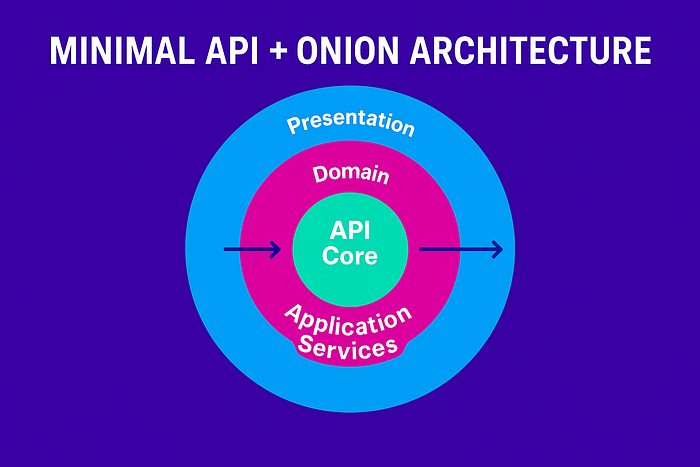
You want startup simplicity, but without spaghetti. ✅ That's why we combine Minimal API for the surface with Onion Architecture underneath.
Here's what it looks like:
🧱 Folder & Layer Overview
JwtAuthOnion/
│
├── JwtAuth.API/                    # 🔹 Presentation Layer (Minimal API)
│   └── Program.cs                  # Entry point
│   └── DependencyInjection.cs      # Centralized DI registration
│   └── AuthEndpoints.cs            # Clean route mapping
│
├── JwtAuth.Application/            # 🔸 Application Layer (Core Logic)
│   └── Interfaces/
│       └── ITokenService.cs
│       └── IRefreshTokenStore.cs
│   └── Services/
│       └── TokenService.cs
│   └── DTOs/
│       └── AuthResult.cs
│       └── LoginRequest.cs
│       └── RefreshRequest.cs
│
├── JwtAuth.Domain/                 # 🔸 Domain Layer (Entities & Business Rules)
│   └── User.cs
│
├── JwtAuth.Infrastructure/         # 🔹 Infrastructure Layer (Data Access / External I/O)
│   └── Stores/
│       └── InMemoryRefreshTokenStore.cs
│       └── RedisRefreshTokenStore.cs
│
├── JwtAuth.Tests/                  # 🧪 Test Project
│   └── TokenServiceTests.cs
│
└── JwtAuth.sln
✅ Minimal API Surface
// In Program.cs

app.MapPost("/login", AuthEndpoints.Login);
app.MapPost("/refresh", AuthEndpoints.Refresh);
app.MapGet("/profile", AuthEndpoints.Profile).RequireAuthorization();
✨ Benefits of This Architecture
- 🧠 Minimal API is fast, clean, and easy to test.
- 🧅 Onion layers separate business logic from infrastructure.
- 🔌 DI config is centralized — easy to swap stores (InMemory ↔ Redis).
- 🔄 Testable services with no dependency on EF or ASP.NET Core.
✅ Stay Connected. Build Better.
🚀 Cut the noise. Write better systems. Build for scale. 🧠 Real-world insights from a senior engineer shipping secure, cloud-native systems since 2009.
📩 Want more? Subscribe for sharp, actionable takes on modern .NET, microservices, and DevOps architecture.
🔗R Lt's connect:
💼 LinkedIn — Tech insights, career reflections, and dev debates
🛠R️
☕ Support My Work
If this breakdown sparked better decisions or inspired cleaner code architecture, you can fuel my next deep dive with a warm mug of support: 👉 Buy Me a Coffee ☕
🔧 Your coffee keeps my terminal glowing, 💡 My ideas flowing, and 🔥 My passion for clean code alive.
Much appreciated, one sip at a time. 🚀👨💻💜