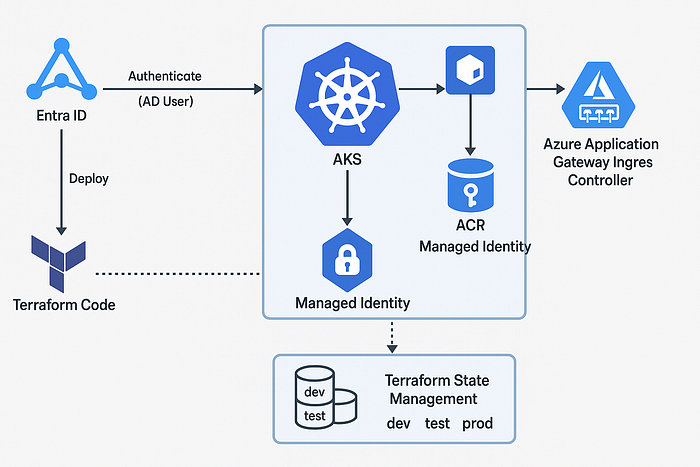

AKS Authentication and Ingress Architecture using Entra ID and Terraform
Overview
This document outlines a Terraform-based project setup for deploying Azure Kubernetes Service (AKS) with the following:
- Entra ID (Azure AD) integration for role-based access control (RBAC)
- Authentication of Azure AD users to AKS using Entra ID
- Azure Container Registry (ACR) authentication using Managed Identity
- Azure Application Gateway Ingress Controller (AGIC)
- Terraform state management for multiple environments (dev, test, prod)
1. Prerequisites
- Azure Subscription
- Azure CLI installed
- Terraform CLI installed
- Registered App in Entra ID with necessary permissions
2. Project Folder Structure
aks-project/
├── environments/
│   ├── dev/
│   │   └── terraform.tfvars
│   ├── test/
│   │   └── terraform.tfvars
│   └── prod/
│       └── terraform.tfvars
├── modules/
│   ├── aks/
│   ├── acr/
│   ├── agic/
│   └── network/
├── main.tf
├── providers.tf
├── variables.tf
├── backend.tf
└── outputs.tf
3. Entra ID Role-Based Access for AKS
Terraform Configuration:
resource "azurerm_kubernetes_cluster" "aks" {
  name                = var.aks_name
  location            = var.location
  resource_group_name = var.resource_group
  dns_prefix          = var.dns_prefix
  identity {
    type = "UserAssigned"
    identity_ids = [azurerm_user_assigned_identity.aks_identity.id]
  }
  role_based_access_control_enabled = true
  azure_active_directory_role_based_access_control {
    managed                = true
    tenant_id              = var.tenant_id
    admin_group_object_ids = [var.admin_group_id]
  }
  default_node_pool {
    name       = "default"
    node_count = 2
    vm_size    = "Standard_DS2_v2"
  }
}
4. Authenticate ACR with AKS using Managed Identity
resource "azurerm_role_assignment" "aks_acr_pull" {
  principal_id         = azurerm_kubernetes_cluster.aks.kubelet_identity[0].object_id
  role_definition_name = "AcrPull"
  scope                = azurerm_container_registry.acr.id
}
5. Terraform State Management
backend.tf:
terraform {
  backend "azurerm" {
    resource_group_name  = "tfstate-rg"
    storage_account_name = "tfstatestorage"
    container_name       = "tfstate"
    key                  = "aks/terraform.tfstate"
  }
}
Configure separate keys per environment:
- dev/terraform.tfstate
- test/terraform.tfstate
- prod/terraform.tfstate
6. Azure Application Gateway Ingress Controller (AGIC)
Enable AGIC in AKS:
resource "azurerm_application_gateway" "agic" {
  name                = var.appgw_name
  resource_group_name = var.resource_group
  location            = var.location
  sku {
    name     = "WAF_v2"
    tier     = "WAF_v2"
    capacity = 2
  }
  gateway_ip_configuration {
    name      = "appGatewayIpConfig"
    subnet_id = var.subnet_id
  }
  frontend_port {
    name = "appGatewayFrontendPort"
    port = 80
  }
  frontend_ip_configuration {
    name                 = "appGatewayFrontendIP"
    public_ip_address_id = azurerm_public_ip.appgw.id
  }
}
resource "helm_release" "agic" {
  name       = "agic"
  repository = "https://appgwingress.blob.core.windows.net/ingress-azure-helm-package/"
  chart      = "ingress-azure"
  namespace  = "agic"
  create_namespace = true
  set {
    name  = "appgw.name"
    value = azurerm_application_gateway.agic.name
  }
  set {
    name  = "armAuth.type"
    value = "aadPodIdentity"
  }
  set {
    name  = "appgw.subscriptionId"
    value = var.subscription_id
  }
  set {
    name  = "appgw.resourceGroup"
    value = var.resource_group
  }
}
7. Variables
Define variables like aks_name, location, admin_group_id, subscription_id, tenant_id, etc., in variables.tf and populate them through respective terraform.tfvars files.
8. Authentication & Role Binding for AD Users
After AKS is deployed, assign roles:
az role assignment create --assignee <object_id> \
  --role "Azure Kubernetes Service RBAC Cluster Admin" \
  --scope /subscriptions/<sub_id>/resourceGroups/<rg>/providers/Microsoft.ContainerService/managedClusters/<aks_name>
9. Summary
This setup provides a secure and scalable AKS environment with:
- Azure AD RBAC
- ACR authentication via Managed Identity
- Centralized Terraform state management
- Ingress traffic management with AGIC
Ensure access control policies and permissions are tightly managed across environments.