
Large Language Models (LLMs) have been demonstrating remarkable capabilities across various tasks for the last two years. However, to optimize their performance for specific applications, such as summarization, fine-tuning is often necessary. Fine-tuning adapts a pre-trained LLM to a particular domain or task, allowing it to generate more accurate and relevant outputs.
Subsequently, the post introduces Parameter Efficient Fine-Tuning (PEFT), focusing on the LoRA (Low-Rank Adaptation) method. Readers learn how to set up and train a PEFT adapter, followed by similar evaluation procedures to assess its performance.
1. Setting Up Working Environment & Getting Started
1.1. Download & Import Required Dependencies
The first step in setting up the working environment is to install the packages and frameworks we will be using in the tutorial.
%pip install --upgrade pip
%pip install --disable-pip-version-check \
    torch==1.13.1 \
    torchdata==0.5.1 --quiet

%pip install \
    transformers==4.27.2 \
    datasets==2.11.0 \
    evaluate==0.4.0 \
    rouge_score==0.1.2 \
    loralib==0.1.1 \
    peft==0.3.0 --quiet
Next, we will import the main packages we will use in this tutorial
from datasets import load_dataset
from transformers import AutoModelForSeq2SeqLM, AutoTokenizer, GenerationConfig, TrainingArguments, Trainer
import torch
import time
import evaluate
import pandas as pd
import numpy as np
1.2. Load Dataset and LLM
We are going to experiment with the DialogSum Hugging Face dataset. It contains 10,000+ dialogues with the corresponding manually labeled summaries and topics.
huggingface_dataset_name = "knkarthick/dialogsum"
dataset = load_dataset(huggingface_dataset_name)
dataset
Next, we load the pre-trained FLAN-T5 model and its tokenizer directly from HuggingFace. We will be using the small version of FLAN-T5. Setting torch_dtype=torch.bfloat16 specifies the memory type to be used by this model.
model_name='google/flan-t5-base'

original_model = AutoModelForSeq2SeqLM.from_pretrained(model_name,
torch_dtype=torch.bfloat16)
tokenizer = AutoTokenizer.from_pretrained(model_name)
It is possible to pull out the number of model parameters and find out how many of them are trainable. The following function can be used to do that, at this stage, you do not need to go into details of it.
def print_number_of_trainable_model_parameters(model):
    trainable_model_params = 0
    all_model_params = 0
    for _, param in model.named_parameters():
        all_model_params += param.numel()
        if param.requires_grad:
            trainable_model_params += param.numel()
    return f"trainable model parameters: {trainable_model_params}\nall model parameters: {all_model_params}\npercentage of trainable model parameters: {100 * trainable_model_params / all_model_params:.2f}%"
print(print_number_of_trainable_model_parameters(original_model))
trainable model parameters: 247577856
all model parameters: 247577856
percentage of trainable model parameters: 100.00%
Next, we will test the model on the summarization task without any fine-tuning.
1.3. Test the Model with Zero Shot Inferencing
We first select a specific test example from a dataset at a given index (200 in this case) and extract the 'dialogue' and 'summary' fields. A prompt is created by inserting the dialogue into a string template asking for a summary.
This prompt is then tokenized and passed to the model to generate a summary, with a maximum of 200 new tokens. The generated output is decoded into a human-readable format, and both the original prompt, the baseline human-written summary, and the model-generated summary are printed out, and separated by dashed lines for clarity.
index = 200

dialogue = dataset['test'][index]['dialogue']
summary = dataset['test'][index]['summary']
prompt = f"""
Summarize the following conversation.
{dialogue}
Summary:
"""
inputs = tokenizer(prompt, return_tensors='pt')
output = tokenizer.decode(
    original_model.generate(
        inputs["input_ids"],
        max_new_tokens=200,
    )[0],
    skip_special_tokens=True
)
dash_line = '-'.join('' for x in range(100))
print(dash_line)
print(f'INPUT PROMPT:\n{prompt}')
print(dash_line)
print(f'BASELINE HUMAN SUMMARY:\n{summary}\n')
print(dash_line)
print(f'MODEL GENERATION - ZERO SHOT:\n{output}')
INPUT PROMPT:
Summarize the following conversation.
#Person1#: Have you considered upgrading your system? #Person2#: Yes, but I'm not sure what exactly I would need. #Person1#: You could consider adding a painting program to your software. It would allow you to make up your own flyers and banners for advertising. #Person2#: That would be a definite bonus. #Person1#: You might also want to upgrade your hardware because it is pretty outdated now. #Person2#: How can we do that? #Person1#: You'd probably need a faster processor, to begin with. And you also need a more powerful hard disc, more memory and a faster modem. Do you have a CD-ROM drive? #Person2#: No. #Person1#: Then you might want to add a CD-ROM drive too, because most new software programs are coming out on Cds. #Person2#: That sounds great. Thanks.
Summary:
— — — — — — — — — — — — — — — — — — — — — — — — — — — — — — — — — — — — — — — — — — — — — — — — — - BASELINE HUMAN SUMMARY: #Person1# teaches #Person2# how to upgrade software and hardware in #Person2#'s system.
— — — — — — — — — — — — — — — — — — — — — — — — — — — — — — — — — — — — — — — — — — — — — — — — — - MODEL GENERATION — ZERO SHOT: #Person1#: I'm thinking of upgrading my computer.
When we test the model with the zero-shot inferencing, we can see that the model struggles to summarize the dialogue compared to the baseline summary, but it does pull out some important information from the text which indicates the model can be fine-tuned to the task at hand. To improve the results we will perform full fine-tuning for the model and compare the results.
2. Perform Full Fine-Tuning
2.1. Preprocess the Dialog-Summary Dataset
To fine-tune the model we will need to convert the dialog-summary (prompt-response) pairs into explicit instructions for the LLM. Prepend an instruction to the start of the dialog with Summarize the following conversation and to the start of the summary with Summary as follows:
Training prompt (dialogue):
Summarize the following conversation. Chris: This is his part of the conversation. Antje: This is her part of the conversation. Summary:
Training response (summary):
Both Chris and Antje participated in the conversation.
Then preprocess the prompt-response dataset into tokens and pull out their input_ids (1 per token).
def tokenize_function(example):
    start_prompt = 'Summarize the following conversation.\n\n'
    end_prompt = '\n\nSummary: '
    prompt = [start_prompt + dialogue + end_prompt for dialogue in example["dialogue"]]
    example['input_ids'] = tokenizer(prompt, padding="max_length", truncation=True, return_tensors="pt").input_ids
    example['labels'] = tokenizer(example["summary"], padding="max_length", truncation=True, return_tensors="pt").input_ids

    return example
# The dataset actually contains 3 diff splits: train, validation, test.
# The tokenize_function code is handling all data across all splits in batches.
tokenized_datasets = dataset.map(tokenize_function, batched=True)
tokenized_datasets = tokenized_datasets.remove_columns(['id', 'topic', 'dialogue', 'summary',])
Now let's check the shapes of all three parts of the dataset but we will first take a subset of the data to save time.
tokenized_datasets = tokenized_datasets.filter(lambda example, index: index % 100 == 0, with_indices=True)

print(f"Shapes of the datasets:")
print(f"Training: {tokenized_datasets['train'].shape}")
print(f"Validation: {tokenized_datasets['validation'].shape}")
print(f"Test: {tokenized_datasets['test'].shape}")
print(tokenized_datasets)
Shapes of the datasets: Training: (125, 2) Validation: (5, 2) Test: (15, 2) DatasetDict({ train: Dataset({ features: ['input_ids', 'labels'], num_rows: 125 }) test: Dataset({ features: ['input_ids', 'labels'], num_rows: 15 }) validation: Dataset({ features: ['input_ids', 'labels'], num_rows: 5 }) })
Now the dataset is ready for fine-tuning so let's jump directly to fine-tuning the model with this processed data.
2.2. Fine-Tune the Model with the Preprocessed Dataset
Now we will utilize the built-in Hugging Face Trainer class. We will pass the preprocessed dataset with reference to the original model. Other training parameters are found experimentally and there is no need to go into details about those at the moment.
output_dir = f'./dialogue-summary-training-{str(int(time.time()))}'

training_args = TrainingArguments(
    output_dir=output_dir,
    learning_rate=1e-5,
    num_train_epochs=1,
    weight_decay=0.01,
    logging_steps=1,
    max_steps=1
)
trainer = Trainer(
    model=original_model,
    args=training_args,
    train_dataset=tokenized_datasets['train'],
    eval_dataset=tokenized_datasets['validation']
)
Now we are ready to fine-tune the model with this simple command
trainer.train()The final step is to save the fine-tuned model and load it after that
# Save the trained model
trained_model_dir = "./trained_model"
trainer.save_model(trained_model_dir)

# Load the trained model
trained_model = AutoModelForSeq2SeqLM.from_pretrained(trained_model_dir)
Now let's evaluate the fine-tuned model qualitatively using human evaluation metrics and quantitatively using the ROUGE metric.
2.3. Evaluate the Model Qualitatively (Human Evaluation)
As with many GenAI applications, a qualitative approach where you ask yourself the question "Is my model behaving the way it is supposed to?" is usually a good starting point.
In the example below (the same one we started this article with), you can see how the fine-tuned model is able to create a reasonable summary of the dialogue compared to the original inability to understand what is being asked of the model.
# Tokenize the prompt
input_ids = tokenizer(prompt, return_tensors="pt").input_ids
# Ensure that input_ids and the models are on the same device
device = torch.device("cuda" if torch.cuda.is_available() else "cpu")
input_ids = input_ids.to(device)
original_model.to(device)
trained_model.to(device)
# Generate outputs using the original model before training
generation_config = GenerationConfig(max_new_tokens=200, num_beams=1)
original_model_outputs = original_model.generate(input_ids=input_ids, generation_config=generation_config)
original_model_text_output = tokenizer.decode(original_model_outputs[0], skip_special_tokens=True)
# Generate outputs using the trained model
trained_model_outputs = trained_model.generate(input_ids=input_ids, generation_config=generation_config)
trained_model_text_output = tokenizer.decode(trained_model_outputs[0], skip_special_tokens=True)

human_baseline_summary = summary
dash_line = '-' * 50  # Assuming dash_line is a line separator
print(dash_line)
print(f'BASELINE HUMAN SUMMARY: \n{human_baseline_summary}')
print(dash_line)
print(f'ORIGINAL MODEL: \n{original_model_text_output}')
print(dash_line)
print(f'TRAINED MODEL: \n{trained_model_text_output}')
— — — — — — — — — — — — — — — — — — — — — — — — — — — — — — — — — — — — — — — — — — — — — — — — — - BASELINE HUMAN SUMMARY: #Person1# teaches #Person2# how to upgrade software and hardware in #Person2#'s system. — — — — — — — — — — — — — — — — — — — — — — — — — — — — — — — — — — — — — — — — — — — — — — — — — - ORIGINAL MODEL: #Person1#: You'd like to upgrade your computer. #Person2: You'd like to upgrade your computer. — — — — — — — — — — — — — — — — — — — — — — — — — — — — — — — — — — — — — — — — — — — — — — — — — - TRAINED MODEL: #Person1# suggests #Person2# upgrading #Person2#'s system, hardware, and CD-ROM drive. #Person2# thinks it's great.
We can see that the summary from the fine-tuned model is improved compared to the original model. Let's now evaluate the summarization model using the ROUGE metric.
2.4. Evaluate the Model Quantitatively (with ROUGE Metric)
The ROUGE metric helps quantify the validity of summarizations produced by models. It compares summarizations to a "baseline" summary which is usually created by a human. While not perfect, it does indicate the overall increase in summarization effectiveness that we have accomplished by fine-tuning.
Let's start first by loading it
rouge = evaluate.load('rouge')Next, we will generate the outputs for the sample of the test dataset (only 10 dialogues and summaries to save time), and save the results in a data frame.
dialogues = dataset['test'][0:10]['dialogue']
human_baseline_summaries = dataset['test'][0:10]['summary']
original_model_summaries = []
instruct_model_summaries = []

for _, dialogue in enumerate(dialogues):
  prompt = f"""
  summarize the following conversation
  {dialogue}
  Summary:
  """
  input_ids = tokenizer(prompt, return_tensors="pt").input_ids
  # Ensure that input_ids and the models are on the same device
  device = torch.device("cuda" if torch.cuda.is_available() else "cpu")
  input_ids = input_ids.to(device)
  original_model_outputs = original_model.generate(input_ids=input_ids, generation_config=GenerationConfig(max_new_tokens=200, num_beams=1))
  original_model_text_output = tokenizer.decode(original_model_outputs[0], skip_special_tokens=True)
  original_model_summaries.append(original_model_text_output)
  instruct_model_outputs = trained_model.generate(input_ids=input_ids, generation_config=GenerationConfig(max_new_tokens=200, num_beams=1))
  instruct_model_text_output = tokenizer.decode(instruct_model_outputs[0], skip_special_tokens=True)
  instruct_model_summaries.append(instruct_model_text_output)
zipped_summaries = list(zip(human_baseline_summaries, original_model_summaries, instruct_model_summaries))
df = pd.DataFrame(zipped_summaries, columns=['human_baseline_summaries', 'original_model_summaries', 'instruct_model_summaries'])
df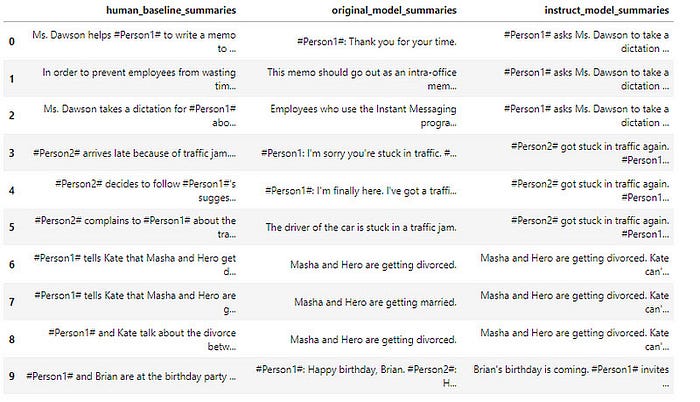
Now let's evaluate the original and fine-tuned model with Rouge and see how much did the trained model improved
from rouge import Rouge
rouge = Rouge()
original_model_results = rouge.get_scores(
    original_model_summaries,
    human_baseline_summaries[0:len(original_model_summaries)],
    )
instruct_model_results = rouge.get_scores(
    instruct_model_summaries,
    human_baseline_summaries[0:len(instruct_model_summaries)],
    )
print('Original Model:')
print(original_model_results)
print('Instruct Model:')
print(instruct_model_results)
ORIGINAL MODEL: {'rouge1': 0.24223171760013867, 'rouge2': 0.10614243734192583, 'rougeL': 0.21380459196706333, 'rougeLsum': 0.21740921541379205} INSTRUCT MODEL: {'rouge1': 0.41026607717457186, 'rouge2': 0.17840645241958838, 'rougeL': 0.2977022096267017, 'rougeLsum': 0.2987374187518165}
Comparing the numbers we can see much improvement in the fine-tuned model. Although there is little room for improvement it will take more time.
3. Perform Parameter Efficient Fine-Tuning (PEFT)
Now, let's perform Parameter Efficient Fine-Tuning (PEFT) fine-tuning as opposed to the "full fine-tuning" we did above. PEFT is a form of instruction fine-tuning that is much more efficient than full fine-tuning with comparable evaluation results as you will see soon.
PEFT is a generic term that includes Low-Rank Adaptation (LoRA) and prompt tuning (which is NOT THE SAME as prompt engineering!). In most cases, when someone says PEFT, they typically mean LoRA.
LoRA, at a very high level, allows the user to fine-tune their model using fewer compute resources (in some cases, a single GPU). After fine-tuning for a specific task, use case, or tenant with LoRA, the result is that the original LLM remains unchanged and a newly-trained "LoRA adapter" emerges. This LoRA adapter is much, much smaller than the original LLM — on the order of a single-digit % of the original LLM size (MBs vs GBs).
That said, at inference time, the LoRA adapter needs to be reunited and combined with its original LLM to serve the inference request. The benefit, however, is that many LoRA adapters can re-use the original LLM which reduces overall memory requirements when serving multiple tasks and use cases.
3.1. Setup the PEFT/LoRA model for Fine-Tuning
You need to set up the PEFT/LoRA model for fine-tuning with a new layer/parameter adapter. Using PEFT/LoRA, you are freezing the underlying LLM and only training the adapter.
Have a look at the LoRA configuration below. Note the rank (r) hyper-parameter defines the rank/dimension of the adapter to be trained.
from peft import LoraConfig, get_peft_model, TaskType
lora_config = LoraConfig(
    r=32, # Rank
    lora_alpha=32,
    target_modules=["q", "v"],
    lora_dropout=0.05,
    bias="none",
    task_type=TaskType.SEQ_2_SEQ_LM # FLAN-T5
)
Next, we will add LoRA adapter layers/parameters to the original LLM to be trained and we will also print the number of trainable parameters:
peft_model = get_peft_model(original_model,
                            lora_config)
print(print_number_of_trainable_model_parameters(peft_model))
trainable model parameters: 3538944 all model parameters: 251116800 percentage of trainable model parameters: 1.41%
We can see that the percentage of trainable parameters is only 1.41% which is very small and will save us time and computation power while as we will see below will not affect the performance.
3.2. Train PEFT Adapter
Now it's time to train the PEFT adapter but we will have first to define the training arguments and the trainer and after that we will be ready to train the model.
output_dir = f'./dialogue-summary-training-{str(int(time.time()))}'
peft_training_args = TrainingArguments(
    output_dir=output_dir,
    auto_find_batch_size=True,
    learning_rate=1e-3,
    num_train_epochs=1,
    logging_steps=1,
    max_steps=1
    )
peft_trainer = Trainer(
    model=peft_model,
    args=peft_training_args,
    train_dataset=tokenized_datasets['train'],
    )
Now everything is ready to train the PEFT adapter and save the model.
peft_trainer.train()
peft_model_path="./peft-dialogue-summary-checkpoint-local"
peft_trainer.model.save_pretrained(peft_model_path)
tokenizer.save_pretrained(peft_model_path)
Finally, we will load the saved fine-tuned model
from peft import PeftModel, PeftConfig
peft_model_base = AutoModelForSeq2SeqLM.from_pretrained("google/flan-t5-base", torch_dtype=torch.bfloat16)
tokenizer = AutoTokenizer.from_pretrained("google/flan-t5-base")
peft_model = PeftModel.from_pretrained(peft_model_base,
                                       peft_model_path,
                                       torch_dtype=torch.bfloat16,
                                       is_trainable=False)
Now let's evaluate the fine-tuned model both qualitatively and quantitatively as we have done before.
3.3. Evaluate the Model Qualitatively (Human Evaluation)
We will see how the PEFT fine-tuned model is able to create a reasonable summary of the dialogue compared to the original and the fined model
index = 200
dialogue = dataset['test'][index]['dialogue']
base_line_human_summary = dataset['test'][index]['summary']
prompt = f"""
Summarize the following conversation
{dialogue}
Summary:
"""
input_ids = tokenizer(prompt, return_tensors="pt").input_ids
# Ensure that input_ids and the models are on the same device
device = torch.device("cuda" if torch.cuda.is_available() else "cpu")
input_ids = input_ids.to(device)
original_model.to(device)
trained_model.to(device)
peft_model.to(device)
original_model_outputs = original_model.generate(input_ids=input_ids, generation_config=GenerationConfig(max_new_tokens=200, num_beams=1))
original_model_text_output = tokenizer.decode(original_model_outputs[0], skip_special_tokens=True)
print(original_model_text_output)
instruct_model_outputs = trained_model.generate(input_ids=input_ids, generation_config=GenerationConfig(max_new_tokens=200, num_beams=1))
instruct_model_text_output = tokenizer.decode(instruct_model_outputs[0], skip_special_tokens=True)
peft_model_outputs = peft_model.generate(input_ids=input_ids, generation_config=GenerationConfig(max_new_tokens=200, num_beams=1))
peft_model_text_output = tokenizer.decode(peft_model_outputs[0], skip_special_tokens=True)
print(dash_line)
print(f'BASELINE HUMAN SUMMARY: \n{base_line_human_summary}')
print(dash_line)
print(f'ORIGINAL MODEL: \n{original_model_text_output}')
print(dash_line)
print(f'TRAINED MODEL: \n{instruct_model_text_output}')
print(dash_line)
print(f'PEFT MODEL: \n{peft_model_text_output}')
— — — — — — — — — — — — — — — — — — — — — — — — — — — — — — — — — — — — — — — — — — — — — — — — — - BASELINE HUMAN SUMMARY: #Person1# teaches #Person2# how to upgrade software and hardware in #Person2#'s system. — — — — — — — — — — — — — — — — — — — — — — — — — — — — — — — — — — — — — — — — — — — — — — — — — - ORIGINAL MODEL: #Pork1: Have you considered upgrading your system? #Person1: Yes, but I'd like to make some improvements. #Pork1: I'd like to make a painting program. #Person1: I'd like to make a flyer. #Pork2: I'd like to make banners. #Person1: I'd like to make a computer graphics program. #Person2: I'd like to make a computer graphics program. #Person1: I'd like to make a computer graphics program. #Person2: Is there anything else you'd like to do? #Person1: I'd like to make a computer graphics program. #Person2: Is there anything else you need? #Person1: I'd like to make a computer graphics program. #Person2: I' — — — — — — — — — — — — — — — — — — — — — — — — — — — — — — — — — — — — — — — — — — — — — — — — — - INSTRUCT MODEL: #Person1# suggests #Person2# upgrading #Person2#'s system, hardware, and CD-ROM drive. #Person2# thinks it's great. — — — — — — — — — — — — — — — — — — — — — — — — — — — — — — — — — — — — — — — — — — — — — — — — — - PEFT MODEL: #Person1# recommends adding a painting program to #Person2#'s software and upgrading hardware. #Person2# also wants to upgrade the hardware because it's outdated now.
We can see that the result from the PEFT model is very similar to the full fine-tuned model. Now let's calculate the rouge score.
3.4. Evaluate the Model Quantitatively (with ROUGE Metric)
Now let's perform inferences for the sample of the test dataset (only 10 dialogues and summaries to save time)
dialogues = dataset['test'][0:10]['dialogue']
human_baseline_summaries = dataset['test'][0:10]['summary']
original_model_summaries = []
instruct_model_summaries = []
peft_model_summaries = []

for idx, dialogue in enumerate(dialogues):
  prompt = f"""
  summarize the following conversation
  {dialogue}
  Summary:
  """
  input_ids = tokenizer(prompt, return_tensors="pt").input_ids
  # Ensure that input_ids and the models are on the same device
  device = torch.device("cuda" if torch.cuda.is_available() else "cpu")
  input_ids = input_ids.to(device)
  human_baseline_text_output = human_baseline_summaries[idx]
  original_model_outputs = original_model.generate(input_ids=input_ids, generation_config=GenerationConfig(max_new_tokens=200, num_beams=1))
  original_model_text_output = tokenizer.decode(original_model_outputs[0], skip_special_tokens=True)
  original_model_summaries.append(original_model_text_output)
  instruct_model_outputs = original_model.generate(input_ids=input_ids, generation_config=GenerationConfig(max_new_tokens=200, num_beams=1))
  instruct_model_text_output = tokenizer.decode(instruct_model_outputs[0], skip_special_tokens=True)
  instruct_model_summaries.append(instruct_model_text_output)
  peft_model_outputs = peft_model.generate(input_ids=input_ids, generation_config=GenerationConfig(max_new_tokens=200, num_beams=1))
  peft_model_text_output = tokenizer.decode(peft_model_outputs[0], skip_special_tokens=True)
  peft_model_summaries.append(peft_model_text_output)
zipped_summaries = list(zip(human_baseline_summaries, original_model_summaries, instruct_model_summaries))
df = pd.DataFrame(zipped_summaries, columns=['human_baseline_summaries', 'original_model_summaries', 'instruct_model_summaries'])
df
Now let's calculate the rouge score using the PEFT fine-tuned model using
rouge = evaluate.load('rouge')

original_model_results = rouge.compute(
    predictions=original_model_summaries,
    references=human_baseline_summaries[0:len(original_model_summaries)],
    use_aggregator=True,
    use_stemmer=True,
)
instruct_model_results = rouge.compute(
    predictions=instruct_model_summaries,
    references=human_baseline_summaries[0:len(instruct_model_summaries)],
    use_aggregator=True,
    use_stemmer=True,
)
peft_model_results = rouge.compute(
    predictions=peft_model_summaries,
    references=human_baseline_summaries[0:len(peft_model_summaries)],
    use_aggregator=True,
    use_stemmer=True,
)
print('ORIGINAL MODEL:')
print(original_model_results)
print('INSTRUCT MODEL:')
print(instruct_model_results)
print('PEFT MODEL:')
print(peft_model_results)
ORIGINAL MODEL: {'rouge1': 0.2127769756385947, 'rouge2': 0.07849999999999999, 'rougeL': 0.1803101433337705, 'rougeLsum': 0.1872151390166362} INSTRUCT MODEL: {'rouge1': 0.41026607717457186, 'rouge2': 0.17840645241958838, 'rougeL': 0.2977022096267017, 'rougeLsum': 0.2987374187518165} PEFT MODEL: {'rouge1': 0.3725351062275605, 'rouge2': 0.12138811933618107, 'rougeL': 0.27620639623170606, 'rougeLsum': 0.2758134870822362}
We can see that the PEFT model results are not too bad and are very comparable to the full fine-tuning, while the training process was much easier!
Now let's calculate the improvement over the original model and the full fine-tuning model
print("Absolute percentage improvement of PEFT MODEL over HUMAN BASELINE")

improvement = (np.array(list(peft_model_results.values())) - np.array(list(original_model_results.values())))
for key, value in zip(peft_model_results.keys(), improvement):
    print(f'{key}: {value*100:.2f}%')
Absolute percentage improvement of PEFT MODEL over HUMAN BASELINE rouge1: 17.47% rouge2: 8.73% rougeL: 12.36% rougeLsum: 12.34%
Now calculate the improvement of PEFT over a full fine-tuned model:
print("Absolute percentage improvement of PEFT MODEL over INSTRUCT MODEL")

improvement = (np.array(list(peft_model_results.values())) - np.array(list(instruct_model_results.values())))
for key, value in zip(peft_model_results.keys(), improvement):
    print(f'{key}: {value*100:.2f}%')
Absolute percentage improvement of PEFT MODEL over INSTRUCT MODEL rouge1: -1.35% rouge2: -1.70% rougeL: -1.34% rougeLsum: -1.35%
Here you see a small percentage decrease in the ROUGE metrics vs. full fine-tuned. However, the training requires much less computing and memory resources (often just a single GPU).