

You're not "bad at research." You're overloaded. When you're juggling client deadlines, edits, outreach, and admin, one more hour spent chasing answers in scattered threads can quietly wreck your day. That's why best AI forums matter: the right communities help you solve problems faster, borrow proven workflows, and get feedback that actually improves your writing-without turning your week into endless scrolling.
McKinsey estimates that "interaction workers" spend 19% of their time just trying to track down information. That's not a personal flaw. That's a system problem.
By the end of this post, you'll have a simple way to pick 2–3 high-signal communities, ask better questions, and turn good threads into reusable writing assets.
Everything I've shared here and more is in my book, available on Amazon. Click the link if you're ready to take the next step.
Best AI Forums by Goal
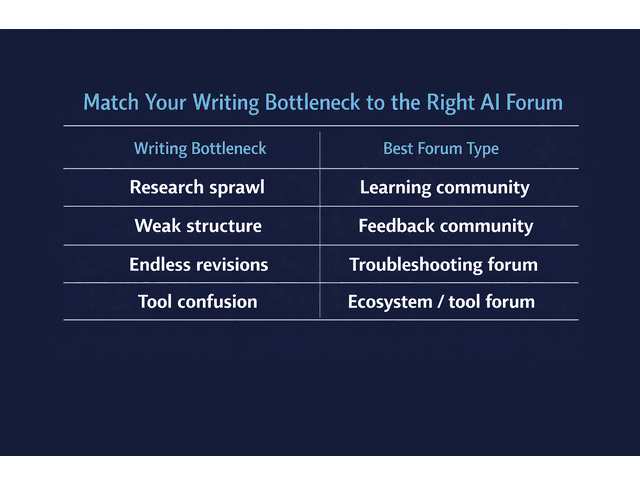
If you join forums without a goal, you'll end up with tabs, not answers. Most writers don't need "more AI content." They need the right kind of community for the bottleneck they're facing today-research sprawl, messy outlines, voice loss in edits, or tool confusion.
Best AI Forums for Workflow Wins
A forum is worth your time when it helps you ship something. For an Overloaded Producer, the highest-value wins usually fall into four buckets:
- Research compression: turn a messy topic into a clean brief fast
- Structure clarity: tighten an outline so drafting is straightforward
- Revision relief: reduce edit loops without flattening your voice
- Tool decisions: avoid experimenting with five tools when one is enough
Quick rule: if the community can't help you produce a deliverable in one session, it's not a "workflow win" space-it's entertainment.
Learning vs Troubleshooting vs Feedback (AI Communities)
Use the right "type" of community for the job:
This single distinction reduces the most common failure mode: joining a dozen AI discussion forums that talk about work instead of helping you finish work.
Quick Fit-Check Signals
Do a 30-second skim test before you join or post:
- Moderation is visible (rules are enforced, spam isn't everywhere)
- Threads are searchable (archives exist; answers aren't trapped in chat)
- Reply quality is real (people ask clarifying questions; answers include reasoning)
If it fails the skim test, skip it.
Once you're clear on what you need and which forum types fit that goal, the next step is choosing spaces that won't waste your time.
How to Choose the Best AI Forums
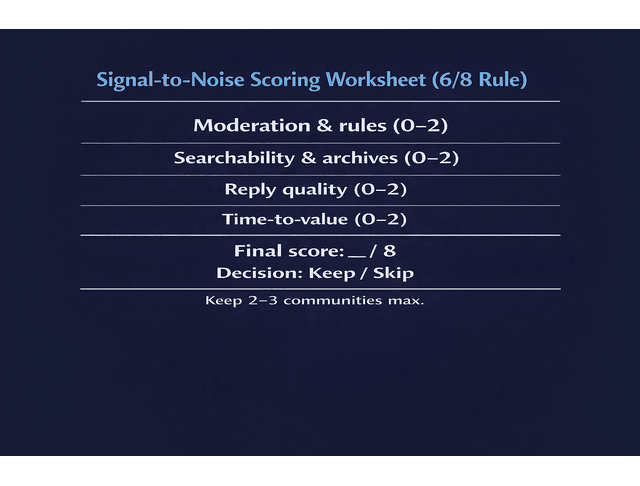
You don't need more communities; you need fewer, better ones. Here's a simple method to evaluate communities quickly-so you stop "trying them all" and start picking the ones that pay you back.
Signal-To-Noise Checklist (AI Communities)
Use this 5-minute evaluation before you commit:
A. Moderation & rules (0–2 points) B. Searchability & archives (0–2) C. Reply quality (0–2) D. Time-to-value (0–2)
Rule: If a forum scores 6/8 or higher, keep it. If it scores lower, don't "give it more time." That's how burnout grows.
Default setup: Score communities before you post, then keep 2–3 active spaces max. Everything else is optional.
Best AI Forums by Skill Level
This isn't about intelligence. It's about norms.
- Beginner-friendly spaces tolerate applied questions and plain language. Good when your goal is writing output, not building models.
- Technical spaces assume jargon, code, and research context. They can be brilliant-but slow-if you're trying to improve a client draft by tomorrow.
If the replies routinely include research shorthand and assume you're implementing models, you'll spend more time translating than writing.
Platform Tradeoffs Explained
Different platforms create different friction:
The platform isn't the point. The question is: Does it fit your working style under deadline pressure?
After you've chosen the right forums, the real leverage comes from how you use them, not how many you join.
Using the Best AI Forums Effectively

The win isn't "being in the community." The win is extracting value fast, then leaving. Being in the right communities is step one. Getting value without losing time is the real skill.
In the 2025 Stack Overflow Developer Survey, 84% of respondents say they're using or planning to use AI tools in their development process, and 51% of professional developers report using AI tools daily.
Microsoft also reports that employees can be interrupted as often as every two minutes during core work hours for high-volume communicators. One reason real-time communities can quietly sabotage writing time is if you don't time-box them.
Questions That Get Answers (Prompt Engineering)
High-signal communities respond best to posts that feel like real work, not vague curiosity. Use templates like these:
Template 1: Research compression
"I'm writing about [topic] for [audience]. Goal: [what the reader should do/understand]. Constraints: [tone, length, SEO angle]. Here are 5 bullets I have-what's missing or misframed?"
Template 2: Outline critique
"Here's my outline for [deliverable]. Where is the logic weak, redundant, or out of order? I want [outcome: clearer structure / fewer sections / stronger flow]."
Template 3: Voice-safe revision
"Here's a paragraph. My voice is [plain/warm/authoritative]. I need it [shorter/clearer/less repetitive] without sounding generic. What would you change and why?"
These templates don't just get replies; they get useful replies.
From Threads to Deliverables
Treat every good thread like a reusable asset.
One thread → one output workflow:
- Extract the best idea (one sentence)
- Test it in your draft immediately (don't "save it for later")
- Keep what works, delete the rest
- Save the final version as a reusable prompt or checklist
Mini example:
Before: "This section feels rambling." → After: "Swap to Problem → Why it matters → 3-step fix → example." Save that as Outline Prompt v1 and reuse it on the next client brief.
Best AI Forums Usage Routines
Keep this lightweight. You're not building a second job.
Weekly routine (10–15 minutes):
- Open saved threads
- Tag anything useful
- Delete anything you won't reuse within 30 days
Over time, this becomes a small, personal workflow library you can search and reuse-so you're not solving the same problem twice.
With a clear usage routine in place, you can now start with a small, intentional shortlist-and protect your time as you go.
Best AI Forums Shortlist
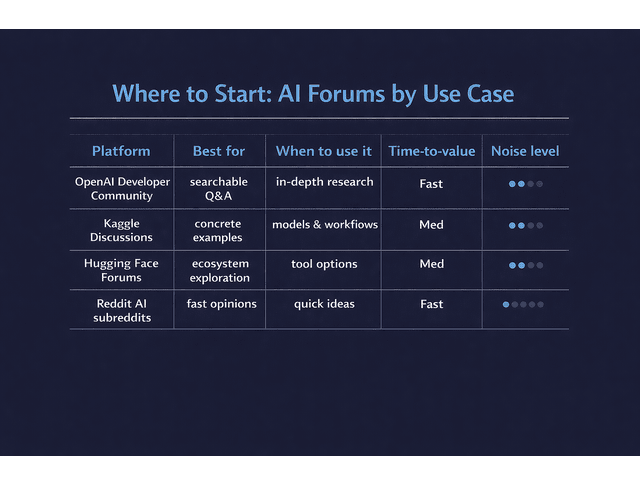
This is the "stop browsing, start choosing" section. You're not looking for the most popular communities-you're looking for the ones that reliably pay you back.
Top Picks in 60 Seconds
- Best overall (searchable + stable): OpenAI Developer Community
- Best for practical problem-solving culture: Kaggle Discussions
- Best for ecosystem context (models/tools/datasets): Hugging Face Forums
- Best for broad Q&A volume (requires filtering): Reddit AI subreddits (r/MachineLearning, r/artificial)
- https://www.reddit.com/r/MachineLearning/
- https://www.reddit.com/r/artificial/
Choose-your-path (pick one place to start today):
- If your bottleneck is research sprawl, start with OpenAI Developer Community (search threads first; post only if needed).
- If your bottleneck is tool decisions, start with Hugging Face Forums (ecosystem context before you commit).
- If your bottleneck is "I need examples to learn from", start with Kaggle Discussions (applied, example-driven mindset).
- If your bottleneck is "I want fast opinions", use Reddit-but time-box it and verify anything you plan to reuse.
High-Signal General Hubs (AI Forums)
Use these as your foundation spaces.
OpenAI Developer Community Kaggle Discussions Hugging Face Forums
Writer-Focused AI Communities
These are specialist add-ons when your problem is writing-specific: clarity, tone, voice, revision.
Use these when:
- You want voice-safe tightening (without "AI blandness")
- You need outline critique and structural feedback
- You want prompt patterns that improve drafts and revisions
- You're building a repeatable writing workflow, not debating AI philosophy
Where to look (categories):
- AI writing assistant communities (prompt sharing, workflows, "here's what worked")
- editing and revision critique spaces (clarity, tone, concision, readability)
- creator communities that discuss repurposing (blogs → posts → emails)
- writing subcommunities inside broader AI spaces (look for channels/threads labeled "writing," "content," "prompts")
What to post there (one realistic example):
"I'm writing a client blog for [industry]. I need a stronger outline that reduces revision loops. Here's my current outline-where does the logic break, and what would you cut?"
Safety and Sanity Rules
This is where most writers burn out: too many communities, too much chatter, too little output.
Final Thoughts
The best AI forums won't make you magically faster. But they will remove friction if you treat them like curated input and consistently convert useful threads into reusable prompts and checklists. Pick communities with a clear purpose, score them quickly, and keep only the ones that pay you back.
If you want deeper, structured systems for writing faster without losing your voice, visit my Amazon Author page.
Frequently Asked Questions About the Best AI Forums
What are the best AI forums to join?
The best AI forums depend on your goal. For writers, prioritize communities with strong moderation, searchable archives, and applied discussions. Start with one foundation hub for broad AI Q&A, then add a writer-focused community only if you need revision, voice, or prompt feedback.
Where can I discuss AI online without wasting time?
Choose spaces that are moderated and searchable, then time-box your visits. If you can't find useful threads within one focused session, the community is probably a distraction-heavy match for an Overloaded Producer.
Are AI Discord servers worth it?
They can be — if you treat them like a tool. Mute most channels, join for a specific purpose, ask your question, capture what you need, and leave. For long-term value, forums usually win.
What are the best AI forums for beginners?
Beginner-friendly forums welcome applied questions and explain reasoning without assuming code-level expertise — ideal for writers using AI for research, outlines, and editing.
How do I ask good questions in AI forums?
Include context, constraints, and a concrete example. Then ask for one specific next step.
Originally published at https://aifreelancer.work on January 1, 2026.