

The landscape of AI-powered development tools has evolved dramatically over the past year. What started as simple autocomplete has matured into sophisticated agents that can build, test, and deploy entire applications. If you're trying to choose the right AI coding assistant for your workflow, understanding the strengths and trade-offs of each tool is crucial.
This guide compares four leading platforms: Claude Code, Replit Agent, GitHub Copilot, and Cursor. Each has carved out its own niche, and the "best" choice depends entirely on your specific needs.
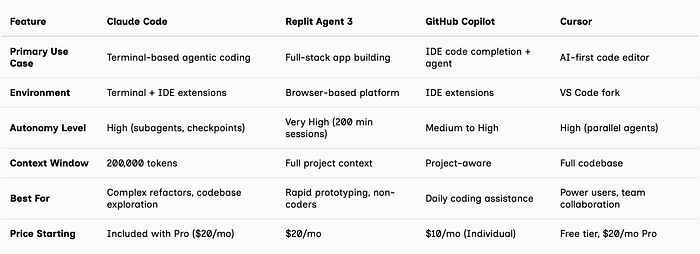
At a Glance: Quick Comparison
Claude Code: The Terminal-First Powerhouse
What It Is: Claude Code is Anthropic's command-line tool that brings their flagship Claude AI directly into your development workflow. It works alongside your existing IDE and leverages the terminal as its primary interface.
Key Strengths
1. Massive Context Understanding (200K Tokens) Claude Code can hold significantly more context than most competitors, making it exceptional for working with large, complex codebases.
2. Checkpointing System
Automatic checkpoints before each change. Hit Esc twice or use /rewind to instantly roll back.
3. Subagents for Parallel Work Spin up specialized subagents that handle discrete tasks in parallel — one agent might build the frontend while another sets up the backend API.
4. Background Tasks Long-running processes like dev servers run in the background without blocking Claude's ability to continue working.
5. VS Code Extension (Beta) While primarily terminal-based, Claude Code now offers a native VS Code extension with visual diffs.
6. Model Choice Access to Claude Opus 4.6, Sonnet 4.5, and Haiku 4.5 models.
Best Use Cases
- Deep codebase refactoring and exploration
- Multi-file architectural changes
- Complex debugging across modules
- Developers comfortable with terminal workflows
Limitations
- Steeper learning curve for those unfamiliar with CLI tools
- Primarily geared toward experienced developers
- Requires local setup and configuration
Replit Agent 3: The Full-Stack Automator
What It Is: Replit Agent is a browser-based platform that lets you describe an app in natural language and watch it build, test, and deploy autonomously. Agent 3 (released September 2025) represents a major leap in autonomy.
Key Strengths
- Extreme Autonomy (200 Minutes): Can run for up to 200 minutes autonomously — 10x longer than its predecessor
- Self-Testing and Self-Healing: Periodically tests itself using a browser, generates bug reports, and automatically fixes issues
- Agent-Building Capability: Ask Agent 3 to build other agents and automations (Slack bots, email automations)
- Zero Setup Required: Everything runs in the browser
Best Use Cases
- Rapid prototyping and MVP development
- Non-developers and product managers who need to build
- Creating automation workflows and bots
- Full-stack web and mobile applications
GitHub Copilot: The Enterprise Standard
What It Is: Microsoft's AI pair programmer, deeply integrated into the GitHub ecosystem. Copilot has evolved from simple autocomplete to include autonomous coding agents.
Key Strengths
- Coding Agent (Released May 2025): Can be assigned GitHub issues and will autonomously implement solutions, creating pull requests for review
- Universal IDE Support: Works in VS Code, Visual Studio, JetBrains IDEs, Eclipse, Xcode, Vim/Neovim, and more
- GitHub Integration: Seamless connection to issues, PRs, code review
- Enterprise Features: Advanced security, SCIM provisioning, IP indemnity
Cursor: The Agent Workbench
What It Is: Cursor is an AI-first code editor built as a fork of VS Code. It recently evolved from "VS Code with AI" to "an agent workbench that happens to be an editor."
Key Strengths
- Composer Model: Cursor 2.0 introduced Composer, their proprietary ultra-fast coding model
- Parallel Agent Workflows: Run up to 8 agents simultaneously on the same task using git worktrees or remote machines
- Plan Mode: Builds a development plan with you inside the editor before execution
- Full Codebase Context: Can index and understand your entire project
How to Choose: Decision Framework
Choose Claude Code if you work primarily in the terminal, need deep codebase understanding for refactors, want checkpoint-based safety, or work on complex large-scale systems.
Choose Replit Agent 3 if you need to build MVPs quickly, are less experienced with coding, want autonomous 200-minute build sessions, or prefer browser-based development.
Choose GitHub Copilot if you already use GitHub heavily, need enterprise security and compliance, want flexibility across multiple IDEs, or require integrated code review.
Choose Cursor if you want to compare multiple agent approaches, need visual editing capabilities, are a power user comfortable with complexity, or like VS Code but want AI-first features.
My Recommendation
For most developers: Start with GitHub Copilot's free tier to get comfortable with AI assistance, then evaluate if you need the additional autonomy of Claude Code or Cursor based on your workflow.
For rapid prototyping: Replit Agent 3 is unmatched in speed-to-working-app, especially if you're not primarily a developer.
For complex codebases: Claude Code's context window and checkpointing system make it the safest choice for risky refactors.
For power users: Cursor's combination of speed, control, and parallel agent workflows offers the most sophisticated development experience.
The truth is, many developers are now using multiple tools: Copilot for day-to-day coding, Claude Code for complex refactors, Cursor for new features, and Replit for quick prototypes. The AI coding tool landscape isn't winner-take-all — it's increasingly about choosing the right tool for each specific task.
Final Thoughts
We're witnessing a fundamental shift in how software gets built. The line between "writing code" and "collaborating with AI" is blurring. Tools like Claude Code, Replit, Copilot, and Cursor aren't just making us faster — they're changing what's possible for individual developers to accomplish.
The key is understanding that these aren't just productivity tools. They're different philosophies about how humans and AI should work together. Claude Code trusts you to drive from the terminal. Replit lets the AI drive while you steer. GitHub Copilot integrates into your existing flow. Cursor gives you a workbench to orchestrate multiple approaches.
Choose based on your workflow, your comfort level, and your goals. And remember: the best AI coding tool is the one that gets out of your way and lets you focus on what you're trying to build.
Have you tried any of these tools? What's been your experience? Let me know in the comments or reach out on social media.