
ThreadPoolExecutor is a concrete implementation of the ExecutorService interface that is used to create a thread pool with configurable parameters:
Core pool size: — Minimum number of threads that stay alive even if idle. — New threads are created until this limit is reached. — Example: If corePoolSize=3, the pool keeps at least 3 threads running.
Maximum pool size: — Maximum number of threads that can be created. — When the work queue is full, new threads are created up to this limit. — Must be ≥ corePoolSize. — Example: If maximumPoolSize=10, the pool can expand up to 10 threads under load.
Keep-alive time: — Idle thread lifetime (for threads beyond corePoolSize). — If a thread is idle for longer than this time, it terminates. — Example: keepAliveTime=60 means extra threads die after 60 seconds of inactivity.
unit (TimeUnit) — Time unit for keepAliveTime (e.g., TimeUnit.SECONDS, TimeUnit.MILLISECONDS). — Example: TimeUnit.SECONDS means keepAliveTime is in seconds.
Work queue: Queue to hold pending tasks when all core threads are busy. Common implementations: — LinkedBlockingQueue (unbounded → risky if tasks grow infinitely) — ArrayBlockingQueue (fixed capacity, safer) — SynchronousQueue (direct handoff to threads, no buffering) — Example: new ArrayBlockingQueue<>(100) → Queue holds 100 tasks max.
Thread factory(Optional to use): — Customizes thread creation (name, priority, daemon status). — Default: Executors.defaultThreadFactory() (names threads pool-N-thread-M).
ThreadFactory customFactory = r -> {
    Thread t = new Thread(r);
    t.setName("Worker-" + t.getId());
    t.setPriority(Thread.MAX_PRIORITY);
    return t;
};
Rejection handler(Optional to use): Handles tasks that cannot be executed (when queue is full and max threads reached).
Policies: — AbortPolicy (default) → Throws RejectedExecutionException. — CallerRunsPolicy → Executes task in the caller's thread. — DiscardPolicy → Silently drops the task. — DiscardOldestPolicy → Removes the oldest task and retries. Example: new ThreadPoolExecutor.CallerRunsPolicy() → Makes the submitting thread run the task.
How ThreadPoolExecutor Works (Step-by-Step Logic) When a task is submitted: — If active threads < corePoolSize → New thread is created. — If active threads ≥ corePoolSize → Task goes to work queue. — If queue is full → New threads are created up to maximumPoolSize. — If maximumPoolSize reached and queue full → Rejection policy is triggered.
Create a thread pool executor without Executors factory class
import java.util.concurrent.*;

public class ThreadPoolExample {
    public static void main(String[] args) {
        // Define ThreadPoolExecutor with all parameters
        ThreadPoolExecutor executor = new ThreadPoolExecutor(
            2,                      // corePoolSize
            5,                      // maximumPoolSize
            60,                     // keepAliveTime
            TimeUnit.SECONDS,       // unit
            new ArrayBlockingQueue<>(10),  // workQueue (capacity=10)
            Executors.defaultThreadFactory(),  // threadFactory
            new ThreadPoolExecutor.CallerRunsPolicy()  // rejection policy
        );

        // Submit 15 tasks (testing queue and max threads)
        for (int i = 1; i <= 15; i++) {
            final int taskId = i;
            executor.submit(() -> {
                System.out.println(
                    "Task " + taskId + " executed by " + Thread.currentThread().getName()
                );
                try {
                    Thread.sleep(1000); // Simulate work
                } catch (InterruptedException e) {
                    Thread.currentThread().interrupt();
                }
            });
        }

        executor.shutdown(); // Graceful shutdown
    }
}
2. What is the role of the core pool size in ThreadPoolExecutor and when core pool size threads are created?
corePoolSize in ThreadPoolExecutor:
- Defines the minimum number of threads that remain active in the pool
- Core threads are never terminated due to inactivity (keepAliveTime doesn't apply to them)
- Determines when tasks should be queued vs. when new threads should be created
- Provides baseline performance for handling steady-state workload
- Excess threads (beyond corePoolSize) terminate after keepAliveTime of inactivity
Core pool threads are created:
- Lazily on first task submission (by default)
- When active threads < corePoolSize and new tasks arrive
- When prestartAllCoreThreads() is called explicitly
- When prestartCoreThread() is called for individual threads
- Before tasks go to the queue when pool is below core size
By default, threads are created on-demand as tasks arrive until corePoolSize is reached.
3. What is the maximum pool size in ThreadPoolExecutor, and when are new threads created?
Maximum pool size is the absolute upper limit of threads in the pool. New threads up to core size are created immediately as tasks arrive. Threads beyond core size are created only when the queue is full. These excess threads terminate after keepAliveTime of inactivity. This prevents thread explosion while handling temporary bursts.
4. What happens when we submit a task to a ThreadPoolExecutor that has reached its maximum pool size and queue capacity?
When we submit a task to a ThreadPoolExecutor that has reached both its maximum thread limit and queue capacity, the task is rejected and the behavior depends on the configured RejectedExecutionHandler.
The executor invokes the RejectedExecutionHandler to handle the task. The default and common policies are:

5. How does ThreadPoolExecutor handle thread creation when the number of tasks exceeds the core pool size?
Thread Creation Rules (Step-by-Step) When tasks are submitted, the executor follows this logic: Stage 1: Use Core Threads If active threads < corePoolSize, a new thread is created immediately (even if idle threads exist). Example: With corePoolSize=2, the first 2 tasks create 2 new threads.
Stage 2: Queue Tasks If active threads ≥ corePoolSize, new tasks go to the workQueue (if space is available). Example: Tasks 3–4 are queued (assuming a queue capacity of 2).
Stage 3: Create Non-Core Threads If the queue is full, new threads are created up to maximumPoolSize. Example: Tasks 5–6 create 2 additional threads (if maxPoolSize=4).
Stage 4: Trigger Rejection Policy If both queue and max threads are exhausted, new tasks are rejected.
6. What is the default thread factory used by ThreadPoolExecutor?
The default ThreadFactory used by ThreadPoolExecutor (when none is explicitly specified) is provided by Executors.defaultThreadFactory(). Default ThreadFactory Behavior Thread Naming: Threads are named in the format: — pool-{poolNumber}-thread-{threadNumber} — poolNumber: Starts at 1 (increments for each new pool). — threadNumber: Starts at 1 (per pool). — Example: pool-1-thread-1, pool-1-thread-2, etc.
Non-Daemon Threads: Threads are non-daemon (setDaemon(false)), meaning they keep the JVM alive until explicitly shutdown.
Normal Priority: Threads have Thread.NORM_PRIORITY (priority=5).
Default Thread Group: Uses the same ThreadGroup as the thread calling the factory.
7. What are the different types of work queues we can use with ThreadPoolExecutor?
The ThreadPoolExecutor in Java allows us to configure different types of work queues to control how tasks are buffered before execution. The choice of queue significantly impacts thread pool behavior. Here are the main types:
1. LinkedBlockingQueue (Unbounded Queue) — Unlimited capacity (grows until memory runs out). — Tasks wait in the queue when all core threads are busy. — No new threads are created beyond corePoolSize (since the queue never fills).
2. ArrayBlockingQueue (Bounded Queue) — Fixed capacity (tasks are rejected when full). — New threads are created beyond corePoolSize only when the queue is full (up to maxPoolSize).
3. SynchronousQueue (Direct Handoff) — Zero capacity (no buffering). — Each new task must be handed to a thread immediately or is rejected. — Threads are created up to maxPoolSize (like a cached thread pool).
4. PriorityBlockingQueue (Priority-Based) — Unbounded queue that orders tasks by priority (custom Comparator). — Useful for scheduling high-priority tasks first.
5. DelayQueue (Time-Based Scheduling) — Holds tasks that implement Delayed (execute after a delay). — Used for scheduling (like ScheduledThreadPoolExecutor).
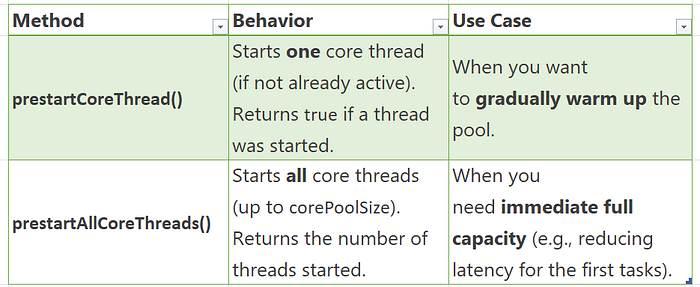
8. What is the difference between prestartCoreThread() and prestartAllCoreThreads() in ThreadPoolExecutor?
Both methods are used to eagerly start core threads in a ThreadPoolExecutor (instead of waiting for tasks to arrive), but they differ in scope:
ThreadPoolExecutor executor = new ThreadPoolExecutor(
    4,  // corePoolSize
    10, // maxPoolSize
    60, TimeUnit.SECONDS,
    new LinkedBlockingQueue<>()
);

executor.prestartCoreThread();      // Starts 1 core thread
executor.prestartAllCoreThreads();  // Starts remaining 3 core threads (total = 4)
When to Use? prestartCoreThread() — For lazy scaling (e.g., background services that ramp up slowly). prestartAllCoreThreads() — For latency-sensitive apps (e.g., web servers needing immediate throughput).
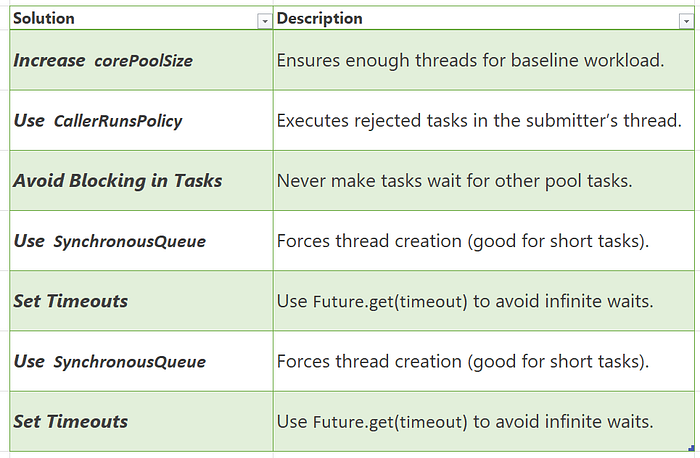
9. What is thread starvation, and how can it occur in a ThreadPoolExecutor?
Thread starvation occurs when tasks in a thread pool cannot get threads for execution, causing delays or deadlocks.
How It Happens in ThreadPoolExecutor 1. Long-Running Tasks + Small Pool If corePoolSize is too small and tasks take too long, new tasks wait indefinitely.
ThreadPoolExecutor executor = new ThreadPoolExecutor(
    1,  // corePoolSize (too small)
    1,  // maxPoolSize (no expansion)
    0, TimeUnit.SECONDS,
    new LinkedBlockingQueue<>()  // Unbounded queue
);
executor.submit(() -> while(true) {});  // Blocks the only thread
executor.submit(() -> System.out.println("Never runs"));  // Starved!
2. Full Queue + No Thread Growth If the workQueue is full and maxPoolSize is reached, new tasks are rejected (starvation via rejection).
ThreadPoolExecutor executor = new ThreadPoolExecutor(
    1, 1, 0, TimeUnit.SECONDS,
    new ArrayBlockingQueue<>(1)  // Queue holds only 1 task
);
executor.submit(longTask);  // Runs immediately
executor.submit(mediumTask); // Queued
executor.submit(shortTask);  // Rejected (starvation)
3. Deadlock Due to Inter-Task Dependencies If tasks in the pool wait for results from other queued tasks, but no threads are free to run them.
ThreadPoolExecutor executor = new ThreadPoolExecutor(1, 1, 0, TimeUnit.SECONDS, new LinkedBlockingQueue<>());
Future<?> future = executor.submit(() -> {
    Future<?> nested = executor.submit(() -> "Nested task");  // Deadlock!
    return nested.get();  // Waits forever (no threads available)
});
10. When would we prefer SynchronousQueue over LinkedBlockingQueue in a ThreadPoolExecutor?
Prefer SynchronousQueue When :
Immediate Thread Creation Needed — Tasks are assigned threads instantly (no queueing). — Works best with corePoolSize=0 and high maxPoolSize.
Low Latency Required — Zero queueing delay → ideal for real-time tasks.
Short-Lived, Bursty Workloads — Example: HTTP request processing, where tasks are quick and sporadic.
Backpressure Handling — Rejects tasks immediately when maxPoolSize is reached (no buffer).
CPU-Bound Tasks — Maximizes thread usage for compute-heavy operations.
Avoid SynchronousQueue When:
Tasks are long-running (risk of thread exhaustion). — You need to buffer tasks during spikes (use LinkedBlockingQueue instead).
Prefer LinkedBlockingQueue When :
Steady, Predictable Workloads — Queues tasks if all threads are busy.
I/O-Bound or Long-Running Tasks — Prevents excessive thread creation.
Unbounded Buffering Needed — Absorbs temporary spikes (but risks OutOfMemoryError if uncontrolled).
Fixed-Size Thread Pools — Classic Executors.newFixedThreadPool() pattern.
Avoid LinkedBlockingQueue When:
You need strict backpressure (tasks may queue indefinitely). Low-latency is critical (queueing adds delay).
11. How can we extend ThreadPoolExecutor to add custom behavior (e.g., logging task execution time)?

1. Logging Task Execution Time
import java.util.concurrent.*;
import java.util.Date;

public class MonitoringThreadPoolExecutor extends ThreadPoolExecutor {

    public MonitoringThreadPoolExecutor(int corePoolSize, int maxPoolSize,
                                      long keepAliveTime, TimeUnit unit,
                                      BlockingQueue<Runnable> workQueue) {
        super(corePoolSize, maxPoolSize, keepAliveTime, unit, workQueue);
    }

    @Override
    protected void beforeExecute(Thread t, Runnable r) {
        super.beforeExecute(t, r);
        // Store start time in ThreadLocal or task wrapper
        System.out.printf("[%s] Start: Task %s on thread %s\n",
                         new Date(), r, t.getName());
    }

    @Override
    protected void afterExecute(Runnable r, Throwable t) {
        super.afterExecute(r, t);
        // Log completion (with error if any)
        System.out.printf("[%s] Finish: Task %s\n", new Date(), r);
        if (t != null) {
            System.err.println("Task failed: " + t.getMessage());
        }
    }

    @Override
    protected void terminated() {
        super.terminated();
        System.out.println("ThreadPool terminated");
    }
}
2. Track Task Execution Time
@Override
protected void beforeExecute(Thread t, Runnable r) {
    super.beforeExecute(t, r);
    if (r instanceof TrackedRunnable) {
        ((TrackedRunnable) r).setStartTime(System.nanoTime());
    }
}

@Override
protected void afterExecute(Runnable r, Throwable t) {
    long duration = TimeUnit.NANOSECONDS.toMillis(
        System.nanoTime() - ((TrackedRunnable) r).getStartTime()
    );
    System.out.printf("Task %s took %d ms\n", r, duration);
    super.afterExecute(r, t);
}

// Task wrapper for timing
static class TrackedRunnable implements Runnable {
    private final Runnable target;
    private long startTime;

    TrackedRunnable(Runnable target) { this.target = target; }
    void setStartTime(long time) { this.startTime = time; }
    long getStartTime() { return startTime; }
    @Override public void run() { target.run(); }
}
Main method execution
public static void main(String[] args) {
    MonitoringThreadPoolExecutor executor = new MonitoringThreadPoolExecutor(
        2, 4, 60, TimeUnit.SECONDS, new LinkedBlockingQueue<>()
    );

    // Submit tasks with timing
    executor.submit(new TrackedRunnable(() -> {
        try { Thread.sleep(1000); }
        catch (InterruptedException e) { Thread.currentThread().interrupt(); }
    }));

    executor.shutdown();
}
12. How can we dynamically resize the core and maximum pool sizes in ThreadPoolExecutor?
You can adjust both corePoolSize and maximumPoolSize at runtime in a ThreadPoolExecutor. Here's how to do it safely and effectively:
Official Methods for Resizing
// Change core pool size (can shrink if allowCoreThreadTimeOut=true)
executor.setCorePoolSize(newCoreSize);

// Change maximum pool size
executor.setMaximumPoolSize(newMaxSize);
Key Behaviors
- Increasing sizes: New threads are created only when new tasks arrive.
- Decreasing sizes: Excess idle threads terminate after
keepAliveTime. - Thread creation: Follows standard rules (queue full → new threads up to max).
Resizing example
ThreadPoolExecutor executor = new ThreadPoolExecutor(
    2,  // Initial corePoolSize
    4,  // Initial maxPoolSize
    60, TimeUnit.SECONDS,
    new LinkedBlockingQueue<>(10)
);

// Dynamically scale up
executor.setCorePoolSize(4);  // Now core=4
executor.setMaximumPoolSize(8); // Now max=8

// Scale down later
executor.setCorePoolSize(2);
executor.setMaximumPoolSize(4);
13. What is thread locality, and how does it impact ThreadPoolExecutor performance?
Thread locality refers to two related concepts that significantly impact performance: data localization for a specific thread, and the low-level CPU concept of keeping a thread running on the same physical processor core.
In Java and in the context of a ThreadPoolExecutor, thread locality primarily refers to:
- Thread-Local Data (Programming Concept): Using
ThreadLocalvariables to give each thread its own independent copy of a variable, avoiding shared state and the need for expensive synchronization.
Bad Locality (Slow) Each task creates a brand new database connection, which is slow because it requires constant opening/closing connections instead of reusing warm ones.
// Database connections created fresh every time
executor.submit(() -> {
    Connection conn = DriverManager.getConnection(url); // SLOW - new connection
    // do work
    conn.close();
});

executor.submit(() -> {
    Connection conn = DriverManager.getConnection(url); // SLOW - new connection
    // do work
    conn.close();
});
Good Locality (Fast) Each thread creates ONE connection initially and reuses it for all its tasks. Subsequent tasks on the same thread get the existing warm connection instantly. The connection stays alive with the thread.
// Thread-local connection pool
ThreadLocal<Connection> connectionHolder = new ThreadLocal<>() {
    @Override
    protected Connection initialValue() {
        return DriverManager.getConnection(url); // Created once per thread
    }
};

executor.submit(() -> {
    Connection conn = connectionHolder.get(); // FAST - reused connection
    // do work
    // Note: Don't close! Thread keeps it for next task
});
2. CPU Cache Locality/Affinity (Hardware Concept): The performance benefit derived from a specific thread executing its tasks repeatedly on the same physical CPU core, allowing data it uses frequently to remain in that core's fast memory cache.
Without Cache Locality (Slow):
// Thread 1 processes random users - constant cache misses
processUserA(); // Loads UserA data to CPU cache
processUserZ(); // UserA evicted, loads UserZ to cache
processUserM(); // UserZ evicted, loads UserM to cache - always slow RAM access
With Cache Locality (Fast):
// Thread 1 processes same user repeatedly - cache stays warm
processUserA(); // Loads UserA data to CPU cache (slow first time)
validateUserA(); // UserA data already in cache - instant access
updateUserA();   // UserA data still in cache - instant access
The CPU cache acts like a fast workspace — when a thread keeps working with the same data, it stays in this workspace. Switching to different data forces the CPU to constantly refill the workspace from slow main memory.
Thread locality affects a ThreadPoolExecutor through two main avenues:
2. Data Locality (ThreadLocal):
- Positive Impact: Avoids expensive locks and synchronization by giving each thread a private copy of data/resources (like DB Connection instances), boosting performance.
- Negative Impact: Requires manual cleanup (
threadLocal.remove()) in pooled threads to prevent memory leaks and data contamination between unrelated tasks.
2. CPU Cache Locality (Thread Affinity):
- Positive Impact: The OS scheduler tends to keep long-running pooled threads on the same CPU core. This increases CPU cache hit rates, leading to faster execution as data is kept in the core's fast local memory.
14. What are the performance implications of using a very large vs. very small queue in ThreadPoolExecutor?
The work queue in ThreadPoolExecutor acts as a buffer between task submission and execution. Its size directly determines how the system handles load:
- Small Queue: Immediate backpressure, fast failure
- Large Queue: Delayed backpressure, risk of memory issues
Very Large/Unbounded Queue — The Silent Killer
How It Works:
// Dangerous unbounded queue - grows indefinitely
ThreadPoolExecutor executor = new ThreadPoolExecutor(
    4, 8, 60, TimeUnit.SECONDS,
    new LinkedBlockingQueue<>() // No size limit - RISKY!
);

// Under sustained load:
for (int i = 0; i < 1000000; i++) {
    executor.submit(task); // Always accepted, no matter what
}
Performance Implications:
- Memory Explosion
// Each task in queue consumes memory
// 1,000,000 tasks × 1KB per task = 1GB RAM used just for queuing
// Result: OutOfMemoryError crashes entire application
2. Hidden System Overload
// Clients see "success" but tasks take hours to complete
// No indication that system is overwhelmed
// Real problem masked until catastrophic failure
3. Stale Data & Timeouts
// Task submitted at time T0
// Executed at time T0 + 30 minutes (due to long queue)
// Result: Data outdated, client already timed out, wasted work
4. Garbage Collection Storms
// Millions of task objects in queue
// GC spends 90% of time trying to manage queue
// Actual processing slows to a crawl
Very Small Queue — The Overly Sensitive Gatekeeper
How It Works:
// Very small queue - rejects aggressively
ThreadPoolExecutor executor = new ThreadPoolExecutor(
    4, 8, 60, TimeUnit.SECONDS,
    new ArrayBlockingQueue<>(2) // Tiny buffer
);

// Even moderate load causes issues:
executor.submit(task1); // Thread 1
executor.submit(task2); // Thread 2
executor.submit(task3); // Queued
executor.submit(task4); // Queued - queue full!
executor.submit(task5); // REJECTED! (even though threads available)
Performance Implications:
- Premature Rejections
// System has capacity (idle threads) but queue says "no"
// Unnecessary client errors and retries
// Poor resource utilization
2. No Burst Absorption
// Brief traffic spike (10 tasks at once)
// Only 2 can be queued, 8 immediately rejected
// Could have handled all 10 with slight delay
3. Retry Storms
// Client gets rejection → immediately retries
// All clients retry simultaneously → worse overload
// Vicious cycle of rejections and retries
4. Poor User Experience
// "System busy" errors during normal operation
// Frustrated users and lost business
// Unnecessarily conservative capacity
Right-Sized Queue
Balanced Approach:
// Properly sized queue - handles bursts but provides backpressure
int reasonableQueueSize = calculateBasedOnRequirements();

ThreadPoolExecutor executor = new ThreadPoolExecutor(
    4, 8, 60, TimeUnit.SECONDS,
    new ArrayBlockingQueue<>(reasonableQueueSize) // Just right
);
Calculation Example:
// Formula: (Acceptable wait time) / (Average task time) × (Expected concurrency)
int maxWaitTimeMs = 2000;    // 2 seconds max wait
int avgTaskTimeMs = 100;     // 100ms per task
int expectedUsers = 50;      // 50 concurrent users

int idealQueueSize = (maxWaitTimeMs / avgTaskTimeMs) * expectedUsers;
// = (2000 / 100) * 50 = 20 * 50 = 1000 tasks

executor = new ThreadPoolExecutor(4, 8, 60, SECONDS,
    new ArrayBlockingQueue<>(1000));
15. How does ThreadPoolExecutor handle thread lifecycle management (creation, idle timeout, termination)?
The ThreadPoolExecutor manages the entire lifecycle of its worker threads internally, abstracting the complexities away from the application developer. It dynamically balances the need to reuse threads for efficiency with the need to reclaim system resources when the workload is light.
This lifecycle management is primarily controlled by the parameters you provide during construction: corePoolSize, maximumPoolSize, and keepAliveTime.
1. Thread Creation
Threads are created lazily or eagerly based on configuration and workload:
- Initialization: When a
ThreadPoolExecutoris created, it initially contains zero threads by default. You can pre-start core threads using theprestartCoreThread()orprestartAllCoreThreads()methods if you need them ready immediately. - On Demand (Default): Threads are typically created only when a new task is submitted and all existing threads are busy.
- Core Size Limit: The executor first tries to keep the number of threads below
corePoolSize. If a new task arrives and all core threads are busy, it enqueues the task in the work queue. - Maximum Size Limit: If the queue is full, the executor creates new threads beyond the
corePoolSize(up tomaximumPoolSize) to handle the immediate load.
2. Idle Timeout (keepAliveTime)
This mechanism is crucial for reclaiming resources when the system load decreases:
- Core Thread Behavior: By default, threads within the
corePoolSizeremain alive indefinitely, even if idle. - Maximum Thread Behavior: Threads created above the
corePoolSizewill wait for a new task for the duration specified bykeepAliveTime. - Reclamation: If an "extra" thread sits idle for longer than
keepAliveTimewithout receiving a new task from the queue, the thread is terminated and removed from the pool. - Allow Core Thread Timeout: You can call
allowCoreThreadTimeOut(true)to make even the core threads subject to thekeepAliveTimeeviction policy, allowing the pool to shrink completely to zero threads when idle.
3. Termination and Shutdown
The ThreadPoolExecutor provides graceful and immediate termination methods:
shutdown() (Graceful): This is the standard way to stop the executor.
- It stops accepting new tasks.
- It allows currently executing tasks to finish.
- It processes all tasks currently waiting in the work queue.
- Once all tasks are finished, all threads are terminated gracefully.
shutdownNow() (Immediate): This method attempts to stop execution immediately.
- It stops accepting new tasks.
- It attempts to interrupt all currently running threads.
- It drains the task queue and returns a list of waiting tasks that never started.
- The threads exit immediately upon receiving the interrupt or completing their current work step.
awaitTermination(): After calling shutdown() or shutdownNow(), this method blocks the calling thread until all tasks are completed and the executor is fully terminated (or a timeout occurs)
16. What happens if a ThreadPoolExecutor has zero core threads (corePoolSize=0)?
If a ThreadPoolExecutor has zero core threads (corePoolSize=0), the executor effectively becomes a "just-in-time" thread creator that immediately tears down threads when they are idle, provided we use the correct queue type and set a non-zero keepAliveTime.
The behavior depends heavily on the type of BlockingQueue used:
1. With a SynchronousQueue (The "Cached Thread Pool" Model)
This is the configuration used internally by Executors.newCachedThreadPool().
- Task Execution: When a task is submitted, since
corePoolSizeis zero, the executor attempts to offer the task to theSynchronousQueue. ASynchronousQueuehas zero capacity and requires a thread to be immediately ready to take the task (a "direct handoff"). - Thread Creation: Because no threads exist initially, the offer to the queue fails, forcing the executor to create a new, non-core thread (up to
maximumPoolSize) to run the task immediately. - Thread Termination: Once the task is finished, the thread waits for a new task for the duration of its
keepAliveTime. If no task arrives within that time, the thread terminates. - Result: You get a highly elastic pool that grows as needed but shrinks completely to zero threads when idle, which is useful for reclaiming resources in long-running applications.
// This configuration mimics Executors.newCachedThreadPool()
// Perfect for highly variable workloads with long idle periods
ThreadPoolExecutor executor = new ThreadPoolExecutor(
    0,   // corePoolSize: ZERO - no permanent threads
    10,  // maximumPoolSize: Can grow up to 10 threads under load
    60,  // keepAliveTime: Threads die after 60 seconds of inactivity
    TimeUnit.SECONDS,
    new SynchronousQueue<>()  // Queue with ZERO capacity - requires immediate handoff
);

// BEHAVIOR WHEN SUBMITTING TASKS:
executor.submit(task1); // Since queue has no capacity and core=0,
                        // FORCES immediate creation of Thread 1

executor.submit(task2); // Again, no queue capacity → Creates Thread 2 immediately

// After 60 seconds with no new tasks:
// Thread 1 TERMINATES (idle timeout)
// Thread 2 TERMINATES (idle timeout)
// Pool shrinks back to ZERO threads - complete resource cleanup
2. With a Bounded or Unbounded Queue (e.g., LinkedBlockingQueue, ArrayBlockingQueue)
This configuration leads to a potential starvation scenario or a non-functional executor in older Java versions:
- Task Queuing: The moment the first task is submitted, since the number of running threads (0) is not less than
corePoolSize(0), the executor attempts to place the task directly into the queue. - No Threads are Created: If the queue has any capacity (which most do), the task successfully enters the queue. The executor then checks if it should start a new thread. In modern Java versions (Java 6+), it correctly creates at least one thread to drain the queue.
- The Issue in Older Java (< Java 6): In Java 5, a common bug/behavior was that the task would sit in the queue indefinitely, as the logic wouldn't create a worker thread until the queue was full or the pool size was less than the core size. The task would simply never execute.
ThreadPoolExecutor executor = new ThreadPoolExecutor(
    0,   // corePoolSize: ZERO - no permanent threads
    5,   // maximumPoolSize: Can grow to 5 threads
    30,  // keepAliveTime: Threads die after 30 seconds idle
    TimeUnit.SECONDS,
    new LinkedBlockingQueue<>(10)  // Queue with capacity for 10 waiting tasks
);

// MODERN JAVA (Java 6+) BEHAVIOR:
executor.submit(task1); // Task goes to QUEUE (since queue has capacity)
                        // THEN executor creates Thread 1 to drain the queue
                        // Task executes after brief queue delay

executor.submit(task2); // Thread 1 picks next task from queue

// After 30 seconds idle: Thread 1 TERMINATES

// LEGACY JAVA 5 BUG BEHAVIOR (HISTORICAL):
executor.submit(task1); // Task goes to QUEUE successfully
                        // BUT no thread gets created due to bug!
                        // Task sits in queue FOREVER - STARVATION!
17. How can you gracefully shut down a ThreadPoolExecutor while ensuring pending tasks are completed?
To gracefully shut down a ThreadPoolExecutor while ensuring that all pending tasks are completed and no new tasks are accepted, you must use the shutdown() method combined with awaitTermination().
Here is the step-by-step process and an example implementation:
The Graceful Shutdown Process
- Initiate Shutdown (
shutdown()):
- This method immediately puts the executor into a "SHUTDOWN" state.
- The executor stops accepting new tasks submitted after this call.
- It allows all currently running tasks to finish execution.
- It processes all tasks already present in the work queue.
2. Wait for Termination (awaitTermination()):
- After calling
shutdown(), the threads are still working on existing tasks. awaitTermination()is a blocking method used to pause the main application thread until all tasks are finished or a specified timeout is reached. This prevents the application from exiting before background work is done.
Example Implementation
A common pattern involves calling shutdown() and then calling awaitTermination() in a loop or with a reasonable timeout period.
ThreadPoolExecutor executor = new ThreadPoolExecutor(
    4, 8, 60, TimeUnit.SECONDS,
    new LinkedBlockingQueue<>(100)
);

// Step 1: Prevent new tasks from being submitted
executor.shutdown();  // Stops accepting new tasks, continues processing existing

try {
    // Step 2: Wait for existing tasks to complete
    if (!executor.awaitTermination(60, TimeUnit.SECONDS)) {
        // Step 3: If timeout, try forceful shutdown
        System.out.println("Forcing shutdown after timeout...");
        List<Runnable> neverRunTasks = executor.shutdownNow();
        System.out.println("Cancelled " + neverRunTasks.size() + " pending tasks");

        // Step 4: Wait a bit more for forceful shutdown to complete
        if (!executor.awaitTermination(30, TimeUnit.SECONDS)) {
            System.err.println("Executor did not terminate fully");
        }
    } else {
        System.out.println("All tasks completed gracefully");
    }
} catch (InterruptedException e) {
    // Step 5: Handle interruption during shutdown
    System.out.println("Shutdown interrupted, forcing immediate shutdown");
    executor.shutdownNow();
    Thread.currentThread().interrupt();  // Preserve interrupt status
}
18. What are the thread-safety guarantees provided by ThreadPoolExecutor?
ThreadPoolExecutor is designed to be highly concurrent — it can safely handle multiple threads submitting tasks simultaneously while managing its internal thread pool. However, the thread-safety guarantees are strategically applied to different types of operations.
1. Thread-Safe Operations (Guaranteed)
Task Submission Methods — Why They're Safe:
// These methods use internal locking to handle concurrent access
executor.execute(Runnable task);        // SAFE - uses ReentrantLock internally
executor.submit(Callable task);         // SAFE - built on top of execute()
executor.submit(Runnable task);         // SAFE - same internal synchronization

// REAL-WORLD SCENARIO: Web server with multiple request threads
public class WebServer {
    private ThreadPoolExecutor executor = new ThreadPoolExecutor(10, 50, 60, SECONDS, queue);

    // Multiple HTTP request threads can safely submit tasks concurrently
    public void handleRequest(HttpRequest request) {
        // NO synchronization needed - even with 1000 concurrent requests
        executor.submit(() -> processRequest(request));
        // ThreadPoolExecutor internally handles all the thread contention
    }
}
Explanation: When we call execute() or submit(), ThreadPoolExecutor uses an internal ReentrantLock to safely manage:
- Checking current thread count
- Deciding whether to create new threads or queue tasks
- Updating internal statistics atomically
Shutdown Methods — Atomic State Transitions:
// These methods safely manage the executor's lifecycle state
executor.shutdown();                    // SAFE - atomically transitions to SHUTDOWN
executor.shutdownNow();                 // SAFE - atomically transitions to STOP
executor.isShutdown();                  // SAFE - read-only volatile variable access

// EXAMPLE: Graceful shutdown from multiple monitoring threads
public class ServiceManager {
    public void stopService() {
        // Thread 1: Health monitor detects issue
        new Thread(() -> executor.shutdown()).start();

        // Thread 2: Admin console shutdown command
        new Thread(() -> executor.shutdown()).start();

        // RESULT: Safe - second shutdown() call is effectively no-op
        // Internal state machine prevents double-shutdown issues
    }
}
Explanation: The shutdown state is managed using an AtomicInteger with careful state transitions, ensuring that multiple threads calling shutdown methods don't corrupt the executor's state.
2. State Inspection Methods (Safe for Monitoring)
// These methods provide snapshots for monitoring but values may be transient
executor.getActiveCount();              // SAFE - but value may change immediately after
executor.getPoolSize();                 // SAFE - snapshot of current thread count
executor.getQueue().size();             // SAFE - but queue may change nanosecond later

// PRACTICAL MONITORING EXAMPLE:
public class PoolMonitor {
    public void logStatistics() {
        // Even though these values might be slightly stale, they're consistent with each other
        // and won't cause ConcurrentModificationExceptions or corrupt data
        System.out.printf("Active: %d, Pool: %d, Queued: %d, Completed: %d%n",
            executor.getActiveCount(),     // Thread-safe snapshot
            executor.getPoolSize(),        // Thread-safe snapshot
            executor.getQueue().size(),    // Thread-safe snapshot
            executor.getCompletedTaskCount()); // AtomicLong - always accurate
    }
}
Important Note: While these methods are thread-safe, they return moment-in-time snapshots. The actual values may change immediately after you read them, but you'll never get corrupted or inconsistent data.
3. Operations Requiring External Synchronization
Configuration Changes — Why They Need Synchronization:
// These methods modify internal configuration without internal locking
executor.setCorePoolSize(int size);     // NOT thread-safe - no internal lock
executor.setMaximumPoolSize(int size);  // NOT thread-safe - no internal lock

// DANGEROUS EXAMPLE - RACE CONDITION:
public class DynamicPoolManager {
    public void adjustPoolBasedOnLoad() {
        // Thread A: Detects high load
        new Thread(() -> executor.setCorePoolSize(20)).start();

        // Thread B: Detects low load
        new Thread(() -> executor.setCorePoolSize(5)).start();

        // PROBLEM: Final corePoolSize is unpredictable!
        // Both threads read current state, then write new state
        // One update will overwrite the other
    }
}
Explanation: Configuration methods don't use the main internal lock because:
- Performance: Avoiding contention during normal task submission
- Flexibility: Allowing applications to implement their own synchronization strategy
- Complexity: Configuration changes are relatively rare compared to task submission
Safe Configuration Pattern:
public class SafePoolConfigurator {
    private final Object configLock = new Object();

    public void reconfigurePool(int newCore, int newMax, long keepAlive) {
        synchronized(configLock) {
            // All configuration changes happen atomically
            executor.setCorePoolSize(newCore);
            executor.setMaximumPoolSize(newMax);
            executor.setKeepAliveTime(keepAlive, TimeUnit.SECONDS);
        }
    }
}
4. Internal Synchronization Mechanism
ThreadPoolExecutor uses a sophisticated combination of synchronization techniques:
// Simplified view of internal synchronization:
public class ThreadPoolExecutor {
    private final ReentrantLock mainLock = new ReentrantLock();
    private final AtomicInteger ctl = new AtomicInteger(ctlOf(RUNNING, 0));
    private volatile int corePoolSize;
    private volatile int maximumPoolSize;

    public void execute(Runnable command) {
        // 1. Uses ctl (AtomicInteger) for fast path checks
        // 2. Uses mainLock for complex state changes
        // 3. Uses volatile for configuration visibility
    }
}
How It Works:
mainLock: Protects worker set modifications (adding/removing threads)ctl(AtomicInteger): Combines runState and workerCount for atomic checksvolatilefields: Ensure configuration changes are visible to all threads
5. Queue Thread-Safety Considerations
// The work queue is thread-safe, but direct manipulation is dangerous
BlockingQueue<Runnable> queue = executor.getQueue();

// SAFE USAGE - Monitoring only:
if (queue.size() > warningThreshold) {
    alertMonitoringSystem(); // Safe - just reading size
}

// DANGEROUS USAGE - Direct modification:
queue.clear(); // UNSAFE - corrupts executor's internal task accounting!
queue.offer(myTask); // UNSAFE - bypasses executor's submission logic

// WHY IT'S DANGEROUS:
// ThreadPoolExecutor maintains internal counters for:
// - taskCount (total tasks)
// - completedTaskCount
// Direct queue manipulation bypasses these counters, causing inconsistencies
6. Memory Visibility and Happens-Before
ThreadPoolExecutor establishes important happens-before relationships:
// Example of memory visibility guarantees:
public class VisibilityExample {
    private int sharedConfig = 0;

    public void updateConfigAndSubmit() {
        sharedConfig = 42; // Write to shared variable

        executor.submit(() -> {
            // GUARANTEED: This task will see sharedConfig = 42
            // The write to sharedConfig happens-before task execution
            System.out.println(sharedConfig); // Always prints 42
        });
    }
}
Key Happens-Before Relationships:
- Task submission → Task execution: All memory writes before
submit()are visible to the task - Task completion → Future.get(): All task memory writes are visible when
Future.get()returns - shutdown() → isTerminated(): State changes are visible across threads
7. Practical Thread-Safe Usage Patterns
Pattern 1: High-Concurrency Task Submission
// E-commerce site during flash sale - thousands of concurrent submissions
public class OrderProcessor {
    public void processConcurrentOrders(List<Order> orders) {
        orders.parallelStream().forEach(order -> {
            // COMPLETELY SAFE: ThreadPoolExecutor handles the concurrency
            executor.submit(() -> processOrder(order));
            // No need for synchronized blocks, no risk of race conditions
        });
    }
}
Pattern 2: Safe Dynamic Reconfiguration
// Autoscaling based on workload - requires external synchronization
public class AutoScalingExecutor {
    private final Object reconfigLock = new Object();

    public void scaleBasedOnQueue() {
        synchronized(reconfigLock) {
            int queueSize = executor.getQueue().size();
            if (queueSize > 1000) {
                executor.setCorePoolSize(50);  // Scale up
            } else if (queueSize < 100) {
                executor.setCorePoolSize(10);  // Scale down
            }
        }
    }
}
19. How can you avoid memory leaks in long-running ThreadPoolExecutor applications?
Memory leaks in long-running ThreadPoolExecutor applications generally stem from improper resource management related to thread reuse. The two main areas for leaks are ThreadLocal variables and queue configuration.
1. Memory Leaks via ThreadLocal (The Most Common Leak)
ThreadLocal variables are used to store data unique to a specific thread. The ThreadPoolExecutor reuses the same worker threads over and over. If data is stored in a ThreadLocal but never removed, the long-lived worker thread retains a strong reference to that data, preventing the garbage collector from reclaiming it.
The Leaky Example:
Imagine a task that generates a large report and stores a temporary session object in a ThreadLocal:
java
public class LeakyTask implements Runnable {
    // This ThreadLocal stores a large session object for the duration of the task
    private static final ThreadLocal<LargeSessionContext> contextHolder = new ThreadLocal<>();

    @Override
    public void run() {
        contextHolder.set(new LargeSessionContext()); // Data is stored
        try {
            // Task logic runs...
        } finally {
            // !!! LEAK: Forgetting to remove the context !!!
            // contextHolder.remove(); is missing
        }
    }
}
If you submit millions of these LeakyTask instances to a fixed ThreadPoolExecutor, the few worker threads eventually accumulate millions of LargeSessionContext objects in their internal maps, quickly exhausting the application's heap memory.
The Fixed Example: Guaranteed Cleanup
The solution is to use a finally block to guarantee the remove() call happens, regardless of whether the task succeeds or fails:
public class FixedTask implements Runnable {
    private static final ThreadLocal<LargeSessionContext> contextHolder = new ThreadLocal<>();

    @Override
    public void run() {
        contextHolder.set(new LargeSessionContext());
        try {
            // Task logic runs...
        } finally {
            // GUARANTEED CLEANUP: The memory leak is prevented here
            contextHolder.remove();
        }
    }
}
2. Memory Leaks via Unbounded Queues
A ThreadPoolExecutor uses a BlockingQueue to hold tasks waiting for an available thread. If this queue has no maximum size (e.g., new LinkedBlockingQueue()), tasks can pile up indefinitely faster than they are processed.
The Leaky Example: In a high-traffic web service, tasks are submitted quickly:
// Executor using an UNBOUNDED queue
ExecutorService executor = new ThreadPoolExecutor(
    10,
    10,
    0L, TimeUnit.MILLISECONDS,
    new LinkedBlockingQueue<Runnable>() // <-- No capacity limit set!
);

// If tasks arrive faster than 10 threads can handle:
while (true) {
    executor.submit(new TaskHoldingLargeDataSet(data));
    // The LinkedBlockingQueue grows indefinitely until OOM Error
}
The tasks sit in the queue waiting to be run, holding strong references to the TaskHoldingLargeDataSet objects and any data they contain, eventually exhausting memory.
The Fixed Example: Bounded Queue and Rejection Policy
By specifying a fixed capacity for the queue, you put a hard limit on the amount of memory consumed by pending tasks:
// Executor using a BOUNDED queue (max 1000 tasks waiting)
ExecutorService executor = new ThreadPoolExecutor(
    10,
    50, // Allows pool to scale up if queue fills temporarily
    60L, TimeUnit.SECONDS,
    new ArrayBlockingQueue<Runnable>(1000) // <-- Memory use is predictable
);
When this bounded queue fills up, the ThreadPoolExecutor activates its RejectedExecutionHandler, preventing the application from consuming infinite memory.
20. What are some common pitfalls when using ThreadPoolExecutor, and how can you avoid them?
1. Pitfall: Unbounded Queue Causing Memory Exhaustion
Dangerous Code:
// Queue grows indefinitely - eventual OutOfMemoryError
ThreadPoolExecutor executor = new ThreadPoolExecutor(
    4, 8, 60, TimeUnit.SECONDS,
    new LinkedBlockingQueue<>() // UNBOUNDED - RISKY!
);

// Under sustained load:
for (int i = 0; i < 1000000; i++) {
    executor.submit(createTask()); // Queue grows until memory exhausted
}
Solution: Use Bounded Queue
// Safe: Queue has fixed capacity, provides backpressure
ThreadPoolExecutor executor = new ThreadPoolExecutor(
    4, 8, 60, TimeUnit.SECONDS,
    new ArrayBlockingQueue<>(1000) // BOUNDED - safe
);

// Handle rejection properly
executor.setRejectedExecutionHandler(new ThreadPoolExecutor.CallerRunsPolicy());
2. Pitfall: ThreadLocal Memory Leaks
Dangerous Code:
private static final ThreadLocal<SimpleDateFormat> formatter =
    ThreadLocal.withInitial(() -> new SimpleDateFormat("yyyy-MM-dd"));

executor.submit(() -> {
    formatter.get().format(new Date()); // Uses ThreadLocal
    // FORGOT: formatter.remove() - MEMORY LEAK!
    // Each thread accumulates ThreadLocal data indefinitely
});
Solution: Always Clean Up ThreadLocal
executor.submit(() -> {
    try {
        formatter.get().format(new Date()); // Use ThreadLocal
        // ... do work
    } finally {
        formatter.remove(); // CRITICAL: Clean up in finally block
    }
});
3. Pitfall: Deadlock from Task Dependencies
Dangerous Code:
// Task A waits for Task B, but both need threads
Future<?> futureB = executor.submit(() -> {
    return processB();
});

executor.submit(() -> {
    Object resultB = futureB.get(); // BLOCKS waiting for B
    processA(resultB);
});

// If all threads are waiting for futures, DEADLOCK occurs!
Solution: Use CompletableFuture for Dependency Chains
CompletableFuture.supplyAsync(() -> processB(), executor)
    .thenAcceptAsync(resultB -> processA(resultB), executor)
    .exceptionally(throwable -> {
        logger.error("Task failed", throwable);
        return null;
    });
// Or use separate executors for different stages
4. Pitfall: Ignoring Rejected Execution
Dangerous Code:
ThreadPoolExecutor executor = new ThreadPoolExecutor(
    2, 2, 60, TimeUnit.SECONDS,
    new ArrayBlockingQueue<>(1)
);

try {
    for (int i = 0; i < 10; i++) {
        executor.submit(task); // Throws RejectedExecutionException silently!
    }
} catch (Exception e) {
    // Exception swallowed - tasks lost silently!
}
Solution: Proper Rejection Handling
// Option 1: Custom rejection handler
executor.setRejectedExecutionHandler((r, exec) -> {
    logger.warn("Task rejected: {}", r);
    // Option: Save to database, retry later, or notify monitoring
});

// Option 2: Use CallerRunsPolicy for backpressure
executor.setRejectedExecutionHandler(new ThreadPoolExecutor.CallerRunsPolicy());

// Option 3: Explicit handling
try {
    executor.submit(task);
} catch (RejectedExecutionException e) {
    logger.warn("System overloaded, task rejected", e);
    handleRejectedTask(task); // Custom logic
}
5. Pitfall: Incorrect Pool Sizing
Dangerous Code:
// CPU-bound tasks with too many threads
ThreadPoolExecutor executor = new ThreadPoolExecutor(
    50, 100, 60, TimeUnit.SECONDS, queue // TOO MANY threads for CPU work
);

// IO-bound tasks with too few threads
ThreadPoolExecutor executor2 = new ThreadPoolExecutor(
    2, 4, 60, TimeUnit.SECONDS, queue // TOO FEW threads for IO work
);
Solution: Right-Size Based on Workload
int cpuCores = Runtime.getRuntime().availableProcessors();

// CPU-bound tasks: Match core count
ThreadPoolExecutor cpuExecutor = new ThreadPoolExecutor(
    cpuCores, cpuCores, 0L, TimeUnit.MILLISECONDS,
    new LinkedBlockingQueue<>()
);

// IO-bound tasks: Larger pool (threads often blocked)
ThreadPoolExecutor ioExecutor = new ThreadPoolExecutor(
    cpuCores * 2, cpuCores * 4, 60L, TimeUnit.SECONDS,
    new LinkedBlockingQueue<>()
);
6. Pitfall: Fire-and-Forget Without Error Handling
Dangerous Code:
executor.submit(() -> {
    riskyOperation(); // Exception thrown here is SWALLOWED!
});

// No way to know if task succeeded or failed
Solution: Proper Error Handling
// Option 1: Use Future and handle exceptions
Future<?> future = executor.submit(() -> {
    try {
        riskyOperation();
    } catch (Exception e) {
        logger.error("Task failed", e);
        throw e; // Re-throw to capture in Future
    }
});

try {
    future.get(30, TimeUnit.SECONDS); // Timeout and check result
} catch (ExecutionException e) {
    logger.error("Task execution failed", e.getCause());
} catch (TimeoutException e) {
    logger.error("Task timed out", e);
    future.cancel(true);
}

// Option 2: Use CompletableFuture
CompletableFuture.runAsync(() -> riskyOperation(), executor)
    .exceptionally(throwable -> {
        logger.error("Async task failed", throwable);
        return null;
    });
7. Pitfall: Not Shutting Down Properly
Dangerous Code:
ThreadPoolExecutor executor = new ThreadPoolExecutor(...);

// Application exits but executor threads keep running
// Threads become zombie processes, resources not released
// OR: Immediate shutdown without letting tasks complete
executor.shutdownNow(); // Interrupts running tasks abruptly
Solution: Graceful Shutdown
// Graceful shutdown sequence
executor.shutdown(); // Stop accepting new tasks

try {
    // Wait for running tasks to complete
    if (!executor.awaitTermination(60, TimeUnit.SECONDS)) {
        // Force shutdown if timeout reached
        List<Runnable> unfinished = executor.shutdownNow();
        logger.warn("Forced shutdown, {} tasks unfinished", unfinished.size());

        // Wait a bit more
        if (!executor.awaitTermination(30, TimeUnit.SECONDS)) {
            logger.error("Executor did not terminate");
        }
    }
} catch (InterruptedException e) {
    executor.shutdownNow();
    Thread.currentThread().interrupt();
}
8. Pitfall: Shared Mutable State Without Synchronization
Dangerous Code:
private int counter = 0; // Shared mutable state

for (int i = 0; i < 1000; i++) {
    executor.submit(() -> {
        counter++; // RACE CONDITION - unpredictable results!
    });
}
Solution: Use Thread-Safe Constructs
// Option 1: Atomic variables
private AtomicInteger counter = new AtomicInteger(0);

executor.submit(() -> {
    counter.incrementAndGet(); // Thread-safe
});

// Option 2: Thread confinement
executor.submit(() -> {
    int localCounter = 0; // Local to each thread
    localCounter++;
    // Merge results safely later
});

// Option 3: Synchronized collections
private Map<String, Integer> safeMap = Collections.synchronizedMap(new HashMap<>());
9. Pitfall: Blocking Calls Starving the Pool
Dangerous Code:
executor.submit(() -> {
    result = blockingDatabaseCall(); // Thread blocks for seconds
    // All threads could be blocked on IO, no threads available for CPU work
});

executor.submit(() -> {
    cpuIntensiveWork(); // Can't run because all threads are blocked
});
Solution: Separate Pools by Work Type
// Separate executors for different work types
ThreadPoolExecutor cpuExecutor = new ThreadPoolExecutor(
    cpuCores, cpuCores, 0L, MILLISECONDS,
    new LinkedBlockingQueue<>()
);

ThreadPoolExecutor ioExecutor = new ThreadPoolExecutor(
    cpuCores * 4, cpuCores * 8, 60L, SECONDS,
    new LinkedBlockingQueue<>()
);

// Submit to appropriate executor
ioExecutor.submit(() -> blockingDatabaseCall());
cpuExecutor.submit(() -> cpuIntensiveWork());
10. Pitfall: Not Monitoring Pool Health
Dangerous Code:
ThreadPoolExecutor executor = new ThreadPoolExecutor(...);
// No monitoring - problems discovered too late
// Queue builds up indefinitely, threads die silently, etc.
Solution: Implement Health Monitoring
public class MonitoredExecutor extends ThreadPoolExecutor {

    public MonitoredExecutor(...) {
        super(...);
    }

    @Override
    protected void afterExecute(Runnable r, Throwable t) {
        super.afterExecute(r, t);
        logMetrics();
    }

    private void logMetrics() {
        logger.info("Pool: {}/{} active, {} queued, {} completed, {} rejected",
            getActiveCount(),
            getPoolSize(),
            getQueue().size(),
            getCompletedTaskCount(),
            getRejectedExecutionCount());
    }

    public boolean isHealthy() {
        return getQueue().size() < 1000 &&
               getRejectedExecutionCount() < 100 &&
               getActiveCount() <= getMaximumPoolSize();
    }
}