
The Layers
📱 Presentation → 🔧 Application  → 💎 Domain  ← 🗄️ Infrastructure
     (UI)           (Use Cases)     (Business)    (Data/Services)
Organization Approaches
Layer-First (this guide): lib/domain/, lib/application/, lib/infrastructure/, lib/presentation/
Feature-First: lib/user/, lib/product/, lib/order/ (each contains all layers)
💡 Want Feature-First approach? Ask in comments!
1. Domain Layer — Business
Job: Contains business logic and rules Rule: No external dependencies
Entities
// domain/entities/user.dart
class User {
  final String id;
  final String name;
  final String email;
  final bool isActive;

  User({required this.id, required this.name, required this.email, required this.isActive});

  bool canLogin() => isActive;
}
Repository Contracts
// domain/repositories/user_repository.dart
abstract class UserRepository {
  Future<User?> getUser(String id);
  Future<User> saveUser(User user);
  Future<List<User>> getAllUsers();
}
Domain Events
// domain/events/user_created_event.dart
class UserCreatedEvent {
  final User user;
  final DateTime createdAt;

  UserCreatedEvent(this.user) : createdAt = DateTime.now();
}

// domain/events/domain_event_bus.dart
abstract class DomainEventBus {
  void publish(Object event);
  void subscribe<T>(Function(T) handler);
}
2. Application Layer — Use Cases
Job: Orchestrates business operations Rule: Uses domain entities, publishes events
Use Cases
// application/usecases/create_user_usecase.dart
class CreateUserUseCase {
  final UserRepository repository;
  final DomainEventBus eventBus;

  CreateUserUseCase(this.repository, this.eventBus);

  Future<User> execute(String name, String email) async {
    // Validate
    if (name.trim().isEmpty) throw Exception('Name required');
    if (!email.contains('@')) throw Exception('Invalid email');

    // Create user
    final user = User(
      id: DateTime.now().millisecondsSinceEpoch.toString(),
      name: name.trim(),
      email: email.toLowerCase(),
      isActive: true,
    );

    // Save
    final savedUser = await repository.saveUser(user);

    // Publish event
    eventBus.publish(UserCreatedEvent(savedUser));

    return savedUser;
  }
}
3. Infrastructure Layer — Technical Stuff
Job: Implements contracts, handles external services Rule: Can depend on anything
Repository Implementation
// infrastructure/repositories/user_repository_impl.dart
class UserRepositoryImpl implements UserRepository {
  final Database database;

  UserRepositoryImpl(this.database);

  @override
  Future<User> saveUser(User user) async {
    await database.insert('users', {
      'id': user.id,
      'name': user.name,
      'email': user.email,
      'is_active': user.isActive ? 1 : 0,
    });
    return user;
  }

  @override
  Future<List<User>> getAllUsers() async {
    final result = await database.query('users');
    return result.map((row) => User(
      id: row['id'] as String,
      name: row['name'] as String,
      email: row['email'] as String,
      isActive: row['is_active'] == 1,
    )).toList();
  }
}
Services
// infrastructure/services/connectivity_service.dart
class ConnectivityService {
  Future<bool> isConnected() async {
    final result = await Connectivity().checkConnectivity();
    return result != ConnectivityResult.none;
  }
}

// infrastructure/events/event_bus_impl.dart
class EventBusImpl implements DomainEventBus {
  final Map<Type, List<Function>> _handlers = {};

  @override
  void publish(Object event) {
    final handlers = _handlers[event.runtimeType] ?? [];
    for (final handler in handlers) {
      handler(event);
    }
  }

  @override
  void subscribe<T>(Function(T) handler) {
    _handlers[T] ??= [];
    _handlers[T]!.add(handler);
  }
}
4. Presentation Layer — User Interface
Job: Handle UI and user interactions Rule: Uses use cases for business logic, can use infrastructure services
State Management
// presentation/cubits/user_cubit.dart
class UserCubit extends Cubit<UserState> {
  final CreateUserUseCase createUserUseCase;
  final GetAllUsersUseCase getAllUsersUseCase;
  final ConnectivityService connectivityService;

  UserCubit({
    required this.createUserUseCase,
    required this.getAllUsersUseCase,
    required this.connectivityService,
  }) : super(UserInitial());

  Future<void> createUser(String name, String email) async {
    // Check connectivity (infrastructure service)
    if (!await connectivityService.isConnected()) {
      emit(UserError('No internet connection'));
      return;
    }

    emit(UserLoading());
    try {
      final user = await createUserUseCase.execute(name, email);
      emit(UserCreated(user));
      loadUsers();
    } catch (e) {
      emit(UserError(e.toString()));
    }
  }

  Future<void> loadUsers() async {
    try {
      final users = await getAllUsersUseCase.execute();
      emit(UsersLoaded(users));
    } catch (e) {
      emit(UserError(e.toString()));
    }
  }
}
UI Widget
// presentation/pages/user_page.dart
class UserPage extends StatelessWidget {
  final nameController = TextEditingController();
  final emailController = TextEditingController();

  @override
  Widget build(BuildContext context) {
    return Scaffold(
      appBar: AppBar(title: Text('Users')),
      body: Column(
        children: [
          // Input Form
          Padding(
            padding: EdgeInsets.all(16),
            child: Column(
              children: [
                TextField(
                  controller: nameController,
                  decoration: InputDecoration(labelText: 'Name'),
                ),
                TextField(
                  controller: emailController,
                  decoration: InputDecoration(labelText: 'Email'),
                ),
                ElevatedButton(
                  onPressed: () => context.read<UserCubit>().createUser(
                    nameController.text,
                    emailController.text,
                  ),
                  child: Text('Add User'),
                ),
              ],
            ),
          ),

          // User List
          Expanded(
            child: BlocBuilder<UserCubit, UserState>(
              builder: (context, state) {
                if (state is UserLoading) return Center(child: CircularProgressIndicator());
                if (state is UserError) return Center(child: Text('Error: ${state.message}'));
                if (state is UsersLoaded) {
                  return ListView.builder(
                    itemCount: state.users.length,
                    itemBuilder: (context, index) {
                      final user = state.users[index];
                      return ListTile(
                        title: Text(user.name),
                        subtitle: Text(user.email),
                        trailing: Icon(
                          user.isActive ? Icons.check : Icons.close,
                          color: user.isActive ? Colors.green : Colors.red,
                        ),
                      );
                    },
                  );
                }
                return Center(child: Text('No users'));
              },
            ),
          ),
        ],
      ),
    );
  }
}
Setup & Dependencies
Dependency Injection
// main.dart
void main() {
  setupDependencies();
  runApp(MyApp());
}

void setupDependencies() {
  final getIt = GetIt.instance;

  // Infrastructure
  getIt.registerSingleton<Database>(/* database instance */);
  getIt.registerSingleton<DomainEventBus>(EventBusImpl());
  getIt.registerSingleton<ConnectivityService>(ConnectivityService());
  getIt.registerSingleton<UserRepository>(UserRepositoryImpl(getIt<Database>()));

  // Application
  getIt.registerSingleton(CreateUserUseCase(getIt<UserRepository>(), getIt<DomainEventBus>()));
  getIt.registerSingleton(GetAllUsersUseCase(getIt<UserRepository>()));

  // Presentation
  getIt.registerFactory(() => UserCubit(
    createUserUseCase: getIt<CreateUserUseCase>(),
    getAllUsersUseCase: getIt<GetAllUsersUseCase>(),
    connectivityService: getIt<ConnectivityService>(),
  ));
}
Folder Structure
lib/
├── main.dart
│
├── domain/
│   ├── entities/
│   │   └── user.dart
│   ├── repositories/
│   │   └── user_repository.dart
│   └── events/
│       ├── user_created_event.dart
│       └── domain_event_bus.dart
│
├── application/
│   └── usecases/
│       ├── create_user_usecase.dart
│       └── get_all_users_usecase.dart
│
├── infrastructure/
│   ├── repositories/
│   │   └── user_repository_impl.dart
│   ├── services/
│   │   └── connectivity_service.dart
│   └── events/
│       └── event_bus_impl.dart
│
└── presentation/
    ├── cubits/
    │   └── user_cubit.dart
    └── pages/
        └── user_page.dart
Domain Events: Why & When?
Domain Events notify other parts of your app when important business things happen.
Example: When user is created → send welcome email, update analytics, log activity. Or avoid making TaskListCubit depend on TaskCreateFormCubit when handling UserCreatedEvent.
// Set up event handlers
void setupEventHandlers() {
  final eventBus = GetIt.instance<DomainEventBus>();

  // When user created, send welcome email
  eventBus.subscribe<UserCreatedEvent>((event) async {
    await EmailService().sendWelcomeEmail(event.user.email);
  });

  // When user created, log analytics
  eventBus.subscribe<UserCreatedEvent>((event) async {
    await AnalyticsService().trackUserRegistration(event.user.id);
  });
}
Benefits:
- Decoupled code (email service doesn't need to know about user creation)
- Easy to add new reactions to events
- Clean separation of concerns
Quick Rules
What each layer can access:
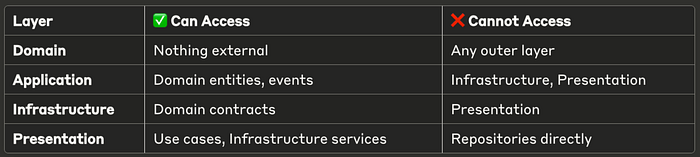
Data Flow: User action → Cubit → Use Case → Repository → Database
Key Benefits:
- Easy testing
- Easy to change implementations
- Clear responsibilities
- Scalable team development
Quick Start
1. Start with Domain — Define your business entities 2. Add Use Cases — Create application operations 3. Implement Infrastructure — Add database/API code 4. Build UI — Connect everything with state management
This keeps your Flutter app organized and maintainable!