
When I first transitioned from managing on-premises servers to AWS, the concept of elastic resources was a massive change. But with that flexibility came a new kind of headache I hadn't anticipated: the silent budget drain. I'm talking about unattached Amazon Elastic Block Store (EBS) volumes. These persistent storage blocks, which are fundamental to our EC2 instances, can become orphaned, quietly accumulating charges in the background. In one of my early projects, I discovered 15 unattached volumes from a short-lived development experiment, which ended up costing over $120 in just one month. This was an eye-opening lesson in cloud cost visibility. Understanding how to manage them is crucial for effective AWS cost management.
These unattached EBS volumes can lead to significant cost spikes if left unchecked. Proactive cloud resource optimization is a necessity. My goal here is to walk you through what I've learned about spotting and preventing these EC2 storage costs before they become a problem. Let's get these ghost charges under control.
Understanding the financial impact of unattached EBS volumes
In the on-premises world, a disconnected hard drive doesn't cost you anything beyond its initial purchase. In AWS, the rules are different. An EBS volume is billed based on its provisioned capacity, not whether it's attached to an instance or how much data is on it.
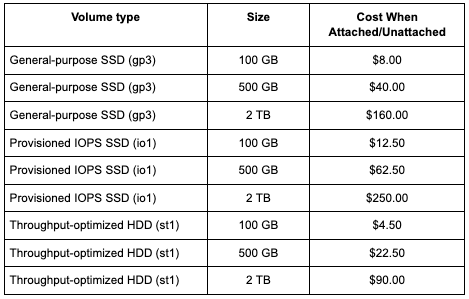
Think about a standard 100 GB General Purpose SSD (gp3) volume. It might cost around $8 per month. That seems small, but if your team spins up and tears down dozens of instances for development and testing, you could easily have 10 or 20 of these unattached volumes lingering. Suddenly, you're looking at an extra $80 to $160 per month for storage that isn't providing any benefits. Over the course of a year, that's a significant and completely avoidable expense.
The cost mechanics depend on the volume type. For instance:
- General-purpose SSD (gp3): You pay for the storage you provision (per GB-month) and can provision IOPS and throughput separately. This is usually the most cost-effective option for most workloads.
- Provisioned IOPS SSD (io1/io2): These are high-performance volumes for I/O-intensive workloads. You pay for both the provisioned storage and the number of IOPS, making orphaned io1 volumes particularly expensive.
- Throughput-optimized HDD (st1): Designed for frequently accessed, throughput-intensive workloads, these drives are priced lower per gigabyte than SSDs but are optimized for large, sequential I/O operations.
A common misconception is that if an instance is stopped, all associated costs cease to exist. While you stop paying for the compute hours of a stopped instance, you are still charged for any attached EBS volumes. The cost remains the same regardless of whether the volume is attached to a running instance, a stopped instance, or not attached at all. The charge is for the provisioned storage, IOPS, and throughput.
This was a huge mental shift for me. As a sysadmin, I was used to thinking about hardware assets. In the cloud, everything is a metered service, and you must track both provisioned and active resources.
Recognizing these billing details is the first step. The next step is to understand how these unattached volumes are created in the first place.
The following table shows the monthly storage cost for common EBS volumes, which remains the same whether the volume is attached or unattached:
Common causes of unattached EBS volumes in AWS
Unattached volumes can lead to unexpected AWS bills and do not appear randomly; they are usually the result of specific actions or, more often, a lack of proper process.
Here are the main culprits I've identified:
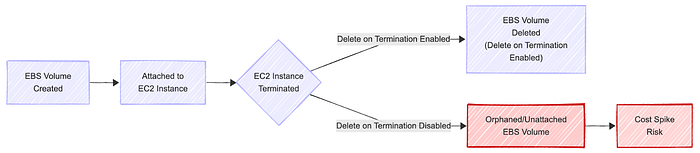
- Instance termination without volume deletion: When you launch an EC2 instance, the root EBS volume has a "Delete on Termination" flag enabled by default. However, for any additional data volumes you attach, this flag is disabled by default. If an engineer terminates an instance and forgets to manually delete the associated data volumes, those volumes become orphaned. This is the single most common cause I've seen.
- Development and testing environments: Agile workflows are great for velocity, but they can be rough on resource hygiene. Teams frequently spin up instances for testing a new feature, running a build, or experimenting with a new service. Without strict cleanup protocols, these environments become breeding grounds for unattached EBS volumes. A short-lived project can leave behind long-term costs.
- Process gaps: In a decentralized team structure, it's easy for resource ownership to become ambiguous. If there isn't a clear process for decommissioning resources when a project ends or an employee leaves, things get left behind. Poor resource tagging exacerbates this problem, as it becomes nearly impossible to determine who a volume belongs to or what its intended purpose was.
These represent systemic problems that arise when operational practices fail to keep pace with the rapid development of the cloud. Visualizing the life cycle of a volume can help clarify how easily it can be orphaned.
Best practices to prevent cost spikes from unused EBS volumes
Once I understood the causes, I could focus on prevention. It's about building guardrails and automating cleanup to make it easy to do the right thing and hard to leave resources behind.
Here are the practices that have made the biggest difference:
- Enable "Delete on Termination": This is the simplest and most effective fix. When attaching a new data volume to an EC2 instance, it is a standard practice to enable the Delete on Termination flag if the data on that volume is not intended to persist beyond the instance's lifetime. For temporary workloads, this is a must.
- Conduct regular audits: You can't fix what you can't see. Use AWS tools to get visibility. AWS Trusted Advisor has a specific check for unattached EBS volumes. AWS Cost Explorer can also help you visualize your EBS costs over time, making spikes easier to spot. I set a recurring calendar reminder to check these weekly.
- Implement strong tagging policies: A consistent tagging strategy is non-negotiable for optimizing cloud resources. At a minimum, every EBS volume should be tagged with an owner, a project, and an environment (dev, staging, prod). This way, when you find an unattached volume, you know exactly who to ask about it. It creates accountability.
- Automate volume management: For more advanced control, leverage automation to optimize your storage. AWS Data Lifecycle Manager can help you manage the life cycle of snapshots, ensuring you don't keep backups for longer than necessary. You can also use services like AWS Lambda and Amazon CloudWatch to build custom cleanup scripts.
- Snapshot before deletion: Before you delete a potentially unused volume, it's a wise precaution to take a snapshot. Snapshots are stored in S3 and are cheaper than active EBS volumes. This provides a data backup just in case you discover the volume was needed after all.
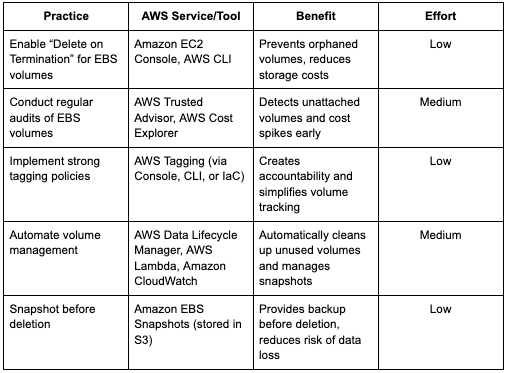
The following table summarizes actionable practices, relevant AWS services, and their benefits for managing and reducing costs from unattached EBS volumes:
Implementing an automated unattached EBS volume cleanup workflow
Manual cleanups are better than nothing, but they're prone to human error and don't scale. Building an automated workflow was the real turning point for me in controlling these costs. In my first attempt at automating volume cleanup, I accidentally tried deleting a volume that was still in use because my Lambda script didn't fully account for edge-case tagging. It was a nerve-wracking lesson in testing automation carefully. After adjusting the logic and adding proper notifications, the workflow became safe and reliable. It takes some initial effort, but the long-term payoff is huge.
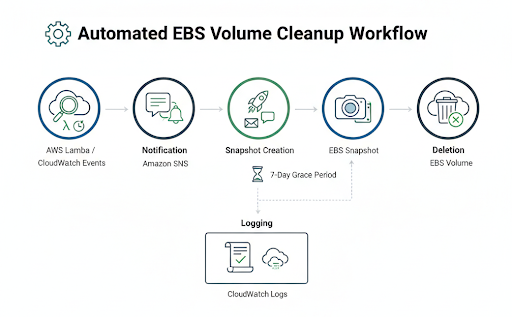
A robust automated cleanup process generally follows these steps. You can build this using a combination of AWS services.
- Detection: The core of the workflow is a mechanism to find unattached volumes. An AWS Lambda function is ideal for this. You can write a script using the AWS SDK (such as Boto3 for Python) that scans all EBS volumes in your account and filters for those with a state of "available," which means they are unattached. Schedule this Lambda to run periodically using an Amazon CloudWatch Events rule, perhaps once a day or once a week. Here is an example of what the detection part of the Lambda function, written in Python, might look like. It focuses on finding volumes with the available status, which indicates they are not attached to an EC2 instance.
import boto3

def list_unattached_ebs_volumes():
    # Initialize the EC2 client
    ec2_client = boto3.client('ec2')

    # Prepare filter to select EBS volumes with status 'available'
    filters = [
        {
            'Name': 'status',
            'Values': ['available']
        }
    ]

    # Call describe_volumes with the specified filter
    response = ec2_client.describe_volumes(Filters=filters)

    # Iterate through volumes and print the VolumeId for unattached volumes
    for volume in response['Volumes']:
        # Volume is unattached if status is 'available'
        print("Unattached Volume ID:", volume['VolumeId'])
For this Python code to run successfully within an AWS Lambda environment, you must assign an IAM Role to the Lambda function (the execution role) with ec2:DescribeVolumes permissions.
2. Notification: Deleting resources automatically can be a risky process. Instead of deleting immediately, the first action should be to notify the owner/administrator. Once the Lambda function identifies an unattached volume, it can publish a message to an Amazon SNS (Simple Notification Service) topic. Your DevOps team can subscribe to this topic via email or a chat client such as Slack to receive alerts. The notification should include the volume ID and any relevant tags. 3. Snapshot creation: To prevent accidental data loss, the automation script should first create a snapshot of the unattached volume before taking any destructive action. The snapshot ID can be tagged with information, such as "pre-deletion-backup" and the date. This provides an immediate, point-in-time recovery option in case the volume was deleted in error.
4. Deletion: After a grace period (e.g., seven days after notification), a second automated process can check if the notified volume is still unattached. If it is, and perhaps if it's tagged with an ok-to-delete tag, the script can then proceed with the deletion.
5. Logging: Every action taken by the workflow should be logged to Amazon CloudWatch Logs. This creates an audit trail, which is essential for troubleshooting and compliance.
Attention: Be extremely careful when implementing automated deletion. Start by only detecting and notifying. Test the full workflow in a non-production account first. You may want to protect certain volumes from deletion by using a specific tag, such as cleanup-exempt: true.
Recommendations for comprehensive cloud cost governance
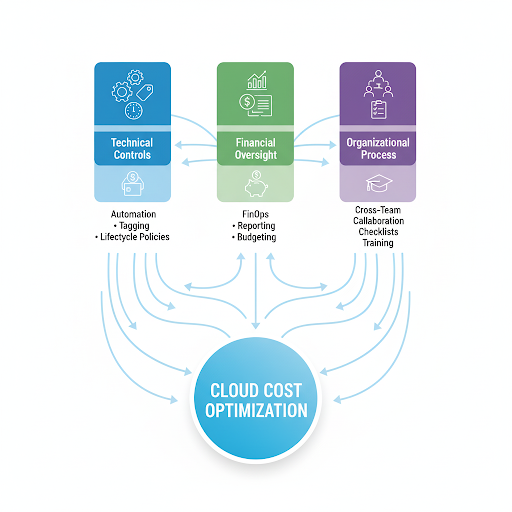
Solving the unattached EBS volume problem is a significant technical win, but it's also a symptom of a larger challenge: overall cloud cost governance. Fixing the leak is beneficial, but building a more comprehensive plumbing system for the entire house is even more effective.
This requires moving beyond just technical fixes and integrating cost awareness into your team's culture. This is the essence of FinOps.
Here are my key recommendations for building a durable governance framework:
- Integrate EBS management into FinOps: Don't treat storage cost optimization as a one-off task. Make it part of your regular FinOps cycle. Include EBS usage and waste metrics in your cloud cost dashboards and review them in monthly meetings.
- Foster cross-team collaboration: Get your DevOps, Finance, and IT teams talking. Finance can see the cost impact, but DevOps and Engineering are the ones who can implement the technical solutions. When they work together, they can align on policies, like mandatory tagging, that benefit everyone.
- Establish clear reporting: Create and distribute regular reports on resource utilization to ensure transparency and accountability. This should highlight not just unattached volumes but also underutilized ones (e.g., gp3 volumes with very low IOPS) and old snapshots. Visibility drives accountability.
- Develop actionable checklists: Create simple checklists for provisioning and decommissioning resources. This standardizes processes and reduces the chance of steps being missed. A decommissioning checklist should always include a step to handle all associated EBS volumes and snapshots.
Building this kind of governance model turns cost management from a reactive chore into a proactive, strategic advantage.
Unattached EBS volumes are a classic example of how easily hidden costs can accumulate in the cloud. They represent a tangible, fixable problem that can deliver immediate savings. By understanding their causes and implementing a few key best practices, you can make a real impact on your AWS bill.
The most important lesson for me has been the shift in mindset. It's about moving from a "set it and forget it" approach to one of continuous vigilance and optimization. Start by enabling the "Delete on Termination" flag on temporary volumes. Conduct regular audits to discover unattached volumes. Finally, leverage automation to efficiently handle recurring cleanup tasks. Implementing a solid governance framework with clear tagging policies and fostering cross-team collaboration ensures that these savings are sustainable and long-lasting. The tools are there; we just need to use them effectively.