
I love building command-line tools. My latest project, codetoprompt, is a Python library that intelligently packages an entire codebase into a single, clean prompt for Large Language Models. It's great for developers, but it still requires a human to run the command and paste the output.
I wanted more. I wanted AI agents to be able to use my tool on their own.
This is where the Model Context Protocol (MCP) changes the game. It's an open standard that lets LLMs and AI agents securely discover and interact with local tools. This is the story of how I took my CLI tool and built codetoprompt-mcp, a lightweight server that opened it up to a world of AI-driven automation.
In this article, I'll walk you through the entire process:
- Showcasing what my original codetoprompt CLI does.
- Building the codetoprompt-mcp server from scratch, file by file.
- A detailed, step-by-step guide on how I tested every feature using the MCP Inspector.
What does my library CodetoPrompt do?
The two core commands are codetoprompt <path>(or ctp <path>) for generating prompts and codetoprompt analyse <path>for inspecting your project.
Output for codetoprompt <path>
"Project Structure:
📁 codetoprompt
├── 📁 .github
│   └── 📁 workflows
├── 📁 codetoprompt
│   ├── 📁 compressor
│   │   ├── 📁 analysers
│   │   │   ├── 📄 __init__.py
│   │   │   ├── 📄 base.py
│   │   │   ├── 📄 cpp.py
│   │   │   ├── 📄 factory.py
│   │   │   ├── 📄 java.py
│   │   │   ├── 📄 javascript.py
│   │   │   ├── 📄 python.py
│   │   │   └── 📄 rust.py
│   │   ├── 📁 formatters
│   │   │   ├── 📄 __init__.py
│   │   │   ├── 📄 base.py
│   │   │   ├── 📄 cpp.py
│   │   │   ├── 📄 factory.py
│   │   │   ├── 📄 java.py
│   │   │   ├── 📄 javascript.py
│   │   │   ├── 📄 python.py
│   │   │   ├── 📄 rust.py
│   │   │   └── 📄 utils.py
│   │   ├── 📄 __init__.py
│   │   └── 📄 compressor.py
│   ├── 📄 __init__.py
│   ├── 📄 analysis.py
│   ├── 📄 arg_parser.py
│   ├── 📄 cli.py
│   ├── 📄 config.py
│   ├── 📄 core.py
│   ├── 📄 interactive.py
│   ├── 📄 utils.py
│   └── 📄 version.py
└── 📁 tests
    ├── 📄 __init__.py
    ├── 📄 test_cli.py
    └── 📄 test_core.py


Relative File Path: codetoprompt/__init__.py

```python
from .core import CodeToPrompt
from .version import __version__

__all__ = ["CodeToPrompt", "__version__"]
```

Relative File Path: codetoprompt/analysis.py

```python
"""Analyse Feature for CodeToPrompt."""

import argparse
from pathlib import Path

from rich.console import Console
... And so on
Output for codetoprompt analyse <path>
--- Overall Project Summary ---
Total Files:  40
Total Lines:  5,060
Total Tokens: 39,614

--- Analysis by File Type (Top 7) ---
Extension    |  Files |     Tokens |    Lines | Avg Tokens/File
-------------+--------+------------+----------+----------------
.py          |     31 |     33,764 |    4,287 |           1,089
.md          |      3 |      4,306 |      531 |           1,435
.toml        |      1 |        771 |      111 |             771
.yml         |      1 |        361 |       56 |             361
.<no_ext>    |      2 |        354 |       66 |             177
.ini         |      1 |         45 |        6 |              45
.in          |      1 |         13 |        3 |              13

--- Largest Files by Tokens (Top 10) ---
File Path                                |     Tokens |    Lines
-----------------------------------------+------------+---------
codetoprompt/core.py                     |      3,316 |      430
README.md                                |      2,702 |      323
...oprompt/compressor/analysers/cpp.py   |      2,276 |      272
...prompt/compressor/analysers/rust.py   |      2,214 |      271
...prompt/compressor/analysers/java.py   |      2,090 |      245
tests/test_core.py                       |      1,878 |      199
codetoprompt/interactive.py              |      1,633 |      203
...prompt/compressor/formatters/cpp.py   |      1,432 |      208
codetoprompt/config.py                   |      1,421 |      159
...rompt/compressor/formatters/rust.py   |      1,412 |      217
Creating the codetoprompt-mcp Server
The goal was to wrap my existing library in a new, lightweight MCP server package. This approach avoids rewriting logic and keeps the projects modular.
Here is the complete codebase for the new codetoprompt-mcp server.
Final Project Structure
📁 codetoprompt-mcp
├── 📁 codetoprompt_mcp
│   ├── 📄 __init__.py
│   ├── 📄 mcp.py
│   └── 📄 mcp_tools.py
├── 📄 .gitignore
├── 📄 LICENSE
├── 📄 README.md
└── 📄 pyproject.toml
1. pyproject.toml
This file defines the new package, lists codetoprompt and mcp as dependencies, and most importantly, creates the ctp-mcp command that will run our server.
[build-system]
requires = ["setuptools>=65.0.0", "wheel>=0.40.0"]
build-backend = "setuptools.build_meta"

[project]
name = "codetoprompt-mcp"
version = "0.1.0"
description = "An MCP server for the codetoprompt library, enabling integration with LLM agents."
readme = "README.md"
requires-python = ">=3.10"
license = { text = "MIT" }
authors = [
    { name = "Yash Bhaskar", email = "yash9439@gmail.com" }
]
classifiers = [
    "Programming Language :: Python :: 3.10",
    "Programming Language :: Python :: 3.11",
    "Programming Language :: Python :: 3.12",
    "Operating System :: OS Independent",
    "Development Status :: 4 - Beta",
    "Intended Audience :: Developers",
    "License :: OSI Approved :: MIT License",
    "Topic :: Software Development :: Libraries :: Python Modules",
    "Topic :: Text Processing :: General",
    "Topic :: Utilities",
]
dependencies = [
    "codetoprompt==0.6.2",
    "mcp>=1.3.0"
]

[project.optional-dependencies]
dev = [
    "pytest",
    "black",
    "isort",
    "mypy"
]

[project.urls]
Homepage = "https://github.com/yash9439/codetoprompt"
Repository = "https://github.com/yash9439/codetoprompt"

[project.scripts]
ctp-mcp = "codetoprompt_mcp.mcp:run_server"

[tool.setuptools.packages.find]
exclude = ["tests*"]

[tool.black]
line-length = 88
2. codetoprompt_mcp/mcp_tools.py
Here, I defined the "shape" of each MCP tool using Pydantic models. This creates a strongly-typed API for the server, defining exactly what arguments each tool accepts.
from pathlib import Path
from typing import Any, Dict, List, Optional

from pydantic import BaseModel, Field


class ProjectContextRequest(BaseModel):
    root_path: Path = Field(..., description="Root directory path of the project.")
    include_patterns: Optional[List[str]] = Field(None, description="Comma-separated glob patterns for files to include.")
    exclude_patterns: Optional[List[str]] = Field(None, description="Comma-separated glob patterns for files to exclude.")
    respect_gitignore: bool = Field(True, description="Whether to respect .gitignore rules.")
    compress: bool = Field(False, description="Use smart code compression to summarize files.")
    output_format: str = Field("default", description="Output format ('default', 'markdown', 'cxml').", pattern="^(default|markdown|cxml)$")
    tree_depth: int = Field(5, description="Maximum depth for the project structure tree.")


class AnalyseProjectRequest(BaseModel):
    root_path: Path = Field(..., description="Root directory path of the project to analyse.")
    include_patterns: Optional[List[str]] = Field(None, description="Comma-separated glob patterns for files to include.")
    exclude_patterns: Optional[List[str]] = Field(None, description="Comma-separated glob patterns for files to exclude.")
    respect_gitignore: bool = Field(True, description="Whether to respect .gitignore rules.")
    top_n: int = Field(10, description="Number of items to show in top lists.")


class GetFilesRequest(BaseModel):
    root_path: Path = Field(..., description="Root directory path of the project.")
    paths: List[str] = Field(..., description="A list of specific file paths to include, relative to the root path.")
    output_format: str = Field("default", description="Output format ('default', 'markdown', 'cxml').", pattern="^(default|markdown|cxml)$")


TOOL_METADATA = {
    "ctp-get-context": {
        "model": ProjectContextRequest,
        "description": "Generates a comprehensive, context-rich prompt from an entire codebase directory, applying filters and formatting options.",
    },
    "ctp-analyse-project": {
        "model": AnalyseProjectRequest,
        "description": "Provides a detailed statistical analysis of a codebase, including token counts, line counts, and breakdowns by file type.",
    },
    "ctp-get-files": {
        "model": GetFilesRequest,
        "description": "Retrieves the content of a specific list of files from the project, formatted into a prompt.",
    },
}


def pydantic_to_json_schema(model: type[BaseModel]) -> Dict[str, Any]:
    schema = model.model_json_schema()
    if "$defs" in schema:
        del schema["$defs"]
    if "title" in schema:
        del schema["title"]
    # Pydantic v2 adds 'format: path', which is not standard JSON schema.
    if "properties" in schema:
        for prop_def in schema["properties"].values():
            if prop_def.get("format") == "path":
                prop_def["type"] = "string"
                del prop_def["format"]
    return schema


def get_tool_definitions() -> List[Dict[str, Any]]:
    tools = []
    for tool_name, metadata in TOOL_METADATA.items():
        model = metadata["model"]
        description = metadata["description"]
        schema = pydantic_to_json_schema(model)
        tools.append(
            {"name": tool_name, "description": description, "schema": schema}
        )
    return tools
3. codetoprompt_mcp/mcp.py
This is the core of the server. It imports the CodeToPrompt class from my original library and wires it up to the MCP handlers. The logic is clean and simple: parse the request, call the library, and return the result.
import asyncio
from importlib.metadata import version
from pathlib import Path
from typing import Any, Dict

from codetoprompt.core import CodeToPrompt
from mcp.server import Server
from mcp.server.stdio import stdio_server
from mcp.shared.exceptions import McpError
from mcp.types import INTERNAL_ERROR, INVALID_PARAMS, ErrorData, TextContent, Tool
from pydantic import ValidationError

from .mcp_tools import (
    AnalyseProjectRequest,
    GetFilesRequest,
    ProjectContextRequest,
    get_tool_definitions,
)

TOOL_DEFINITIONS = get_tool_definitions()
TOOLS = [
    Tool(name=tool["name"], description=tool["description"], inputSchema=tool["schema"])
    for tool in TOOL_DEFINITIONS
]

def format_analysis_report(data: Dict[str, Any], top_n: int) -> str:
    """Formats the dictionary from `CodeToPrompt.analyse()` into a readable string."""
    report = []

    overall = data.get("overall", {})
    report.append("--- Overall Project Summary ---")
    report.append(f"Total Files:  {overall.get('file_count', 0):,}")
    report.append(f"Total Lines:  {overall.get('total_lines', 0):,}")
    report.append(f"Total Tokens: {overall.get('total_tokens', 0):,}")
    report.append("")

    by_extension = data.get("by_extension", [])
    if by_extension:
        report.append(f"--- Analysis by File Type (Top {len(by_extension)}) ---")
        report.append(f"{'Extension':<12} | {'Files':>6} | {'Tokens':>10} | {'Lines':>8} | {'Avg Tokens/File':>15}")
        report.append(f"{'-'*12}-+-{'-'*6}-+-{'-'*10}-+-{'-'*8}-+-{'-'*15}")
        for row in by_extension:
            avg = row['tokens'] / row['file_count'] if row.get('file_count', 0) > 0 else 0
            report.append(f"{row.get('extension', ''):<12} | {row.get('file_count', 0):>6,} | {row.get('tokens', 0):>10,} | {row.get('lines', 0):>8,} | {avg:>15,.0f}")
        report.append("")

    top_files = data.get("top_files_by_tokens", [])
    if top_files:
        report.append(f"--- Largest Files by Tokens (Top {len(top_files)}) ---")
        report.append(f"{'File Path':<40} | {'Tokens':>10} | {'Lines':>8}")
        report.append(f"{'-'*40}-+-{'-'*10}-+-{'-'*8}")
        for row in top_files:
            path_str = str(row.get('path', ''))
            if len(path_str) > 38:
                path_str = "..." + path_str[-35:]
            report.append(f"{path_str:<40} | {row.get('tokens', 0):>10,} | {row.get('lines', 0):>8,}")

    return "\n".join(report)

async def get_context(arguments: dict) -> list[TextContent]:
    request = ProjectContextRequest(**arguments)
    ctp = CodeToPrompt(
        root_dir=str(request.root_path),
        include_patterns=request.include_patterns,
        exclude_patterns=request.exclude_patterns,
        respect_gitignore=request.respect_gitignore,
        compress=request.compress,
        output_format=request.output_format,
        tree_depth=request.tree_depth,
    )
    prompt = ctp.generate_prompt()
    return [TextContent(type="text", text=prompt)]

async def analyse_project(arguments: dict) -> list[TextContent]:
    request = AnalyseProjectRequest(**arguments)
    ctp = CodeToPrompt(
        root_dir=str(request.root_path),
        include_patterns=request.include_patterns,
        exclude_patterns=request.exclude_patterns,
        respect_gitignore=request.respect_gitignore,
    )
    analysis_data = ctp.analyse(top_n=request.top_n)
    report = format_analysis_report(analysis_data, top_n=request.top_n)
    return [TextContent(type="text", text=report)]

async def get_files(arguments: dict) -> list[TextContent]:
    request = GetFilesRequest(**arguments)
    # Convert string paths to Path objects for the `explicit_files` argument
    explicit_files = [Path(request.root_path) / p for p in request.paths]
    ctp = CodeToPrompt(
        root_dir=str(request.root_path),
        output_format=request.output_format,
        explicit_files=explicit_files,
    )
    prompt = ctp.generate_prompt()
    return [TextContent(type="text", text=prompt)]

async def serve() -> None:
    server = Server("codetoprompt-mcp", version("codetoprompt-mcp"))

    @server.list_tools()
    async def handle_list_tools() -> list[Tool]:
        return TOOLS

    @server.call_tool()
    async def handle_call_tool(name: str, arguments: dict) -> list[TextContent]:
        handlers = {
            "ctp-get-context": get_context,
            "ctp-analyse-project": analyse_project,
            "ctp-get-files": get_files,
        }
        try:
            return await handlers[name](arguments)
        except KeyError:
            raise McpError(ErrorData(code=INVALID_PARAMS, message=f"Unknown tool: {name}"))
        except (ValidationError, TypeError) as e:
            raise McpError(ErrorData(code=INVALID_PARAMS, message=str(e)))
        except Exception as e:
            raise McpError(ErrorData(code=INTERNAL_ERROR, message=str(e)))

    async with stdio_server() as (read_stream, write_stream):
        await server.run(
            read_stream, write_stream, server.create_initialization_options(), raise_exceptions=True
        )

def run_server():
    try:
        asyncio.run(serve())
    except KeyboardInterrupt:
        print("Server interrupted and shut down.")
Testing my MCP Server with MCP Inspector
With the server built, it was time for the most important step: testing. The MCP Inspector provides a web UI to interactively call your server's tools, making it perfect for debugging.
MCP Inspector Documentation : https://modelcontextprotocol.io/docs/tools/inspector
Step 1: Setup
We will be testing it on codetoprompt codebase itself.
Hence, I installed my new server package : pip install .
OR after publish it on pypi, directly install as pip install codetoprompt-mcp
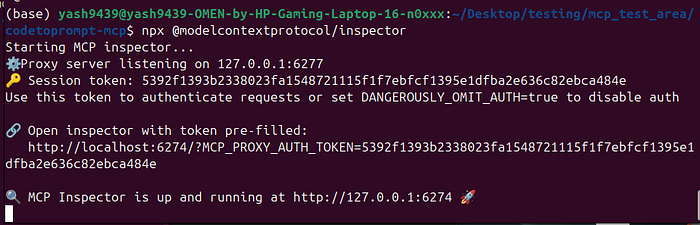
Step 2: Launching the Inspector
I started the inspector with:
npx @modelcontextprotocol/inspectorThe inspector started up and provided a URL to the UI. You can directly use the token pre-filled link.
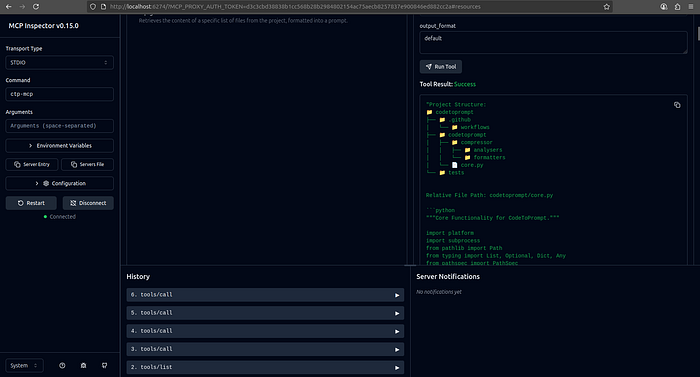
Step 3: Connecting and Testing
In the inspector UI, I followed three quick steps:
- Set Command: Changed the default command to ctp-mcp.
- Set the Proxy Session Token: Copied the session token from my terminal and pasted it into the UI's Configuration settings just above Connect.
- Connect: Hit the "Connect" button.
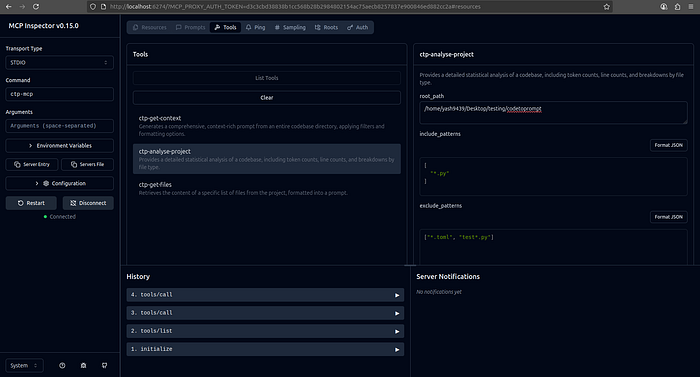
- You can view the available tools by clicking List Tools
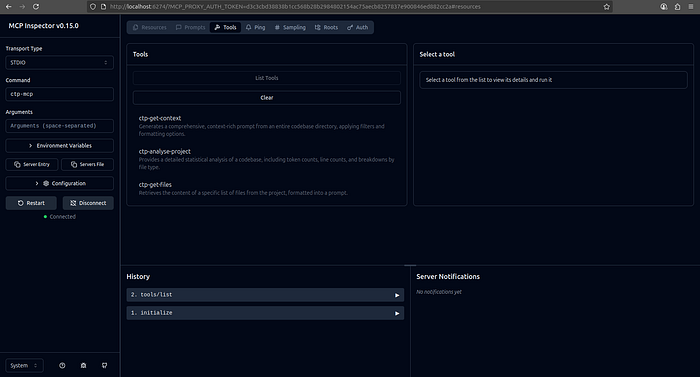
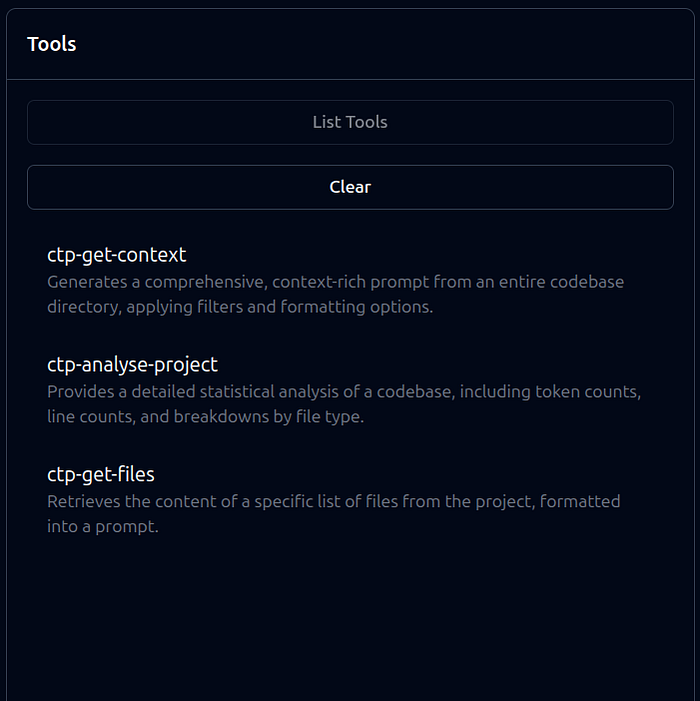
The server connected, and its three tools appeared in the UI. I tested each one:
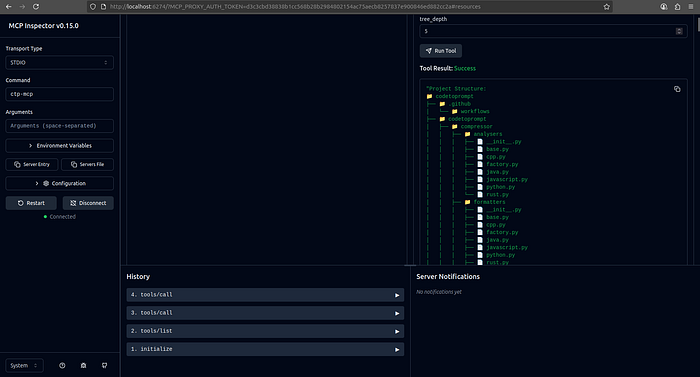
- ctp-get-context: I provided Codetoprompt Library as the root_path. It returned a perfect prompt with a project tree and the contents of both files.
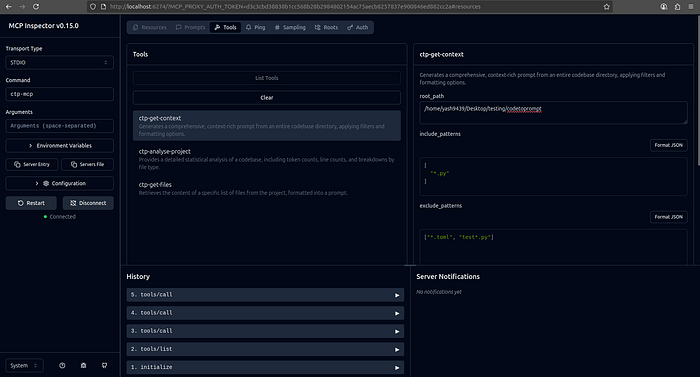
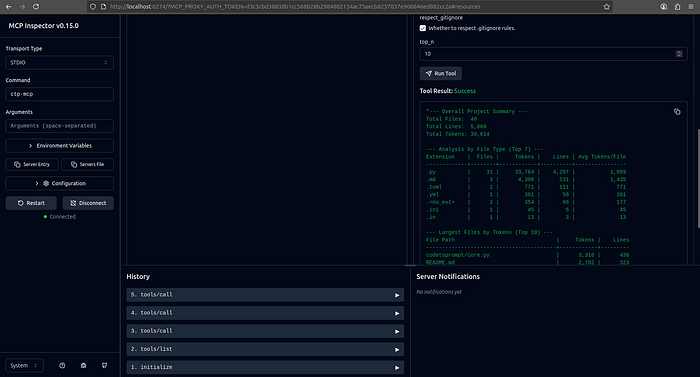
- ctp-analyse-project: Using the same root_path, the tool returned a formatted analysis report with correct file and token counts.
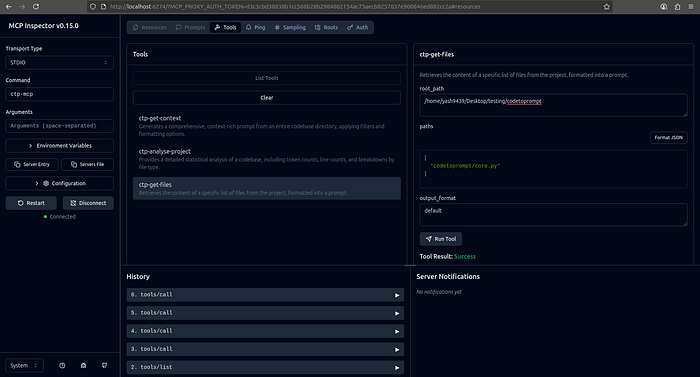
- ctp-get-files: I requested only src/main.py. The server correctly returned just that file's content, proving the specific file-fetching logic worked.
Conclusion
The process of creating an MCP server for my existing library was remarkably smooth. By building a lightweight wrapper, I was able to expose its core functionality to AI agents without a major refactor. The protocol provides a clear standard, and tools like the MCP Inspector make development and testing a seamless experience. My CLI tool is no longer just for me — it's now a service ready for the next generation of AI-powered development.
Read more : https://medium.com/@yash9439/what-are-mcp-servers-and-why-theyre-fixing-ai-d47efb8e9529
https://medium.com/@yash9439/how-to-package-your-code-as-an-mcp-server-af86568739ea
https://medium.com/@yash9439/mcps-three-core-capabilities-tools-resources-and-prompts-43c3214ff43e
Connect with me : https://www.linkedin.com/in/yash-bhaskar/ More Articles like this: https://medium.com/@yash9439