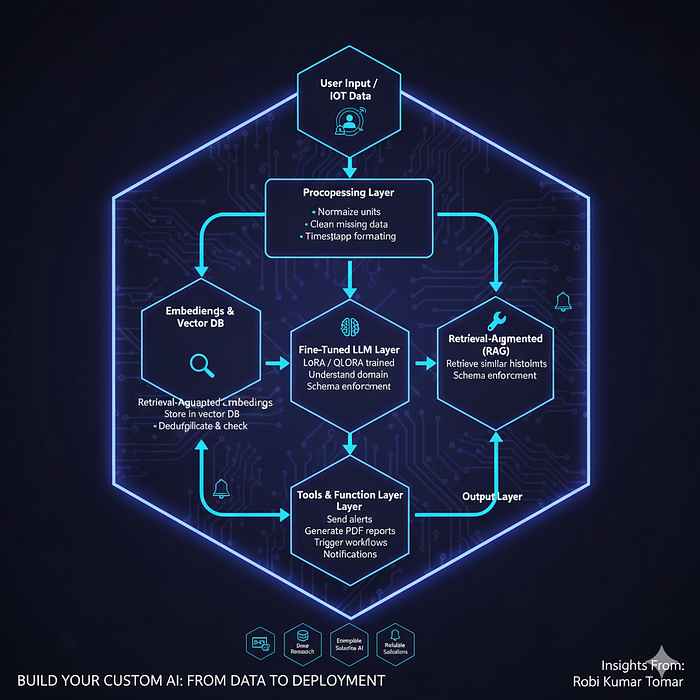

In this chapter, you'll learn how to take everything from fine-tuning, RAG, and vector databases and combine it into a fully working AI system. By the end, you'll know how to build a custom AI application that can reliably perform real-world tasks.
1. Step 1: Define Your Objective
Before writing code, answer:
- What problem does my AI solve?
- What input will users provide?
- What output do I want?
- Do I need structured output or free text?
- Will knowledge change frequently? (RAG helps)
Example 1 — Cold-Chain Incident Tracker:
- Input: IoT temperature logs, door sensor events, battery alarms
- Output: Categorized incident + suggested corrective action + regulatory-ready report
Example 2 — Heritage Textile Restoration AI:
- Input: Conservator notes + chemical treatment guidelines + fabric metadata
- Task: Suggest safe restoration process, solvent, humidity, and cloth support method
- Output: Structured step-by-step instructions, audit-ready
2. Architecture Blueprint (End-to-End)
 ┌───────────────────────┐
 │  User Input / IoT Data │
 └───────────┬───────────┘
             │
 ┌───────────▼───────────┐
 │  Preprocessing Layer   │
 │  - Normalize units     │
 │  - Clean missing data  │
 │  - Timestamp formatting│
 └───────────┬───────────┘
             │
 ┌───────────▼───────────┐
 │  Embeddings & Vector DB│
 │  - Convert events to   │
 │    embeddings          │
 │  - Store in vector DB  │
 │  - Deduplicate & check │
 └───────────┬───────────┘
             │
 ┌───────────▼───────────┐
 │  Retrieval-Augmented   │
 │  Generation (RAG)      │
 │  - Retrieve similar    │
 │    historical incidents│
 │  - Schema enforcement  │
 └───────────┬───────────┘
             │
 ┌───────────▼───────────┐
 │  Fine-Tuned LLM Layer  │
 │  - LoRA / QLoRA trained│
 │  - Understand domain   │
 │  - Overfitting checks  │
 └───────────┬───────────┘
             │
 ┌───────────▼───────────┐
 │  Tools & Function Layer│
 │  - Send alerts         │
 │  - Generate PDF reports│
 │  - Trigger workflows   │
 └───────────┬───────────┘
             │
 ┌───────────▼───────────┐
 │       Output Layer     │
 │  - JSON / report       │
 │  - Notifications       │
 └───────────────────────┘
3. Step 2: Dataset Preparation
Tips:
- Collect IoT logs, conservator notes, operational events
- Annotate with categories and actions
- Include negative examples
- Deduplicate and remove contradictions
JSONL Example:
{"input":"Temperature spike 8°C above limit at storage unit #12",
 "output":"{\"status\":\"ALERT\",\"category\":\"Temperature excursion\",\"action\":\"Notify warehouse manager and log event\",\"report_id\":\"RPT_1023\"}"}
{"input":"Battery low alert on transport vehicle #5",
 "output":"{\"status\":\"WARNING\",\"category\":\"Battery low\",\"action\":\"Schedule battery replacement\",\"report_id\":\"RPT_1024\"}"}
4. Step 3: Preprocessing & Embeddings
from sentence_transformers import SentenceTransformer
import numpy as np
from sklearn.metrics.pairwise import cosine_similarity

# Load model
model = SentenceTransformer('all-MiniLM-L6-v2')
embeddings = model.encode(["Temperature spike 8°C above limit", "Battery low alert"])

# Deduplicate / remove outliers
sim_matrix = cosine_similarity(embeddings)
to_keep = []
for i, row in enumerate(sim_matrix):
    if all(row[j] < 0.95 for j in to_keep):
        to_keep.append(i)
filtered_embeddings = embeddings[to_keep]
5. Step 4: Fine-Tuning Your LLM
from peft import LoraConfig, get_peft_model
from transformers import AutoModelForCausalLM, AutoTokenizer, Trainer, TrainingArguments
from datasets import load_dataset

dataset = load_dataset("json", data_files="cold_chain_train.jsonl")
tokenizer = AutoTokenizer.from_pretrained("meta-llama/Meta-Llama-3.1-7B")
model = AutoModelForCausalLM.from_pretrained("meta-llama/Meta-Llama-3.1-7B")

lora_config = LoraConfig(r=16, lora_alpha=32, target_modules=["q_proj","v_proj"], lora_dropout=0.05)
model = get_peft_model(model, lora_config)

trainer = Trainer(
    model=model,
    train_dataset=dataset["train"],
    args=TrainingArguments(
        output_dir="./lora_coldchain",
        per_device_train_batch_size=2,
        num_train_epochs=5,
        learning_rate=1e-4,
        logging_steps=20,
        evaluation_strategy="steps",
        eval_steps=50,
        save_strategy="steps",
        save_steps=50,
        load_best_model_at_end=True,
        metric_for_best_model="f1_score"
    )
)
trainer.train()
model.save_pretrained("./lora_coldchain")
6. Step 5: Build RAG Pipeline with Anti-Hallucination
query_embedding = model.encode(["Temperature spike 8°C above limit"])
similar_events = vector_db.search(query_embedding, top_k=5)

llm_input = f"Past incidents: {similar_events}\nCurrent Event: Temperature spike 8°C above limit"

# Schema enforcement
schema = {
    "type": "object",
    "properties": {
        "status": {"type": "string", "enum": ["ALERT","WARNING","OK"]},
        "category": {"type": "string"},
        "action": {"type": "string"},
        "report_id": {"type": "string"}
    },
    "required": ["status","category","action","report_id"]
}
response = llm_model.generate(llm_input, schema=schema)
7. Step 6: Tools & Automation Layer
import requests, pdfkit

# Generate report
def generate_report(event, output_file):
    pdfkit.from_string(event, output_file)

# Trigger workflow
def trigger_corrective_action(event_id, action_type):
    url = "https://api.company.com/workflow"
    payload = {"event_id": event_id, "action": action_type}
    return requests.post(url, json=payload).status_code
8. Step 7: Evaluation & Monitoring
# Auto-alert if validation F1 drops
if current_f1 < baseline_f1 * 0.95:
send_email("Ops Team", "Validation metric dropped! Check model.")- Metrics: exact match, F1, latency
- Monitoring: drift detection, error logs, user corrections
9. Step 8: Deployment Options
- Cloud: AWS, GCP, Azure, HuggingFace Inference API
- On-Prem: Sensitive data
- Edge: Low-latency IoT devices
Tip: Use containerized deployment + dashboards for real-time monitoring.
10. Cost vs Accuracy Tradeoff
| Component           | Infra             | Notes                   |
| ------------------- | ----------------- | ----------------------- |
| LoRA fine-tuning 7B | 1 x 48GB GPU      | Hours                   |
| Vector DB           | CPU + RAM         | FAISS / Pinecone        |
| RAG inference       | 1–2 GPUs          | Batch size optimization |
| Full 70B fine-tune  | Multi-GPU cluster | $10k+                   |
11. Real-World Use Cases
- Cold-Chain Incident Tracker — automates compliance reporting
- Heritage Textile Restoration AI — guides safe conservation steps
This demonstrates that the approach works across domains, not just generic chatbots.
Conclusion
You now know how to build a complete AI system end-to-end:
✔ Dataset prep, cleaning & embedding quality ✔ Fine-tuning with LoRA/QLoRA + overfitting prevention ✔ RAG pipeline with schema enforcement ✔ Automation via tools / API calls ✔ Monitoring, alerting, and deployment strategies ✔ Cost-aware GPU & infrastructure planning
This is the capstone of the series — you can now build real-world AI systems for enterprise and niche domains.
🔗 Important links to previous chapters
- Part-1: What AI/ML/Deep Learning/Generative AI are.
- Part-2: How Gen-AI actually works under the hood.
- Part-3: Real-World Applications, Enterprise Adoption, Risks & Practical Limitations
- Part-4: Building Real-World AI Systems (Architecture, RAG, Agents, Deployments & Your Complete Roadmap)
- Part-5: How ChatGPT-Style Apps Work Under the Hood (Step-by-Step Guide)
- Part-6: How to Build Your First GenAI App (Step-by-Step Guide)
- Part-7: How LLM Training Actually Works (Tokens, Batches, GPUs & Checkpoints Explained Simply)
- Part-8: How RAG Actually Works (Embeddings, Vector Databases, Indexing & Retrieval Explained Simply)
- Part-9: Fine-Tuning LLMs Explained Simply (LoRA, QLoRA, SFT, Hyperparameters & When to Use What)
👉 If you enjoyed this article, here's how you can support my work and get more out of this series:
👏 Clap for the article — every clap helps it reach more readers 👤 Follow me to get notified as soon as the next part is published 💬 Comment with your thoughts, questions, or topic suggestions — I love hearing from readers 🔗 Share with friends or colleagues who might benefit
Thank you for reading this journey — from Part-1 to Part-10! 🚀